
Project X Ghost Box (1 Keypad + 4 Modules)
PROJECT X Ghost Box Wireless Accessory Control Ecosystem Kit Instruction Manual
Model: Ghost Box (1 Keypad + 4 Modules)
ആമുഖം
This manual provides comprehensive instructions for the installation, operation, and maintenance of your PROJECT X Ghost Box Wireless Accessory Control Ecosystem Kit. This system is designed to offer a customizable and wirelessly controlled experience for managing vehicle accessories. Please read this manual thoroughly before installation and operation to ensure proper function and safety.
The Ghost Box kit includes one keypad and four control modules, enabling smart control of multiple accessories.
ഉൽപ്പന്നം കഴിഞ്ഞുview
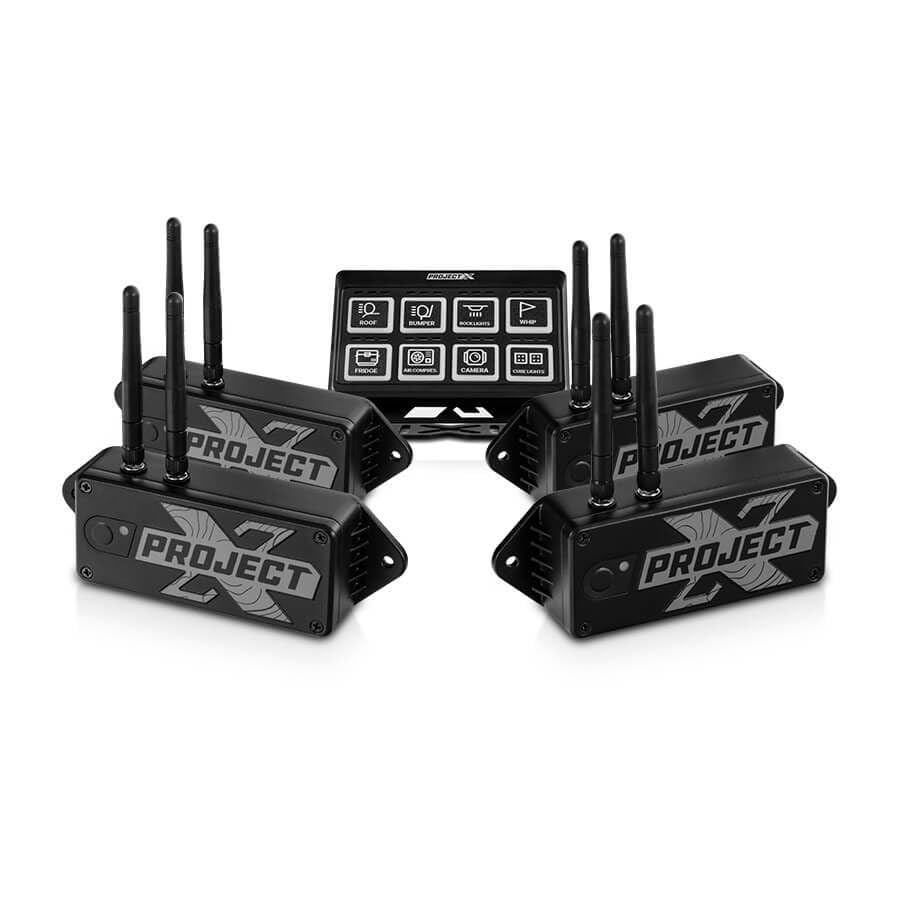
ചിത്രം 1: The PROJECT X Ghost Box Kit, featuring a central control keypad and four individual wireless control modules. Each module is black with "PROJECT X" branding and multiple antennas for wireless communication. The keypad displays various accessory icons such as roof, bumper, spotlights, whip, fridge, air compressor, camera, and rock lights.
The PROJECT X Ghost Box system consists of a central keypad and multiple wireless control modules. These modules connect to your vehicle's accessory power harness, converting traditional accessories into "smart" devices controllable via the keypad or the PROJECT X mobile application.
പ്രധാന സവിശേഷതകൾ:
- വയർലെസ് കണക്റ്റിവിറ്റി: Utilizes Bluetooth for initial pairing and 2.4GHz RF Wireless for reliable, low-latency communication with accessories.
- കുറഞ്ഞ വോള്യംtagഇ സംരക്ഷണം: Each control module features adjustable low-voltage protection (10.0V to 14.9V) to prevent battery drain.
- ആപ്പ് നിയന്ത്രണം: Remote control functionality via the PROJECT X mobile application.
- വികസിപ്പിക്കാവുന്ന സിസ്റ്റം: Designed for easy integration and expansion with additional accessories.
ബോക്സിൽ എന്താണുള്ളത്
Upon opening your PROJECT X Ghost Box kit, please verify that all components are present:
- 1 x Ghost Box Keypad
- 4 x Ghost Box Control Modules
സജ്ജീകരണവും ഇൻസ്റ്റാളേഷനും
1. നിങ്ങളുടെ ഇൻസ്റ്റലേഷൻ ആസൂത്രണം ചെയ്യുന്നു
Before beginning installation, plan the placement of your Ghost Box Keypad and Control Modules. Consider accessibility, cable routing, and proximity to the accessories they will control. Ensure the chosen locations are protected from extreme elements and potential damage.
2. Installing Control Modules
- Mount each control module securely in a dry, protected location near the accessory it will power.
- Connect the accessory's power harness to the designated output on the control module. Refer to the wiring diagram (if provided separately) for specific connections.
- Connect the control module's power input to a fused 12V power source in your vehicle. Ensure proper grounding.
- Repeat for all four control modules and their respective accessories.
3. Installing the Keypad
- Choose a convenient and accessible location for the keypad within the vehicle's cabin.
- Securely mount the keypad using the provided hardware or adhesive.
- Connect the keypad to a suitable 12V power source, ensuring it is fused.
4. പ്രാരംഭ ജോടിയാക്കൽ (ബ്ലൂടൂത്ത്)
- Power on your vehicle and the Ghost Box system.
- Download the PROJECT X app from your device's app store.
- Open the app and follow the on-screen instructions to pair your Ghost Box Keypad and Control Modules via Bluetooth. This initial pairing establishes the connection for 2.4GHz RF Wireless communication.
പ്രവർത്തന നിർദ്ദേശങ്ങൾ
കീപാഡ് ഉപയോഗിച്ച്
The Ghost Box Keypad provides direct control over your connected accessories. Each button on the keypad corresponds to a specific accessory or function.
- Press a button once to activate the corresponding accessory.
- Press the button again to deactivate the accessory.
- Some buttons may have additional functions (e.g., momentary, dimming) configurable via the PROJECT X app.
Using the PROJECT X App
The PROJECT X app offers advanced control and customization options for your Ghost Box system.
- റിമോട്ട് കൺട്രോൾ: Activate and deactivate accessories directly from your smartphone.
- ഇഷ്ടാനുസൃതമാക്കൽ: Assign specific accessories to keypad buttons, configure button behavior (e.g., ON-OFF-ON, momentary), and adjust low-voltage protection settings for each module.
- നിരീക്ഷണം: View the status of connected accessories and system diagnostics.
Adjusting Low-Voltagഇ സംരക്ഷണം
Each control module's low-voltage protection can be adjusted from 10.0V to 14.9V in 0.1V increments. This feature prevents excessive battery drain by automatically shutting off accessories if the vehicle's battery voltage നിശ്ചിത പരിധിക്ക് താഴെയായി താഴുന്നു.
- Open the PROJECT X app on your smartphone.
- Navigate to the settings for the specific control module you wish to adjust.
- Select the desired low-voltage cutoff point.
- നിങ്ങളുടെ മാറ്റങ്ങൾ സംരക്ഷിക്കുക.
മെയിൻ്റനൻസ്
The PROJECT X Ghost Box system is designed for durability and minimal maintenance. However, regular checks can ensure optimal performance.
- വയറിംഗ് പരിശോധന: Periodically inspect all wiring connections for corrosion, fraying, or loose terminals. Ensure all connections are secure.
- Module and Keypad Cleaning: Keep the control modules and keypad clean and free of dirt, dust, and moisture. Use a soft, dry cloth for cleaning. Avoid harsh chemicals.
- ഫേംവെയർ അപ്ഡേറ്റുകൾ: Check the PROJECT X app regularly for any available firmware updates for your Ghost Box system. Updates can improve performance and add new features.
ട്രബിൾഷൂട്ടിംഗ്
| പ്രശ്നം | സാധ്യമായ കാരണം | പരിഹാരം |
|---|---|---|
| Accessory does not turn on. |
|
|
| കീപാഡ് പ്രതികരിക്കുന്നില്ല. |
|
|
| App cannot connect to Ghost Box. |
|
|
സ്പെസിഫിക്കേഷനുകൾ
| ഫീച്ചർ | വിശദാംശങ്ങൾ |
|---|---|
| ബ്രാൻഡ് | പ്രോജക്റ്റ് എക്സ് |
| മോഡൽ | Ghost Box (1 Keypad + 4 Modules) |
| ഓപ്പറേഷൻ മോഡ് | ഓൺ-ഓഫ്-ഓൺ |
| Current Rating (per module) | 40 Amps |
| ഓപ്പറേറ്റിംഗ് വോളിയംtage | 16 വോൾട്ട് (പരമാവധി) |
| കുറഞ്ഞ വോള്യംtagഇ സംരക്ഷണം | ക്രമീകരിക്കാവുന്ന 10.0V മുതൽ 14.9V വരെ |
| ബന്ധപ്പെടാനുള്ള തരം | സാധാരണയായി തുറന്നിരിക്കുന്നു |
| കണക്റ്റർ തരം | പ്ലഗ് ഇൻ ചെയ്യുക |
| വയർലെസ് ടെക്നോളജി | Bluetooth (pairing), 2.4GHz RF Wireless (operation) |
| ഉൽപ്പന്ന അളവുകൾ (L x W x H) | 6.7 x 3.4 x 4.5 inches (overall package/keypad, modules are smaller) |
| ഭാരം | 7.3 Pounds (overall package) |
വാറൻ്റി വിവരങ്ങൾ
PROJECT X products are manufactured to high-quality standards. For specific warranty terms and conditions, please refer to the warranty card included with your product or visit the official PROJECT X webസൈറ്റ്. വാറന്റി ക്ലെയിമുകൾക്കായി നിങ്ങളുടെ വാങ്ങലിന്റെ തെളിവ് സൂക്ഷിക്കുക.
സംരക്ഷണ പ്ലാനുകൾ പ്രത്യേകം വാങ്ങാൻ ലഭ്യമാണ്:
- 4-വർഷ സംരക്ഷണ പദ്ധതി
- Complete Protect: Covers eligible past and future purchases (monthly subscription)
ഉപഭോക്തൃ പിന്തുണ
If you encounter any issues or have questions not covered in this manual, please contact PROJECT X customer support. Contact information can typically be found on the product packaging or the official PROJECT X webസൈറ്റ്.
For the latest information, FAQs, and additional resources, please visit the Project X Brand Page.
Ask a question about this manual
Ask about setup, troubleshooting, compatibility, parts, safety, or missing instructions. Manuals+ will review the question and use this page’s manual context to help answer it.