
ഉൽപ്പന്നം കഴിഞ്ഞുview
The Celestron 5MP Digital USB Microscope Imager is designed to convert traditional microscopes into digital imaging systems. It features a high-resolution 5-megapixel CMOS sensor capable of capturing detailed still images and 30 frames per second (fps) video. This imager connects to a personal computer via a USB port, allowing for a live feed display. The accompanying software provides functionalities for precise measurements, calibration, note-taking, and comparison of live streams. Compatible with both Mac OS X and Windows operating systems, this imager is suitable for educational, laboratory, and hobbyist applications.
ബോക്സിൽ എന്താണുള്ളത്
- 5 MP Microscope Imager with 2.0 USB Cable
- Adjustable Aluminum Collar (for 23mm and 30mm eyepiece diameters)
- CD/DVD with Celestron HD Digital Software
- നിർദ്ദേശ മാനുവൽ (ഈ പ്രമാണം)
സജ്ജീകരണ ഗൈഡ്
1. സോഫ്റ്റ്വെയർ ഇൻസ്റ്റാളേഷൻ
Before connecting the imager, install the Celestron HD Digital Software from the included CD/DVD. If your computer lacks a CD/DVD drive or if you encounter installation issues, download the latest software version directly from the official Celestron website. Follow the on-screen prompts to complete the installation. Note that the software may require the imager's serial number for activation, which is typically found on the product packaging or the imager itself.
2. Attaching the Imager to Your Microscope
The imager is designed to replace a standard microscope eyepiece. It accommodates eyepiece tubes with diameters of 23mm or 30mm. Use the adjustable aluminum collar provided to ensure a secure fit.

Image: The Celestron 5MP Digital USB Microscope Imager shown with the included 30mm adapter.
- Remove the Eyepiece: Carefully remove one of the eyepieces from your traditional microscope.
- അഡാപ്റ്റർ തിരഞ്ഞെടുക്കുക: Determine if your microscope's eyepiece tube requires the 30mm adapter. The imager itself fits 23mm tubes directly.
- Insert Imager: Gently insert the Celestron 5MP Digital USB Microscope Imager (with the appropriate adapter if needed) into the microscope's eyepiece tube. Ensure it is seated firmly.

Image: The Celestron 5MP Digital USB Microscope Imager correctly inserted into a microscope's eyepiece tube.
3. കമ്പ്യൂട്ടറുമായി ബന്ധിപ്പിക്കുന്നു
Connect the USB cable from the imager to an available USB port on your personal computer. The imager is USB-powered and does not require an external power source.
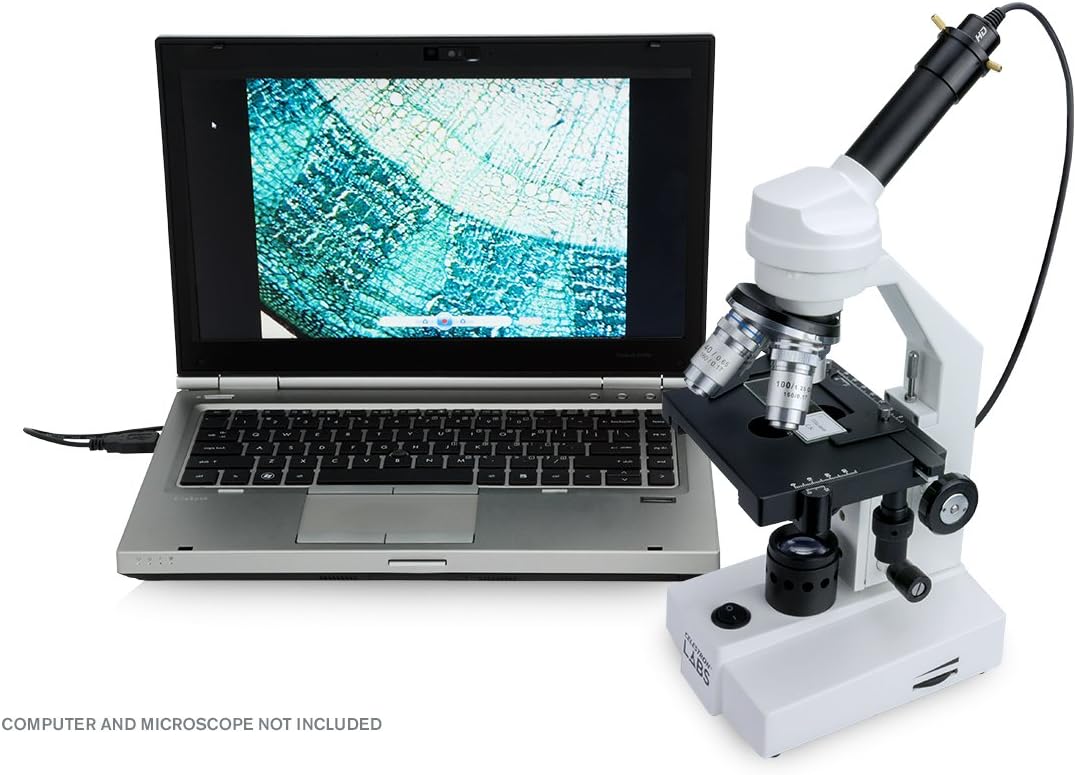
Image: A microscope with the Celestron 5MP Digital USB Microscope Imager connected to a laptop, displaying a live image.
പ്രവർത്തന നിർദ്ദേശങ്ങൾ
1. Launching the Software
After successful installation and connection, launch the Celestron HD Digital Software. The software should automatically detect the imager and display a live view from your microscope.
2. Adjusting Focus and Magnification
Use your microscope's coarse and fine focus knobs to bring the specimen into sharp focus on your computer screen. Adjust the microscope's objective lenses to change magnification as desired. Note that the imager provides a fixed magnification factor (approximately 30x compared to a 10x eyepiece), so the field of view will be more zoomed in than through a traditional eyepiece.
3. Capturing Images and Video
The software interface includes controls for capturing still images and recording video. Refer to the software's help documentation for detailed instructions on using these features, including selecting resolution (up to 5MP for still images, 30fps for video).
4. Using Advanced Software Features
The Celestron HD Digital Software offers advanced features such as:
- അളക്കൽ ഉപകരണങ്ങൾ: Calibrate the software to take precise measurements of specimens.
- വ്യാഖ്യാനം: Add notes and labels directly to your captured images.
- താരതമ്യം: Compare two live streams or captured images side-by-side.
മെയിൻ്റനൻസ്
To ensure the longevity and optimal performance of your Celestron 5MP Digital USB Microscope Imager, follow these maintenance guidelines:
- വൃത്തിയാക്കൽ: Use a soft, lint-free cloth to clean the exterior of the imager. For the lens, use a specialized lens cleaning solution and cloth to avoid scratches. Do not use abrasive cleaners or solvents.
- സംഭരണം: When not in use, store the imager in a dry, dust-free environment. It is recommended to use a protective cap for the lens to prevent dust accumulation and damage.
- കൈകാര്യം ചെയ്യൽ: Handle the imager with care. Avoid dropping it or subjecting it to strong impacts, as this can damage internal components.
ട്രബിൾഷൂട്ടിംഗ്
If you encounter issues with your Celestron 5MP Digital USB Microscope Imager, refer to the following common problems and solutions:
- Imager Not Detected / Software Connection Issues:
- Ensure the USB cable is securely connected to both the imager and the computer.
- നിങ്ങളുടെ കമ്പ്യൂട്ടറിൽ മറ്റൊരു USB പോർട്ട് പരീക്ഷിക്കുക.
- Verify that the Celestron HD Digital Software is correctly installed and up-to-date. Download the latest version from the Celestron webആവശ്യമെങ്കിൽ സൈറ്റ്.
- സോഫ്റ്റ്വെയർ കൂടാതെ/അല്ലെങ്കിൽ നിങ്ങളുടെ കമ്പ്യൂട്ടർ പുനരാരംഭിക്കുക.
- Image is Too Zoomed In:
- The imager has a higher magnification factor than typical eyepieces. Adjust your microscope's objective lenses to a lower power to achieve a wider field of view.
- Within the software, ensure you are using the native resolution (e.g., 960P) if available, as higher resolutions might involve software upsampling or cropping, leading to a more zoomed-in appearance.
- Poor Image Quality / Underexposed Images:
- Ensure the microscope's illumination is adequate and properly adjusted.
- Check the software settings for brightness, contrast, and gamma. While these adjust the display, proper microscope illumination is crucial for the initial capture.
- Clean the imager's lens and the microscope's objective lenses.
- സോഫ്റ്റ്വെയർ ക്രാഷുകൾ അല്ലെങ്കിൽ ഫ്രീസുകൾ:
- നിങ്ങളുടെ കമ്പ്യൂട്ടർ സോഫ്റ്റ്വെയറിനായുള്ള ഏറ്റവും കുറഞ്ഞ സിസ്റ്റം ആവശ്യകതകൾ പാലിക്കുന്നുണ്ടെന്ന് ഉറപ്പാക്കുക.
- നിങ്ങളുടെ കമ്പ്യൂട്ടറിന്റെ ഓപ്പറേറ്റിംഗ് സിസ്റ്റവും ഗ്രാഫിക്സ് ഡ്രൈവറുകളും അപ്ഡേറ്റ് ചെയ്യുക.
- Reinstall the Celestron HD Digital Software.
സ്പെസിഫിക്കേഷനുകൾ
| ഫീച്ചർ | വിശദാംശങ്ങൾ |
|---|---|
| മോഡലിൻ്റെ പേര് | Digital Microscope Imager HD 5MP |
| മോഡൽ നമ്പർ | 44422-സിജിഎൽ |
| സെൻസർ തരം | 5MP CMOS |
| സ്റ്റിൽ ഇമേജ് മിഴിവ് | 5 മെഗാപിക്സലുകൾ വരെ |
| വീഡിയോ ഫ്രെയിം റേറ്റ് | 30 FPS |
| ഇൻ്റർഫേസ് | USB 2.0 |
| Eyepiece Compatibility | 23mm or 30mm diameter |
| അനുയോജ്യമായ ഓപ്പറേറ്റിംഗ് സിസ്റ്റങ്ങൾ | Mac OS, Windows PCs |
| മെറ്റീരിയൽ | അലുമിനിയം |
| നിറം | കറുപ്പ് |
| ഉൽപ്പന്ന അളവുകൾ (L x W x H) | 6.5" x 5.87" x 2.25" |
| ഇനത്തിൻ്റെ ഭാരം | 97 ഗ്രാം |
| പവർ ഉറവിടം | Corded Electric (USB-powered) |
| പരമാവധി മാഗ്നിഫിക്കേഷൻ | 30x (relative to a 1x eyepiece) |
| യു.പി.സി | 050234444224 |
വാറൻ്റി വിവരങ്ങൾ
The Celestron 5MP Digital USB Microscope Imager is covered by a രണ്ട് വർഷത്തെ പരിമിത വാറൻ്റി. This warranty covers defects in materials and workmanship under normal use. For specific terms, conditions, and details on how to make a warranty claim, please refer to the full warranty statement available on the official Celestron webസൈറ്റ് അല്ലെങ്കിൽ ഉപഭോക്തൃ പിന്തുണയുമായി ബന്ധപ്പെടുക.
പിന്തുണ
For further assistance, technical support, or to access additional resources such as updated software and FAQs, please visit the official Celestron website. You can also contact Celestron customer service directly for personalized support.
- Celestron Official Webസൈറ്റ്: www.celestron.com
- കസ്റ്റമർ സർവീസ്: റഫർ ചെയ്യുക website for contact information (phone, email, or support tickets).