
1. ആമുഖം
The Life Fitness T5 Treadmill with Go Console is designed to provide an effective and comfortable workout experience. It features a FlexDeck Select Shock Absorption system, heart rate monitoring, and a user-friendly Go Console with various pre-programmed workouts. This manual provides essential information for the safe and efficient operation, setup, and maintenance of your treadmill.
2 പ്രധാനപ്പെട്ട സുരക്ഷാ വിവരങ്ങൾ
ട്രെഡ്മിൽ പ്രവർത്തിപ്പിക്കുന്നതിന് മുമ്പ്, എല്ലാ സുരക്ഷാ നിർദ്ദേശങ്ങളും വായിച്ച് മനസ്സിലാക്കുക. അങ്ങനെ ചെയ്യുന്നതിൽ പരാജയപ്പെടുന്നത് ഉപകരണങ്ങൾക്ക് പരിക്കോ കേടുപാടുകളോ ഉണ്ടാക്കാൻ ഇടയാക്കും.
- ഏതെങ്കിലും പുതിയ വ്യായാമ പരിപാടി ആരംഭിക്കുന്നതിന് മുമ്പ് എല്ലായ്പ്പോഴും ഒരു ഡോക്ടറെ സമീപിക്കുക.
- ഓപ്പറേഷൻ സമയത്ത് ട്രെഡ്മില്ലിൽ നിന്ന് കുട്ടികളെയും വളർത്തുമൃഗങ്ങളെയും അകറ്റി നിർത്തുക.
- ട്രെഡ്മില്ല് ചുറ്റും മതിയായ ക്ലിയറൻസുള്ള ഒരു ഉറച്ച, നിരപ്പായ പ്രതലത്തിൽ വയ്ക്കുക.
- ഉചിതമായ കായിക പാദരക്ഷകളും വസ്ത്രങ്ങളും ധരിക്കുക.
- ട്രെഡ്മിൽ കേടായാലോ തകരാറിലായാലും അത് പ്രവർത്തിപ്പിക്കരുത്.
- Use the safety stop key at all times. Attach the clip to your clothing before starting your workout.
- ബെൽറ്റ് ചലിക്കുമ്പോൾ ട്രെഡ്മില്ലിൽ ചവിട്ടുകയോ ഇറങ്ങുകയോ ചെയ്യരുത്.
- Hold the handrails for support, especially when starting or stopping the treadmill, or adjusting speed/incline.
- Unplug the treadmill from the power source when not in use or before cleaning/maintenance.
3. സജ്ജീകരണവും അസംബ്ലിയും
The Life Fitness T5 Treadmill with Go Console is designed for minimal assembly. Please ensure you have adequate space and the correct power source before beginning.
3.1 അൺപാക്കിംഗും പ്ലേസ്മെന്റും
Carefully remove all components from the packaging. This treadmill does not require assembly. Place the treadmill on a firm, level surface. Ensure there is at least 2 meters (6.5 feet) of clear space behind the treadmill and 0.5 meters (1.6 feet) on each side for safe operation and access.
3.2 പവർ കണക്ഷൻ
Connect the treadmill to a grounded electrical outlet using the provided power cord. The treadmill operates on a standard corded electric power source. Ensure the power switch is in the OFF position before plugging in.
3.3 Included Components Overview
Your treadmill package includes the following main components:
- ട്രെഡ്മിൽ ബേസ്
- Go Console with Blue LCD Screen
- നിയന്ത്രണ പാനൽ
- Ergobar
- Integrated Accessory Tray
- 2 Removable Dishwasher-Safe Cup Holders
- Hand Sensors for Heart Rate Monitoring
- Smartphone/Tablet Holder (also serves as a reading rack)
- User Manuals and Warranty Documentation
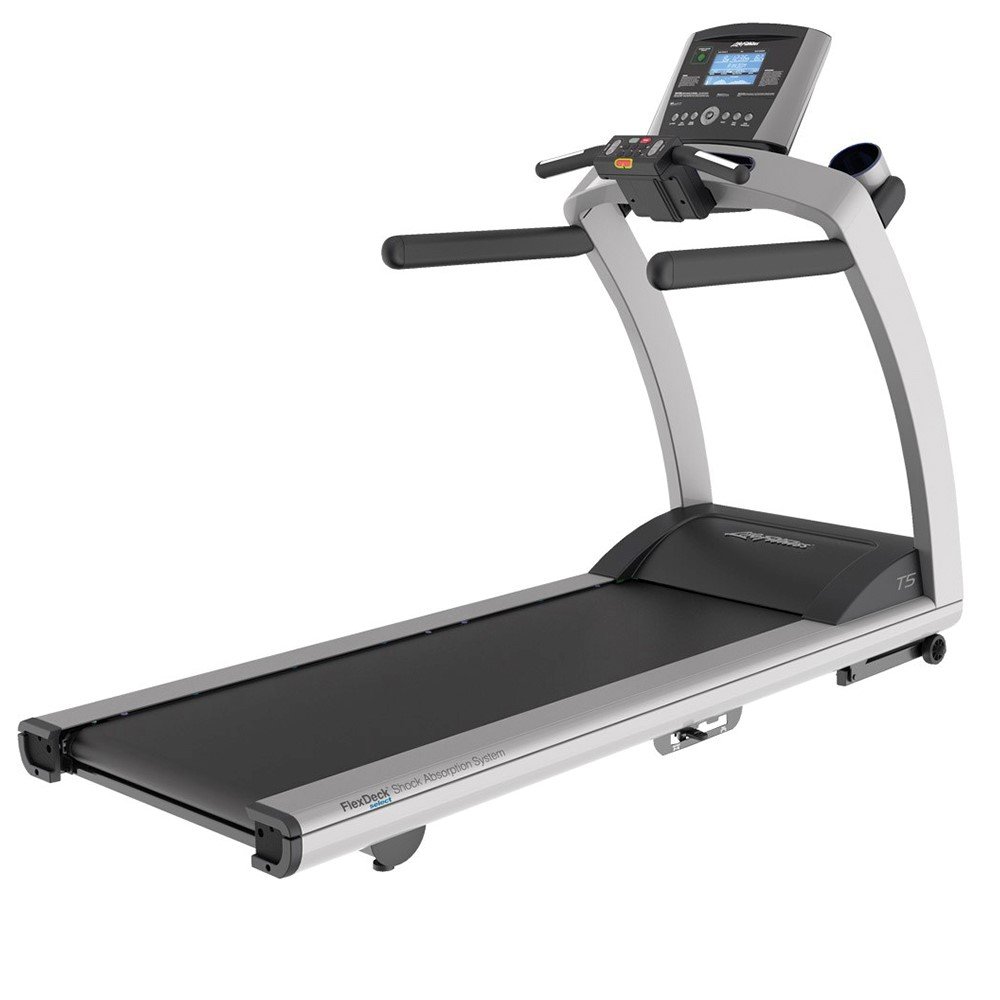
Image 1: Life Fitness T5 Treadmill with Go Console. This image shows the complete treadmill unit, including the base, running deck, and the Go Console with its display and controls.
4. പ്രവർത്തന നിർദ്ദേശങ്ങൾ
Familiarize yourself with the Go Console and its functions before beginning your workout.
4.1 Go Console Overview
The Go Console features an intuitive design with an energy-saving capability and a blue, custom-etched LCD screen. It displays key workout metrics and allows access to various programs.
- Display Metrics: The LCD screen shows Resistance Levels, Time, Speed, Distance, Heart Rate, and Calories Burned.
- വ്യായാമ പരിപാടികൾ: The console includes 12 pre-programmed workouts, 2 custom workouts, and supports 2 user profiles.
- ക്വിക്ക് സ്റ്റാർട്ട് ബട്ടൺ: This button remembers your preferred walk, jog, or run speed for quick access to your favorite settings.
4.2 ഒരു വ്യായാമം ആരംഭിക്കൽ
- ട്രെഡ്മിൽ പ്ലഗ് ഇൻ ചെയ്തിട്ടുണ്ടെന്നും പവർ സ്വിച്ച് ഓണാണെന്നും ഉറപ്പാക്കുക.
- Attach the safety stop key clip to your clothing.
- Step onto the treadmill, placing your feet on the side rails.
- അമർത്തുക ദ്രുത ആരംഭം button to begin a manual workout at your saved speed, or select a pre-programmed workout from the console.
- The belt will start moving at a low speed. Begin walking and gradually increase speed as desired.
4.3 വേഗതയും ചരിവും ക്രമീകരിക്കൽ
- വേഗത: Use the speed control buttons on the console to increase or decrease the belt speed. The minimum speed is 0.5 mph, and the maximum speed is 12 mph.
- ചരിവ്: Use the incline control buttons to adjust the running surface angle. The treadmill offers 3 different incline positions, with an increment of 0.5 percent.
4.4 ഹൃദയമിടിപ്പ് നിരീക്ഷണം
The treadmill is equipped with hand sensors and a wireless telemetry system for heart rate monitoring. To use the hand sensors, grip them firmly with both hands during your workout. Your heart rate will be displayed on the Go Console screen.
4.5 FlexDeck Select Shock Absorption System
The FlexDeck Select system allows you to choose from 3 kinds of running surface firmness to customize your workout comfort and impact reduction.
4.6 Ending a Workout
To end your workout, press the നിർത്തുക button on the console. The treadmill belt will gradually slow down and stop. Alternatively, pull the safety stop key to immediately stop the treadmill in an emergency.
5. പരിപാലനം
Regular maintenance ensures the longevity and optimal performance of your Life Fitness T5 Treadmill.
5.1 വൃത്തിയാക്കൽ
- വൃത്തിയാക്കുന്നതിന് മുമ്പ് എല്ലായ്പ്പോഴും ട്രെഡ്മിൽ അഴിക്കുക.
- കൺസോളിന്റെയും പുറംഭാഗങ്ങളുടെയും ഉപരിതലം പരസ്യം ഉപയോഗിച്ച് തുടയ്ക്കുക.amp തുണിയും വീര്യം കുറഞ്ഞ സോപ്പും ഉപയോഗിക്കുക. ഉരച്ചിലുകളുള്ള ക്ലീനറുകളോ ലായകങ്ങളോ ഒഴിവാക്കുക.
- Regularly clean the running deck and belt to prevent dust and debris buildup.
- The cup holders are removable and dishwasher-safe for easy cleaning.
5.2 പരിശോധന
- എന്തെങ്കിലും കേടുപാടുകൾ ഉണ്ടോയെന്ന് ഇടയ്ക്കിടെ പവർ കോർഡ് പരിശോധിക്കുക.
- Check the running belt for signs of wear or fraying.
- Ensure all visible bolts and screws are tight.
5.3 ലൂബ്രിക്കേഷൻ
Refer to the separate lubrication guide or contact customer support for specific instructions on running belt lubrication, if required. Over-lubrication can damage the treadmill.
6. പ്രശ്നപരിഹാരം
നിങ്ങളുടെ ട്രെഡ്മില്ലിൽ നിങ്ങൾ നേരിട്ടേക്കാവുന്ന സാധാരണ പ്രശ്നങ്ങൾ ഈ വിഭാഗം അഭിസംബോധന ചെയ്യുന്നു. ഇവിടെ പട്ടികപ്പെടുത്തിയിട്ടില്ലാത്ത പ്രശ്നങ്ങൾക്ക്, ദയവായി ഉപഭോക്തൃ പിന്തുണയുമായി ബന്ധപ്പെടുക.
6.1 Treadmill Does Not Power On
- പവർ കോർഡ് ഒരു ഗ്രൗണ്ടഡ് ഔട്ട്ലെറ്റിലേക്കും ട്രെഡ്മില്ലിലേക്കും സുരക്ഷിതമായി പ്ലഗ് ചെയ്തിട്ടുണ്ടെന്ന് ഉറപ്പാക്കുക.
- Check that the power switch on the treadmill is in the ON position.
- Verify the circuit breaker in your home has not tripped.
6.2 Running Belt Stops or Hesitates
- Ensure the safety stop key is fully engaged.
- Check if the maximum user weight (400 lbs) is exceeded.
- The running belt may require lubrication or adjustment. Refer to the maintenance section or contact support.
6.3 Inaccurate Heart Rate Reading
- Ensure your hands are firmly gripping the hand sensors.
- Moisture or dry skin can affect readings; ensure hands are clean and slightly moist.
- Interference from other electronic devices may occur.
7 സ്പെസിഫിക്കേഷനുകൾ
| ഫീച്ചർ | സ്പെസിഫിക്കേഷൻ |
|---|---|
| ഉൽപ്പന്ന അളവുകൾ (അടിസ്ഥാന യൂണിറ്റ്) | H-ൽ W x 79.5-ൽ L x 32-ൽ 61 (201.93 cm L x 81.28 cm W x 154.94 cm H) |
| നിയന്ത്രണ പാനൽ അളവുകൾ | 23 ൽ x 20 ൽ x 6 ഇഞ്ച് |
| അസംബിൾഡ് വെയ്റ്റ് | 349.5 പൗണ്ട് |
| ഉപരിതലത്തിൽ പ്രവർത്തിക്കുന്നു | 60 ൽ x 22 ഇഞ്ച് |
| മോട്ടോർ സിസ്റ്റം | 3.0 HP (6.0 HP Peak) DC Motor with MagnaDrive Controller |
| കുറഞ്ഞ വേഗത | 0.5 mph |
| പരമാവധി വേഗത | 12 mph |
| Incline Increment | 0.5% |
| പരമാവധി ഉപയോക്തൃ ഭാരം | 400 പൗണ്ട് |
| പവർ ഉറവിടം | കോർഡഡ് ഇലക്ട്രിക് |
| ഡിസ്പ്ലേ തരം | നീല എൽസിഡി |
| ഫ്രെയിം മെറ്റീരിയൽ | അലോയ് സ്റ്റീൽ |
| പ്രോഗ്രാമുകളുടെ എണ്ണം | 12 Pre-programmed, 2 Custom |
| പ്രത്യേക സവിശേഷതകൾ | Heart Rate Monitor, FlexDeck Select System, Quick Start Button, Smartphone/Tablet Holder |
8. വാറൻ്റിയും പിന്തുണയും
Life Fitness provides comprehensive warranty coverage for the T5 Treadmill with Go Console:
- ഫ്രെയിം: ആജീവനാന്ത വാറൻ്റി
- ഡ്രൈവ് മോട്ടോർ: 10 വർഷത്തെ വാറൻ്റി
- ഭാഗങ്ങൾ: 7 വർഷത്തെ വാറൻ്റി
- കൺസോൾ: 3 വർഷത്തെ വാറൻ്റി
- തൊഴിൽ: 1 വർഷത്തെ വാറൻ്റി
For technical support, service, or warranty claims, please contact Life Fitness customer service. Refer to the warranty documentation included with your product for detailed terms and conditions.