
1. ആമുഖം
This manual provides essential instructions for the safe and efficient operation, setup, and maintenance of your Elna eXpressive 920 Sewing, Quilting, and Embroidery Machine. Please read this manual thoroughly before using the machine to ensure proper function and to prevent damage.
2. പ്രധാന സുരക്ഷാ നിർദ്ദേശങ്ങൾ
ഒരു ഇലക്ട്രിക്കൽ ഉപകരണം ഉപയോഗിക്കുമ്പോൾ, ഇനിപ്പറയുന്നവ ഉൾപ്പെടെ അടിസ്ഥാന സുരക്ഷാ മുൻകരുതലുകൾ എല്ലായ്പ്പോഴും പാലിക്കണം:
- ഈ തയ്യൽ മെഷീൻ ഉപയോഗിക്കുന്നതിന് മുമ്പ് എല്ലാ നിർദ്ദേശങ്ങളും വായിക്കുക.
- ചലിക്കുന്ന എല്ലാ ഭാഗങ്ങളിൽ നിന്നും വിരലുകൾ അകറ്റി നിർത്തുക. തയ്യൽ മെഷീൻ സൂചിക്ക് ചുറ്റും പ്രത്യേക ശ്രദ്ധ ആവശ്യമാണ്.
- എല്ലായ്പ്പോഴും ശരിയായ സൂചി പ്ലേറ്റ് ഉപയോഗിക്കുക. തെറ്റായ പ്ലേറ്റ് സൂചി തകരാൻ കാരണമാകും.
- സൂചിയിൽ ത്രെഡ് ഇടുക, സൂചി മാറ്റുക, ബോബിൻ ത്രെഡ് ഇടുക, അല്ലെങ്കിൽ പ്രഷർ ഫൂട്ട് മാറ്റുക തുടങ്ങിയ സൂചി ഭാഗത്ത് എന്തെങ്കിലും ക്രമീകരണങ്ങൾ വരുത്തുമ്പോൾ തയ്യൽ മെഷീൻ ഓഫ് ചെയ്യുക.
- കവറുകൾ നീക്കംചെയ്യുമ്പോഴോ ലൂബ്രിക്കേറ്റുചെയ്യുമ്പോഴോ ഇൻസ്ട്രക്ഷൻ മാനുവലിൽ പറഞ്ഞിരിക്കുന്ന മറ്റേതെങ്കിലും ഉപയോക്തൃ സേവന ക്രമീകരണങ്ങൾ നടത്തുമ്പോഴോ എല്ലായ്പ്പോഴും തയ്യൽ മെഷീൻ ഇലക്ട്രിക്കൽ ഔട്ട്ലെറ്റിൽ നിന്ന് അൺപ്ലഗ് ചെയ്യുക.
- യന്ത്രത്തിന് കേടുവന്ന കമ്പിയിലോ പ്ലഗ്ഗിലോ ഉണ്ടെങ്കിലോ, അത് ശരിയായി പ്രവർത്തിക്കുന്നില്ലെങ്കിൽ, അല്ലെങ്കിൽ അത് താഴെ വീണാലോ കേടുപാടുകൾ സംഭവിച്ചാലോ ഒരിക്കലും അത് പ്രവർത്തിപ്പിക്കരുത്.
- വെളിയിൽ ഉപയോഗിക്കരുത്.
3. ഉൽപ്പന്നം കഴിഞ്ഞുview
The Elna eXpressive 920 is a versatile machine designed for sewing, quilting, and embroidery. It features a large workspace, an intuitive touch screen, and a wide array of built-in designs and stitches.

Figure 3.1: The Elna eXpressive 920 machine with its extension table attached, providing an expansive work surface for large projects like quilting.
പ്രധാന സവിശേഷതകൾ:
- 350 Embroidery Designs: Includes a wide variety of built-in embroidery patterns.
- 10 Embroidery Fonts and 2 Alphabets: Offers extensive customization for lettering.
- ഉയർന്ന തയ്യൽ വേഗത: Adjustable up to 1,060 stitches per minute (spm).
- Automatic Presser Foot Lifter: Enhances ease of use and efficiency.
- എക്സ്ട്രാ-ഹൈ പ്രഷർ ഫൂട്ട് ലിഫ്റ്റർ: Accommodates thicker fabrics and multiple layers.
- Large Color Touch Screen: For intuitive navigation and design selection.
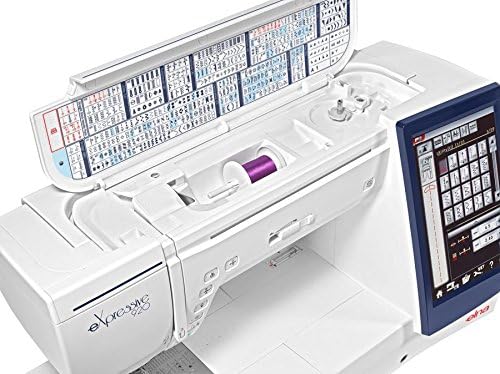
ചിത്രം 3.2: മുകളിൽ view of the Elna eXpressive 920, illustrating the accessible thread spool compartment and the convenient stitch guide located on the inside of the top cover.
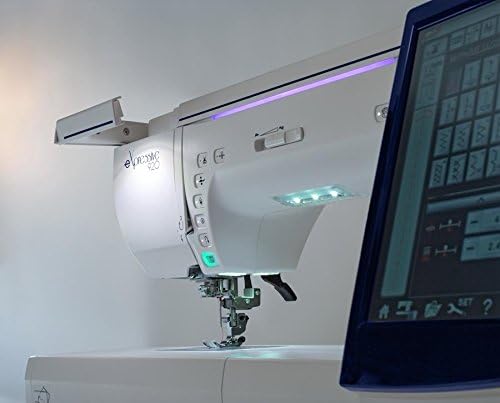
ചിത്രം 3.3: ഒരു ക്ലോസ്-അപ്പ് വശം view of the Elna eXpressive 920, highlighting the integrated LED lighting system and the easily accessible control buttons for various functions.
4. സജ്ജീകരണം
4.1 അൺപാക്കിംഗും പ്ലേസ്മെന്റും
- മെഷീൻ അതിന്റെ പാക്കേജിംഗിൽ നിന്ന് ശ്രദ്ധാപൂർവ്വം നീക്കം ചെയ്യുക. ഭാവിയിലെ ഗതാഗതത്തിനോ സംഭരണത്തിനോ വേണ്ടി എല്ലാ പാക്കേജിംഗ് വസ്തുക്കളും സൂക്ഷിക്കുക.
- Place the machine on a stable, level surface. Ensure there is adequate space around the machine for comfortable operation and fabric handling.
- പവർ കോർഡ് മെഷീനുമായി ബന്ധിപ്പിക്കുക, തുടർന്ന് അനുയോജ്യമായ ഒരു ഇലക്ട്രിക്കൽ ഔട്ട്ലെറ്റുമായി ബന്ധിപ്പിക്കുക.
4.2 എക്സ്റ്റൻഷൻ ടേബിൾ അറ്റാച്ചുചെയ്യൽ
For larger projects, such as quilting, attach the included extension table to expand your workspace.
- Align the pins on the extension table with the corresponding holes on the free arm of the machine.
- Gently push the table towards the machine until it clicks into place.
- Adjust the support legs on the extension table for stability.

Figure 4.1: The Elna eXpressive 920 with the extension table securely attached, demonstrating the expanded work area for larger sewing and quilting projects.
4.3 മെഷീനിൽ ത്രെഡിംഗ്
Proper threading is crucial for optimal stitch quality. Refer to the on-screen guide or the detailed instructions in the full manual for specific threading paths.
- സ്പൂൾ പിന്നിൽ നൂലിന്റെ സ്പൂൾ വയ്ക്കുക.
- Follow the numbered threading guides on the machine, ensuring the thread is seated correctly in each tension disc and guide.
- Thread the needle using the automatic needle threader or manually.
4.4 Winding and Inserting the Bobbin
The bobbin provides the lower thread for stitching.
- ബോബിൻ വൈൻഡർ സ്പിൻഡിൽ ഒരു ഒഴിഞ്ഞ ബോബിൻ വയ്ക്കുക.
- Follow the bobbin winding path and start winding. The machine will automatically stop when the bobbin is full.
- Open the bobbin cover plate and insert the wound bobbin into the bobbin case, following the indicated thread path.
5. പ്രവർത്തന നിർദ്ദേശങ്ങൾ
5.1 അടിസ്ഥാന തയ്യൽ
- Turn on the machine using the power switch. The touch screen will illuminate.
- Select your desired stitch pattern from the touch screen. Adjust stitch length and width as needed.
- Place your fabric under the presser foot. Lower the presser foot using the lever or the automatic presser foot lifter.
- Begin sewing by pressing the foot controller or the Start/Stop button. Adjust sewing speed using the speed control slider.
- To finish, press the reverse stitch button for a few stitches, then press the thread cutter button or manually cut the threads.
5.2 Embroidery Functions
The Elna eXpressive 920 offers 350 built-in embroidery designs, 10 fonts, and 2 alphabets.
- Attach the embroidery unit and hoop to the machine.
- Select an embroidery design from the touch screen. You can resize, rotate, and combine designs.
- Hoop your fabric with stabilizer.
- Follow the on-screen prompts for thread color changes and other instructions.
- Start the embroidery process. The machine will automatically stitch the design.
5.3 Quilting
This machine is well-suited for quilting with its large workspace and various quilting stitches.
- Utilize the extension table for better support of large quilt projects.
- Select appropriate quilting stitches from the machine's menu.
- Consider using a walking foot (often included in accessories) for even feeding of multiple fabric layers.
- Adjust the presser foot pressure if necessary for different fabric thicknesses.
6. പരിപാലനം
Regular maintenance ensures the longevity and optimal performance of your Elna eXpressive 920.
6.1 വൃത്തിയാക്കൽ
- വൃത്തിയാക്കുന്നതിന് മുമ്പ് എല്ലായ്പ്പോഴും മെഷീൻ അൺപ്ലഗ് ചെയ്യുക.
- സൂചി പ്ലേറ്റും ബോബിൻ കേസും നീക്കം ചെയ്യുക.
- Use the provided brush to remove lint and dust from the feed dogs, bobbin area, and tension discs.
- മൃദുവായതും ഉണങ്ങിയതുമായ തുണി ഉപയോഗിച്ച് മെഷീനിന്റെ പുറംഭാഗം തുടയ്ക്കുക. കഠിനമായ രാസവസ്തുക്കൾ ഉപയോഗിക്കരുത്.
6.2 ലൂബ്രിക്കേഷൻ
Your Elna eXpressive 920 is designed to require minimal lubrication. Refer to the full instruction manual for specific lubrication points and frequency, if any are required. Over-oiling can cause issues.
6.3 സൂചി മാറ്റിസ്ഥാപിക്കൽ
Replace the needle regularly (after 8-10 hours of sewing or when it becomes dull/bent) to prevent skipped stitches and fabric damage.
- മെഷീൻ ഓഫാക്കി അൺപ്ലഗ് ചെയ്യുക.
- സൂചി cl അഴിക്കുകamp സ്ക്രൂ.
- Remove the old needle and insert a new one with the flat side facing the back of the machine, pushing it up as far as it will go.
- സൂചി മുറുക്കുക clamp സുരക്ഷിതമായി സ്ക്രൂ ചെയ്യുക.
7. പ്രശ്നപരിഹാരം
This section addresses common issues you might encounter. For more complex problems, consult the full service manual or contact customer support.
| പ്രശ്നം | സാധ്യമായ കാരണം | പരിഹാരം |
|---|---|---|
| ഒഴിവാക്കിയ തുന്നലുകൾ | തെറ്റായ സൂചി, വളഞ്ഞ സൂചി, തെറ്റായ നൂൽ നൂൽ, തുണിയുടെ തെറ്റായ സൂചി വലുപ്പം. | സൂചി മാറ്റി സ്ഥാപിക്കുക, മെഷീൻ വീണ്ടും ത്രെഡ് ചെയ്യുക, ശരിയായ സൂചി തരം/വലുപ്പം ഉപയോഗിക്കുക. |
| ത്രെഡ് ബ്രേക്കേജ് | Improper threading, incorrect tension, burr on needle plate, poor quality thread. | Re-thread, adjust tension, check for burrs, use quality thread. |
| തുണി പക്കറിംഗ് | Incorrect tension, wrong stitch length, dull needle, no stabilizer for embroidery. | Adjust tension, increase stitch length, replace needle, use stabilizer. |
| മെഷീൻ ആരംഭിക്കുന്നില്ല | Power cord not connected, foot controller not plugged in, bobbin winder engaged. | Check power connections, ensure bobbin winder is disengaged. |
8 സ്പെസിഫിക്കേഷനുകൾ
| ഫീച്ചർ | വിശദാംശങ്ങൾ |
|---|---|
| മോഡൽ നമ്പർ | 920 |
| ബ്രാൻഡ് | എൽന |
| ടൈപ്പ് ചെയ്യുക | Sewing, Quilting, and Embroidery Machine |
| എംബ്രോയ്ഡറി ഡിസൈനുകൾ | 350 (including 10 fonts, 2 alphabets) |
| പരമാവധി തയ്യൽ വേഗത | 1,060 stitches per minute (spm) |
| പ്രസ്സർ ഫുട്ട് ലിഫ്റ്റർ | Automatic and Extra-High |
| പവർ ഉറവിടം | കോർഡഡ് ഇലക്ട്രിക് |
| ഇനത്തിൻ്റെ ഭാരം | 50 പൗണ്ട് |
| നിറം | വെള്ള |
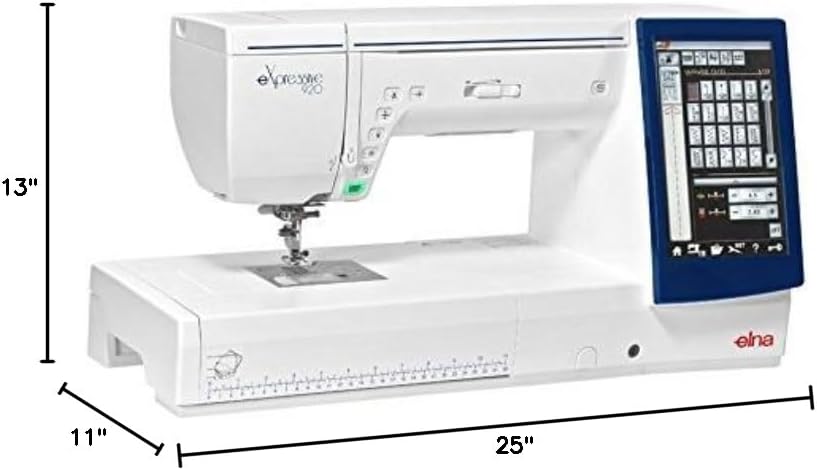
Figure 8.1: The Elna eXpressive 920 machine with its approximate dimensions: 25 inches in length, 11 inches in width, and 13 inches in height.

ചിത്രം 8.2: ഒരു സമഗ്രമായ view of the accessories included with the Elna eXpressive 920, featuring various presser feet, bobbins, needles, cleaning tools, and other essential components for diverse sewing and embroidery tasks.
9. വാറൻ്റിയും പിന്തുണയും
For warranty information, please refer to the warranty card included with your product or visit the official Elna webസൈറ്റ്.
For technical support, service, or to order replacement parts, please contact your authorized Elna dealer or Elna customer service. Keep your model number (eXpressive 920) and serial number (found on the machine's rating plate) ready when contacting support.
ഓൺലൈൻ ഉറവിടങ്ങൾ: For additional guides, FAQs, and software updates, visit the official Elna support portal.