
1. ആമുഖം
This manual provides detailed instructions for the installation, operation, and maintenance of the MCO Home MH9-CO2-WD Z-Wave Smart Carbon Dioxide Sensor. This device is designed to accurately monitor CO2 levels, temperature, and humidity in real-time, and can be integrated into any Z-Wave network with other certified Z-Wave devices. It can also be equipped with outputs to directly control ventilation systems, contributing to improved indoor air quality.
2 പ്രധാനപ്പെട്ട സുരക്ഷാ വിവരങ്ങൾ
- ഇൻസ്റ്റാളേഷനും പ്രവർത്തനത്തിനും മുമ്പ് എല്ലാ നിർദ്ദേശങ്ങളും ശ്രദ്ധാപൂർവ്വം വായിക്കുക.
- പ്രാദേശിക ഇലക്ട്രിക്കൽ കോഡുകൾക്ക് അനുസൃതമായി യോഗ്യതയുള്ള ഒരു ഇലക്ട്രീഷ്യനാണ് ഇൻസ്റ്റാളേഷൻ നടത്തേണ്ടത്.
- ഏതെങ്കിലും ഇൻസ്റ്റാളേഷനോ അറ്റകുറ്റപ്പണിയോ നടത്തുന്നതിന് മുമ്പ് വൈദ്യുതി വിതരണം വിച്ഛേദിക്കപ്പെട്ടുവെന്ന് ഉറപ്പാക്കുക.
- This device is designed for indoor use only. Do not expose to moisture or extreme temperatures.
- ഉപകരണം നന്നാക്കാനോ പരിഷ്ക്കരിക്കാനോ ശ്രമിക്കരുത്. എല്ലാ സേവനങ്ങളും യോഗ്യതയുള്ള ഉദ്യോഗസ്ഥരെ ഏൽപ്പിക്കുക.
3. പാക്കേജ് ഉള്ളടക്കം
പാക്കേജിൽ എല്ലാ ഇനങ്ങളും ഉണ്ടെന്ന് ഉറപ്പാക്കുക:
- MCO Home MH9-CO2-WD Sensor Unit
- മൗണ്ടിംഗ് ആക്സസറികൾ (സ്ക്രൂകൾ, വാൾ പ്ലഗുകൾ)
- ഉപയോക്തൃ മാനുവൽ
4. ഉൽപ്പന്നം കഴിഞ്ഞുview
The MCO Home MH9-CO2-WD is a smart multi-sensor device featuring a clear display and intuitive controls. It continuously monitors CO2 concentration, ambient temperature, and relative humidity.
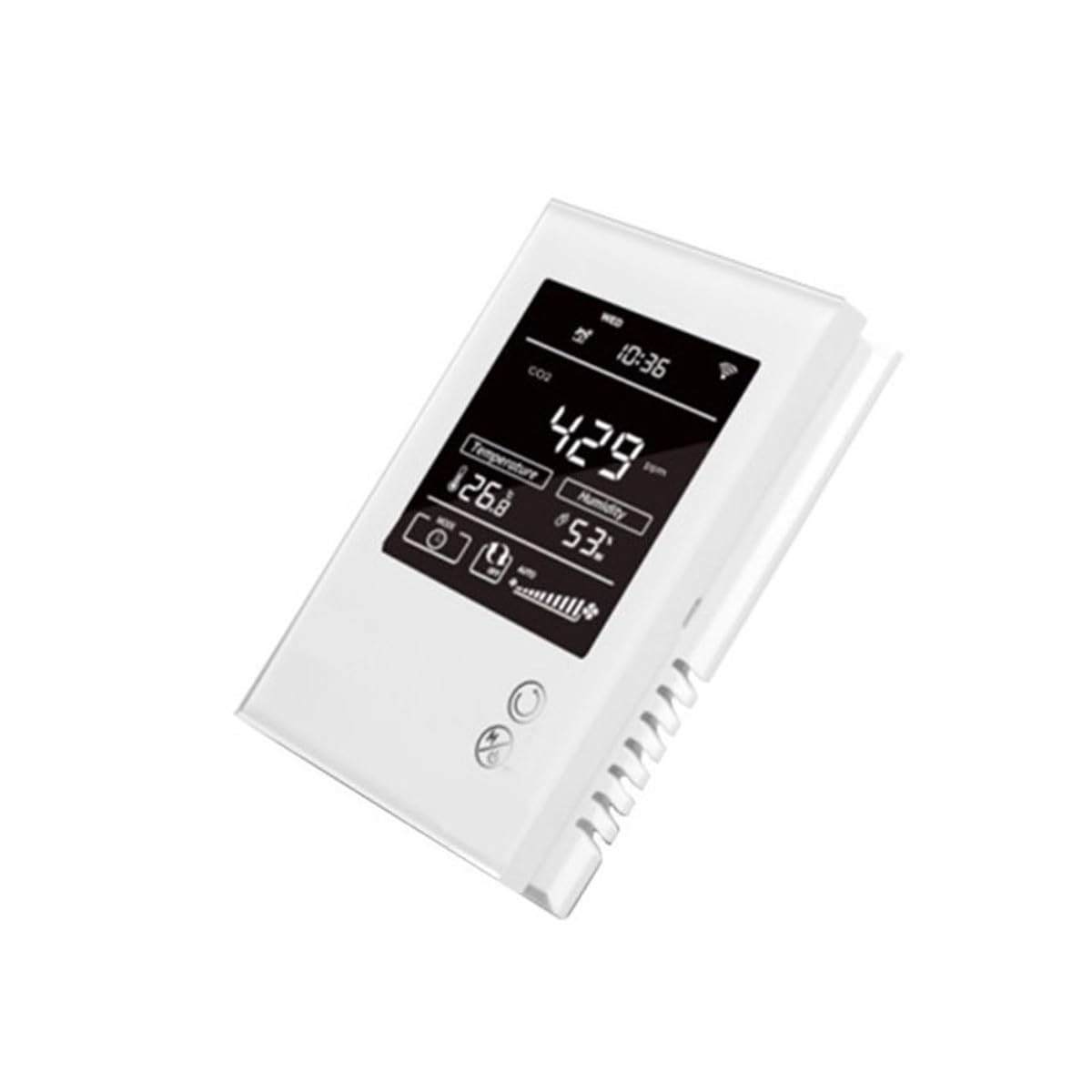
ചിത്രം 1: മുൻഭാഗം view of the MCO Home MH9-CO2-WD sensor, displaying CO2 levels, temperature, and humidity.
The device integrates advanced sensors for accurate environmental monitoring. Its Z-Wave compatibility allows for seamless integration into smart home systems, enabling automated responses based on detected air quality parameters.

Figure 2: The multi-sensor capability of the device for comprehensive environmental monitoring.
5. സജ്ജീകരണവും ഇൻസ്റ്റാളേഷനും
5.1 വാൾ മൗണ്ടിംഗ്
- Choose a suitable vertical wall location, away from direct sunlight, drafts, or heat sources, to ensure accurate readings.
- ഉപകരണം ശ്രദ്ധാപൂർവ്വം തുറക്കുക casinമൗണ്ടിംഗ് ദ്വാരങ്ങളിലേക്ക് പ്രവേശിക്കാൻ ഗ്രാം.
- ഉപകരണം ഒരു ടെംപ്ലേറ്റായി ഉപയോഗിച്ച് ചുവരിൽ ഡ്രില്ലിംഗ് പോയിന്റുകൾ അടയാളപ്പെടുത്തുക.
- ആവശ്യമെങ്കിൽ ദ്വാരങ്ങൾ തുരന്ന് വാൾ പ്ലഗുകൾ ഇടുക.
- നൽകിയിരിക്കുന്ന സ്ക്രൂകൾ ഉപയോഗിച്ച് ഉപകരണം ഭിത്തിയിൽ ഉറപ്പിക്കുക.
5.2 പവർ കണക്ഷൻ
The device requires a 230V AC power supply. Connect the power wires to the designated terminals inside the device. Ensure proper polarity and secure connections. Always disconnect power before making any electrical connections.
5.3 Z-Wave Network Inclusion
To add the sensor to your Z-Wave network:
- Put your Z-Wave controller into inclusion (pairing) mode. Refer to your controller's manual for specific instructions.
- On the MH9-CO2-WD sensor, follow the device-specific instructions (usually involving a button press sequence) to initiate inclusion mode.
- The device will confirm successful inclusion on its display or through an indicator light.
- Once included, the sensor will appear in your Z-Wave controller's device list, and you can configure its parameters.
6. ഓപ്പറേഷൻ
6.1 വിവരങ്ങൾ പ്രദർശിപ്പിക്കുക
The device's display provides real-time readings:
- CO2 സാന്ദ്രത: Displays the current carbon dioxide level in parts per million (ppm). Range: 0-2000 ppm.
- താപനില: Shows the ambient temperature in Celsius (°C). Range: -9.0 ~ 50 °C.
- ഈർപ്പം: Indicates the relative humidity (RH) percentage. Range: 0% ~ 99% RH.
6.2 CO2 Alarm Settings
The sensor features an audible alarm for high CO2 levels. The standard alarm threshold is set at 1000 ppm, but this value is adjustable through the device's settings or via your Z-Wave controller. When the CO2 level exceeds the set threshold, an alarm will sound.
6.3 Ventilation System Control
The MH9-CO2-WD can be configured to control external ventilation systems. By connecting the device's outputs to a ventilation system, you can automate air exchange based on CO2, temperature, or humidity levels, ensuring optimal indoor air quality.

Figure 3: The sensor can be integrated into a climate control system to manage ventilation.

Figure 4: The device helps maintain clean air quality by monitoring CO2 levels.
7. പരിപാലനം
7.1 വൃത്തിയാക്കൽ
To maintain the device's appearance and functionality, periodically wipe the exterior with a soft, dry cloth. Do not use abrasive cleaners, solvents, or chemical agents, as these can damage the casing അല്ലെങ്കിൽ ആന്തരിക ഘടകങ്ങൾ.
7.2 കാലിബ്രേഷൻ
While the sensor is designed for long-term accuracy, environmental CO2 sensors may require periodic calibration to ensure precise readings over time. Refer to the advanced settings within your Z-Wave controller or MCO Home's official support documentation for any available calibration procedures.
8. പ്രശ്നപരിഹാരം
8.1 പൊതുവായ പ്രശ്നങ്ങൾ
- ഉപകരണം ഓണാക്കുന്നില്ല: Check the 230V AC power connection. Ensure the circuit breaker is on.
- No Z-Wave connectivity: Ensure the device is within range of your Z-Wave controller. Try re-including the device into the network. Check for interference from other wireless devices.
- കൃത്യമല്ലാത്ത വായനകൾ: Ensure the sensor is not placed near heat sources, open windows, or in direct sunlight. Allow sufficient time for the sensor to stabilize after initial power-up.
- ഡിസ്പ്ലേ തകരാറ്: If the display is not functioning correctly, ensure the power supply is stable. If the issue persists, contact customer support.
9 സ്പെസിഫിക്കേഷനുകൾ
സാങ്കേതിക ഡാറ്റ
| ഫീച്ചർ | സ്പെസിഫിക്കേഷൻ |
|---|---|
| മോഡൽ നമ്പർ | MCOEMH9-CO2 |
| വൈദ്യുതി വിതരണം | 230V എസി |
| CO2 ശ്രേണി | 0-2000 പിപിഎം |
| Standard Alarm Threshold | 1000 ppm (adjustable) |
| താപനില പരിധി | -9.0 ~ 50 °C |
| ഈർപ്പം പരിധി | 0% ~ 99% RH |
| ഇൻസ്റ്റലേഷൻ | Wall mount (vertical) |
| അളവുകൾ (L x W x H) | 9 x 2.8 x 13 സെ.മീ |
| ഭാരം | 300 ഗ്രാം |
| അലാറം തരം | കേൾക്കാവുന്ന |
| കണക്റ്റിവിറ്റി | Z-വേവ് |
| മാതൃരാജ്യം | യുണൈറ്റഡ് സ്റ്റേറ്റ്സ് ഓഫ് അമേരിക്ക |
10. വാറൻ്റിയും പിന്തുണയും
10.1 വാറൻ്റി വിവരങ്ങൾ
MCO Home products are covered by a limited warranty. For specific warranty terms and conditions, please refer to the warranty card included with your product or visit the official MCO Home webവാറന്റി ക്ലെയിമുകൾക്കുള്ള വാങ്ങലിന്റെ തെളിവായി നിങ്ങളുടെ വാങ്ങൽ രസീത് സൂക്ഷിക്കുക.
10.2 ഉപഭോക്തൃ പിന്തുണ
If you encounter any issues or have questions regarding the installation, operation, or maintenance of your MCO Home MH9-CO2-WD sensor, please contact MCO Home customer support. Contact details can be found on the official MCO Home webസൈറ്റ് അല്ലെങ്കിൽ നിങ്ങളുടെ ഉൽപ്പന്ന ഡോക്യുമെന്റേഷനിൽ.