
ആമുഖം
This manual provides comprehensive instructions for the safe and efficient operation, assembly, maintenance, and troubleshooting of your Dirt Devil ND40150MDI Pressure Flex Pro. This versatile appliance combines a powerful pressure washer with an effective wet/dry vacuum, designed for various cleaning tasks. Please read this manual thoroughly before first use and retain it for future reference.

Image: The Dirt Devil ND40150MDI Pressure Flex Pro, showing both the pressure washer unit and the wet/dry vacuum unit side-by-side.
പ്രധാനപ്പെട്ട സുരക്ഷാ വിവരങ്ങൾ
Always observe basic safety precautions when using electrical appliances to reduce the risk of fire, electric shock, and personal injury. Failure to follow these instructions may result in serious injury or property damage.
- എല്ലാ നിർദ്ദേശങ്ങളും വായിക്കുക: ഉപകരണത്തിന്റെ നിയന്ത്രണങ്ങളും ശരിയായ ഉപയോഗവും സ്വയം പരിചയപ്പെടുത്തുക.
- ഇലക്ട്രിക്കൽ സുരക്ഷ: This unit is equipped with a GFCI (Ground Fault Circuit Interrupter) for user protection against electrical shocks. Do not bypass or modify the GFCI. Always connect to a properly grounded outlet.
- Water Pressure Safety: The pressure washer generates high-pressure water. Never direct the spray at people, pets, or electrical devices. Keep hands and feet clear of the nozzle.
- വെൻ്റിലേഷൻ: Ensure adequate ventilation when operating the vacuum, especially in enclosed spaces.
- കുട്ടികളും വളർത്തുമൃഗങ്ങളും: പ്രവർത്തന സമയത്ത് കുട്ടികളെയും വളർത്തുമൃഗങ്ങളെയും ഉപകരണത്തിൽ നിന്ന് അകറ്റി നിർത്തുക.
- പരിപാലനം: Disconnect from power supply before performing any maintenance or cleaning.
- കേടായ ഭാഗങ്ങൾ: Do not operate the appliance with a damaged cord, plug, or any other damaged part. Contact customer support for repairs.
ഉൽപ്പന്ന ഘടകങ്ങൾ
Your Dirt Devil ND40150MDI Pressure Flex Pro comes with the following components:
- പ്രഷർ വാഷർ യൂണിറ്റ്
- Wet/Dry Vacuum Unit
- High-Pressure Hose (5.8m)
- സ്പ്രേ ഗൺ
- Vacuum Suction Hose
- Dust Cleaning Brush
- നോസൽ
- റോട്ടറി ബ്രഷ്
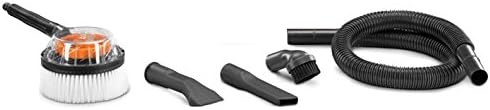
Image: Various accessories including a dust cleaning brush, nozzle, rotary brush, and vacuum suction hose.
സജ്ജമാക്കുക
Pressure Washer Setup
- ഹാൻഡിൽ കൂട്ടിച്ചേർക്കുക: Attach the handle to the main pressure washer unit, ensuring it clicks securely into place.
- ഉയർന്ന മർദ്ദമുള്ള ഹോസ് ബന്ധിപ്പിക്കുക: Screw the high-pressure hose firmly to the pressure washer outlet and to the spray gun.
- ജലവിതരണം ബന്ധിപ്പിക്കുക: Attach a garden hose (not included) to the water inlet on the pressure washer. Ensure the connection is tight to prevent leaks.
- നോസൽ അറ്റാച്ചുചെയ്യുക: Select the desired nozzle and attach it to the spray gun.
- ബ്ലീഡ് എയർ: Before turning on the power, turn on the water supply and squeeze the spray gun trigger to allow air to escape from the system until a steady stream of water emerges.

ചിത്രം: മുൻഭാഗം view of the Dirt Devil pressure washer unit, showing the water inlet and high-pressure hose connection points.
Wet/Dry Vacuum Setup
- സക്ഷൻ ഹോസ് ഘടിപ്പിക്കുക: Connect the vacuum suction hose to the inlet port on the vacuum unit.
- ഫിൽട്ടർ ഇൻസ്റ്റാൾ ചെയ്യുക: For dry vacuuming, ensure the dry filter is properly installed. For wet vacuuming, remove the dry filter and ensure the foam filter (if included) is in place.
- ആക്സസറികൾ അറ്റാച്ചുചെയ്യുക: Select and attach the appropriate accessory (e.g., dust cleaning brush, nozzle) to the end of the suction hose.

Image: A person demonstrating how to lift and carry the Dirt Devil wet/dry vacuum unit by its integrated handle.
പ്രവർത്തന നിർദ്ദേശങ്ങൾ
പ്രഷർ വാഷർ പ്രവർത്തിപ്പിക്കുന്നു
- പവർ ഓൺ: Plug the power cord into a grounded electrical outlet. Press the ON/OFF switch to the 'ON' position.
- വൃത്തിയാക്കൽ ആരംഭിക്കുക: Hold the spray gun firmly and direct the spray at the surface to be cleaned. Maintain a safe distance to avoid damaging the surface.
- സമ്മർദ്ദം ക്രമീകരിക്കുക: Pressure can be adjusted by changing nozzles or by varying the distance from the surface. The unit provides up to 1800 PSI.
- പവർ ഓഫ്: When finished, turn off the power switch, then turn off the water supply. Squeeze the trigger to release any remaining pressure before disconnecting the hose.
Operating the Wet/Dry Vacuum
- പവർ ഓൺ: Plug the power cord into a grounded electrical outlet. Press the ON/OFF switch to the 'ON' position.
- ഡ്രൈ വാക്വമിംഗ്: Ensure the dry filter is installed. Use appropriate attachments for dust, debris, or other dry materials.
- വെറ്റ് വാക്വമിംഗ്: Ensure the dry filter is removed and the foam filter (if applicable) is installed. Use for liquids or wet spills. The vacuum will automatically shut off when the tank is full.
- Emptying Tank: After wet vacuuming, or when the tank is full, turn off the unit, unplug it, and empty the collection tank.
- പവർ ഓഫ്: പൂർത്തിയാകുമ്പോൾ, പവർ സ്വിച്ച് ഓഫ് ചെയ്ത് യൂണിറ്റ് അൺപ്ലഗ് ചെയ്യുക.

Image: A person demonstrating the use of the Dirt Devil wet/dry vacuum to clean debris from a tiled floor.
മെയിൻ്റനൻസ്
Regular maintenance ensures optimal performance and extends the life of your appliance. Always unplug the unit before performing any maintenance.
- ക്ലീനിംഗ് നോസിലുകൾ: Periodically clean the pressure washer nozzles to remove any blockages. Use the provided nozzle cleaning tool if necessary.
- Vacuum Filter Maintenance: Clean or replace the dry filter regularly. Wash the foam filter after wet vacuuming and allow it to air dry completely before reuse.
- Emptying and Cleaning Tank: After each use, especially after wet vacuuming, empty and rinse the collection tank to prevent mold and odors.
- ഹോസ് ആൻഡ് കോർഡ് പരിശോധന: Regularly inspect the high-pressure hose, vacuum hose, and power cord for any signs of wear, cuts, or damage. Replace damaged parts immediately.
- സംഭരണം: Store the appliance in a dry, frost-free area. Drain all water from the pressure washer pump and hoses before storing to prevent freezing damage.
ട്രബിൾഷൂട്ടിംഗ്
If you encounter issues with your Dirt Devil ND40150MDI, refer to the following common problems and solutions:
| പ്രശ്നം | സാധ്യമായ കാരണം | പരിഹാരം |
|---|---|---|
| Pressure washer not starting | വൈദ്യുതിയില്ല, GFCI ട്രിപ്പ് ആയി, ഓൺ/ഓഫ് സ്വിച്ച് ഓഫ് ആയി | Check power connection, reset GFCI, ensure switch is ON. |
| Low pressure from washer | Insufficient water supply, clogged nozzle, air in pump | Ensure full water flow, clean nozzle, bleed air from system. |
| വാക്വം കുറഞ്ഞ സക്ഷൻ ഉണ്ട് | Clogged hose/filter, full tank, improper filter for wet/dry | Clear blockages, clean/replace filter, empty tank, ensure correct filter type. |
| Water leaking from pressure washer | Loose connections, damaged O-rings/seals | Tighten all connections, inspect and replace damaged seals. |
ഈ പരിഹാരങ്ങൾ പരീക്ഷിച്ചതിനുശേഷവും പ്രശ്നം നിലനിൽക്കുകയാണെങ്കിൽ, ദയവായി ഉപഭോക്തൃ പിന്തുണയുമായി ബന്ധപ്പെടുക.
സ്പെസിഫിക്കേഷനുകൾ
Key technical specifications for the Dirt Devil ND40150MDI Pressure Flex Pro:
- മോഡലിൻ്റെ പേര്: ND40150MDI
- തരം: 2-in-1 Pressure Washer and Wet/Dry Vacuum
- Pressure Washer Max PSI: 1800 സൈ
- ഊർജ്ജ സ്രോതസ്സ്: കോർഡഡ് ഇലക്ട്രിക്
- വാട്ട്tage: 120 വാട്ട്സ്
- ഉയർന്ന മർദ്ദം ഹോസ് നീളം: 5.8 മീറ്റർ
- പ്രത്യേക സവിശേഷത: Wet/Dry Vacuum capability
- സുരക്ഷാ സവിശേഷത: GFCI (ഗ്രൗണ്ട് ഫാൾട്ട് സർക്യൂട്ട് ഇൻ്ററപ്റ്റർ)
- ഭാരം: 11 കിലോഗ്രാം
- നിറം: Red with Black accents
- ശുപാർശ ചെയ്യുന്ന ഉപയോഗം: Outdoor cleaning
വാറൻ്റി വിവരങ്ങൾ
This Dirt Devil ND40150MDI Pressure Flex Pro is covered by a manufacturer's warranty for a period of 1 വർഷം from the date of purchase. This warranty covers defects in materials and workmanship under normal use. Please retain your proof of purchase for warranty claims. For specific terms and conditions, refer to the warranty card included with your product or contact customer support.
ഉപഭോക്തൃ പിന്തുണ
For technical assistance, warranty claims, or to order replacement parts, please contact Dirt Devil customer support. Have your model number (ND40150MDI) and purchase information ready when contacting support.
Webസൈറ്റ്: www.dirtdevil.com (ദയവായി ഔദ്യോഗികമായി പരിശോധിക്കുക) website for regional contact information)
ഫോൺ: Refer to the contact section on the official Dirt Devil website for your region's customer service number.