
1. ആമുഖം
വാങ്ങിയതിന് നന്ദി.asing the GPO Bermuda Classic Turntable. This manual provides essential information for the safe and efficient operation of your new turntable. Please read these instructions thoroughly before use and retain them for future reference.
2 സുരക്ഷാ വിവരങ്ങൾ
- വൈദ്യുതി വിതരണം: നൽകിയിരിക്കുന്ന പവർ അഡാപ്റ്റർ മാത്രം ഉപയോഗിക്കുക. വോളിയം ഉറപ്പാക്കുകtagഇ നിങ്ങളുടെ പ്രാദേശിക വൈദ്യുതി വിതരണവുമായി പൊരുത്തപ്പെടുന്നു.
- ജലവും ഈർപ്പവും: യൂണിറ്റിൽ മഴ, ഈർപ്പം, ദ്രാവകങ്ങൾ എന്നിവ ഏൽക്കരുത്. പാത്രങ്ങൾ പോലുള്ള ദ്രാവകങ്ങൾ നിറച്ച വസ്തുക്കൾ യൂണിറ്റിൽ വയ്ക്കരുത്.
- വെൻ്റിലേഷൻ: യൂണിറ്റിന് ചുറ്റും മതിയായ വായുസഞ്ചാരം ഉറപ്പാക്കുക. വെന്റിലേഷൻ തുറസ്സുകൾ തടയരുത്.
- താപ സ്രോതസ്സുകൾ: റേഡിയേറ്ററുകൾ, ഹീറ്റ് രജിസ്റ്ററുകൾ, സ്റ്റൗകൾ അല്ലെങ്കിൽ താപം ഉൽപ്പാദിപ്പിക്കുന്ന മറ്റ് ഉപകരണങ്ങൾ പോലുള്ള താപ സ്രോതസ്സുകളിൽ നിന്ന് യൂണിറ്റ് അകറ്റി നിർത്തുക.
- വൃത്തിയാക്കൽ: വൃത്തിയാക്കുന്നതിന് മുമ്പ് പവർ ഔട്ട്ലെറ്റിൽ നിന്ന് യൂണിറ്റ് പ്ലഗ് അൺപ്ലഗ് ചെയ്യുക. മൃദുവായതും ഉണങ്ങിയതുമായ തുണി ഉപയോഗിക്കുക. ലിക്വിഡ് ക്ലീനറുകളോ എയറോസോൾ ക്ലീനറുകളോ ഉപയോഗിക്കരുത്.
- സ്റ്റൈലസ് കെയർ: The stylus (needle) is delicate. Handle with care to avoid bending or breaking. Keep out of reach of children.
- സേവനം: ഈ ഉൽപ്പന്നം സ്വയം സേവിക്കാൻ ശ്രമിക്കരുത്. യോഗ്യതയുള്ള സേവന ഉദ്യോഗസ്ഥർക്ക് എല്ലാ സേവനങ്ങളും റഫർ ചെയ്യുക.
3. പാക്കേജ് ഉള്ളടക്കം
താഴെ പട്ടികപ്പെടുത്തിയിരിക്കുന്ന എല്ലാ ഇനങ്ങളും നിങ്ങളുടെ പാക്കേജിൽ ഉൾപ്പെടുത്തിയിട്ടുണ്ടോയെന്ന് ദയവായി പരിശോധിക്കുക:
- GPO Bermuda Classic Turntable Unit
- Removable Legs (4 pieces)
- 45-rpm അഡാപ്റ്റർ
- യുഎസ്ബി സ്റ്റിക്ക്
- പവർ അഡാപ്റ്റർ
- ഇൻസ്ട്രക്ഷൻ മാനുവൽ
4. ഉൽപ്പന്നം കഴിഞ്ഞുview
The GPO Bermuda Classic Turntable is a versatile record player featuring a classic design with modern functionalities. It includes built-in stereo speakers, USB recording capability, Bluetooth connectivity, and removable legs for flexible placement.

ചിത്രം 4.1: GPO Bermuda Classic Turntable with legs attached, highlighting key features and dimensions.

ചിത്രം 4.2: The GPO Bermuda Classic Turntable with its lid open, displaying the record platter and the removable legs.
നിയന്ത്രണങ്ങളും കണക്ഷനുകളും

ചിത്രം 4.3: Front control panel with USB port, Bluetooth indicator, and playback/recording buttons.
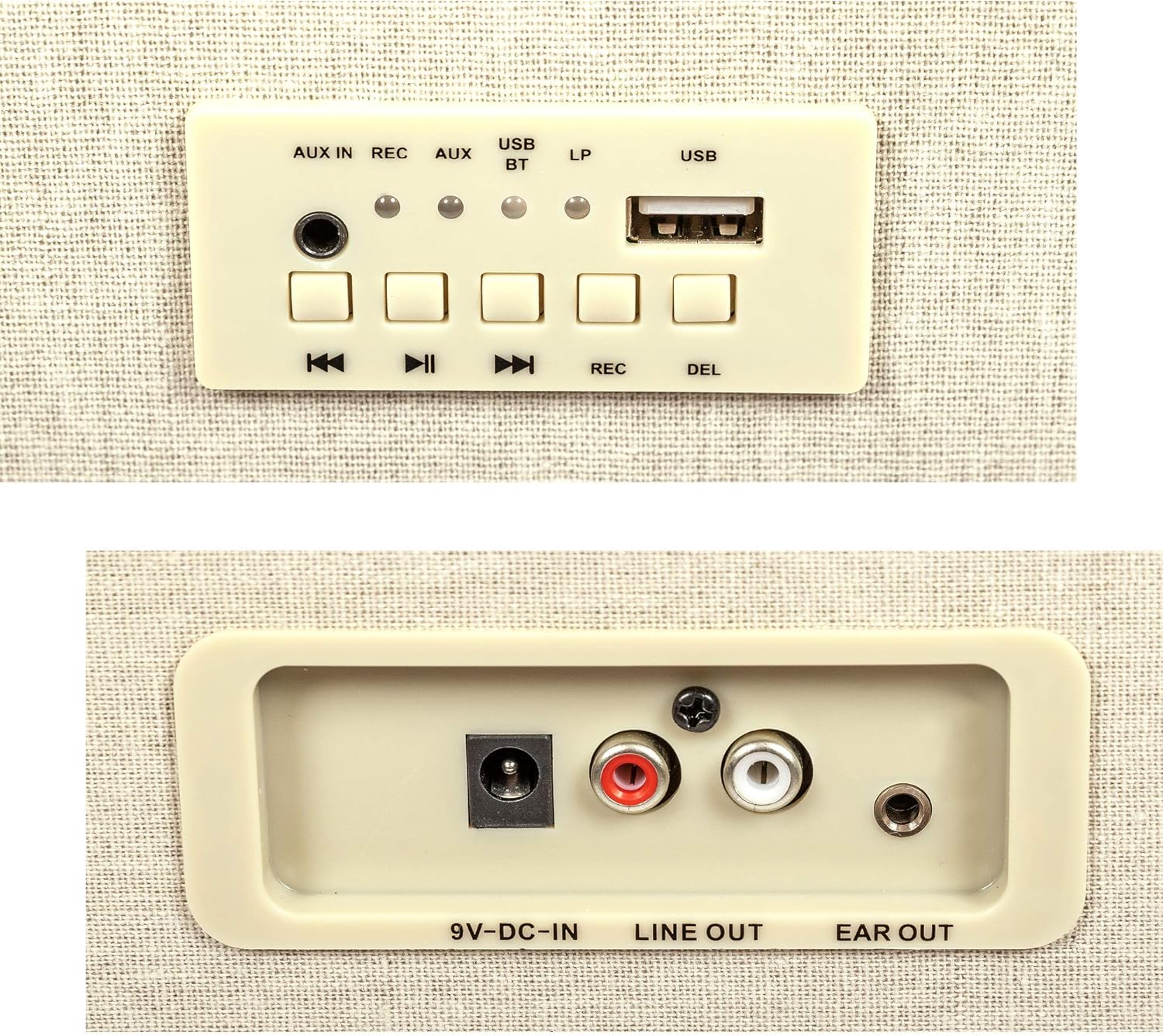
ചിത്രം 4.4: Rear panel connections including power input, line out, and ear out.
- പവർ/വോളിയം നോബ്: Turns the unit on/off and adjusts the volume.
- ഫംഗ്ഷൻ സെലക്ടർ: Switches between Turntable, USB, Bluetooth, and AUX In modes.
- USB പോർട്ട്: For connecting a USB stick for recording or playback.
- ഓക്സ് ഇൻ: ബാഹ്യ ഓഡിയോ ഉപകരണങ്ങൾ ബന്ധിപ്പിക്കുന്നതിനുള്ള 3.5mm ജാക്ക്.
- REC ബട്ടൺ: Initiates USB recording.
- DEL Button: Deletes recorded tracks from the USB stick.
- പ്ലേബാക്ക് നിയന്ത്രണങ്ങൾ: Play/Pause, Skip Forward, Skip Backward for USB/Bluetooth.
- 9V DC-IN: Power input for the adapter.
- ലൈൻ ഔട്ട് (ആർസിഎ): ബാഹ്യ ഉപകരണങ്ങളുമായി ബന്ധിപ്പിക്കുന്നതിന് ampലൈഫറുകൾ അല്ലെങ്കിൽ പവർ സ്പീക്കറുകൾ.
- EAR OUT: 3.5എംഎം ഹെഡ്ഫോൺ ജാക്ക്.
5. സജ്ജീകരണം
5.1 അൺപാക്കിംഗും പ്ലേസ്മെന്റും
- Carefully remove the turntable and all accessories from the packaging.
- Place the unit on a stable, level surface. Ensure there is enough space for the lid to open fully.
5.2 Attaching/Detaching Legs
The GPO Bermuda Classic Turntable comes with four removable legs, allowing it to be used as a standalone unit or placed on a table.
- അറ്റാച്ചുചെയ്യാൻ: Align each leg with the screw holes on the bottom corners of the turntable. Gently twist each leg clockwise until securely fastened. Do not overtighten.
- വേർപെടുത്താൻ: Twist each leg counter-clockwise until it can be removed. Store the legs safely when not in use.
5.3 പവർ കണക്ഷൻ
Connect the provided power adapter to the 9V DC-IN port on the rear of the unit (Figure 4.4), then plug the adapter into a wall outlet.
6. പ്രവർത്തന നിർദ്ദേശങ്ങൾ
6.1 പ്ലേയിംഗ് റെക്കോർഡുകൾ
- ടർടേബിളിന്റെ ലിഡ് തുറക്കുക.
- Place a record on the platter. If playing a 45-rpm single, use the included 45-rpm adaptor.
- Select the correct speed (33, 45, or 78 RPM) using the speed selector switch located near the tone arm.
- Release the tone arm locking clip.
- Gently lift the tone arm using the tone arm lever.
- റെക്കോർഡിന്റെ ആവശ്യമുള്ള സ്റ്റാർട്ടിംഗ് ഗ്രൂവിന് മുകളിൽ സ്റ്റൈലസ് സ്ഥാപിക്കുക.
- Lower the tone arm gently onto the record using the tone arm lever. The record will begin to play.
- പവർ/വോളിയം നോബ് ഉപയോഗിച്ച് വോളിയം ക്രമീകരിക്കുക.
- At the end of the record, the auto-return arm will lift and return to its rest position.
- To stop playback manually, lift the tone arm, return it to its rest, and engage the locking clip.

ചിത്രം 6.1: Speed selector switch and tone arm controls.

ചിത്രം 6.2: Stylus and auto-return arm detail.
6.2 USB റെക്കോർഡിംഗ്
You can record your vinyl records directly to a USB stick.
- Insert the USB stick into the USB port on the front panel (Figure 4.3).
- Start playing your record as described in Section 6.1.
- അമർത്തുക REC button to begin recording. The REC indicator light will illuminate.
- അമർത്തുക REC button again to stop recording. The REC indicator light will turn off.
- To delete a recorded track, navigate to the track using the skip buttons and press the DEL ബട്ടൺ.
6.3 ബ്ലൂടൂത്ത് കണക്റ്റിവിറ്റി
The turntable can receive audio wirelessly via Bluetooth from compatible devices.
- Turn on the turntable and select the Bluetooth (BT) function using the function selector. The BT indicator light will flash, indicating pairing mode.
- നിങ്ങളുടെ സ്മാർട്ട്ഫോണിലോ, ടാബ്ലെറ്റിലോ, മറ്റ് ബ്ലൂടൂത്ത് ഉപകരണത്തിലോ, ബ്ലൂടൂത്ത് പ്രവർത്തനക്ഷമമാക്കി ലഭ്യമായ ഉപകരണങ്ങൾക്കായി തിരയുക.
- Select "GPO Bermuda" (or similar) from the list of devices.
- Once paired, the BT indicator light will stop flashing and remain solid. You can now play audio from your device through the turntable's speakers.
6.4 ബാഹ്യ ഓഡിയോ കണക്ഷനുകൾ
- ഓക്സ് ഇൻ: Connect an external audio source (e.g., MP3 player, CD player) to the AUX IN jack (3.5mm) on the front panel (Figure 4.3). Select the AUX IN function on the turntable to play audio from the connected device.
- ലൈൻ ഔട്ട് (ആർസിഎ): Connect the LINE OUT RCA jacks (red and white) on the rear panel (Figure 4.4) to an external amplifier or powered speakers for enhanced sound output.
- EAR OUT: Connect headphones to the EAR OUT jack (3.5mm) on the rear panel (Figure 4.4) for private listening.
7. പരിപാലനം
7.1 യൂണിറ്റ് വൃത്തിയാക്കൽ
മൃദുവായതും ഉണങ്ങിയതുമായ തുണി ഉപയോഗിച്ച് യൂണിറ്റിന്റെ പുറംഭാഗം തുടയ്ക്കുക. അബ്രാസീവ് ക്ലീനറുകൾ, മെഴുക് അല്ലെങ്കിൽ ലായകങ്ങൾ എന്നിവ ഉപയോഗിക്കരുത്, കാരണം അവ ഫിനിഷിന് കേടുവരുത്തും.
7.2 Stylus Care and Replacement
The stylus is a consumable part and will wear out over time. A worn stylus can damage records and degrade sound quality.
- വൃത്തിയാക്കൽ: Gently brush the stylus tip from back to front with a soft brush designed for stylus cleaning. Do not use your fingers.
- മാറ്റിസ്ഥാപിക്കൽ: Replace the stylus after approximately 300-500 hours of playback, or if you notice a decrease in sound quality or visible damage. Refer to the manufacturer's webമാറ്റിസ്ഥാപിക്കൽ സ്റ്റൈലിക്കായി സൈറ്റ് അല്ലെങ്കിൽ അംഗീകൃത ഡീലർമാർ.
8. പ്രശ്നപരിഹാരം
| പ്രശ്നം | സാധ്യമായ കാരണം | പരിഹാരം |
|---|---|---|
| ശക്തിയില്ല | പവർ അഡാപ്റ്റർ ബന്ധിപ്പിച്ചിട്ടില്ല അല്ലെങ്കിൽ തകരാറുണ്ട്. | പവർ അഡാപ്റ്റർ യൂണിറ്റിലേക്കും വർക്കിംഗ് വാൾ ഔട്ട്ലെറ്റിലേക്കും സുരക്ഷിതമായി ബന്ധിപ്പിച്ചിട്ടുണ്ടെന്ന് ഉറപ്പാക്കുക. |
| സ്പീക്കറുകളിൽ നിന്ന് ശബ്ദമില്ല | Volume too low; incorrect function selected; external speakers not connected/powered. | Increase volume. Select correct function (Turntable, AUX, BT). If using external speakers, ensure they are connected and powered on. |
| റെക്കോർഡ് ഒഴിവാക്കൽ | Record is dirty or scratched; turntable not level; stylus worn or dirty. | Clean record. Ensure turntable is on a stable, level surface. Clean or replace stylus. |
| ബ്ലൂടൂത്ത് ജോടിയാക്കുന്നില്ല | ടേൺടേബിൾ ജോടിയാക്കൽ മോഡിൽ അല്ല; ഉപകരണം വളരെ അകലെയാണ്; ഇടപെടൽ. | Ensure turntable is in BT pairing mode (flashing light). Move device closer. Avoid other wireless devices. |
| USB റെക്കോർഡിംഗ് പ്രവർത്തിക്കുന്നില്ല | USB stick full or incompatible; REC button not pressed. | Use a different USB stick. Ensure USB stick is formatted correctly (FAT32). Press REC button firmly. |
9 സ്പെസിഫിക്കേഷനുകൾ
- മോഡലിൻ്റെ പേര്: Bermuda Classic
- മോഡൽ നമ്പർ: GPO BERMUDA GREY
- ബ്രാൻഡ്: ജി.പി.ഒ
- ഉൽപ്പന്ന അളവുകൾ: 8.46 x 15.04 x 14.49 ഇഞ്ച് (21.5 x 38.2 x 36.8 സെ.മീ)
- ഇനത്തിൻ്റെ ഭാരം: 15.27 പൗണ്ട് (6.94 കിലോഗ്രാം)
- മെറ്റീരിയൽ: പ്ലാസ്റ്റിക്
- നിറം: Grey Cream
- മോട്ടോർ തരം: എസി മോട്ടോർ
- പ്ലേബാക്ക് വേഗത: 33, 45, 78 ആർപിഎം
- പ്രത്യേക സവിശേഷതകൾ: Detachable Legs, USB Recording, Bluetooth Connectivity, Built-in Stereo Speakers, Auto-Return Arm
- ഉൾപ്പെടുത്തിയ ഘടകങ്ങൾ: 45-rpm adaptor, USB stick
- അനുയോജ്യമായ ഉപകരണങ്ങൾ: Smartphone, Speaker, Tablet (for Bluetooth/AUX input)
10. വാറൻ്റിയും പിന്തുണയും
GPO products are designed and manufactured to the highest quality standards. In the unlikely event of any issues, please refer to the warranty information provided with your purchase or contact GPO customer support for assistance.
For further support, please visit the official GPO webസൈറ്റ് അല്ലെങ്കിൽ നിങ്ങളുടെ പ്രാദേശിക ഡീലറെ ബന്ധപ്പെടുക.