
1. ആമുഖം
The Vivitek Qumi Q8-BK is a compact and portable DLP projector designed for both business and personal use. It offers Full HD 1080p resolution, 1000 lumens brightness, and versatile connectivity options including HDMI, USB, and wireless mirroring for Android and iOS devices. This manual provides essential information for setting up, operating, maintaining, and troubleshooting your projector to ensure optimal performance.
2 സുരക്ഷാ വിവരങ്ങൾ
പ്രൊജക്ടർ ഉപയോഗിക്കുന്നതിന് മുമ്പ് എല്ലാ സുരക്ഷാ നിർദ്ദേശങ്ങളും വായിക്കുക. ഭാവിയിലെ റഫറൻസിനായി ഈ മാനുവൽ സൂക്ഷിക്കുക.
- വെന്റിലേഷൻ ദ്വാരങ്ങൾ തടയരുത്. പ്രൊജക്ടറിന് ചുറ്റും മതിയായ വായുസഞ്ചാരം ഉറപ്പാക്കുക.
- l ചെയ്യുമ്പോൾ പ്രൊജക്ടർ ലെൻസിലേക്ക് നേരിട്ട് നോക്കരുത്amp ഓണാണ്. തിളക്കമുള്ള വെളിച്ചം കണ്ണിന് കേടുപാടുകൾ വരുത്തിയേക്കാം.
- Avoid placing the projector in direct sunlight, near heat sources, or in environments with extreme temperatures or humidity.
- പ്രൊജക്ടറിനൊപ്പം നൽകിയിരിക്കുന്ന പവർ അഡാപ്റ്റർ മാത്രം ഉപയോഗിക്കുക.
- പ്രൊജക്ടർ സ്വയം വേർപെടുത്താനോ നന്നാക്കാനോ ശ്രമിക്കരുത്. എല്ലാ സേവനങ്ങളും യോഗ്യതയുള്ള ഉദ്യോഗസ്ഥർക്ക് റഫർ ചെയ്യുക.
- പ്രൊജക്ടർ വെള്ളത്തിൽ നിന്നോ മറ്റ് ദ്രാവകങ്ങളിൽ നിന്നോ അകറ്റി നിർത്തുക.
3. പാക്കേജ് ഉള്ളടക്കം
നിങ്ങളുടെ പാക്കേജിൽ എല്ലാ ഇനങ്ങളും ഉണ്ടെന്ന് ഉറപ്പാക്കുക:
- Vivitek Qumi Q8-BK Projector
- പവർ അഡാപ്റ്റർ
- റിമോട്ട് കൺട്രോൾ
- HDMI കേബിൾ
- ദ്രുത ആരംഭ ഗൈഡ്
- ചുമക്കുന്ന കേസ്
4. ഉൽപ്പന്നം കഴിഞ്ഞുview
Familiarize yourself with the projector's components and connection ports.
4.1 Top Panel and Controls
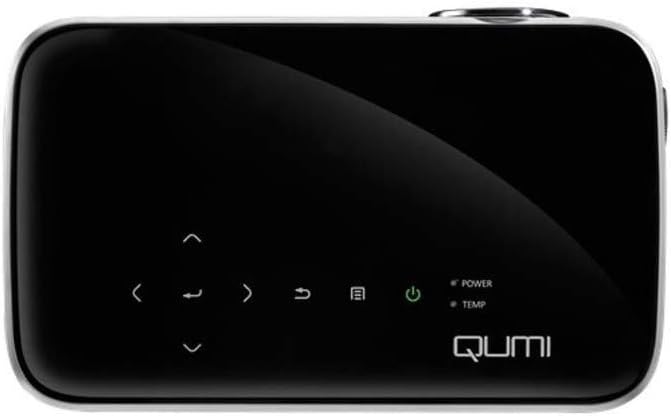
ചിത്രം 1: മുകളിൽ view of the Vivitek Qumi Q8-BK projector, highlighting the touch-sensitive control panel. This panel includes navigation arrows, menu access, source selection, and power buttons, along with LED indicators for power and temperature.
The top panel features touch-sensitive controls for navigating menus, adjusting settings, and power management. LED indicators show the power status and temperature warnings.
4.2 Side Panel and Ports
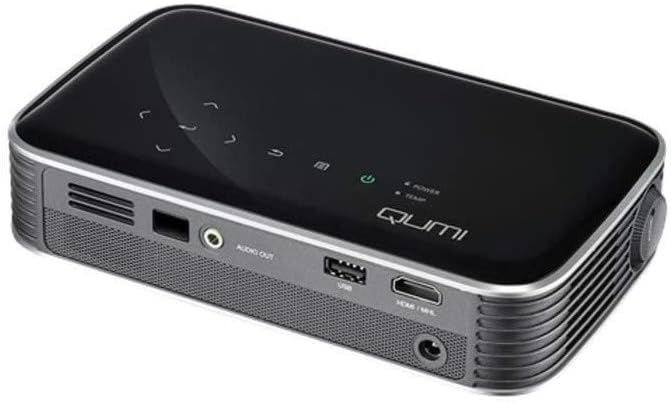
ചിത്രം 2: വശം view of the Vivitek Qumi Q8-BK projector, displaying its connectivity ports. These include an audio out jack, a USB port, and an HDMI/MHL input, along with ventilation grilles.
The side panel provides essential connectivity options:
- ഓഡിയോ Outട്ട്: ബാഹ്യ സ്പീക്കറുകളോ ഹെഡ്ഫോണുകളോ ബന്ധിപ്പിക്കുക.
- USB: മീഡിയ പ്ലേ ചെയ്യുന്നതിന് USB സംഭരണ ഉപകരണങ്ങൾ ബന്ധിപ്പിക്കുന്നതിന് files or for firmware updates.
- HDMI/MHL: Connect to HDMI-enabled devices such as laptops, Blu-ray players, or MHL-compatible smartphones/tablets.
- പവർ ഇൻപുട്ട്: വിതരണം ചെയ്ത പവർ അഡാപ്റ്റർ ബന്ധിപ്പിക്കുക.
5. സജ്ജീകരണം
Follow these steps to set up your Vivitek Qumi Q8-BK projector.
5.1 പവർ ചെയ്യുന്നു
- Connect the power adapter to the projector's power input port and then to an electrical outlet.
- Press the power button on the projector's top panel or on the remote control. The power LED indicator will illuminate.
- Allow a few moments for the projector to warm up and display the initial screen.
5.2 Adjusting Focus and Keystone
- ഫോക്കസ്: Rotate the focus ring located near the lens until the projected image is sharp and clear.
- കീസ്റ്റോൺ തിരുത്തൽ: If the image appears trapezoidal (wider at the top or bottom), use the keystone correction function in the projector's menu to adjust it. This corrects the image geometry to a rectangular shape.
5.3 ഇൻപുട്ട് സ്രോതസ്സുകൾ ബന്ധിപ്പിക്കുന്നു
The Qumi Q8-BK supports multiple input sources:
- HDMI/MHL: Connect an HDMI cable from your source device (laptop, game console, Blu-ray player) to the HDMI/MHL port on the projector. For MHL-compatible mobile devices, use an MHL cable.
- USB: Insert a USB flash drive into the USB port to access media fileകൾ അതിൽ സൂക്ഷിച്ചിരിക്കുന്നു.
- Wireless (Miracast/AirPlay): The projector features built-in Wi-Fi for wireless content sharing from Android and iOS devices. Refer to the "Operating" section for detailed instructions on wireless setup.
6. പ്രവർത്തിക്കുന്നു
This section covers the basic operation of your projector.
6.1 മെനു നാവിഗേറ്റ് ചെയ്യുന്നു
Use the navigation buttons on the top panel or the remote control to browse the projector's on-screen menu. Press the "Menu" button to access settings such as image adjustments, source selection, and system configurations.
6.2 ഉറവിട തിരഞ്ഞെടുപ്പ്
Press the "Source" button on the remote or the projector to cycle through available input sources (HDMI, USB, Wireless). Select the desired source from the on-screen menu.
6.3 Wireless Content Sharing (Miracast/AirPlay)
The Qumi Q8-BK supports wireless mirroring for compatible devices:
- Ensure the projector's Wi-Fi is enabled and connected to your network (if required for your device's mirroring function).
- Select the "Wireless" input source on the projector.
- On your Android device, enable "Screen Mirroring," "Smart View," or a similar function. On iOS devices, use "AirPlay Mirroring."
- Select the Qumi Q8-BK from the list of available devices on your mobile device.
- Your device's screen should now be mirrored on the projector.
Note: Performance may vary depending on network conditions and device compatibility. Some streaming services may restrict mirrored content.
6.4 USB-യിൽ നിന്നുള്ള മീഡിയ പ്ലേബാക്ക്
Insert a USB flash drive into the USB port. The projector's media player interface will typically launch automatically, allowing you to browse and play supported video, audio, and image files.
6.5 3D പ്രവർത്തനം
The Qumi Q8-BK supports 3D content. To view 3D content, you will need compatible 3D glasses (sold separately) and a 3D-enabled source device playing 3D content. Refer to the projector's on-screen menu for 3D settings and modes.
7. പരിപാലനം
ശരിയായ അറ്റകുറ്റപ്പണികൾ നിങ്ങളുടെ പ്രൊജക്ടറിന്റെ ദീർഘായുസ്സും മികച്ച പ്രകടനവും ഉറപ്പാക്കുന്നു.
- ലെൻസ് ക്ലീനിംഗ്: ഒപ്റ്റിക്കൽ പ്രതലങ്ങൾക്കായി പ്രത്യേകം രൂപകൽപ്പന ചെയ്ത മൃദുവായ, ലിന്റ് രഹിത തുണി ഉപയോഗിച്ച് പ്രൊജക്ടർ ലെൻസ് സൌമ്യമായി തുടയ്ക്കുക. അബ്രാസീവ് ക്ലീനറുകളോ അമിതമായ ബലപ്രയോഗമോ ഉപയോഗിക്കരുത്.
- വെൻ്റിലേഷൻ: Regularly check and clean the ventilation grilles to prevent dust buildup, which can lead to overheating. Use a soft brush or compressed air.
- സംഭരണം: When not in use for extended periods, store the projector in its carrying case in a cool, dry, and dust-free environment.
- എൽഇഡി എൽamp: The projector uses an energy-efficient LED lamp with an estimated operational life of up to 30,000 hours, requiring no replacement under normal usage.
8. പ്രശ്നപരിഹാരം
നിങ്ങളുടെ പ്രൊജക്ടറിൽ പ്രശ്നങ്ങൾ നേരിടുകയാണെങ്കിൽ, താഴെ പറയുന്ന പൊതുവായ പ്രശ്നങ്ങളും പരിഹാരങ്ങളും പരിശോധിക്കുക.
| പ്രശ്നം | സാധ്യമായ പരിഹാരം |
|---|---|
| ചിത്രമൊന്നും പ്രദർശിപ്പിച്ചിട്ടില്ല |
|
| ശബ്ദമില്ല |
|
| വയർലെസ് മിററിംഗ് പ്രശ്നങ്ങൾ |
|
| പ്രൊജക്ടർ അമിതമായി ചൂടാകുകയോ ഓഫാകുകയോ ചെയ്യുന്നു |
|
If the problem persists after trying these solutions, please contact Vivitek customer support.
9 സ്പെസിഫിക്കേഷനുകൾ
Key technical specifications for the Vivitek Qumi Q8-BK projector:
| ഫീച്ചർ | വിശദാംശങ്ങൾ |
|---|---|
| ബ്രാൻഡ് | വിവിടെക് |
| മോഡൽ നമ്പർ | Qumi Q8-BK |
| ഡിസ്പ്ലേ റെസല്യൂഷൻ | 1920 x 1080 (പൂർണ്ണ HD) |
| തെളിച്ചം | 1000 Lumens വരെ |
| കോൺട്രാസ്റ്റ് റേഷ്യോ | 30,000:1 |
| Lamp ടൈപ്പ് ചെയ്യുക | എൽഇഡി |
| Lamp ജീവിതം | Estimated 30,000 hours |
| കണക്റ്റിവിറ്റി ടെക്നോളജി | HDMI, USB, Wi-Fi (Miracast/AirPlay) |
| പ്രത്യേക സവിശേഷതകൾ | HDMI Connectivity, Portable, USB Connectivity, Wireless, Miracast |
| ഉൽപ്പന്ന അളവുകൾ | 1.7 x 4.4 x 7.4 ഇഞ്ച് |
| ഇനത്തിൻ്റെ ഭാരം | 1.4 പൗണ്ട് |
10. വാറൻ്റിയും പിന്തുണയും
Vivitek products are designed for reliability and performance. For warranty information, please refer to the warranty card included in your product package or visit the official Vivitek website. For technical support, troubleshooting assistance beyond this manual, or service inquiries, please contact Vivitek customer support through their official channels.
Please have your product model number (Qumi Q8-BK) and serial number ready when contacting support.