
1. ആമുഖം
This manual provides essential information for the safe and efficient operation of your Njoy Horus Plus 800 VA Line Interactive Uninterruptible Power Supply (UPS). Please read this manual thoroughly before installation and use, and retain it for future reference. The Njoy Horus Plus UPS is designed to protect sensitive electronic equipment from power fluctuations and outages, ensuring continuous operation and data integrity. Its line-interactive mode regulates voltage over a wide range for advanced AC filtering without activating backup mode, and the Automatic Voltage Regulation (AVR) system protects against electrical input damage from large power fluctuations.
2. സുരക്ഷാ നിർദ്ദേശങ്ങൾ
മുന്നറിയിപ്പ്: ഈ സുരക്ഷാ നിർദ്ദേശങ്ങൾ പാലിക്കുന്നതിൽ പരാജയപ്പെടുന്നത് തീപിടുത്തം, വൈദ്യുതാഘാതം അല്ലെങ്കിൽ പരിക്കിന് കാരണമായേക്കാം.
- യുപിഎസ് തുറക്കരുത് casing. There are no user-serviceable parts inside. Refer servicing to qualified personnel.
- Do not connect appliances that could overload the UPS, such as laser printers or vacuum cleaners.
- യുപിഎസ് ഒരു ഗ്രൗണ്ടഡ് എസി പവർ ഔട്ട്ലെറ്റുമായി ബന്ധിപ്പിച്ചിട്ടുണ്ടെന്ന് ഉറപ്പാക്കുക.
- Do not expose the UPS to rain, water, or excessive humidity.
- Place the UPS in a well-ventilated area, away from direct sunlight or heat sources.
- Ensure the total load of connected equipment does not exceed the UPS's rated capacity (800 VA / 480 W).
- In case of emergency, press the power button to turn off the UPS and disconnect it from the AC power source.
3. പാക്കേജ് ഉള്ളടക്കം
പാക്കേജിൽ എല്ലാ ഇനങ്ങളും ഉണ്ടെന്ന് ഉറപ്പാക്കുക:
- Njoy Horus Plus 800 VA UPS Unit
- യുഎസ്ബി കമ്മ്യൂണിക്കേഷൻ കേബിൾ
- ഉപയോക്തൃ മാനുവൽ (ഈ പ്രമാണം)
- സോഫ്റ്റ്വെയർ സിഡി (അല്ലെങ്കിൽ ഡൗൺലോഡ് നിർദ്ദേശങ്ങൾ)
4. ഉൽപ്പന്നം കഴിഞ്ഞുview
4.1 ഫ്രണ്ട് പാനൽ

The front panel features the LCD touchscreen display and the power button. The LCD provides real-time information about the UPS status, including input/output voltage, ബാറ്ററി ശേഷി, ലോഡ് ലെവൽ.
4.2 പിൻ പാനൽ
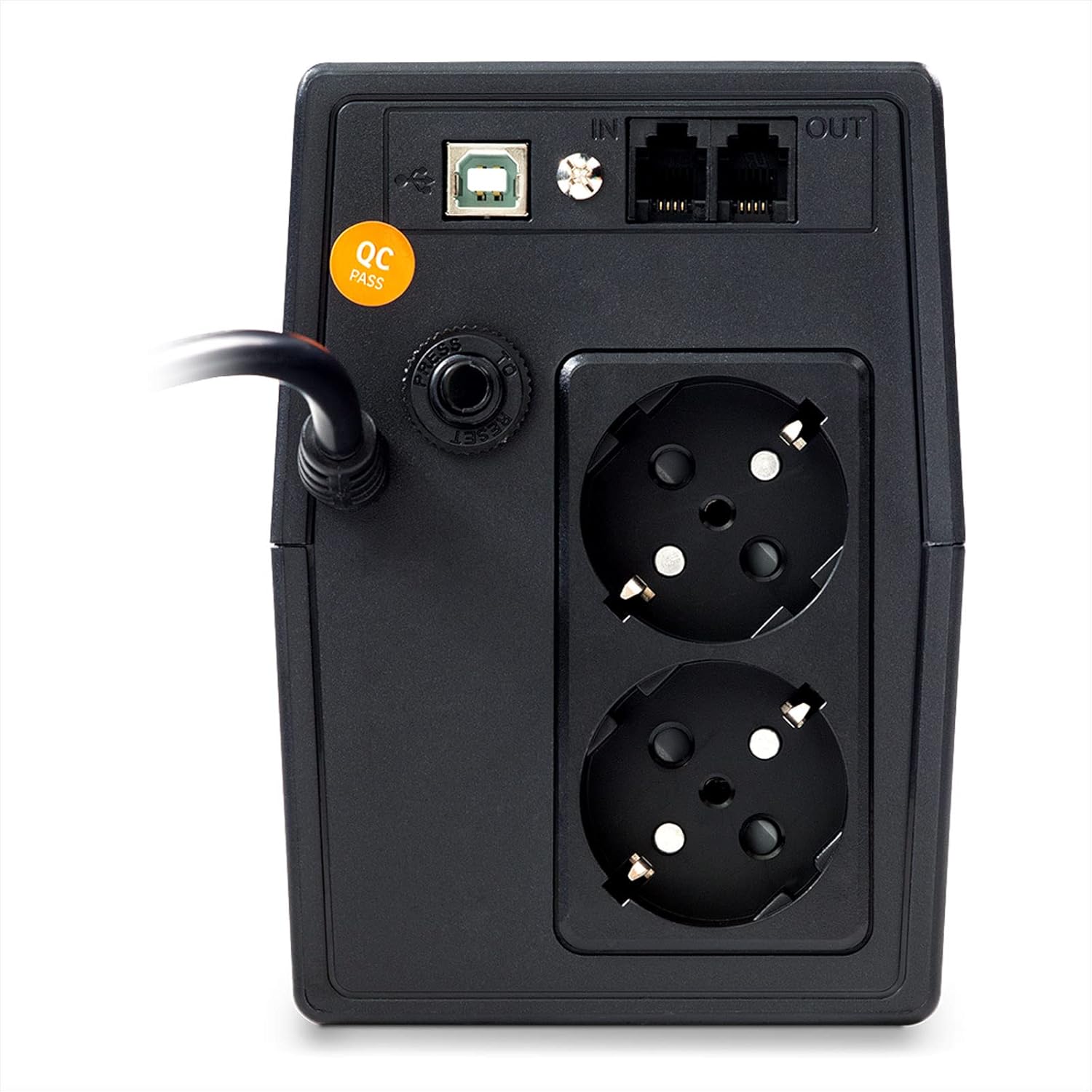
പിൻ പാനലിൽ ഇവ ഉൾപ്പെടുന്നു:
- എസി ഇൻപുട്ട് പവർ കോർഡ്: Connects the UPS to the wall outlet.
- Schuko Outlets (x2): Provide battery backup and surge protection for connected devices.
- USB കമ്മ്യൂണിക്കേഷൻ പോർട്ട്: For connecting to a computer for monitoring and management software.
- RJ11/RJ45 In/Out Ports: Provide surge protection for telephone/network lines.
- റീസെറ്റ് ബട്ടൺ: Used to reset the UPS in certain error conditions.
4.3 എൽസിഡി ഡിസ്പ്ലേ

The LCD touchscreen displays critical operational data. Users can tap the screen to cycle through information such as:
- ഇൻപുട്ട് വോളിയംtage
- Putട്ട്പുട്ട് വോളിയംtage
- ബാറ്ററി ശേഷി
- ലോഡ് ലെവൽ
- Operating Mode (AC, Battery, AVR)
5. സജ്ജീകരണം
- അൺപാക്ക് ചെയ്യുന്നു: യുപിഎസ് അതിന്റെ പാക്കേജിംഗിൽ നിന്ന് ശ്രദ്ധാപൂർവ്വം നീക്കം ചെയ്യുക. ഷിപ്പിംഗ് കേടുപാടുകൾ ഉണ്ടോ എന്ന് പരിശോധിക്കുക.
- പ്ലേസ്മെൻ്റ്: Position the UPS on a flat, stable surface in a cool, dry, and well-ventilated area. Avoid direct sunlight, heat sources, and moisture. Ensure adequate clearance around the ventilation openings.
- പ്രാരംഭ ചാർജിംഗ്: Connect the UPS to a standard grounded AC wall outlet using its integrated power cord. Allow the UPS to charge for at least 8 hours before connecting any devices to ensure optimal battery performance. The LCD will indicate battery charging status.
- ബന്ധിപ്പിക്കുന്ന ഉപകരണങ്ങൾ:
- Plug your computer, monitor, and other critical electronic equipment into the Schuko outlets on the rear panel.
- For surge protection of telephone or network lines, connect the incoming line to the "IN" RJ11/RJ45 port and connect your device to the "OUT" port.
- സോഫ്റ്റ്വെയർ ഇൻസ്റ്റാളേഷൻ (ഓപ്ഷണൽ): Connect the USB cable from the UPS to your computer. Install the included management software (refer to the software's specific instructions for installation). This software allows for advanced monitoring, configuration, and automatic shutdown of your computer during extended power outages.
6. പ്രവർത്തന നിർദ്ദേശങ്ങൾ
6.1 Turning On the UPS
After initial charging, press and hold the power button on the front panel for approximately 2 seconds until you hear a beep and the LCD display illuminates. The UPS will perform a self-test and then enter AC mode, providing power to connected devices.
6.2 Turning Off the UPS
Press and hold the power button for approximately 2 seconds until you hear a beep and the LCD display turns off. This will shut down the UPS and cut power to connected devices.
6.3 LCD Touchscreen Operation
Tap the LCD screen to cycle through various display modes, showing real-time information such as input voltagഇ, outputട്ട്പുട്ട് വോളിയംtage, battery charge level, and connected load percentage.
6.4 ഓട്ടോമാറ്റിക് വോളിയംtagഇ റെഗുലേഷൻ (AVR)
The Njoy Horus Plus features an Automatic Voltage Regulation (AVR) function. In AC mode, if the input voltage fluctuates outside the acceptable range (160-280 VAC), the AVR will automatically adjust the output voltage to a safe level (196-255 VAC) without switching to battery power. This protects connected equipment from voltage sags and surges.
6.5 Battery Mode Operation
ഒരു വൈദ്യുതി സമയത്ത് outage or if the input voltage goes beyond the AVR's correction capabilities, the UPS will automatically switch to battery mode. The LCD will indicate battery operation, and an audible alarm will sound (typically beeping every 10 seconds). The UPS will provide power from its internal battery for a limited duration, depending on the connected load.
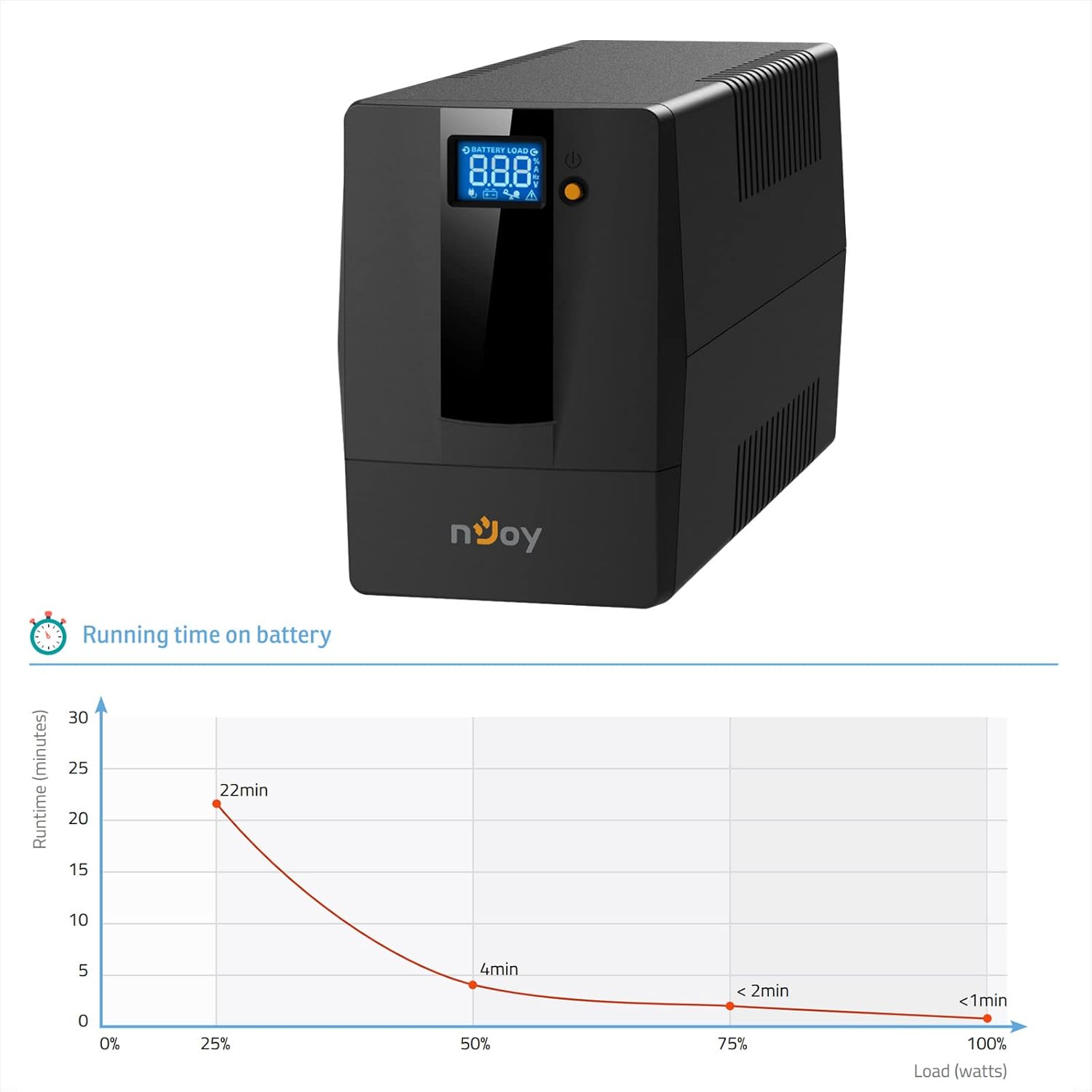
When the battery capacity is low, the alarm will sound more frequently (e.g., every second). It is recommended to save your work and shut down connected equipment gracefully during this time.
6.6 Auto-Restart Function
ഒരു ശക്തി എങ്കിൽ outage occurs and the UPS shuts down due to low battery, it will automatically restart and resume normal operation once AC power is restored and the battery has recharged sufficiently.
6.7 കോൾഡ് സ്റ്റാർട്ട് ഫംഗ്ഷൻ
The UPS can be started directly from battery power even when no AC input is available. To perform a cold start, ensure the UPS is off, then press and hold the power button for approximately 5 seconds. The UPS will turn on and provide battery power to connected devices.
7. പരിപാലനം
- വൃത്തിയാക്കൽ: Use a soft, dry cloth to clean the exterior of the UPS. Do not use liquid or aerosol cleaners.
- ബാറ്ററി കെയർ: To maximize battery life, ensure the UPS is always connected to an AC outlet to keep the battery charged. If the UPS is stored for an extended period, recharge the battery every three months for at least 8 hours.
- ബാറ്ററി മാറ്റിസ്ഥാപിക്കൽ: The internal battery is not user-replaceable. Battery replacement should only be performed by qualified service personnel.
- വെൻ്റിലേഷൻ: Regularly check that the ventilation openings are clear of dust and obstructions to prevent overheating.
8. പ്രശ്നപരിഹാരം
| പ്രശ്നം | സാധ്യമായ കാരണം | പരിഹാരം |
|---|---|---|
| യുപിഎസ് ഓണാകുന്നില്ല. | Battery discharged or not connected to AC power. | Connect to AC power and allow to charge for 8 hours. Ensure power button is pressed correctly. |
| UPS beeps continuously in AC mode. | ഓവർലോഡ് അവസ്ഥ. | Disconnect non-essential equipment. Ensure total load is within 480W. |
| യുപിഎസ് ഇടയ്ക്കിടെ ബാറ്ററി മോഡിലേക്ക് മാറുന്നു. | Unstable AC input power or AVR limits exceeded. | Check AC power quality. If problem persists, consult an electrician. |
| കുറഞ്ഞ ബാക്കപ്പ് സമയം. | Battery not fully charged or battery end-of-life. | Allow UPS to charge for 8 hours. If battery is old, consider professional replacement. |
| എൽസിഡി ഡിസ്പ്ലേ ഓഫാണ്. | UPS is off or in power-saving mode. | Press the power button to turn on. Tap the screen to activate display. |
9 സ്പെസിഫിക്കേഷനുകൾ
| ഫീച്ചർ | വിശദാംശങ്ങൾ |
|---|---|
| മോഡൽ | PWUP-LI080H1-AZ01B |
| ശേഷി | 800 VA / 480 W |
| ഇൻപുട്ട് വോളിയംtagഇ (നാമമാത്ര) | 230 V എസി |
| ഇൻപുട്ട് വോളിയംtagഇ റേഞ്ച് | 160 - 280 V AC |
| Putട്ട്പുട്ട് വോളിയംtage Range (AVR) | 196 - 255 V AC |
| ആവൃത്തി | 50 Hz or 60 Hz ± 1 Hz (auto-sensing) |
| ഔട്ട്പുട്ട് സോക്കറ്റുകൾ | 2 x ഷുകോ |
| കമ്മ്യൂണിക്കേഷൻ പോർട്ട് | USB |
| ഡാറ്റ ലൈൻ സംരക്ഷണം | RJ11 / RJ45 In/Out |
| ബാറ്ററി തരം | 1 x 12 V / 9 Ah (Sealed Lead Acid) |
| കൈമാറ്റ സമയം | 2-6 ms (സാധാരണ) |
| പ്രവർത്തന താപനില | 0°C ~ 40°C |
| അളവുകൾ (L x W x H) | 300 x 101 x 142 മിമി |
| ഭാരം | 5 കി.ഗ്രാം |
| പ്രത്യേക സവിശേഷതകൾ | LCD Touchscreen, AVR, Auto-Restart, Cold Start Function, Software Management |
10. വാറൻ്റിയും പിന്തുണയും
For warranty information and technical support, please refer to the warranty card included with your product or visit the official NJOY webവാറന്റി ക്ലെയിമുകൾക്കുള്ള വാങ്ങലിന്റെ തെളിവായി നിങ്ങളുടെ വാങ്ങൽ രസീത് സൂക്ഷിക്കുക.
നിർമ്മാതാവ്: nജോയ്
ബന്ധപ്പെടുക: Please refer to the contact information provided on the official NJOY website or your regional distributor for support.