
cellularline BTMOSQUITOK
Cellularline BTMOSQUITOK MOTION In-Ear Bluetooth Stereo Earphone User Manual
Model: BTMOSQUITOK
1. ആമുഖം
Thank you for choosing the Cellularline BTMOSQUITOK MOTION In-Ear Bluetooth Stereo Earphone. This manual provides essential information for the safe and efficient use of your new earphones. Please read it thoroughly before use and keep it for future reference.
These in-ear Bluetooth earphones feature perfect fit technology, a built-in microphone with an answer button, and remote control, making them ideal for listening to music and managing calls. They also include a simple magnetic closure for convenient portability.
2. പാക്കേജ് ഉള്ളടക്കം
പാക്കേജിൽ എല്ലാ ഇനങ്ങളും ഉണ്ടെന്ന് ദയവായി പരിശോധിക്കുക:
- Cellularline BTMOSQUITOK MOTION In-Ear Bluetooth Stereo Earphone
- USB ചാർജിംഗ് കേബിൾ
- 3 sets of earbuds (various sizes)
- ഉപയോക്തൃ മാനുവൽ
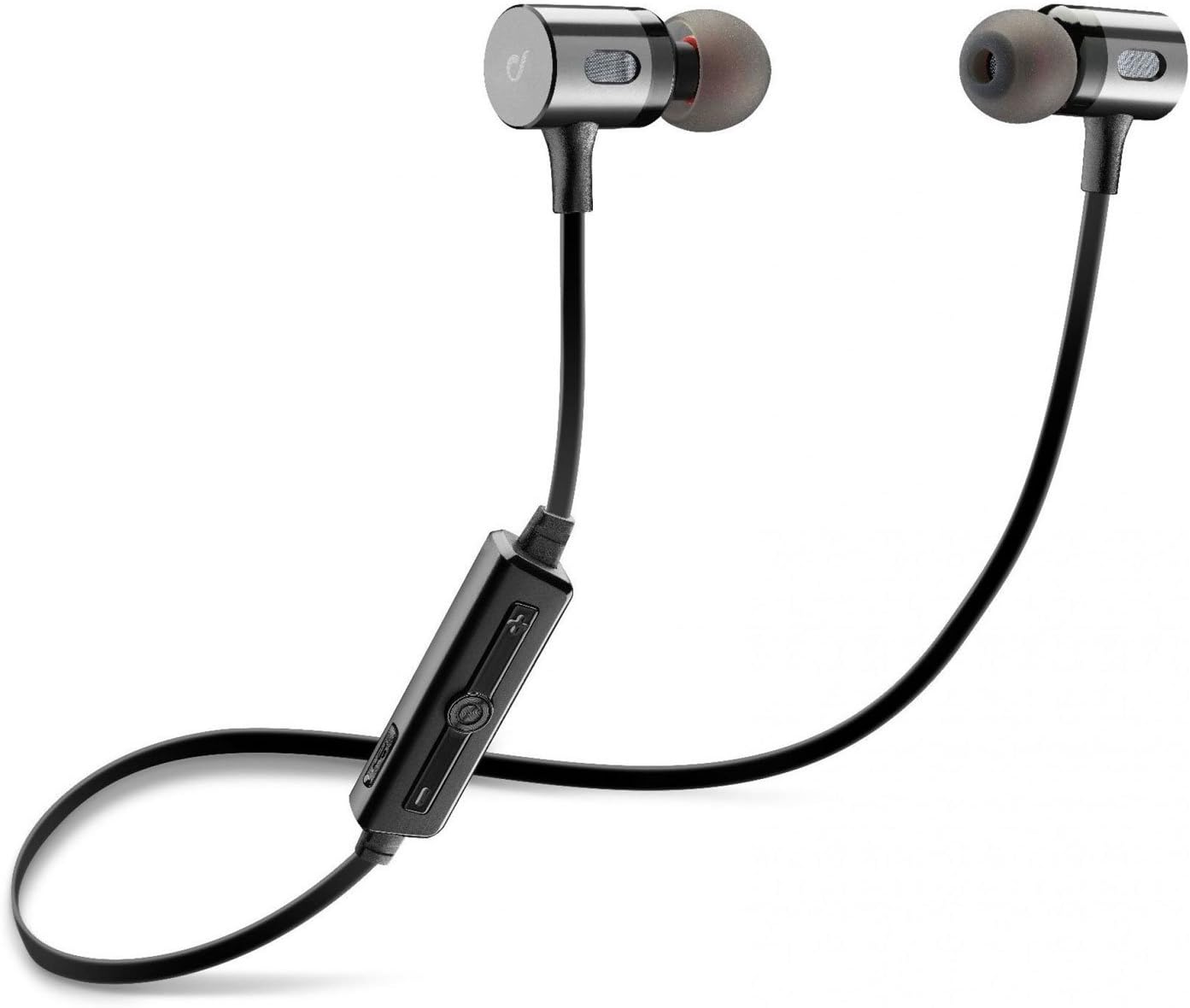
Image: The Cellularline BTMOSQUITOK MOTION In-Ear Bluetooth Stereo Earphone, showing the earbuds, cable, and inline remote.
3 സുരക്ഷാ വിവരങ്ങൾ
- ഇയർഫോണുകൾ തീവ്രമായ താപനിലയിലോ, ഈർപ്പം അല്ലെങ്കിൽ ദ്രാവകങ്ങളിലോ ഏൽപ്പിക്കരുത്.
- ഇയർഫോണുകൾ താഴെയിടുകയോ ശക്തമായ ആഘാതങ്ങൾക്ക് വിധേയമാക്കുകയോ ചെയ്യുന്നത് ഒഴിവാക്കുക.
- Do not attempt to disassemble or repair the earphones yourself. Refer to qualified service personnel.
- ഉച്ചത്തിലുള്ള ശബ്ദങ്ങൾ ദീർഘനേരം കേൾക്കുന്നത് കേൾവിക്ക് കേടുപാടുകൾ വരുത്തിയേക്കാം. ശബ്ദം മിതമായ അളവിൽ ക്രമീകരിക്കുക.
- കുട്ടികൾക്ക് ലഭ്യമാകാതെ സൂക്ഷിക്കുക.
4. സജ്ജീകരണവും ആദ്യ ഉപയോഗവും
4.1. ഇയർഫോണുകൾ ചാർജ് ചെയ്യുന്നു
Before first use, fully charge the earphones. Connect the supplied USB charging cable to the charging port on the inline remote control and the other end to a USB power source (e.g., computer USB port or USB wall adapter).
- A red indicator light will typically show during charging.
- The light will turn blue or off when charging is complete.

Image: Close-up of the inline remote control on the Cellularline BTMOSQUITOK earphones, showing buttons and charging port location.
4.2. ബ്ലൂടൂത്ത് ഉപകരണവുമായി ജോടിയാക്കുന്നു
- ഇയർഫോണുകൾ ചാർജ് ചെയ്തിട്ടുണ്ടെന്നും ഓഫാണെന്നും ഉറപ്പാക്കുക.
- Press and hold the multi-function button (usually the center button on the remote) until the indicator light flashes red and blue alternately, indicating pairing mode.
- On your Bluetooth device (smartphone, tablet, etc.), enable Bluetooth and search for new devices.
- Select "BTMOSQUITOK" or similar name from the list of available devices.
- Once paired, the indicator light on the earphones will typically flash blue slowly or turn off, and you may hear a confirmation tone.
Note: If a passcode is required, enter "0000".
5. പ്രവർത്തന നിർദ്ദേശങ്ങൾ
5.1. പവർ ഓൺ/ഓഫ്
- പവർ ഓൺ: നീല ഇൻഡിക്കേറ്റർ ലൈറ്റ് മിന്നുന്നത് വരെ മൾട്ടി-ഫംഗ്ഷൻ ബട്ടൺ ഏകദേശം 3 സെക്കൻഡ് അമർത്തിപ്പിടിക്കുക.
- പവർ ഓഫ്: ചുവന്ന ഇൻഡിക്കേറ്റർ ലൈറ്റ് മിന്നിമറയുന്നതുവരെ മൾട്ടി-ഫംഗ്ഷൻ ബട്ടൺ ഏകദേശം 5 സെക്കൻഡ് അമർത്തിപ്പിടിക്കുക, തുടർന്ന് ഓഫാകും.
5.2. സംഗീതം പ്ലേബാക്ക്
- പ്ലേ/താൽക്കാലികമായി നിർത്തുക: മൾട്ടി-ഫംഗ്ഷൻ ബട്ടൺ ഒരിക്കൽ അമർത്തുക.
- അടുത്ത ട്രാക്ക്: Press and hold the "+" volume button.
- മുമ്പത്തെ ട്രാക്ക്: Press and hold the "-" volume button.
- വോളിയം കൂട്ടുക: Short press the "+" volume button.
- വോളിയം താഴേക്ക്: Short press the "-" volume button.
5.3. കോൾ മാനേജ്മെന്റ്
- ഉത്തരം/അവസാന കോൾ: മൾട്ടി-ഫംഗ്ഷൻ ബട്ടൺ ഒരിക്കൽ അമർത്തുക.
- കോൾ നിരസിക്കുക: മൾട്ടി-ഫംഗ്ഷൻ ബട്ടൺ ഏകദേശം 2 സെക്കൻഡ് അമർത്തിപ്പിടിക്കുക.
- അവസാന നമ്പർ വീണ്ടും ഡയൽ ചെയ്യുക: മൾട്ടി-ഫംഗ്ഷൻ ബട്ടൺ രണ്ടുതവണ അമർത്തുക.

Image: The magnetic closure feature of the Cellularline BTMOSQUITOK earbuds, allowing them to snap together for secure carrying.
6. പരിപാലനവും പരിചരണവും
- Clean the earphones regularly with a soft, dry cloth.
- ഉരച്ചിലുകളുള്ള ക്ലീനറുകളോ ലായകങ്ങളോ ഉപയോഗിക്കരുത്.
- Remove and clean the ear tips periodically to prevent wax buildup.
- Store the earphones in a cool, dry place when not in use. The magnetic closure helps keep them tangle-free.
7. പ്രശ്നപരിഹാരം
| പ്രശ്നം | സാധ്യമായ കാരണം | പരിഹാരം |
|---|---|---|
| ഇയർഫോണുകൾ ഓണാകുന്നില്ല. | കുറഞ്ഞ ബാറ്ററി. | ഇയർഫോണുകൾ പൂർണ്ണമായും ചാർജ് ചെയ്യുക. |
| ഉപകരണവുമായി ജോടിയാക്കാൻ കഴിയില്ല. | ഇയർഫോണുകൾ ജോടിയാക്കൽ മോഡിലല്ല; ഉപകരണത്തിൽ ബ്ലൂടൂത്ത് ഓഫാണ്; ഉപകരണം വളരെ അകലെയാണ്. | Ensure earphones are in pairing mode (flashing red/blue). Turn on Bluetooth on your device. Move device closer to earphones. |
| ശബ്ദമില്ല അല്ലെങ്കിൽ കുറഞ്ഞ ശബ്ദമില്ല. | Volume too low; earphones not connected; incorrect audio output selected on device. | Increase volume on earphones and device. Re-pair earphones. Check audio output settings on your device. |
| ഇടവിട്ടുള്ള കണക്ഷൻ. | ഇടപെടൽ; ഉപകരണം വളരെ അകലെയാണ്; ബാറ്ററി കുറവാണ്. | Move away from sources of interference (Wi-Fi routers, other Bluetooth devices). Keep device within range. Charge earphones. |
8 സ്പെസിഫിക്കേഷനുകൾ
| മോഡലിൻ്റെ പേര് | BTMOSQUITOK MOTION |
| ബ്രാൻഡ് | സെല്ലുലാർലൈൻ |
| ടൈപ്പ് ചെയ്യുക | In-Ear Bluetooth Stereo Earphone |
| നിറം | കറുപ്പ് |
| മൈക്രോഫോൺ | Built-in with answer button and remote control |
| ബാറ്ററി തരം | ലിഥിയം അയോൺ (1 ആവശ്യമാണ്) |
| ഉൽപ്പന്ന അളവുകൾ | 9.2 x 2 x 17.5 സെ.മീ |
| ഭാരം | 65 ഗ്രാം |
| ശബ്ദ നിയന്ത്രണം | സൗണ്ട് ഐസൊലേഷൻ |
9. വാറൻ്റിയും പിന്തുണയും
For warranty information and technical support, please refer to the warranty card included with your product or visit the official Cellularline webസൈറ്റ്. വാറന്റി ക്ലെയിമുകൾക്കായി നിങ്ങളുടെ വാങ്ങലിന്റെ തെളിവ് സൂക്ഷിക്കുക.
Manufacturer: Cellularline
Ask a question about this manual
Ask about setup, troubleshooting, compatibility, parts, safety, or missing instructions. Manuals+ will review the question and use this page’s manual context to help answer it.