
1. ആമുഖം
This manual provides comprehensive instructions for the safe and efficient operation of your VERITAS Sarah Sewing Machine, Model 1301. Designed for ease of use, this machine is suitable for beginners and experienced sewers alike, offering essential functions for various sewing projects. Please read this manual thoroughly before using the machine to ensure proper setup, operation, and maintenance.

ചിത്രം 1.1: The VERITAS Sarah Sewing Machine. This image displays the compact white sewing machine with red accents, featuring two rotary dials on the front for stitch selection and length adjustment.

ചിത്രം 1.2: Key benefits for users. This image highlights the machine's suitability for all who want to start sewing, requiring no prior experience, offering particularly simple operation, and being excellent for all common fabrics, including fine materials like chiffon, silk, and satin.
2. സുരക്ഷാ മുന്നറിയിപ്പുകൾ
സുരക്ഷിതമായ പ്രവർത്തനം ഉറപ്പാക്കുന്നതിനും പരിക്കുകളോ കേടുപാടുകളോ തടയുന്നതിനും, ദയവായി ഇനിപ്പറയുന്ന സുരക്ഷാ മാർഗ്ഗനിർദ്ദേശങ്ങൾ പാലിക്കുക:
- Children and individuals with limited physical, sensory, or mental capabilities should only use the machine after receiving thorough instruction and under constant supervision.
- Never leave the machine unattended, especially in areas accessible to children.
- Always disconnect the machine from the power supply before cleaning, performing maintenance, or when not in use.
- Keep fingers away from all moving parts, especially the needle, during operation.
- നിർമ്മാതാവ് ശുപാർശ ചെയ്യുന്ന ആക്സസറികളും അറ്റാച്ച്മെന്റുകളും മാത്രം ഉപയോഗിക്കുക.
- Do not operate the machine if it has a damaged cord or plug, or if it is not working properly.
- Ensure the machine is placed on a stable, level surface during use.
3. ബോക്സ് ഉള്ളടക്കം
Upon unpacking your VERITAS Sarah Sewing Machine, please verify that all the following items are included:
- VERITAS Sarah Sewing Machine
- 5 Quality Needles
- All-round Sewing Foot
- സിപ്പർ കാൽ
- ബട്ടൺഹോൾ കാൽ
- ബ്രഷ്
- സീം റിപ്പർ
- 3 ബോബിൻസ്
- Embroidery and Darning Plate
- സ്ക്രൂഡ്രൈവർ
- Edge Ruler
- 2 Felt Pads
- ഇൻസ്ട്രക്ഷൻ മാനുവൽ

ചിത്രം 3.1: Extensive accessories included with the VERITAS Sarah. This image shows various accessories such as quality needles, a zipper foot, and highlights the machine's suitability for multi-layer fabrics.
4 പ്രധാന സവിശേഷതകൾ
The VERITAS Sarah Sewing Machine is equipped with features designed for efficient and versatile sewing:
- 13 Stitch Programs: Offers a variety of essential stitches for different sewing needs.
- 4-Step Buttonhole Function: Simplifies the creation of consistent buttonholes.
- ക്രമീകരിക്കാവുന്ന തുന്നൽ നീളം: Easily set stitch length between 0 and 4 mm using a rotary wheel.
- ഉയർന്ന ടോർക്ക് മോട്ടോർ: Capable of handling thicker fabrics such as denim and canvas.
- Integrated Wire Cutter: For convenient thread trimming.
- Free Arm Function: Ideal for sewing cylindrical items like sleeves, cuffs, and pant hems.
- Glare-Free LED Light: മെച്ചപ്പെട്ട ദൃശ്യപരതയ്ക്കായി തയ്യൽ ഭാഗം പ്രകാശിപ്പിക്കുന്നു.
- Automatic Thread Tensioner: Helps maintain optimal thread tension for balanced stitches.
- Snap-On Presser Foot System: Allows for quick and easy changing of presser feet, includes 6 different feet.
- തയ്യൽ വേഗത: മിനിറ്റിൽ 750 തുന്നലുകൾ വരെ ഇടാം.
- Removable Accessory Compartment: Provides convenient storage for tools and accessories.
- കരുത്തുറ്റ നിർമ്മാണം: Features a stable, durable aluminum die-cast frame.

ചിത്രം 4.1: Performance features of the VERITAS Sarah. This image highlights a sewing speed of 750 stitches per minute, the Snap-On presser foot system including 6 presser feet, and the integrated LED sewing light.

ചിത്രം 4.2: Stitch capabilities of the VERITAS Sarah. This image illustrates the maximum stitch length of 4 mm, maximum stitch width of 5 mm, 13 different stitches, a 4-step automatic buttonhole function, and adjustable stitch length.
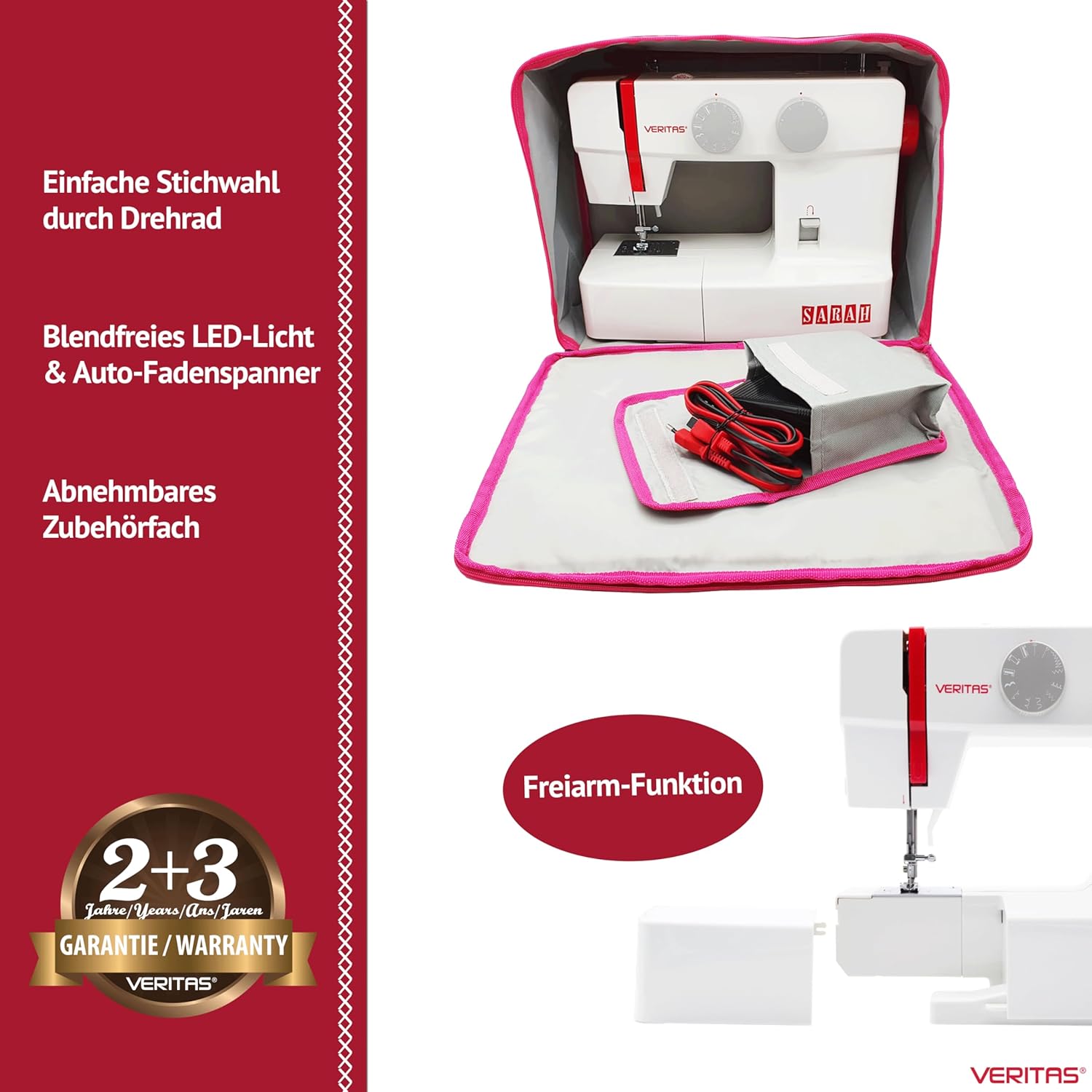
ചിത്രം 4.3: Convenience features of the VERITAS Sarah. This image shows easy stitch selection via a rotary dial, glare-free LED light, auto-thread tensioner, a removable accessory compartment, and the free-arm function.
5. സജ്ജീകരണം
5.1 അൺപാക്കിംഗും പ്ലേസ്മെന്റും
- Carefully remove the sewing machine from its packaging.
- മതിയായ വെളിച്ചമുള്ള, സ്ഥിരതയുള്ളതും പരന്നതുമായ ഒരു പ്രതലത്തിൽ മെഷീൻ സ്ഥാപിക്കുക.
- സുഖകരമായ പ്രവർത്തനത്തിനും തുണി കൈകാര്യം ചെയ്യലിനും മെഷീനിന് ചുറ്റും മതിയായ ഇടമുണ്ടെന്ന് ഉറപ്പാക്കുക.
5.2 പവർ കണക്ഷൻ
- മെഷീനിന്റെ പവർ സോക്കറ്റിലേക്ക് ഫൂട്ട് കൺട്രോളർ പ്ലഗ് ബന്ധിപ്പിക്കുക.
- അനുയോജ്യമായ ഒരു ഇലക്ട്രിക്കൽ ഔട്ട്ലെറ്റിലേക്ക് പവർ കോർഡ് പ്ലഗ് ചെയ്യുക.
- Turn on the machine using the power switch, usually located on the side or back.
5.3 ബോബിൻ വൈൻഡിംഗ്
- സ്പൂൾ പിന്നിൽ ഒരു സ്പൂൾ ത്രെഡ് വയ്ക്കുക.
- മുകളിലെ ത്രെഡ് ഗൈഡിലൂടെയും ബോബിൻ വൈൻഡിംഗ് ടെൻഷൻ ഡിസ്കിന് ചുറ്റും ത്രെഡ് ഗൈഡ് ചെയ്യുക.
- Insert the thread through the hole in the bobbin and place the bobbin onto the bobbin winder spindle.
- ബോബിൻ വിൻഡർ സ്പിൻഡിൽ വലതുവശത്തേക്ക് തള്ളുക.
- Gently press the foot controller to start winding. Stop when the bobbin is full.
- നൂൽ മുറിച്ച് ബോബിൻ വൈൻഡർ സ്പിൻഡിൽ ഇടതുവശത്തേക്ക് തിരികെ തള്ളുക.
5.4 ബോബിൻ ചേർക്കൽ
- ബോബിൻ കവർ പ്ലേറ്റ് തുറക്കുക.
- നൂൽ ശരിയായ ദിശയിൽ (സാധാരണയായി എതിർ ഘടികാരദിശയിൽ) അഴിക്കുന്നുണ്ടെന്ന് ഉറപ്പാക്കിക്കൊണ്ട്, മുറിവ് ബോബിൻ ബോബിൻ കേസിൽ തിരുകുക.
- ടെൻഷൻ സ്പ്രിംഗിലൂടെ ത്രെഡ് ഗൈഡ് സ്ലോട്ടിലേക്ക് നയിക്കുക.
- ബോബിൻ കവർ പ്ലേറ്റ് അടയ്ക്കുക.
5.5 മുകളിലെ ത്രെഡ് ത്രെഡ് ചെയ്യൽ
- പ്രസ്സർ കാൽ ലിവർ ഉയർത്തുക.
- സ്പൂൾ പിന്നിൽ ഒരു സ്പൂൾ ത്രെഡ് വയ്ക്കുക.
- മെഷീനിൽ സൂചിപ്പിച്ചിരിക്കുന്ന നമ്പർ നൽകിയ ത്രെഡിംഗ് പാത പിന്തുടരുക, എല്ലാ ഗൈഡുകളിലൂടെയും ടെൻഷൻ ഡിസ്കുകളിലൂടെയും ത്രെഡ് നയിക്കുക.
- Bring the thread down and through the needle eye from front to back.
- Pull about 15 cm (6 inches) of thread through the needle eye and under the presser foot.
5.6 ബോബിൻ ത്രെഡ് ഉയർത്തൽ
- നിങ്ങളുടെ ഇടതു കൈകൊണ്ട് മുകളിലെ നൂൽ ലഘുവായി പിടിക്കുക.
- സൂചി സൂചി പ്ലേറ്റിലേക്ക് താഴ്ത്താൻ ഹാൻഡ്വീൽ നിങ്ങളുടെ നേരെ തിരിക്കുക, തുടർന്ന് അത് വീണ്ടും ഉയർത്തുക.
- The upper thread will catch the bobbin thread, forming a loop. Pull the loop to bring the bobbin thread up through the needle plate hole.
- രണ്ട് ത്രെഡുകളും (മുകളിലെ നൂലും ബോബിനും) പ്രഷർ പാദത്തിനടിയിലൂടെയും മെഷീനിന്റെ പിൻഭാഗത്തേക്കും വലിക്കുക.
6. പ്രവർത്തന നിർദ്ദേശങ്ങൾ
6.1 തുന്നൽ തിരഞ്ഞെടുക്കൽ
The VERITAS Sarah offers 13 different stitch patterns. To select a stitch, turn the stitch selection dial (left rotary wheel) until the desired stitch pattern aligns with the indicator mark.
6.2 Adjusting Stitch Length
Adjust the stitch length using the stitch length dial (right rotary wheel). You can set the length between 0 and 4 mm. For most general sewing, a length of 2.5 mm is suitable.
6.3 തയ്യൽ ആരംഭിക്കൽ
- പ്രഷർ പാദത്തിനടിയിൽ തുണി വയ്ക്കുക.
- പ്രസ്സർ ഫുട്ട് ലിവർ താഴ്ത്തുക.
- Gently press the foot controller to start sewing. The harder you press, the faster the machine will sew.
- Guide the fabric gently with both hands, but do not push or pull it forcefully.
6.4 റിവേഴ്സ് തയ്യൽ
ഒരു തുന്നലിന്റെ തുടക്കത്തിലും അവസാനത്തിലും തുന്നലുകൾ ശക്തിപ്പെടുത്തുന്നതിന്, റിവേഴ്സ് ലിവർ/ബട്ടൺ അമർത്തിപ്പിടിക്കുക. മെഷീൻ പിന്നിലേക്ക് തയ്യൽ ചെയ്യും. ഫോർവേഡ് തയ്യൽ പുനരാരംഭിക്കാൻ ലിവർ/ബട്ടൺ വിടുക.
6.5 ഒരു തയ്യൽ പൂർത്തിയാക്കൽ
- Sew a few reverse stitches to secure the seam.
- കൈചക്രം നിങ്ങളുടെ നേരെ തിരിച്ചുകൊണ്ട് സൂചി അതിന്റെ ഏറ്റവും ഉയർന്ന സ്ഥാനത്തേക്ക് ഉയർത്തുക.
- പ്രസ്സർ കാൽ ലിവർ ഉയർത്തുക.
- മെഷീനിന്റെ പിൻഭാഗത്തേക്ക് തുണി വലിക്കുക.
- Use the integrated thread cutter or scissors to cut the threads, leaving about 10-15 cm (4-6 inches) of thread.
6.6 Buttonhole Sewing (4-Step)
- ബട്ടൺഹോൾ കാൽ അറ്റാച്ചുചെയ്യുക.
- Mark the buttonhole position on your fabric.
- Select the first step of the buttonhole program on the stitch selection dial.
- Sew the first side of the buttonhole.
- Change to the next step on the dial and sew the bar tack.
- Continue through all four steps, following the machine's instructions for each segment of the buttonhole.
- Use the seam ripper to carefully open the buttonhole.
6.7 സൗജന്യ കൈ തയ്യൽ
To use the free arm, simply slide off the accessory compartment. This exposes the narrow free arm, making it easier to sew small, circular items.
7. പരിപാലനം
Regular maintenance ensures the longevity and optimal performance of your sewing machine. Always disconnect the machine from the power supply before performing any maintenance.
7.1 ബോബിൻ ഏരിയ വൃത്തിയാക്കൽ
- സൂചി, പ്രഷർ ഫൂട്ട്, സൂചി പ്ലേറ്റ് എന്നിവ നീക്കം ചെയ്യുക.
- ബോബിൻ കേസ് നീക്കം ചെയ്യുക.
- Use the small brush provided to remove any lint and dust accumulated in the bobbin area and feed dog teeth.
- ഭാഗങ്ങൾ വീണ്ടും കൂട്ടിച്ചേർക്കുക.
7.2 Oiling (If Applicable)
Refer to the detailed instruction manual for specific oiling points and frequency. Generally, a few drops of sewing machine oil in designated areas can keep moving parts running smoothly. Avoid over-oiling.
7.3 സൂചി മാറ്റിസ്ഥാപിക്കൽ
Replace the needle regularly (after 8-10 hours of sewing) or if it becomes bent, dull, or broken. Use the screwdriver to loosen the needle clamp screw, remove the old needle, insert a new one with the flat side facing the back, and tighten the screw. Ensure the needle is fully inserted.
8. പ്രശ്നപരിഹാരം
This section addresses common issues you might encounter. For more detailed troubleshooting, consult the full instruction manual.
8.1 ഒഴിവാക്കിയ തുന്നലുകൾ
- കാരണം: തെറ്റായ സൂചി, വളഞ്ഞ സൂചി, തെറ്റായ നൂൽ നൂൽ, തുണിയുടെ തെറ്റായ സൂചി വലുപ്പം.
- പരിഹാരം: Replace the needle with a new, correct type and size for your fabric. Re-thread the machine completely, ensuring all guides are followed.
8.2 Thread Breakage (Upper Thread)
- കാരണം: Incorrect upper thread tension, improperly threaded, burr on needle eye or thread path, poor quality thread, needle inserted incorrectly.
- പരിഹാരം: Check and adjust upper thread tension. Re-thread the machine. Inspect the needle and thread path for rough spots. Use good quality thread. Ensure needle is correctly inserted.
8.3 Thread Breakage (Bobbin Thread)
- കാരണം: Improperly wound bobbin, incorrect bobbin insertion, lint in bobbin case, incorrect bobbin tension.
- പരിഹാരം: Re-wind the bobbin evenly. Re-insert the bobbin correctly. Clean the bobbin case area.
8.4 Uneven Stitches / Looping
- കാരണം: Incorrect thread tension (upper or bobbin), improper threading, wrong needle size, pulling fabric.
- പരിഹാരം: Adjust thread tensions. Re-thread both upper and bobbin threads. Use the correct needle. Allow the feed dogs to move the fabric naturally.
8.5 Machine Not Starting
- കാരണം: Power cord not plugged in, power switch off, bobbin winder spindle engaged, machine jammed.
- പരിഹാരം: Check power connections. Ensure power switch is on. Disengage bobbin winder spindle. Check for thread jams in the bobbin area or needle plate.
9 സ്പെസിഫിക്കേഷനുകൾ
| ബ്രാൻഡ് | വെരിറ്റാസ് |
| മോഡൽ നമ്പർ | 1301 |
| ഉൽപ്പന്ന അളവുകൾ (L x W x H) | 37 x 16 x 29.5 സെ.മീ |
| ഇനത്തിൻ്റെ ഭാരം | 5 കി.ഗ്രാം |
| മെറ്റീരിയൽ | Metal (Aluminum Die-Cast Frame), Plastic |
| സ്റ്റിച്ച് പ്രോഗ്രാമുകൾ | 13 |
| ബട്ടൺഹോൾ തരം | 4-ഘട്ട ഓട്ടോമാറ്റിക് |
| പരമാവധി തുന്നൽ നീളം | 4 മി.മീ |
| പരമാവധി തുന്നൽ വീതി | 5 മി.മീ |
| തയ്യൽ വേഗത | 750 തുന്നലുകൾ/മിനിറ്റ് |
| ലൈറ്റിംഗ് | എൽഇഡി |
| പവർ ഉറവിടം | കോർഡഡ് ഇലക്ട്രിക് |

ചിത്രം 9.1: Dimensions of the VERITAS Sarah Sewing Machine. This image provides a visual representation of the machine's length (37 cm), width (16 cm), and height (29.5 cm).
10. വാറൻ്റിയും പിന്തുണയും
10.1 വാറൻ്റി വിവരങ്ങൾ
The VERITAS Sarah Sewing Machine comes with a 5 വർഷത്തെ നിർമ്മാതാവിന്റെ വാറന്റി. This typically includes a standard 2-year warranty, which can be extended by an additional 3 years upon product registration. Please refer to the warranty card included in your packaging or the manufacturer's official website for detailed terms and conditions regarding warranty claims and registration procedures.

ചിത്രം 10.1: Comparison highlighting VERITAS quality and warranty. This image emphasizes the stable aluminum die-cast frame, high piercing power for all fabrics, modern manufacturing, and the 5-year extended manufacturer's warranty upon registration.
ചിത്രം 10.2: Visual representation of the 2+3 year warranty for the VERITAS Sarah. This image clearly shows "2+3 Jahre/Years/Ans/Jaren GARANTIE/WARRANTY VERITAS".
10.2 ഉപഭോക്തൃ പിന്തുണ
For technical assistance, spare parts, or further inquiries, please contact VERITAS customer support. Contact details can typically be found on the manufacturer's webസൈറ്റ് അല്ലെങ്കിൽ നിങ്ങളുടെ ഉൽപ്പന്നത്തിൽ ഉൾപ്പെടുത്തിയിരിക്കുന്ന ഡോക്യുമെന്റേഷനിൽ.