
1. ആമുഖം
This manual provides detailed instructions for the installation, operation, and programming of the Baomain THC15A Digital LCD Programmable Timer Switch Relay. This device is designed for precise control of electrical circuits, allowing for automated on/off switching based on a programmed schedule. Please read this manual thoroughly before use to ensure safe and efficient operation.
2. ഉൽപ്പന്ന സവിശേഷതകൾ
- ഡിജിറ്റൽ എൽസിഡി ഡിസ്പ്ലേ: Clear display for time, day, and programming status.
- പ്രോഗ്രാം ചെയ്യാവുന്ന ഷെഡ്യൂളുകൾ: Up to 16 ON/OFF programs per day or week.
- വൈഡ് വോളിയംtagഇ ശ്രേണി: Operates on AC 220V - 240V.
- High Contact Capacity: Rated for 16A.
- ആന്തരിക റീചാർജ് ചെയ്യാവുന്ന ബാറ്ററി: 1.2V/40mA battery for power failure memory.
- പവർ പരാജയ മെമ്മറി: Retains settings for up to 60 days without external power.
- മാനുവൽ അസാധുവാക്കൽ: Allows temporary manual control.
- കോംപാക്റ്റ് ഡിസൈൻ: Suitable for DIN rail mounting.
3 സ്പെസിഫിക്കേഷനുകൾ
| മോഡൽ നമ്പർ | THC15A |
| റേറ്റുചെയ്ത വോളിയംtage | എസി 220 വി - 240 വി |
| ബന്ധപ്പെടാനുള്ള ശേഷി | 16എ |
| Full Time Range | 1 Minute - 168 Hours |
| പ്രോഗ്രാം ചെയ്യാവുന്ന ക്രമീകരണങ്ങൾ | 16 ON/OFF times per week or day |
| ആന്തരിക ബാറ്ററി | 1.2V/40mA (റീചാർജ് ചെയ്യാവുന്നത്) |
| പവർ പരാജയം മെമ്മറി | 60 ദിവസം |
| പ്രവർത്തന താപനില | -10°C മുതൽ +40°C വരെ |
| ഉൽപ്പന്ന അളവുകൾ (D x W x H) | 1.42" x 3.39" x 2.56" (36mm x 86mm x 65mm) |
| മൊത്തം ഭാരം | 120 ഗ്രാം (4.2 ഔൺസ്) |
| മെറ്റീരിയൽ | പ്ലാസ്റ്റിക് |
| നിറം | വെള്ള |
 Image: Baomain THC15A Digital Timer Switch showing its physical dimensions (1.42"D x 3.39"W x 2.56"H).
4 സുരക്ഷാ വിവരങ്ങൾ
- വൈദ്യുത അപകടം: Installation and wiring should only be performed by a qualified electrician or competent person. Ensure power is disconnected before any installation or maintenance.
- വാല്യംtagഇ അനുയോജ്യത: വിതരണം വോളിയം ആണെന്ന് പരിശോധിക്കുകtage matches the timer's rated voltagഇ (എസി 220V-240V).
- ലോഡ് കപ്പാസിറ്റി: Do not exceed the maximum contact capacity of 16A. Overloading can cause damage or fire.
- പരിസ്ഥിതി: Do not install in areas with excessive moisture, dust, or extreme temperatures outside the specified operating range (-10°C to +40°C).
- ശരിയായ ഗ്രൗണ്ടിംഗ്: Ensure the device is properly grounded according to local electrical codes.
5. ഉൽപ്പന്നം കഴിഞ്ഞുview ഘടകങ്ങളും
The Baomain THC15A is a compact digital timer switch designed for DIN rail mounting. It features an LCD screen for displaying time and programming, along with several buttons for setting and control.
 ചിത്രം: ആംഗിൾഡ് view of the Baomain THC15A timer switch, highlighting the LCD display and blue control buttons.
 ചിത്രം: മുൻഭാഗം view of the Baomain THC15A Digital Timer Switch, showing the LCD screen, buttons, and terminal connections.
നിയന്ത്രണ ബട്ടണുകൾ:
- (P) Button: Used to enter programming mode and confirm settings.
- D+ Button: Adjusts the day of the week during time setting or selects day combinations for programs.
- H+ Button: Adjusts the hour.
- എം+ ബട്ടൺ: Adjusts the minute.
- Clock Button (Clock icon): Exits programming mode and saves current time settings.
- റീസെറ്റ് ബട്ടൺ: ഫാക്ടറി ഡിഫോൾട്ടുകളിലേക്ക് എല്ലാ ക്രമീകരണങ്ങളും പുനtsസജ്ജമാക്കുന്നു.
- മാനുവൽ ബട്ടൺ: Toggles between AUTO, ON, and OFF modes.
6. ഇൻസ്റ്റലേഷനും വയറിംഗും
The THC15A timer switch is designed for DIN rail mounting. Ensure all power is disconnected before proceeding with wiring.
 Image: Wiring diagram for the Baomain THC15A Digital Timer Switch, showing connections for Neutral (N), Live (L), and load terminals (3, 4, 5) with an optional circuit breaker.
വയറിംഗ് കണക്ഷനുകൾ:
- Connect the Live (L) wire to terminal 1.
- Connect the Neutral (N) wire to terminal 2.
- For the output, connect the common terminal (usually 4) to the load's power input.
- Connect the normally open (NO) terminal (usually 3) or normally closed (NC) terminal (usually 5) to the other side of the load, depending on desired operation.
- എല്ലാ കണക്ഷനുകളും സുരക്ഷിതവും ഇൻസുലേറ്റ് ചെയ്തതുമാണെന്ന് ഉറപ്പാക്കുക.
Warning: Incorrect wiring can lead to electric shock or damage to the device and connected equipment. Consult a professional if unsure.
7. പ്രാരംഭ സജ്ജീകരണം
7.1. Resetting the Timer
Upon first use or after a long period of inactivity, it is recommended to reset the timer. Use a pointed object (like a pen tip) to press the പുനഃസജ്ജമാക്കുക button. The LCD display will show "00:00" and all previous settings will be cleared.
 ചിത്രം: ക്ലോസ്-അപ്പ് view of the Baomain THC15A timer's control panel, showing the LCD screen and the blue buttons, including the recessed Reset button.
7.2. നിലവിലെ സമയവും ദിവസവും ക്രമീകരിക്കുന്നു
നിലവിലെ സമയവും ദിവസവും സജ്ജമാക്കാൻ:
- അമർത്തിപ്പിടിക്കുക ക്ലോക്ക് button (with the clock icon).
- പിടിക്കുമ്പോൾ ക്ലോക്ക് ബട്ടൺ, അമർത്തുക D+ to set the current day of the week (MO, TU, WE, TH, FR, SA, SU).
- പിടിക്കുമ്പോൾ ക്ലോക്ക് ബട്ടൺ, അമർത്തുക H+ to set the current hour (0-23 for 24-hour format).
- പിടിക്കുമ്പോൾ ക്ലോക്ക് ബട്ടൺ, അമർത്തുക M+ to set the current minute (0-59).
- റിലീസ് ചെയ്യുക ക്ലോക്ക് button to save the settings. The display will show the current time and day.
8. Programming the Timer
The THC15A allows for up to 16 ON/OFF programs. Follow these steps to set your desired schedule:
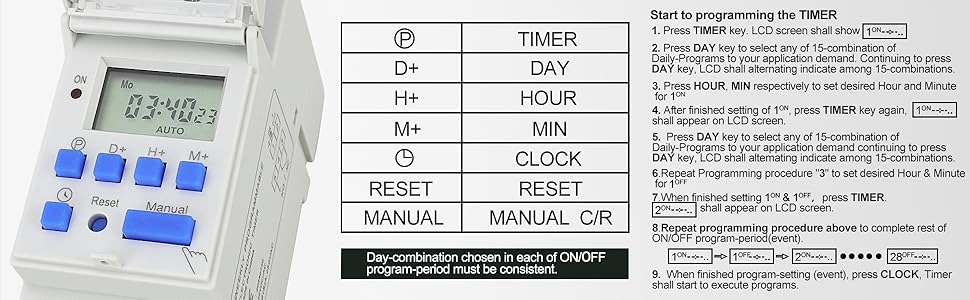 Image: A table outlining the programming steps for the Baomain THC15A timer, detailing button presses for setting ON/OFF times and day combinations.
 Image: Detailed programming instructions for the Baomain THC15A timer, showing the sequence of button presses for setting ON/OFF events and day selections.
- അമർത്തുക (പി) button once. The LCD will display "1 ON" (first ON program).
- അമർത്തുക D+ to select the desired day combination for this program (e.g., MO, TU, WE, TH, FR, SA, SU for everyday, or specific days). Continue pressing D+ to cycle through 15 different day combinations.
- അമർത്തുക H+ to set the hour for the "1 ON" time.
- അമർത്തുക M+ to set the minute for the "1 ON" time.
- അമർത്തുക (പി) button again. The LCD will display "1 OFF" (first OFF program).
- If you want the same day combination as "1 ON", you do not need to press D+. If different, press D+ തിരഞ്ഞെടുക്കാൻ.
- അമർത്തുക H+ to set the hour for the "1 OFF" time.
- അമർത്തുക M+ to set the minute for the "1 OFF" time.
- Repeat steps 1-8 for additional ON/OFF programs (up to 16 pairs). The display will cycle through "2 ON", "2 OFF", etc., up to "16 ON", "16 OFF".
- ആവശ്യമുള്ള എല്ലാ പ്രോഗ്രാമുകളും സജ്ജീകരിച്ച ശേഷം, അമർത്തുക ക്ലോക്ക് button to exit programming mode and save your settings. The timer will then execute the programs.
Programming Video Tutorial:
Video: This video demonstrates the programming steps for the Baomain THC15A Digital LCD Power Programmable Timer Switch Relay, showing how to set ON/OFF times and day combinations.
9. Operating Modes (Manual Control)
ദി മാനുവൽ button allows you to override the programmed schedule temporarily or permanently.
- അമർത്തുക മാനുവൽ ഇനിപ്പറയുന്ന മോഡുകളിലൂടെ സൈക്കിൾ ചെയ്യാനുള്ള ബട്ടൺ:
- സ്വയമേവ: The timer operates according to the programmed schedule.
- ഓൺ: The output is continuously ON, overriding any programmed OFF times.
- ഓഫാണ്: The output is continuously OFF, overriding any programmed ON times.
Always return the timer to ഓട്ടോ mode for scheduled operation.
10. പ്രശ്നപരിഹാരം
പൊതുവായ പ്രശ്നങ്ങളും പരിഹാരങ്ങളും:
- പ്രദർശനം ശൂന്യമാണ്:
- Check power supply to terminals 1 and 2.
- The internal battery might be fully discharged. Connect to power for several hours to charge.
- പ്രോഗ്രാം ചെയ്തതുപോലെ ടൈമർ ഓൺ/ഓഫ് ചെയ്യുന്നില്ല:
- ടൈമർ ഓണാണെന്ന് ഉറപ്പാക്കുക ഓട്ടോ mode (check the display).
- Verify that the current time and day are set correctly.
- Review your programmed ON/OFF times for accuracy.
- Check wiring connections to the load.
- എൽസിഡിയിൽ പിശക് കോഡുകൾ:
- E1: Indicates that a START time was not set for a program.
- E2: Indicates that an END time was not set for a program.
- പരിഹാരം: Re-enter programming mode and ensure both ON and OFF times are set for each program you intend to use. Press the ക്ലോക്ക് സംരക്ഷിക്കാനും പുറത്തുകടക്കാനുമുള്ള ബട്ടൺ.
- ബട്ടണുകൾ പ്രതികരിക്കുന്നില്ല:
- അമർത്താൻ ശ്രമിക്കുക പുനഃസജ്ജമാക്കുക button with a pointed object to clear any temporary glitches.
11. പരിപാലനം
- ഉപകരണം വൃത്തിയായും പൊടിയില്ലാതെയും സൂക്ഷിക്കുക. വൃത്തിയാക്കാൻ മൃദുവായതും ഉണങ്ങിയതുമായ തുണി ഉപയോഗിക്കുക.
- ഉരച്ചിലുകളുള്ള ക്ലീനറുകളോ ലായകങ്ങളോ ഉപയോഗിക്കരുത്.
- അമിതമായി ചൂടാക്കുന്നത് തടയാൻ ഉപകരണത്തിന് ചുറ്റും ശരിയായ വായുസഞ്ചാരം ഉറപ്പാക്കുക.
- The internal battery is designed for long life and is generally not user-replaceable. If the power failure memory fails, the unit may need servicing or replacement.
12. വാറൻ്റിയും പിന്തുണയും
Baomain products are manufactured to high-quality standards. For warranty information, technical support, or service inquiries, please refer to the contact information provided with your purchase or visit the official Baomain webവാറന്റി ക്ലെയിമുകൾക്കുള്ള വാങ്ങലിന്റെ തെളിവായി നിങ്ങളുടെ വാങ്ങൽ രസീത് സൂക്ഷിക്കുക.