
1. ആമുഖം
Thank you for choosing the Oasser Dash Cam U1. This manual provides detailed instructions for the proper installation, operation, and maintenance of your dash camera. Please read this manual thoroughly before using the device to ensure optimal performance and longevity. The Oasser Dash Cam U1 is designed to record your driving journey in Full HD 1080p, offering features like a wide viewing angle, G-Sensor for emergency recording, loop recording, and smart parking monitoring.
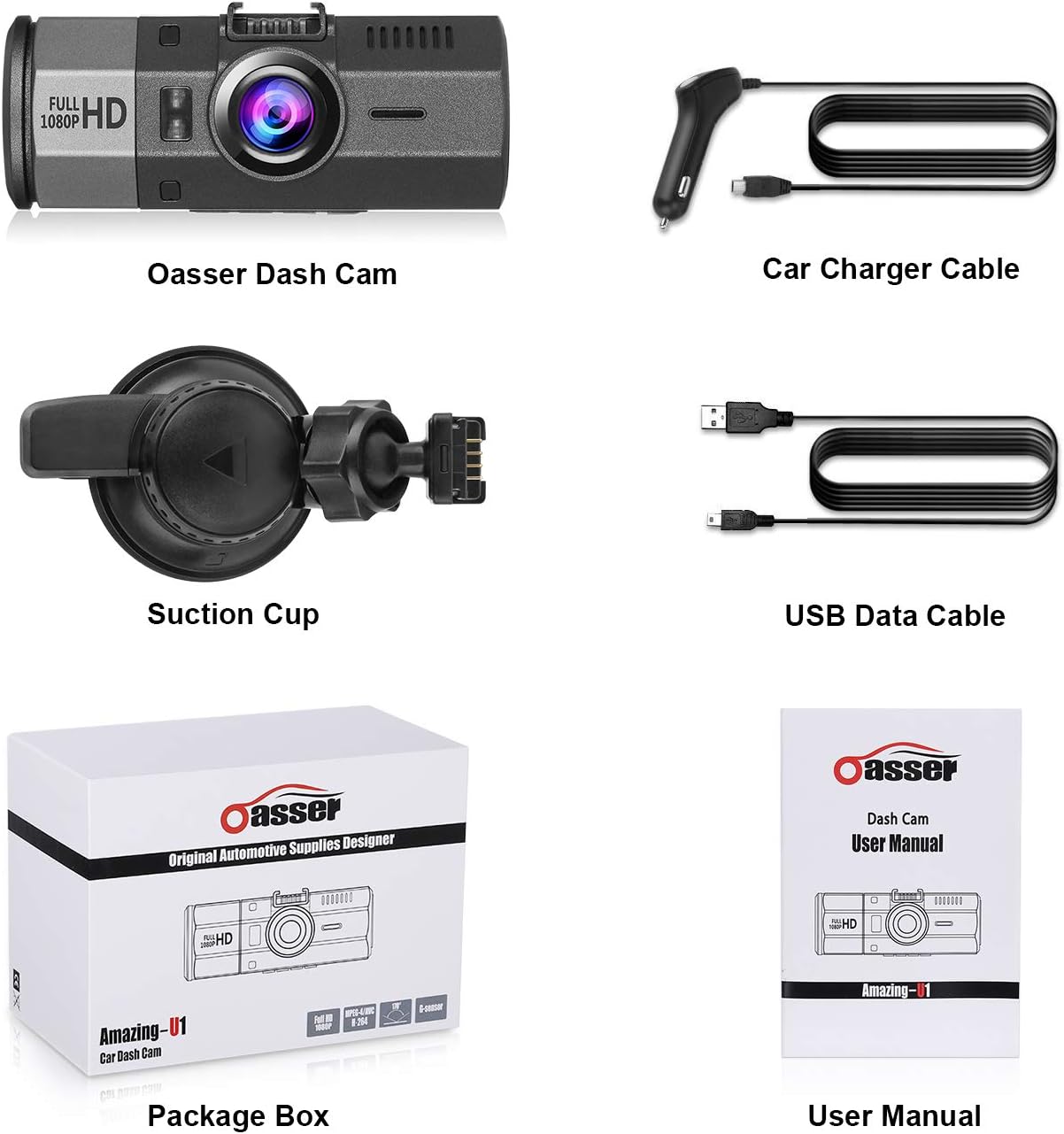
2. പാക്കേജ് ഉള്ളടക്കം
താഴെ ലിസ്റ്റ് ചെയ്തിരിക്കുന്ന എല്ലാ ഇനങ്ങളും നിങ്ങളുടെ പാക്കേജിൽ ഉൾപ്പെടുത്തിയിട്ടുണ്ടെന്ന് ദയവായി പരിശോധിക്കുക. ഏതെങ്കിലും ഇനങ്ങൾ നഷ്ടപ്പെട്ടിട്ടുണ്ടെങ്കിലോ കേടായിട്ടുണ്ടെങ്കിലോ, ദയവായി ഉപഭോക്തൃ പിന്തുണയുമായി ബന്ധപ്പെടുക.
- Oasser Dash Cam U1 Unit
- കാർ ചാർജർ കേബിൾ
- സക്ഷൻ കപ്പ് മ .ണ്ട്
- യുഎസ്ബി ഡാറ്റ കേബിൾ
- ഉപയോക്തൃ മാനുവൽ
- പാക്കേജ് ബോക്സ്

Image 2.1: Contents of the Oasser Dash Cam U1 package, including the dash cam, car charger, suction cup mount, USB cable, and user manual.
3. ഉൽപ്പന്നം കഴിഞ്ഞുview
The Oasser Dash Cam U1 features a compact design with a 1.5-inch LCD screen for easy navigation and playback. It is equipped with a high-resolution lens and various ports for connectivity.

ചിത്രം 3.1: മുൻഭാഗം view of the Oasser Dash Cam U1 with the suction cup mount attached, showcasinലെൻസും മെയിൻ ബോഡിയും g.

ചിത്രം 3.2: മുകളിൽ നിന്ന് താഴേക്ക് view of the Oasser Dash Cam U1 showing both the front lens and the rear LCD screen with control buttons.
3.1. ഉപകരണ ഘടകങ്ങൾ
- ഫ്രണ്ട് ലെൻസ്: വീഡിയോ foo ക്യാപ്ചർ ചെയ്യുന്നുtage.
- LCD സ്ക്രീൻ: തത്സമയം പ്രദർശിപ്പിക്കുന്നു view, menu, and playback.
- നിയന്ത്രണ ബട്ടണുകൾ: For navigation and function selection.
- USB പോർട്ട്: For power and data transfer.
- എച്ച്ഡിഎംഐ പോർട്ട്: വീഡിയോ ഔട്ട്പുട്ടിനായി.
- മൈക്രോ എസ്ഡി കാർഡ് സ്ലോട്ട്: മെമ്മറി കാർഡ് ചേർക്കുന്നതിനായി.
- സ്പീക്കർ/മൈക്രോഫോൺ: ഓഡിയോ റെക്കോർഡിംഗിനും പ്ലേബാക്കിനും.
ചിത്രം 3.3: ക്ലോസ്-അപ്പ് view of the Oasser Dash Cam U1's side, showing the USB port, HDMI port, and the slot for a MicroSD card. Note that the SD card is not included with the product.
4. സജ്ജീകരണം
Follow these steps to properly set up your Oasser Dash Cam U1.
4.1. മൈക്രോ എസ്ഡി കാർഡ് ചേർക്കുന്നു
- ഡാഷ് കാം ഓഫ് ചെയ്തിട്ടുണ്ടെന്ന് ഉറപ്പാക്കുക.
- ഉപകരണത്തിന്റെ വശത്ത് മൈക്രോ എസ്ഡി കാർഡ് സ്ലോട്ട് കണ്ടെത്തുക.
- Insert a Class 10 or higher MicroSD card (not included) into the slot until it clicks into place.
- നീക്കം ചെയ്യാൻ, കാർഡ് പുറത്തേക്ക് വരുന്നത് വരെ സൌമ്യമായി അകത്തേക്ക് തള്ളുക.
പ്രധാനപ്പെട്ടത്: For optimal performance, it is recommended to format the MicroSD card within the dash cam's settings before first use and periodically thereafter.
4.2. ഡാഷ് കാം മൌണ്ട് ചെയ്യുന്നു
- നിങ്ങളുടെ വിൻഡ്ഷീൽഡിൽ ആവശ്യമുള്ള ഭാഗം നന്നായി വൃത്തിയാക്കുക.
- സക്ഷൻ കപ്പ് മൗണ്ട് ഡാഷ് കാമിൽ ഘടിപ്പിക്കുക.
- Press the suction cup firmly against the windshield and rotate the locking mechanism clockwise to secure it.
- വ്യക്തമായ ഒരു ദൃശ്യത ഉറപ്പാക്കാൻ ഡാഷ് കാമിന്റെ ആംഗിൾ ക്രമീകരിക്കുക. view മുന്നോട്ടുള്ള പാതയുടെ.

Image 4.1: Diagram illustrating the attachment of the suction cup mount to the windshield and the connection of the car charger cable to the dash cam.
4.3. പവർ ബന്ധിപ്പിക്കുന്നു
- Connect the car charger cable to the dash cam's USB port.
- കാർ ചാർജറിന്റെ മറ്റേ അറ്റം നിങ്ങളുടെ വാഹനത്തിന്റെ സിഗരറ്റ് ലൈറ്റർ സോക്കറ്റിൽ പ്ലഗ് ചെയ്യുക.
- വാഹനത്തിന്റെ ഇഗ്നിഷൻ ഓണാക്കുമ്പോൾ ഡാഷ്ക്യാം യാന്ത്രികമായി ഓണാകുകയും റെക്കോർഡിംഗ് ആരംഭിക്കുകയും ചെയ്യും.
5. പ്രവർത്തന നിർദ്ദേശങ്ങൾ
Understand the various functions and modes of your Oasser Dash Cam U1.
5.1. വീഡിയോ റെക്കോർഡിംഗ്
The dash cam records video in Full HD 1080p resolution at 30 frames per second, capturing a wide 170-degree viewing ആംഗിൾ.

Image 5.1: Comparison of video recording quality during day and night conditions, demonstrating the FHD 1080P capability of the Oasser Dash Cam U1.

Image 5.2: Illustration of the 170-degree ultra-wide viewing angle, showing how it captures a broader perspective of the road.
5.2. ലൂപ്പ് റെക്കോർഡിംഗ്
The dash cam continuously records video in segments (e.g., 1, 3, or 5 minutes). When the MicroSD card is full, the oldest unlocked video segments are automatically overwritten by new recordings. This ensures continuous recording without manual intervention.
5.3. G-Sensor (Gravity Sensor)
The built-in G-Sensor detects sudden movements or impacts, such as collisions. When an event is detected, the current video segment is automatically locked and saved to prevent it from being overwritten by loop recording. This ensures critical footagഇ സംരക്ഷിക്കപ്പെട്ടിരിക്കുന്നു.

Image 5.3: Visual representation of the G-Sensor automatically locking video files during an impact event, indicated by a padlock icon on the screen.
5.4. Smart Parking Monitoring
When enabled, the parking monitor feature uses motion detection to record any moving objects close to your parked car. It can also utilize time-lapse recording, taking photos at set intervals to record changes, which are then compiled into a video clip. This provides surveillance when your vehicle is stationary.

Image 5.4: The Oasser Dash Cam U1 mounted in a vehicle, demonstrating its smart parking monitoring feature in a parking garage setting.
5.5. നൈറ്റ് വിഷൻ
The dash cam is equipped with night vision capabilities to enhance video clarity in low-light conditions. While it improves visibility, it is not military-grade night vision and relies on available ambient light sources.
5.6. നിശബ്ദ പ്രവർത്തനം
The dash cam includes a mute function, allowing you to disable audio recording when desired. This can be useful for privacy or to reduce file വലിപ്പം.
6. പരിപാലനം
Proper maintenance ensures the longevity and reliable operation of your dash cam.
- വൃത്തിയാക്കൽ: ലെൻസും സ്ക്രീനും വൃത്തിയാക്കാൻ മൃദുവായതും ഉണങ്ങിയതുമായ തുണി ഉപയോഗിക്കുക. ഉരച്ചിലുകൾ ഉള്ള ക്ലീനറുകളോ ലായകങ്ങളോ ഉപയോഗിക്കുന്നത് ഒഴിവാക്കുക.
- SD കാർഡ് ഫോർമാറ്റിംഗ്: Regularly format your MicroSD card (at least once a month) through the dash cam's settings. This helps prevent data corruption and ensures smooth recording.
- ഫേംവെയർ അപ്ഡേറ്റുകൾ: Check the official Oasser website periodically for firmware updates. Updating the firmware can improve performance and address known issues. Follow the instructions provided with the firmware update carefully.
- താപനില: Avoid exposing the dash cam to extreme temperatures for extended periods, especially direct sunlight in a parked car, as this can affect battery life and internal components.
7. പ്രശ്നപരിഹാരം
If you encounter issues with your Oasser Dash Cam U1, refer to the following common problems and solutions.
| പ്രശ്നം | സാധ്യമായ കാരണം / പരിഹാരം |
|---|---|
| ഡാഷ് ക്യാം പവർ ഓൺ ചെയ്യുന്നില്ല. | Check the car charger connection and ensure the vehicle's cigarette lighter socket is functional. The dash cam requires continuous power from the car charger to operate. |
| റെക്കോർഡിംഗ് നിർത്തുകയോ മരവിപ്പിക്കുകയോ ചെയ്യുന്നു. | Ensure you are using a Class 10 or higher MicroSD card. Format the MicroSD card regularly. The card may be full or corrupted. Try a different MicroSD card. |
| Video segments have gaps or transitions issues. | Ensure the latest firmware is installed. Formatting the MicroSD card can also resolve this. |
| ജി-സെൻസർ വളരെ സെൻസിറ്റീവ് ആണ് അല്ലെങ്കിൽ വേണ്ടത്ര സെൻസിറ്റീവ് അല്ല. | Adjust the G-Sensor sensitivity setting in the dash cam's menu. A lower setting will trigger less frequently, while a higher setting will trigger more easily. |
| Suction cup mount does not stay in place. | Ensure the windshield surface is clean and dry. Apply firm pressure and rotate the locking mechanism fully. If the mount is old, the suction cup material may have degraded and require replacement. |
| Night vision quality is poor. | Night vision enhances low-light recording but does not create light. Performance depends on ambient light. Ensure the windshield is clean and free of obstructions. |
| License plates are difficult to read in recordings. | While the dash cam records in 1080p, factors like speed, distance, lighting conditions, and reflections can affect license plate readability. Ensure the lens is clean. |
| Camera reboots or shuts down unexpectedly. | This can occur if the power supply is unstable or if the internal battery is low. Ensure a stable power connection. If the issue persists, the internal battery may need service. |
8 സ്പെസിഫിക്കേഷനുകൾ
Key technical specifications for the Oasser Dash Cam U1.
| ഫീച്ചർ | സ്പെസിഫിക്കേഷൻ |
|---|---|
| മോഡൽ | Amazing-U1 |
| ഡിസ്പ്ലേ തരം | എൽസിഡി |
| Visible Screen Area Size | 1.5 ഇഞ്ച് / 4 സെ.മീ |
| വീഡിയോ ക്യാപ്ചർ റെസല്യൂഷൻ | 1080p (പൂർണ്ണ HD) |
| യഥാർത്ഥം View ആംഗിൾ | 170 ഡിഗ്രി |
| പ്രത്യേക സവിശേഷതകൾ | G-Sensor, Loop Recording, Mute Function, Night Vision, Parking Monitoring |
| കണക്റ്റിവിറ്റി ടെക്നോളജി | HDMI, USB |
| ബാറ്ററി കോമ്പോസിഷൻ | ലിഥിയം അയോൺ |
| ഉൽപ്പന്ന അളവുകൾ | 9.5 x 3.91 x 3.91 സെ.മീ |
| ഉൽപ്പന്ന ഭാരം | 520 ഗ്രാം |
9. വാറൻ്റിയും പിന്തുണയും
Oasser products are designed for reliability and performance. For warranty information, technical support, or any inquiries regarding your Oasser Dash Cam U1, please refer to the contact details provided in your product packaging or visit the official Oasser webസൈറ്റ്. വാറന്റി ക്ലെയിമുകൾക്കായി നിങ്ങളുടെ വാങ്ങലിന്റെ തെളിവ് സൂക്ഷിക്കുക.