
ആമുഖം
The Tripp Lite U442-DOCK1 USB 3.1 Gen 1 USB-C Docking Station transforms your computer, laptop, or tablet into a versatile workstation. By connecting its integrated USB-C cable to your device, you gain the ability to connect an external display, access Gigabit Ethernet networks, transfer data, and utilize various peripherals.
This docking station supports a wide range of functionalities, including high-definition video output, multiple USB-A ports for peripherals, memory card access, and power delivery to your host device.
ഫീച്ചറുകൾ
- ഡ്യുവൽ മോണിറ്റർ പിന്തുണ: Connects two displays simultaneously for enhanced multitasking. Compatible with Thunderbolt 3. Supports extended, mirror, or video wall modes. Note: HDMI and VGA video ports do not operate simultaneously.
- ഹൈ-ഡെഫനിഷൻ വീഡിയോ ഔട്ട്പുട്ട്: Mini DisplayPort (mDP) and HDMI ports support Ultra HD video resolutions up to 3840 x 2160 (4K x 2K) at 30 Hz. The VGA port supports HD resolutions up to 1920 x 1200, including 1080p, at 60 Hz.
- ഗിഗാബൈറ്റ് ഇഥർനെറ്റ്: RJ45 port provides true 10/100/1000 Mbps network speeds.
- യുഎസ്ബി-എ ഹബ്: Three USB-A 3.2 Gen 1 ports offer data transfer speeds up to 5 Gbps for connecting flash drives, mice, keyboards, and printers. One dedicated BC 1.2-compliant USB port provides up to 1.5A for fast charging.
- ഓഡിയോ പോർട്ട്: A 3.5mm mini stereo jack allows connection of speakers, headphones, or a microphone.
- മെമ്മറി കാർഡ് സ്ലോട്ടുകൾ: Micro SD and SD/MMC slots provide access to external memory.
- USB-C പവർ ഡെലിവറി (PD): Supports power input up to 20V 3A (60W) to power the connected device and peripherals.
- പ്ലഗ് ആൻഡ് പ്ലേ: Requires no software drivers or external power for basic functionality.
പാക്കേജ് ഉള്ളടക്കം
- U442-DOCK1 USB 3.1 Gen 1 USB-C ഡോക്കിംഗ് സ്റ്റേഷൻ
- ഉടമയുടെ മാനുവൽ
സജ്ജമാക്കുക
Follow these steps to set up your Tripp Lite U442-DOCK1 docking station:
- Connect the integrated USB-C cable from the U442-DOCK1 to an available USB-C port on your host device (laptop, tablet, or computer).
- If power delivery is desired, connect a USB-C wall charger (not included) to the USB-C PD port on the docking station. This will power the docking station and charge your host device.
- Connect your desired peripherals and displays to the appropriate ports on the docking station as described in the Operating Instructions section.
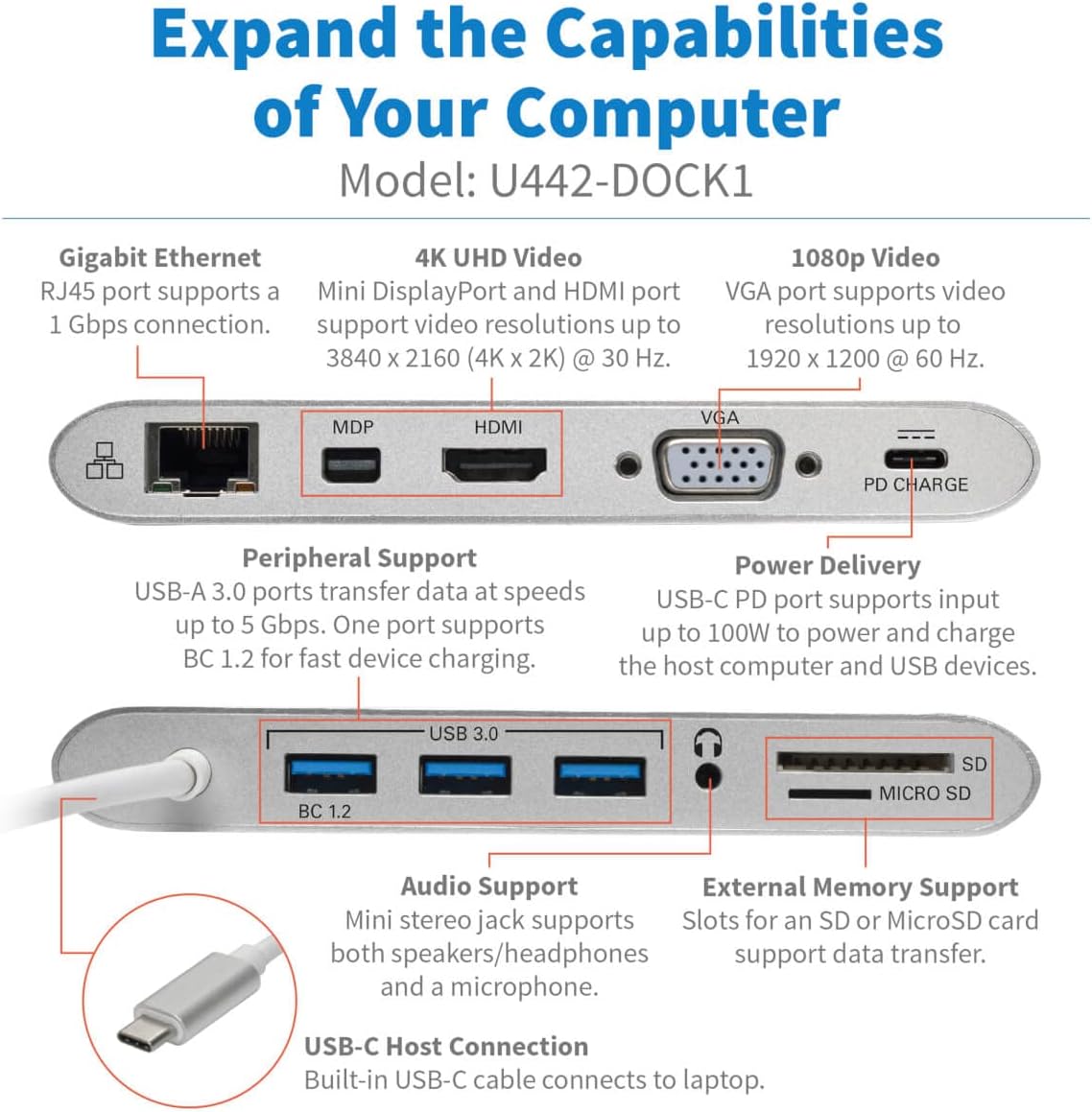
ചിത്രം: കഴിഞ്ഞുview of the Tripp Lite U442-DOCK1 USB-C Docking Station, showcasing its compact design and available ports.
പ്രവർത്തന നിർദ്ദേശങ്ങൾ
1. ഡിസ്പ്ലേകൾ ബന്ധിപ്പിക്കുന്നു
The U442-DOCK1 supports connecting one or two external displays. Note that HDMI and VGA ports cannot be used simultaneously for video output. For dual display, use Mini DisplayPort with either HDMI or VGA.
- എച്ച്ഡിഎംഐ പോർട്ട്: Connect an HDMI cable from your display to the HDMI port on the docking station. Supports resolutions up to 4K (3840 x 2160) at 30 Hz.
- Mini DisplayPort (mDP): Connect a Mini DisplayPort cable from your display to the mDP port. Supports resolutions up to 4K (3840 x 2160) at 30 Hz.
- VGA പോർട്ട്: Connect a VGA cable from your display to the VGA port. Supports resolutions up to 1920 x 1200 (1080p) at 60 Hz.

Image: Diagram showing how to configure dual monitors in Extended Mode (e.g., 4K mDP + 1080p HDMI) and Mirror Mode (e.g., 1080p mDP + 1080p HDMI).

ചിത്രം: വിശദമായത് view of the docking station's ports, including Gigabit Ethernet, 4K UHD Video (mDP, HDMI), 1080p Video (VGA), PD Charge, Peripheral Support (USB 3.0, BC 1.2), Audio Support, External Memory Support (SD, Micro SD), and USB-C Host Connection.
2. USB-A Peripheral Connections
Connect USB devices such as keyboards, mice, flash drives, or external hard drives to the three USB 3.0 ports. The port labeled 'BC 1.2' provides enhanced charging capabilities for compatible devices.
3. ജിഗാബിറ്റ് ഇഥർനെറ്റ്
For a wired network connection, connect an Ethernet cable (RJ45) from your network router or switch to the Gigabit Ethernet port on the docking station.
4. ഓഡിയോ കണക്ഷൻ
Plug headphones, speakers, or a microphone into the 3.5mm audio jack for audio input/output.
5. Memory Card Access
Insert SD or Micro SD memory cards into the corresponding slots to access data from external memory.
6. പവർ ഡെലിവറി
If your host device supports USB-C Power Delivery, connect its original USB-C power adapter to the PD CHARGE port on the docking station. This will pass power through to charge your host device while also powering the docking station and connected USB peripherals.

Image: Illustration of the U442-DOCK1 connecting to a host laptop and supporting various peripherals including network, multiple monitors, power adapter, smartphone, USB flash drive, mouse, headset, and SD/MicroSD memory cards.
മെയിൻ്റനൻസ്
To ensure optimal performance and longevity of your Tripp Lite U442-DOCK1 docking station:
- Keep the device clean by wiping it with a soft, dry cloth. Avoid using liquid or aerosol cleaners.
- തീവ്രമായ ഊഷ്മാവ്, ഈർപ്പം, നേരിട്ടുള്ള സൂര്യപ്രകാശം എന്നിവയിൽ ഉപകരണം തുറന്നുകാട്ടരുത്.
- ശക്തമായ ആഘാതങ്ങൾക്ക് ഉപകരണം ഇടുകയോ ഇടുകയോ ചെയ്യുന്നത് ഒഴിവാക്കുക.
- പ്രവർത്തന സമയത്ത് ഉപകരണത്തിന് ചുറ്റും ശരിയായ വായുസഞ്ചാരം ഉറപ്പാക്കുക.
ട്രബിൾഷൂട്ടിംഗ്
If you encounter issues with your U442-DOCK1, try the following steps:
- ഡിസ്പ്ലേ ഔട്ട്പുട്ട് ഇല്ല:
- യുഎസ്ബി-സി കേബിൾ ഡോക്കിംഗ് സ്റ്റേഷനിലേക്കും നിങ്ങളുടെ ഹോസ്റ്റ് ഉപകരണത്തിലേക്കും സുരക്ഷിതമായി ബന്ധിപ്പിച്ചിട്ടുണ്ടെന്ന് ഉറപ്പാക്കുക.
- Verify that the display cable (HDMI, mDP, or VGA) is firmly connected to both the docking station and the monitor.
- Check your host device's display settings to ensure the external monitor is detected and configured correctly (e.g., extended, mirrored).
- Remember that HDMI and VGA ports cannot be used simultaneously for video output.
- തിരിച്ചറിയാത്ത USB ഉപകരണങ്ങൾ:
- Ensure the USB device is properly inserted into the docking station's USB-A port.
- Try connecting the USB device to a different USB-A port on the docking station or directly to your host device to rule out device issues.
- If using a high-power USB device, ensure the docking station is connected to a power source via its USB-C PD port.
- നെറ്റ്വർക്ക് കണക്ഷൻ ഇല്ല:
- Verify the Ethernet cable is securely connected to both the docking station and your network.
- Check your host device's network settings to ensure the Ethernet adapter is recognized and enabled.
- Power Delivery Not Working:
- Ensure your USB-C wall charger is connected to the PD CHARGE port and is functional.
- നിങ്ങളുടെ ഹോസ്റ്റ് ഉപകരണം USB-C പവർ ഡെലിവറിയെ പിന്തുണയ്ക്കുന്നുണ്ടെന്ന് സ്ഥിരീകരിക്കുക.
- ഓഡിയോ പ്രശ്നങ്ങൾ:
- Check that your audio device (headphones/speakers) is correctly plugged into the 3.5mm audio jack.
- Verify your host device's audio output settings are configured to use the docking station's audio output.
സ്പെസിഫിക്കേഷനുകൾ
| ഫീച്ചർ | സ്പെസിഫിക്കേഷൻ |
|---|---|
| മോഡൽ നമ്പർ | U442-DOCK1 |
| ബ്രാൻഡ് | ട്രിപ്പ് ലൈറ്റ് |
| ഹാർഡ്വെയർ ഇന്റർഫേസ് | യുഎസ്ബി ടൈപ്പ് സി |
| അനുയോജ്യമായ ഉപകരണങ്ങൾ | ലാപ്ടോപ്പ്, ടാബ്ലെറ്റ്, സ്മാർട്ട്ഫോൺ |
| മൊത്തം USB പോർട്ടുകൾ | 5 (3x USB 3.0, 1x BC 1.2, 1x USB-C PD) |
| ഉൽപ്പന്ന അളവുകൾ (L x W x H) | 7" x 5" x 1" (17.78 സെ.മീ x 12.7 സെ.മീ x 2.54 സെ.മീ) |
| ഇനത്തിൻ്റെ ഭാരം | 0.5 പൗണ്ട് (0.23 കി.ഗ്രാം) |
| ആകെ HDMI പോർട്ടുകൾ | 1 |
| Total Mini DisplayPort (mDP) | 1 |
| ആകെ VGA പോർട്ടുകൾ | 1 |
| ഗിഗാബിറ്റ് ഇഥർനെറ്റ് | 1 (RJ45) |
| ഓഡിയോ ജാക്ക് | (1 മില്ലി) |
| മെമ്മറി കാർഡ് സ്ലോട്ടുകൾ | SD, മൈക്രോ SD |
| Power Delivery (PD) Input | Up to 100W (20V 3A) |
| HDMI റെസല്യൂഷൻ | 4K (3840 x 2160) @ 30 Hz വരെ |
| Mini DisplayPort Resolution | 4K (3840 x 2160) @ 30 Hz വരെ |
| വിജിഎ റെസലൂഷൻ | Up to 1920 x 1200 (1080p) @ 60 Hz |

Image: Physical dimensions of the U442-DOCK1, showing length, width, height, and cable length.
വാറൻ്റിയും പിന്തുണയും
This Tripp Lite product is covered by a 1-year limited warranty. For technical support or warranty inquiries, please refer to the official Tripp Lite webസൈറ്റിൽ ബന്ധപ്പെടുക അല്ലെങ്കിൽ അവരുടെ ഉപഭോക്തൃ സേവനവുമായി ബന്ധപ്പെടുക. വാറന്റി സാധൂകരണത്തിനായി നിങ്ങളുടെ വാങ്ങൽ രസീത് സൂക്ഷിക്കുക.
For the most current support information, visit the Tripp Lite webസൈറ്റ്: www.tripplite.com