
ആമുഖം
The Navitel E700 is a reliable GPS navigation device designed for automotive use. It features a clear 7-inch touchscreen display and operates on the Windows CE operating system. The device comes with pre-installed offline maps for Europe, ensuring navigation without reliance on mobile network signals. This manual provides essential information for setting up, operating, maintaining, and troubleshooting your Navitel E700 navigation system.
സുരക്ഷാ വിവരങ്ങൾ
- Always prioritize road safety. Do not operate the device in a way that distracts you from driving.
- Mount the device securely to avoid obstruction of your view അല്ലെങ്കിൽ വാഹന നിയന്ത്രണങ്ങളിൽ ഇടപെടൽ.
- Use only the provided car charger (12V) to power the device. Using incompatible chargers may damage the unit.
- ഉപകരണത്തെ തീവ്രമായ താപനിലയിലോ, ദീർഘനേരം നേരിട്ടുള്ള സൂര്യപ്രകാശത്തിലോ, അമിതമായ ഈർപ്പത്തിലോ തുറന്നുകാട്ടുന്നത് ഒഴിവാക്കുക.
- ഉപകരണം സ്വയം വേർപെടുത്താനോ നന്നാക്കാനോ ശ്രമിക്കരുത്. യോഗ്യതയുള്ള സേവന ഉദ്യോഗസ്ഥരെ ബന്ധപ്പെടുക.
- ഉപകരണം കുട്ടികൾക്ക് ലഭ്യമാകാതെ സൂക്ഷിക്കുക.
പാക്കേജ് ഉള്ളടക്കം
താഴെ പറയുന്ന ഇനങ്ങൾക്കായി ബോക്സ് ചെക്ക് ചെയ്യുക:
- Navitel E700 Navigation Device
- Vehicle Holder (for windshield)
- 12 വി കാർ ചാർജർ
- മിനി-യുഎസ്ബി കേബിൾ
- സ്റ്റൈലസ് പേന
- ഉപയോക്തൃ മാനുവൽ

Image: Navitel E700 device partially visible inside a black protective pouch with the Navitel logo.

Image: The included 12V car charger with an attached mini-USB cable for powering the device in a vehicle.

Image: The windshield suction cup mount and the cradle designed to hold the Navitel E700 device.

Image: A standard mini-USB cable, used for connecting the device to a computer or for charging.
ഉപകരണം കഴിഞ്ഞുview
The Navitel E700 features a 7-inch capacitive touchscreen display with an 800x480 pixel resolution. It is equipped with a MStar MSB 2521 Cortex-A7 800 MHz processor and 256 MB DDR3 RAM. The device includes a mini-USB port, a 3.5 mm audio jack, and an SD card slot supporting up to 32 GB.
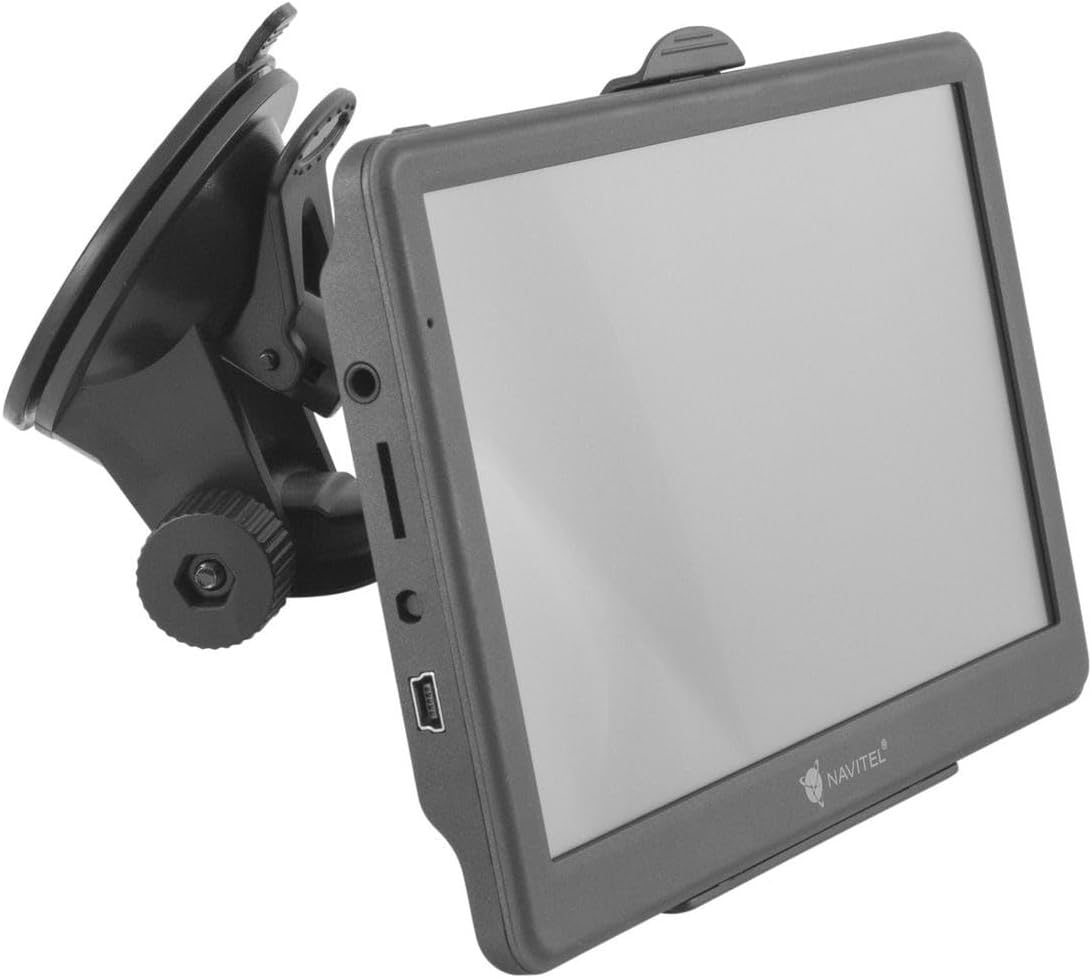
Image: The Navitel E700 navigation device with the suction cup mount attached, showing the side ports including the mini-USB and SD card slot.
സജ്ജമാക്കുക
1. ഉപകരണം മൌണ്ട് ചെയ്യുന്നു
- നിങ്ങളുടെ വിൻഡ്ഷീൽഡിൽ ആവശ്യമുള്ള ഭാഗം വൃത്തിയാക്കുക.
- Attach the suction cup mount to the windshield and press firmly to secure it.
- Slide the Navitel E700 device into the cradle until it clicks into place.
- ക്രമീകരിക്കുക viewനിങ്ങളുടെ ഡ്രൈവിംഗിന് തടസ്സമാകാതെ ഒപ്റ്റിമൽ ദൃശ്യപരതയ്ക്കായി ഇംഗ് ആംഗിൾ view.
Image: The windshield suction cup mount and the cradle, ready for device attachment.
2. പവർ ബന്ധിപ്പിക്കുന്നു
- Connect the mini-USB end of the car charger cable to the mini-USB port on the Navitel E700.
- കാർ ചാർജറിന്റെ മറ്റേ അറ്റം നിങ്ങളുടെ വാഹനത്തിന്റെ 12V പവർ ഔട്ട്ലെറ്റിലേക്ക് (സിഗരറ്റ് ലൈറ്റർ സോക്കറ്റ്) പ്ലഗ് ചെയ്യുക.
- The device should power on automatically or can be turned on by pressing the power button.
Image: The 12V car charger and mini-USB cable, essential for powering the device in a vehicle.
3. Inserting an SD Card (Optional)
If you wish to expand storage or load additional maps, insert a microSD card (up to 32 GB) into the designated SD card slot on the side of the device. Ensure the card is inserted correctly until it clicks into place.
പ്രവർത്തന നിർദ്ദേശങ്ങൾ
1. Initial Power-On and Language Selection
Upon first power-on, the device may prompt you to select your preferred language and region settings. Follow the on-screen instructions using the touchscreen.
2. ജിപിഎസ് സിഗ്നൽ അക്വിസിഷൻ
For accurate navigation, the device needs to acquire a GPS signal. Ensure the device has a clear view of the sky. This process may take a few minutes during the first use or after a long period of inactivity.
3. Planning a Route
- From the main menu, select "Navigation" or "Find Destination".
- Enter your destination using the on-screen keyboard (address, point of interest, coordinates).
- The device will calculate up to three alternative routes. Select your preferred route.
- Confirm the route, and navigation will begin with voice guidance and visual instructions.

Image: The Navitel E700 screen showing a navigation route with highlighted features like "Free lifetime maps updates" and "Three alternative routes".
4. നാവിഗേഷൻ സവിശേഷതകൾ
- ശബ്ദ മാർഗനിർദേശം: Clear, turn-by-turn voice instructions guide you to your destination.
- വിഷ്വൽ നിർദ്ദേശങ്ങൾ: The map displays in 2D or 3D, showing upcoming turns, lane assistance, and junction views.
- Points of Interest (POIs): Access a database of over 5,000,000 POIs including restaurants, hotels, banks, pharmacies, shops, gas stations, and historical sites.
- Speed Camera Warnings: Receive alerts for speed measurement cameras.
- Lifetime Map Updates: The device includes free lifetime map updates for the pre-installed European maps. Refer to the Navitel webഅപ്ഡേറ്റ് നടപടിക്രമങ്ങൾക്കായുള്ള സൈറ്റ്.
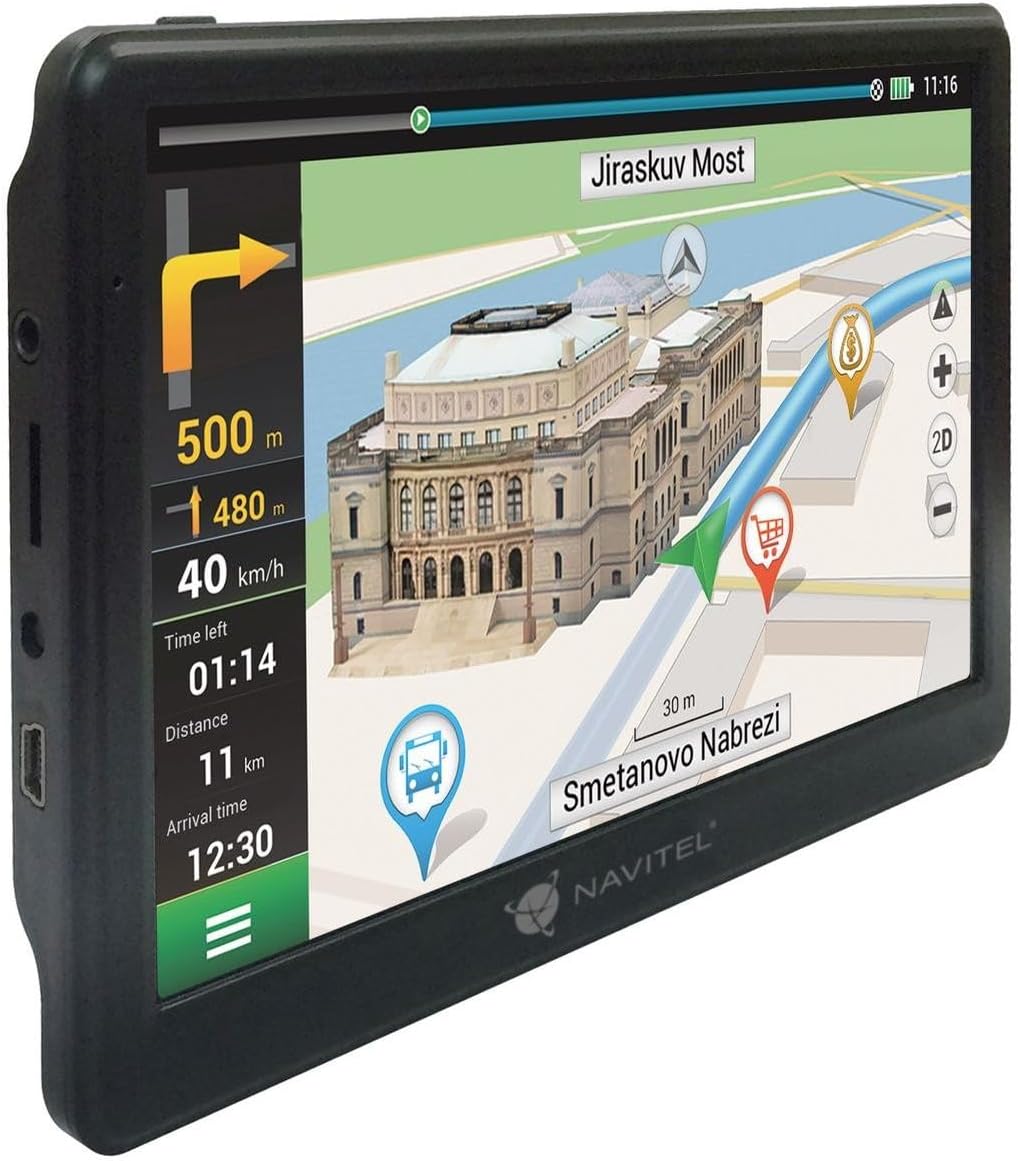
Image: A close-up of the Navitel E700 screen showing a detailed navigation map with current speed, distance, and estimated arrival time.
മെയിൻ്റനൻസ്
- വൃത്തിയാക്കൽ: Use a soft, dry cloth to clean the device screen and body. Do not use abrasive cleaners or solvents.
- Software and Map Updates: Regularly check the Navitel official website for software and map updates to ensure optimal performance and the most current map data. Connect the device to a computer using the mini-USB cable for updates.
- സംഭരണം: ഉപയോഗത്തിലില്ലാത്തപ്പോൾ, ഉപകരണം തണുത്തതും വരണ്ടതുമായ സ്ഥലത്ത് സൂക്ഷിക്കുക, നേരിട്ടുള്ള സൂര്യപ്രകാശത്തിൽ നിന്നും തീവ്രമായ താപനിലയിൽ നിന്നും അകറ്റി നിർത്തുക.
ട്രബിൾഷൂട്ടിംഗ്
| പ്രശ്നം | സാധ്യമായ കാരണം | പരിഹാരം |
|---|---|---|
| ഉപകരണം പവർ ഓണാക്കുന്നില്ല. | Low battery or power connection issue. | Ensure the car charger is securely connected to both the device and the vehicle's 12V outlet. Charge the device for at least 30 minutes. |
| GPS സിഗ്നൽ ഇല്ല. | തടസ്സപ്പെട്ടു view of the sky, device indoors. | ഉപകരണം ഒരു തുറന്ന സ്ഥലത്തേക്ക് മാറ്റുക, അവിടെ വ്യക്തമായ വെളിച്ചം ഉണ്ടാകും. view ആകാശത്തിന്റെ. സിഗ്നൽ ലഭിക്കാൻ കുറച്ച് മിനിറ്റ് കാത്തിരിക്കുക. |
| Maps are outdated or incorrect. | Map data needs updating. | Connect the device to a computer and visit the Navitel website for the latest map updates. |
| ടച്ച്സ്ക്രീൻ പ്രതികരിക്കുന്നില്ല. | Software glitch or screen calibration issue. | Restart the device. If the issue persists, perform a factory reset (refer to advanced settings in the device menu, if available). |
സ്പെസിഫിക്കേഷനുകൾ
| ഫീച്ചർ | വിശദാംശങ്ങൾ |
|---|---|
| ബ്രാൻഡ് | നാവിറ്റെൽ |
| മോഡലിൻ്റെ പേര് | E700 |
| സ്ക്രീൻ വലിപ്പം | 7 ഇഞ്ച് |
| റെസലൂഷൻ | 800 x 480 പിക്സലുകൾ |
| ഡിസ്പ്ലേ തരം | TFT LCD, Capacitive Touchscreen |
| ഓപ്പറേറ്റിംഗ് സിസ്റ്റം | വിൻഡോസ് സിഇ 6.0 |
| പ്രോസസ്സർ | MStar MSB 2521, Cortex-A7, 800 MHz |
| റാം | 256 MB DDR3 |
| മെമ്മറി സ്റ്റോറേജ് കപ്പാസിറ്റി | 32 GB വരെയുള്ള SD കാർഡുകൾ പിന്തുണയ്ക്കുന്നു |
| കണക്റ്റിവിറ്റി | Mini-USB, 3.5 mm Audio Jack |
| Supported Satellite Navigation | ജിപിഎസ് |
| മാപ്പ് തരം | Europe (46 countries) with Lifetime Updates |
| പ്രത്യേക സവിശേഷതകൾ | Lane Assistance, Touchscreen, Speed Camera Warning |
| മൗണ്ടിംഗ് തരം | വിൻഡ്ഷീൽഡ് മ .ണ്ട് |
| പവർ ഉറവിടം | 12 വി കാർ ചാർജർ |
| ബാറ്ററികൾ ഉൾപ്പെടുത്തിയിട്ടുണ്ട് | ഇല്ല |
വാറൻ്റിയും പിന്തുണയും
For warranty information, technical support, or service inquiries, please refer to the official Navitel webസൈറ്റിൽ ബന്ധപ്പെടുക അല്ലെങ്കിൽ അവരുടെ ഉപഭോക്തൃ സേവനവുമായി നേരിട്ട് ബന്ധപ്പെടുക. വാങ്ങിയതിന്റെ തെളിവായി നിങ്ങളുടെ വാങ്ങൽ രസീത് സൂക്ഷിക്കുക.
Official Navitel Webസൈറ്റ്: https://navitel.cz/en (ഉദാamp(ലിങ്ക്, യഥാർത്ഥ ലിങ്ക് പ്രദേശത്തിനനുസരിച്ച് വ്യത്യാസപ്പെടാം)