
1. ആമുഖം
This manual provides detailed instructions for the proper use and maintenance of your ANYSECU HYT SM26M1 IP54 Portable Speaker Microphone. Designed for seamless integration with compatible Hytera two-way radios, this speaker microphone enhances communication by allowing you to transmit and receive audio without needing to remove your radio from its belt clip or carrying case. Its robust design includes a retractable coil cord and a 360-degree swivel clip for convenience and durability.
2. ഉൽപ്പന്നം കഴിഞ്ഞുview
The ANYSECU HYT SM26M1 is a compact and reliable speaker microphone built for demanding environments. It features a clear speaker for receiving transmissions and an integrated microphone for clear voice transmission. The unit is equipped with a standard 2-pin connector for compatibility with various Hytera radio models.

ചിത്രം 2.1: മുൻഭാഗം view of the ANYSECU HYT SM26M1 Portable Speaker Microphone, showing the speaker grille and overall design.
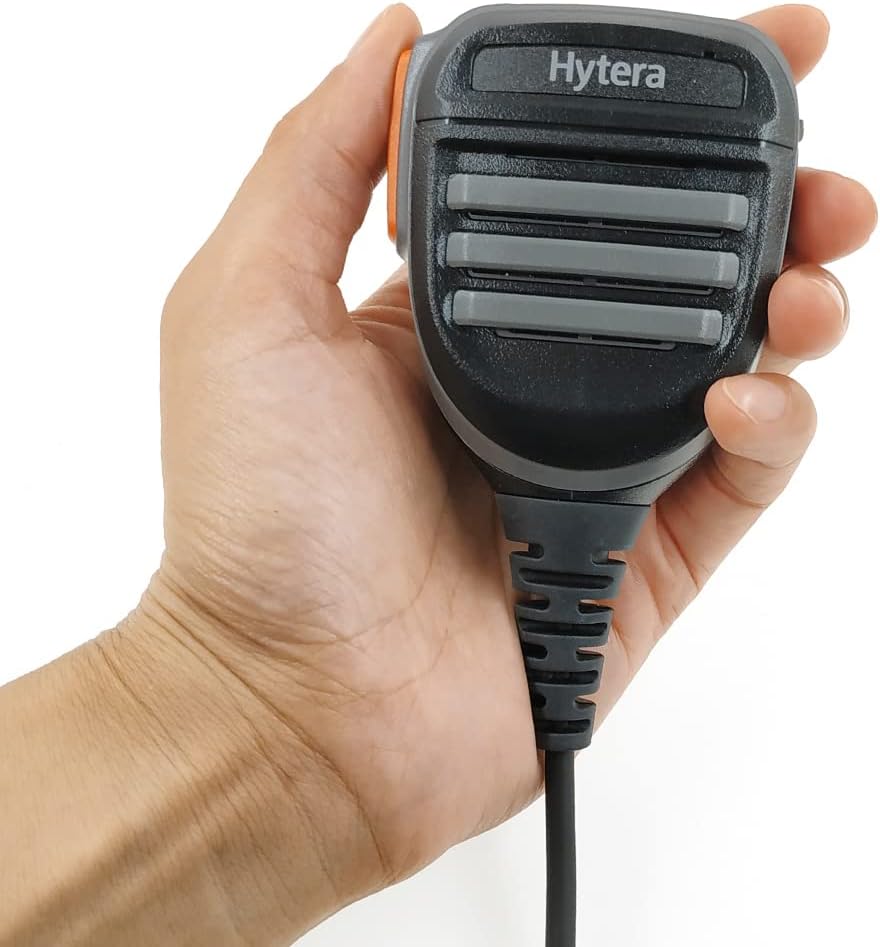
Figure 2.2: A hand holding the speaker microphone, illustrating its ergonomic design and compact size.
3. ഘടകങ്ങൾ
- Speaker/Microphone Unit: Main body for audio input and output.
- പുഷ്-ടു-ടോക്ക് (PTT) ബട്ടൺ: Located on the side for transmitting.
- 360-Degree Swivel Clip: For attaching the unit to clothing or gear.
- Retractable Coil Cord: Connects the speaker microphone to the radio.
- 2-പിൻ കണക്റ്റർ: For connecting to compatible two-way radios.
- 3.5mm ഓഡിയോ ജാക്ക്: For connecting an external earpiece (not included).

ചിത്രം 3.1: വശം view of the speaker microphone, highlighting the Push-to-Talk (PTT) button and the 3.5mm audio jack for an earpiece.

ചിത്രം 3.2: പിൻഭാഗം view of the speaker microphone, displaying the robust 360-degree rotatable swivel clip for secure attachment.
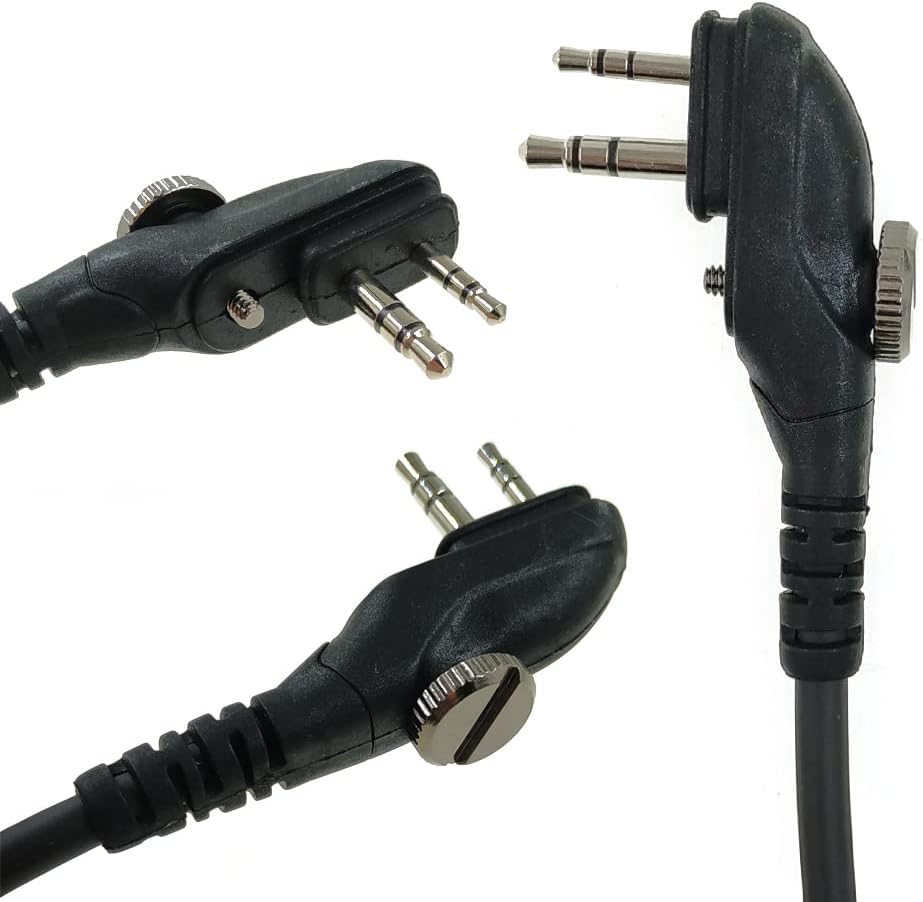
ചിത്രം 3.3: വിശദമായി view of the 2-pin connector, designed for compatibility with specific Hytera two-way radio models.
4. സജ്ജീകരണ നിർദ്ദേശങ്ങൾ
- Identify Radio Connector: Ensure your Hytera two-way radio has a compatible 2-pin accessory port.
- സ്പീക്കർ മൈക്രോഫോൺ ബന്ധിപ്പിക്കുക: Carefully align the 2-pin connector of the speaker microphone with the accessory port on your radio. Push firmly until it is securely seated. Some connectors may have a screw to further secure the connection; tighten if applicable.
- ക്ലിപ്പ് സുരക്ഷിതമാക്കുക: Attach the 360-degree swivel clip to your lapel, collar, or other convenient location on your clothing or gear. Adjust the angle for optimal comfort and accessibility.
- Optional Earpiece Connection: If using an external earpiece (not included), plug its 3.5mm jack into the audio port on the side of the speaker microphone.

Figure 4.1: The speaker microphone shown with its packaging and a small instruction manual, indicating the product's presentation.
5. പ്രവർത്തന നിർദ്ദേശങ്ങൾ
- ഓഡിയോ സ്വീകരിക്കുന്നു: Once connected, audio from your radio will be routed through the speaker microphone's integrated speaker. Adjust the radio's volume for comfortable listening.
- Transmitting Audio (Push-to-Talk): To transmit, press and hold the PTT button located on the side of the speaker microphone. Speak clearly into the microphone. Release the PTT button to return to receive mode.
- Using an Earpiece: If an earpiece is connected to the 3.5mm audio jack, audio will be directed to the earpiece for private listening, bypassing the main speaker.
6. സവിശേഷതകൾ
- IP54 റേറ്റിംഗ്: Provides protection against dust ingress and splashing water from any direction, making it suitable for various outdoor and challenging environments.
- Retractable Coil Cord: Offers flexibility and prevents tangling, extending as needed for comfortable use and retracting for compact storage.
- 360-Degree Swivel Clip: Allows for versatile attachment to clothing or gear, ensuring the microphone can be positioned optimally for communication.
- എളുപ്പമുള്ള പ്രവർത്തനം: Designed for ease of use, enabling transmission and reception without needing to handle the main radio unit.
7 അനുയോജ്യത
The ANYSECU HYT SM26M1 Portable Speaker Microphone is compatible with the following Hytera two-way radio models:
- ഹൈറ്റെറ ടിസി-600
- ഹൈറ്റെറ ടിസി-610
- ഹൈറ്റെറ ടിസി-620
- ഹൈറ്റെറ ടിസി-700
- ഹൈറ്റെറ ടിസി-580
- ഹൈറ്റെറ ടിസി-518
- ഹൈറ്റെറ ടിസി-618
- ഹൈറ്റെറ BD500
- Hytera TD500
- Hytera TD560
- Hytera PD530
8 സ്പെസിഫിക്കേഷനുകൾ
| ഫീച്ചർ | വിശദാംശങ്ങൾ |
|---|---|
| മോഡൽ നമ്പർ | SM08M3 (also referred to as SM26M1) |
| ബ്രാൻഡ് | ANYSECU |
| അളവുകൾ (L x W x H) | 1.34 x 2.38 x 1.34 ഇഞ്ച് (34 x 60.5 x 34 മിമി) |
| ഇനത്തിൻ്റെ ഭാരം | 5.6 ഔൺസ് (160 ഗ്രാം) |
| മെറ്റീരിയൽ | Metal (internal components), Durable Plastic (housing) |
| മൈക്രോഫോൺ ഫോം ഫാക്ടർ | ലാവലിയർ |
| ഓഡിയോ സെൻസിറ്റിവിറ്റി | 42 ഡെസിബെൽ |
| പ്രതിരോധം | 600 ഓം |
| സിഗ്നൽ-ടു-നോയിസ് അനുപാതം | 58 ഡി.ബി |
| ഫ്രീക്വൻസി പ്രതികരണം | 20 KHz |
| കണക്റ്റിവിറ്റി ടെക്നോളജി | XLR (referring to the 2-pin connector type) |
| പ്രത്യേക ഫീച്ചർ | Clip (360-degree swivel) |
| പവർ ഉറവിടം | കോർഡഡ് ഇലക്ട്രിക് (റേഡിയോ ഉപയോഗിച്ച് പ്രവർത്തിപ്പിക്കുന്നത്) |
| ഉൾപ്പെടുത്തിയ ഘടകങ്ങൾ | Microphone, Holder, Screw |
| IP റേറ്റിംഗ് | IP54 |
9. പരിപാലനവും പരിചരണവും
- വൃത്തിയാക്കൽ: Wipe the speaker microphone with a soft, damp തുണി. കഠിനമായ രാസവസ്തുക്കളോ ഉരച്ചിലുകളുള്ള ക്ലീനറുകളോ ഉപയോഗിക്കുന്നത് ഒഴിവാക്കുക.
- സംഭരണം: Store the unit in a dry, cool place away from direct sunlight and extreme temperatures when not in use.
- ചരട് പരിചരണം: Avoid excessive pulling or twisting of the coiled cord to prevent damage.
- കണക്റ്റർ സംരക്ഷണം: Keep the 2-pin connector clean and free from debris to ensure a reliable connection.
10. പ്രശ്നപരിഹാരം
- സ്പീക്കറിൽ നിന്ന് ഓഡിയോ ഇല്ല:
- Ensure the speaker microphone is securely connected to the radio.
- റേഡിയോയുടെ വോളിയം ലെവൽ പരിശോധിക്കുക.
- If an earpiece is connected, audio will be routed there; disconnect the earpiece to use the main speaker.
- സംപ്രേഷണം ചെയ്യാൻ കഴിയില്ല:
- Verify the 2-pin connector is fully inserted and secured.
- Ensure the PTT button is being pressed firmly.
- Check the radio's battery level.
- ഇടവിട്ടുള്ള കണക്ഷൻ:
- Inspect the connector pins for any bends or damage.
- Clean the connector and the radio's accessory port.
11. വാറൻ്റിയും പിന്തുണയും
ഈ ഉൽപ്പന്നം എ 1 വർഷത്തെ വാറൻ്റി from the manufacturer, Hytera. For technical support, warranty claims, or further assistance, please refer to the contact information provided with your product packaging or visit the official Hytera webസൈറ്റ്.