
SHARP LC-40U45
SHARP AQUOS LC-40U45 40-inch 4K HDR LCD TV User Manual
Model: LC-40U45 | Brand: SHARP
1. ആമുഖം
This manual provides essential information for the safe and efficient operation of your SHARP AQUOS LC-40U45 40-inch 4K HDR LCD TV. Please read these instructions thoroughly before using the product and retain them for future reference.
The LC-40U45 features a 4K low-reflection panel to minimize glare, 120-speed backlight technology for smooth motion, and the AQUOS 4K-Master Engine PRO II for high-definition image processing. Experience enhanced audio with the bass-reflex speaker box, Sound by ONKYO collaboration, and Eilex PRISM technology. The TV also includes a swivel stand for flexible viewകോണുകൾ.
2 സുരക്ഷാ വിവരങ്ങൾ
തീ, വൈദ്യുതാഘാതം, പരിക്കുകൾ എന്നിവ കുറയ്ക്കുന്നതിന് ഈ ടെലിവിഷൻ ഉപയോഗിക്കുമ്പോൾ എല്ലായ്പ്പോഴും അടിസ്ഥാന സുരക്ഷാ മുൻകരുതലുകൾ പാലിക്കുക.
- മഴയോ ഈർപ്പമോ ടിവിയെ തുറന്നുകാട്ടരുത്.
- വെന്റിലേഷൻ തുറക്കൽ തടയരുത്.
- പവർ പ്ലഗിന്റെ ശരിയായ ഗ്രൗണ്ടിംഗ് ഉറപ്പാക്കുക.
- ഇടിമിന്നൽ ഉണ്ടാകുമ്പോഴോ ദീർഘനേരം ഉപയോഗിക്കാതിരിക്കുമ്പോഴോ ടിവി പ്ലഗ് ഊരിവയ്ക്കുക.
- ചെറിയ ഭാഗങ്ങളും ബാറ്ററികളും കുട്ടികൾക്ക് ലഭ്യമാകാതെ സൂക്ഷിക്കുക.
3. ബോക്സിൽ എന്താണുള്ളത്?
നിങ്ങളുടെ ടെലിവിഷനിൽ ഇനിപ്പറയുന്ന എല്ലാ ഇനങ്ങളും ഉൾപ്പെടുത്തിയിട്ടുണ്ടെന്ന് ഉറപ്പാക്കുക:
- SHARP AQUOS LC-40U45 4K HDR LCD TV
- റിമോട്ട് കൺട്രോൾ (2 AAA ബാറ്ററികൾ ഉള്ളത്)
- പവർ കോർഡ്
- ടേബിൾ-ടോപ്പ് സ്റ്റാൻഡ് (ബാധകമെങ്കിൽ)
- AV Terminal Conversion Cable
- ഉപയോക്തൃ മാനുവൽ (ഈ പ്രമാണം)
4. സജ്ജീകരണം
4.1 Physical Placement and Dimensions
Ensure the TV is placed on a stable surface or mounted securely. The dimensions of the TV with the stand are approximately 90.1 cm (width) x 27.1 cm (depth) x 55.8 cm (height). The weight is approximately 20.5 kg.

Figure 4.1: TV dimensions (Width: 90.1cm, Height: 55.8cm, Depth: 27.1cm) and recommended viewing distance of approximately 150cm.
4.2 പെരിഫറലുകൾ ബന്ധിപ്പിക്കുന്നു
Your TV offers various connection ports on the rear panel for external devices.

Figure 4.2: Rear panel connections including HDMI inputs, USB ports, headphone jack, AV input, LAN port, and antenna inputs.
- HDMI ഇൻപുട്ടുകൾ (x4): Connect Blu-ray players, game consoles, or other HDMI-compatible devices. Input 1 supports HDR.
- യുഎസ്ബി പോർട്ടുകൾ (x2): Connect USB storage devices for media playback or external HDD for recording.
- PC Input (x1): ഒരു കമ്പ്യൂട്ടർ ബന്ധിപ്പിക്കുക.
- LAN Port (10BASE-T/100BASE-TX): വയർഡ് ഇന്റർനെറ്റ് കണക്ഷന്.
- Headphone Jack (3.5mm stereo mini-jack): സ്വകാര്യ ശ്രവണത്തിനായി.
- AV ഇൻപുട്ട്: Use the provided AV terminal conversion cable for older devices.
- ആൻ്റിന ഇൻപുട്ടുകൾ: Connect terrestrial digital and BS/CS digital antennas.
- B-CAS Card Slot: Insert the B-CAS card to decrypt digital broadcasts.
4.3 നെറ്റ്വർക്ക് കണക്ഷൻ
The TV supports both wired and wireless (Wi-Fi) network connections. Built-in Wi-Fi allows for easy connection to your home network.
4.4 Swivel Stand
The TV features a swivel stand that allows you to adjust the screen angle left and right by 30 degrees. This provides flexibility for optimal viewing from various positions in the room and makes accessing rear ports easier for cleaning or connecting devices.

Figure 4.3: The swivel stand allows for 30-degree left/right adjustment, simplifying cleaning and access to rear connections.
5. നിങ്ങളുടെ ടിവി പ്രവർത്തിപ്പിക്കുന്നു
5.1 വിദൂര നിയന്ത്രണ പ്രവർത്തനങ്ങൾ
Use the provided remote control to navigate menus, change channels, adjust volume, and access smart TV features. The remote includes dedicated buttons for popular streaming services.
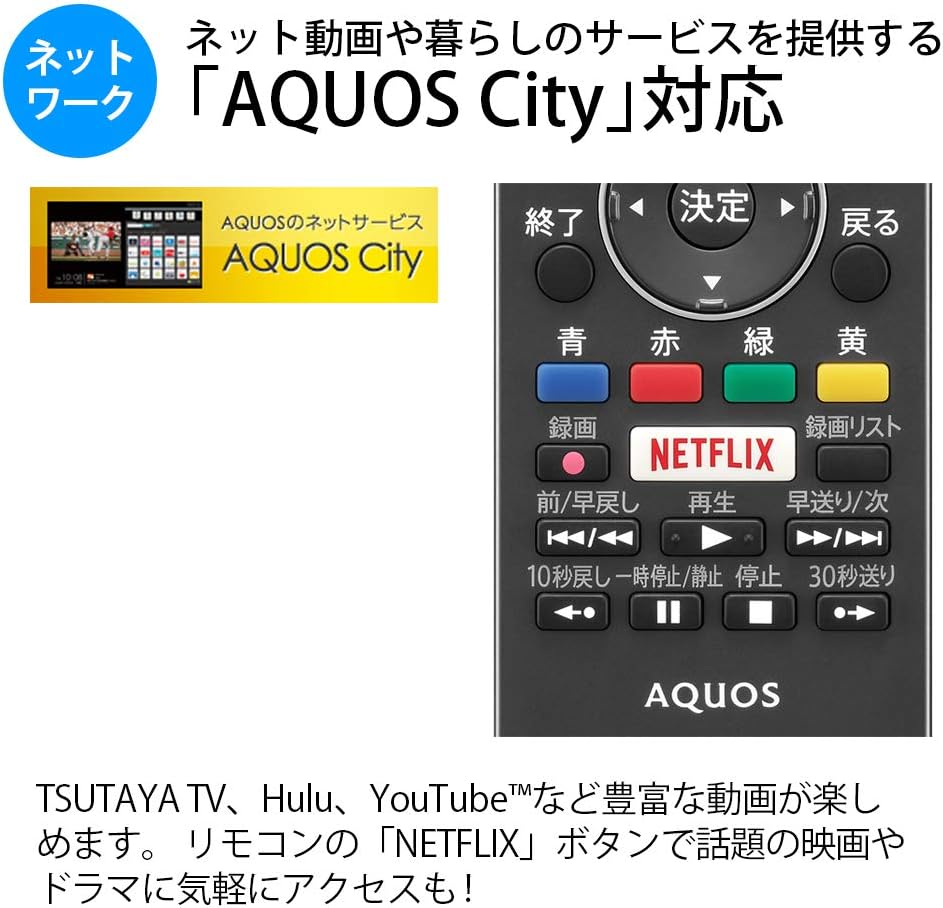
Figure 5.1: Remote control with a dedicated Netflix button and a view of the AQUOS City interface.
5.2 Smart TV Features (AQUOS City)
Your AQUOS TV supports "AQUOS City," providing access to various internet video services and lifestyle applications. Enjoy streaming content from platforms like NETFLIX, YouTube, Hulu, and TSUTAYA TV. Simply press the dedicated "NETFLIX" button on your remote for quick access.
5.3 4K Image Processing
The AQUOS 4K-Master Engine PRO II is a high-definition image processing circuit specifically designed for 4K LCD panels. It reduces noise and enhances contrast for a more immersive 4K viewഅനുഭവം.

Figure 5.2: The AQUOS 4K-Master Engine PRO II enhances 4K images by reducing noise and improving contrast.
5.4 ഓഡിയോ സവിശേഷതകൾ
The TV is equipped with a bass-reflex type speaker box, developed in collaboration with ONKYO, to deliver high-quality sound with enhanced high-frequency pressure and rich bass. Eilex PRISM technology expands the listening position and creates a sense of audio depth.

Figure 5.3: Illustration of the bass-reflex speaker box, designed for superior sound quality.
5.5 Low-Reflection Panel
The 4K low-reflection panel minimizes reflections from room lighting and external light sources, ensuring clear and comfortable viewing even in bright environments.

Figure 5.4: Visual comparison demonstrating how the low-reflection panel reduces glare compared to a conventional LCD panel.
5.6 Video Mirroring (Fire TV)
You can mirror your smartphone screen to the TV using Fire TV mirroring. This allows you to display photos, videos, or smartphone apps on the large TV screen. To use this feature, connect a Fire TV device to one of the TV's HDMI ports and ensure both devices are on the same Wi-Fi network. Refer to your Fire TV device's manual for specific mirroring instructions.
6. പരിപാലനം
നിങ്ങളുടെ ടിവിയുടെ ദീർഘായുസ്സും മികച്ച പ്രകടനവും ഉറപ്പാക്കാൻ, ഈ പരിപാലന മാർഗ്ഗനിർദ്ദേശങ്ങൾ പാലിക്കുക:
- സ്ക്രീൻ വൃത്തിയാക്കൽ: മൃദുവായ, ലിന്റ് രഹിത തുണി ഉപയോഗിച്ച് സ്ക്രീൻ സൌമ്യമായി തുടയ്ക്കുക. കഠിനമായ പാടുകൾക്ക്, ചെറുതായി dampതുണിയിൽ വെള്ളം അല്ലെങ്കിൽ ഒരു പ്രത്യേക സ്ക്രീൻ ക്ലീനർ ഉപയോഗിക്കുക. സ്ക്രീനിലേക്ക് നേരിട്ട് ദ്രാവകം സ്പ്രേ ചെയ്യരുത്.
- കാബിനറ്റ് വൃത്തിയാക്കൽ: ടിവി കാബിനറ്റ് തുടയ്ക്കാൻ മൃദുവായതും ഉണങ്ങിയതുമായ തുണി ഉപയോഗിക്കുക. അബ്രസീവ് ക്ലീനറുകളോ ലായകങ്ങളോ ഉപയോഗിക്കുന്നത് ഒഴിവാക്കുക.
- വെൻ്റിലേഷൻ: ടിവിയിലെ വെന്റിലേഷൻ ഓപ്പണിംഗുകൾ അമിതമായി ചൂടാകുന്നത് തടയാൻ അടഞ്ഞിട്ടില്ലെന്ന് ഉറപ്പാക്കുക.
- പവർ കോർഡ്: പവർ കോർഡിന് എന്തെങ്കിലും കേടുപാടുകൾ സംഭവിച്ചിട്ടുണ്ടോ എന്ന് പതിവായി പരിശോധിക്കുക. കേടുപാടുകൾ സംഭവിച്ചാൽ, യോഗ്യതയുള്ള സേവന ഉദ്യോഗസ്ഥരെ ബന്ധപ്പെടുക.
7. പ്രശ്നപരിഹാരം
നിങ്ങളുടെ ടിവിയിൽ പ്രശ്നങ്ങൾ നേരിടുകയാണെങ്കിൽ, ഇനിപ്പറയുന്ന പൊതുവായ പ്രശ്നങ്ങളും പരിഹാരങ്ങളും പരിശോധിക്കുക:
| പ്രശ്നം | സാധ്യമായ കാരണം / പരിഹാരം |
|---|---|
| ശക്തിയില്ല | Check if the power cord is securely plugged into the TV and the wall outlet. Press the power button on the remote or TV. |
| ചിത്രമില്ല, പക്ഷേ ശബ്ദം ഉണ്ട് | ശരിയായ ഇൻപുട്ട് ഉറവിടം തിരഞ്ഞെടുത്തിട്ടുണ്ടെന്ന് ഉറപ്പാക്കുക. ബാഹ്യ ഉപകരണങ്ങളിലേക്കുള്ള കേബിൾ കണക്ഷനുകൾ പരിശോധിക്കുക. |
| ശബ്ദമില്ല, പക്ഷേ ചിത്രം ഉണ്ട് | Check volume level and mute status. Ensure audio cables are correctly connected. |
| റിമോട്ട് കൺട്രോൾ പ്രവർത്തിക്കുന്നില്ല | ബാറ്ററികൾ മാറ്റിസ്ഥാപിക്കുക. റിമോട്ടിനും ടിവിയുടെ ഐആർ സെൻസറിനും ഇടയിൽ തടസ്സങ്ങളൊന്നുമില്ലെന്ന് ഉറപ്പാക്കുക. |
| Wi-Fi-യിലേക്ക് കണക്റ്റുചെയ്യാൻ കഴിയില്ല | Check your Wi-Fi router and network settings. Ensure the TV is within range of the router. |
8 സ്പെസിഫിക്കേഷനുകൾ
| ഫീച്ചർ | സ്പെസിഫിക്കേഷൻ |
|---|---|
| സ്ക്രീൻ വലിപ്പം | 40 ഇഞ്ച് |
| ഡിസ്പ്ലേ ടെക്നോളജി | എൽസിഡി |
| റെസലൂഷൻ | 3840 x 2160 (4K) |
| HDR പിന്തുണ | HDR compatible (HDMI Input 1) |
| പുതുക്കിയ നിരക്ക് | 120 Hz (120 Speed backlight technology) |
| ട്യൂണറുകൾ | Terrestrial Digital x3, BS/CS Digital x3 |
| ഓഡിയോ ഔട്ട്പുട്ട് | 20W (10W + 10W) |
| സ്പീക്കർ സവിശേഷതകൾ | Bass-reflex type, Sound by ONKYO, Eilex PRISM |
| HDMI പോർട്ടുകൾ | 4 |
| USB പോർട്ടുകൾ | 2 (USB-HDD recording compatible) |
| പിസി ഇൻപുട്ട് | 1 |
| നെറ്റ്വർക്ക് കണക്റ്റിവിറ്റി | Wi-Fi built-in, LAN port |
| വയർലെസ് തരം | Bluetooth, Wi-Fi, Miracast |
| വൈദ്യുതി ഉപഭോഗം | Approx. 106W (Annual: 96Kwh/year) |
| അളവുകൾ (W x D x H) | 90.1 x 27.1 x 55.8 സെ.മീ (സ്റ്റാൻഡോടുകൂടി) |
| ഭാരം | 20.5 കി.ഗ്രാം |
| VESA മൗണ്ട് സ്റ്റാൻഡേർഡ് | 600 x 400 മി.മീ |
| Recommended Network Services | NETFLIX, YouTube, Hikari TV 4K, Hulu, TSUTAYA TV |
9. വാറൻ്റിയും പിന്തുണയും
വാറന്റി വിവരങ്ങൾക്ക്, നിങ്ങളുടെ ഉൽപ്പന്നത്തിനൊപ്പം ഉൾപ്പെടുത്തിയിരിക്കുന്ന വാറന്റി കാർഡ് പരിശോധിക്കുക അല്ലെങ്കിൽ ഔദ്യോഗിക SHARP സന്ദർശിക്കുക. website. For technical support, troubleshooting assistance, or service requests, please contact SHARP customer service. Contact details can be found on the official SHARP webസൈറ്റ് അല്ലെങ്കിൽ നിങ്ങളുടെ ഉൽപ്പന്ന ഡോക്യുമെന്റേഷനിൽ.
Ask a question about this manual
Ask about setup, troubleshooting, compatibility, parts, safety, or missing instructions. Manuals+ will review the question and use this page’s manual context to help answer it.