
1. ആമുഖം
Thank you for choosing the BBC Jadel K100 Gaming Keyboard. This manual provides essential information for setting up, operating, maintaining, and troubleshooting your new keyboard. The Jadel K100 is designed for gaming, office, and daily home use, featuring multimedia keys and a mechanical suspension design for a responsive typing experience.
Please read this manual thoroughly before using the product to ensure proper function and longevity.
2. പാക്കേജ് ഉള്ളടക്കം
പായ്ക്ക് അൺപാക്ക് ചെയ്യുമ്പോൾ, എല്ലാ ഇനങ്ങളും ഉണ്ടെന്ന് ഉറപ്പാക്കുക:
- BBC Jadel K100 Gaming Keyboard
- ഉപയോക്തൃ മാനുവൽ (ഈ പ്രമാണം)
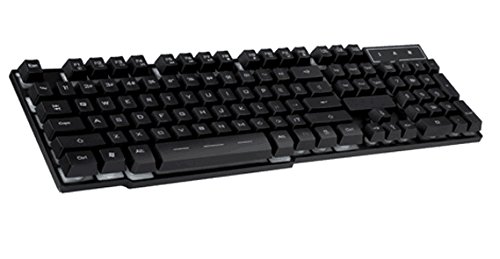
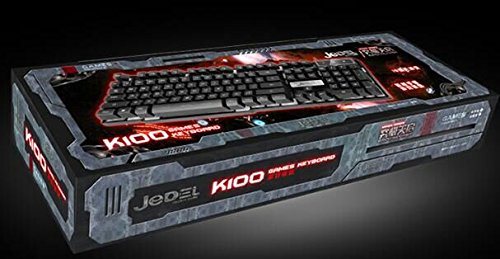
Image 1: The BBC Jadel K100 Gaming Keyboard, showcasing അതിന്റെ രൂപകൽപ്പനയും പാക്കേജിംഗും.
3. സജ്ജീകരണം
Follow these steps to connect your BBC Jadel K100 Gaming Keyboard to your computer:
- കീബോർഡ് അൺപാക്ക് ചെയ്യുക: കീബോർഡ് അതിന്റെ പാക്കേജിംഗിൽ നിന്ന് ശ്രദ്ധാപൂർവ്വം നീക്കം ചെയ്യുക.
- കമ്പ്യൂട്ടറുമായി ബന്ധിപ്പിക്കുക: Locate an available USB port on your laptop or desktop computer. Insert the USB connector of the keyboard firmly into the USB port.
- ഡ്രൈവർ ഇൻസ്റ്റാളേഷൻ: The keyboard is plug-and-play. Your operating system (Windows, macOS, Linux) should automatically detect and install the necessary drivers. This process may take a few moments.
- കണക്ഷൻ സ്ഥിരീകരിക്കുക: Once drivers are installed, the keyboard should be ready for use. Test by typing in a text editor or browser.
കുറിപ്പ്: This keyboard is compatible with laptops and desktop computers running standard operating systems.
4. പ്രവർത്തന നിർദ്ദേശങ്ങൾ
The Jadel K100 keyboard features a standard 104-key layout, including a numeric keypad and function keys. It also incorporates multimedia functions accessible via the FN താക്കോൽ.
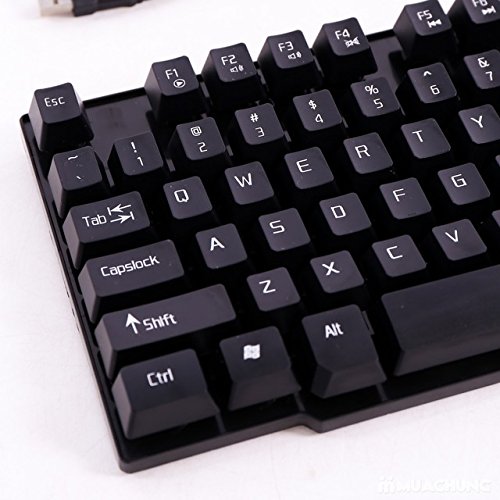
ചിത്രം 2: ക്ലോസ്-അപ്പ് view of the BBC Jadel K100 keyboard's main keys, including Esc, Tab, Caps Lock, Shift, Ctrl, and Alt.
4.1. Standard Key Functions
All standard alphanumeric, symbol, and navigation keys operate as expected on a typical keyboard.
4.2. Multimedia Functions (FN Key)
The Jadel K100 includes an FN (Function) key, similar to those found on laptops, to access multimedia controls. To use these functions, press and hold the FN key, then press the corresponding function key (F1-F12) or other designated keys.
Common multimedia functions typically include:
- എഫ്എൻ + എഫ്1-എഫ്12: Control media playback (play/pause, stop, previous/next track), volume (mute, volume up/down), and other system functions (e.g., open default browser, email client, calculator). Refer to the keycap legends for specific functions.
ചിത്രം 3: വിശദമായത് view of the BBC Jadel K100 keyboard's F-keys, which often include multimedia shortcuts when combined with the FN key.
4.3. ഗെയിമിംഗ് അനുഭവം
The mechanical suspension design provides a tactile and responsive feel, enhancing the gaming experience. The keyboard is designed for durability and comfort during extended gaming sessions.
5. പരിപാലനം
ശരിയായ അറ്റകുറ്റപ്പണി നിങ്ങളുടെ കീബോർഡിന്റെ ദീർഘായുസ്സും മികച്ച പ്രകടനവും ഉറപ്പാക്കുന്നു.
- വൃത്തിയാക്കൽ:
- വൃത്തിയാക്കുന്നതിനുമുമ്പ് നിങ്ങളുടെ കമ്പ്യൂട്ടറിൽ നിന്ന് കീബോർഡ് വിച്ഛേദിക്കുക.
- മൃദുവായ, ലിൻ്റ് രഹിത തുണി ഉപയോഗിക്കുകampകീക്യാപ്പുകളും പ്രതലവും തുടയ്ക്കാൻ വെള്ളമോ നേരിയ ക്ലീനിംഗ് ലായനിയോ ഉപയോഗിച്ച് നനയ്ക്കുക.
- താക്കോലുകൾക്കിടയിലുള്ള പൊടിയും അവശിഷ്ടങ്ങളും ഒഴിവാക്കാൻ, കംപ്രസ് ചെയ്ത വായു ഉപയോഗിക്കുക.
- കഠിനമായ രാസവസ്തുക്കൾ, അബ്രസീവ് ക്ലീനറുകൾ, അല്ലെങ്കിൽ കീബോർഡിലേക്ക് നേരിട്ട് ദ്രാവകങ്ങൾ തളിക്കുന്നത് ഒഴിവാക്കുക.
- സംഭരണം: ദീർഘനേരം ഉപയോഗിക്കാത്തപ്പോൾ, നേരിട്ടുള്ള സൂര്യപ്രകാശത്തിൽ നിന്നും കടുത്ത താപനിലയിൽ നിന്നും അകന്ന്, തണുത്തതും വരണ്ടതുമായ സ്ഥലത്ത് കീബോർഡ് സൂക്ഷിക്കുക.
- കൈകാര്യം ചെയ്യൽ: Avoid dropping the keyboard or exposing it to excessive force, which can damage internal components or key mechanisms.
6. പ്രശ്നപരിഹാരം
If you encounter issues with your BBC Jadel K100 keyboard, refer to the following common problems and solutions:
| പ്രശ്നം | സാധ്യമായ കാരണം | പരിഹാരം |
|---|---|---|
| കീബോർഡ് പ്രതികരിക്കുന്നില്ല | അയഞ്ഞ യുഎസ്ബി കണക്ഷൻ, തകരാറുള്ള യുഎസ്ബി പോർട്ട്, ഡ്രൈവർ പ്രശ്നം. |
|
| പ്രത്യേക കീകൾ പ്രവർത്തിക്കുന്നില്ല | Debris under keycap, physical damage, software conflict. |
|
| മൾട്ടിമീഡിയ കീകൾ പ്രവർത്തിക്കുന്നില്ല. | Incorrect usage of FN key, software conflict. |
|
7 സ്പെസിഫിക്കേഷനുകൾ
| ഫീച്ചർ | വിശദാംശങ്ങൾ |
|---|---|
| ബ്രാൻഡ് | ബിബിസി |
| മോഡൽ നമ്പർ | Jadel K100 |
| കീബോർഡ് വിവരണം | ഗെയിമിംഗ് |
| കീകളുടെ എണ്ണം | 104 |
| കീ തരം | മെക്കാനിക്കൽ സസ്പെൻഷൻ |
| നിറം | കറുപ്പ് |
| അനുയോജ്യമായ ഉപകരണങ്ങൾ | ലാപ്ടോപ്പ്, ഡെസ്ക്ടോപ്പ് പിസി |
| കണക്റ്റിവിറ്റി | USB |
| ശൈലി | ആധുനികം |
| കൈ ഓറിയൻ്റേഷൻ | ഉഭയകക്ഷി |
| നിർമ്മാതാവ് | bbc |
8. വാറൻ്റിയും പിന്തുണയും
Specific warranty details for the BBC Jadel K100 Gaming Keyboard are not provided in this manual. For warranty information, please refer to the product packaging or contact your retailer at the point of purchase.
For technical support or further assistance, please contact the manufacturer or your retailer. Keep your purchase receipt as proof of purchase for any warranty claims.