
1. ഉൽപ്പന്നം കഴിഞ്ഞുview
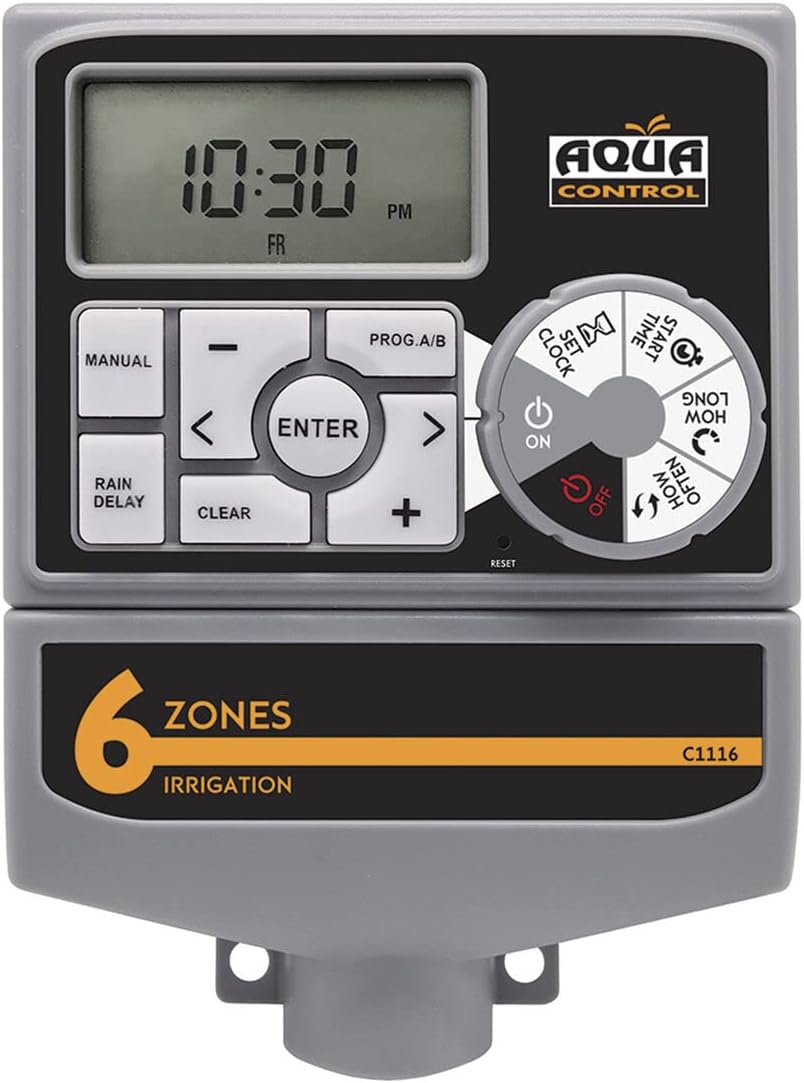
The Aqua Control C1116 is an automatic irrigation programmer designed to manage your garden watering system efficiently. It controls the opening and closing of solenoid valves, allowing for automated and precise irrigation across multiple zones. Featuring an intuitive dial and a large LCD screen, programming is straightforward, ensuring your plants receive optimal hydration.
2 പ്രധാന സവിശേഷതകൾ
- Multi-Zone Control: Manages 1 to 6 independent irrigation zones by controlling solenoid valves.
- ഉപയോക്തൃ-സൗഹൃദ ഇൻ്റർഫേസ്: Easy programming via a rotary dial and a large, clear LCD screen.
- ഫ്ലെക്സിബിൾ നനവ് ഷെഡ്യൂളുകൾ: Supports manual or automatic irrigation, with watering times adjustable from 1 minute up to 4 hours.
- വൈദ്യുതി വിതരണം: Operates with an included transformer and requires 2 AA alkaline batteries (not included) for backup.
- Pump/Master Valve Support: Equipped with a connector for a pump start or master valve.
- മഴ സെൻസർ അനുയോജ്യത: Includes a connector for an external rain sensor to prevent unnecessary watering.
- മഴ വൈകൽ പ്രവർത്തനം: Allows delaying irrigation for up to 72 hours, useful during rainy periods or other factors.
3. പാക്കേജ് ഉള്ളടക്കം
പാക്കേജിൽ എല്ലാ ഇനങ്ങളും ഉണ്ടെന്ന് ഉറപ്പാക്കുക:
- Aqua Control C1116 Irrigation Programmer
- പവർ ട്രാൻസ്ഫോർമർ
- ഉപയോക്തൃ മാനുവൽ

4. സജ്ജീകരണം
4.1. ബാറ്ററി ഇൻസ്റ്റാളേഷൻ
The programmer requires 2 AA alkaline batteries (not included) for memory backup and to maintain settings during power outages. Ensure correct polarity when inserting batteries.
- Locate the battery compartment on the back of the programmer.
- ബാറ്ററി കമ്പാർട്ട്മെൻ്റ് കവർ തുറക്കുക.
- Insert 2 new AA alkaline batteries, observing the correct (+) and (-) polarity markings.
- ബാറ്ററി കമ്പാർട്ട്മെൻ്റ് കവർ സുരക്ഷിതമായി അടയ്ക്കുക.

4.2. മൗണ്ടിംഗും വയറിംഗും
Mount the programmer in a location protected from direct sunlight and extreme weather conditions. Connect the transformer and solenoid valves as per the wiring diagram.
- Securely mount the programmer to a wall or suitable surface using appropriate fasteners.
- Connect the included transformer to the designated power input on the programmer.
- Connect your solenoid valves to the corresponding zone terminals (1-6) on the programmer. Ensure the common wire from all valves is connected to the 'C' terminal.
- If using a pump start relay or master valve, connect it to the 'M' terminal.
- If using a rain sensor, connect it to the designated rain sensor terminals.
5. പ്രവർത്തന നിർദ്ദേശങ്ങൾ
The C1116 programmer features a large LCD screen and a rotary dial for easy navigation and programming. Refer to the diagram below for button and dial functions.

5.1. നിലവിലെ സമയവും തീയതിയും ക്രമീകരിക്കുന്നു
- ഡയൽ ഇതിലേക്ക് തിരിക്കുക ക്ലോക്ക് സജ്ജമാക്കുക.
- ഉപയോഗിക്കുക + ഒപ്പം - buttons to adjust the current hour, then press പ്രവേശിക്കുക.
- Repeat for minutes, day, and year.
- ഡയൽ ഇതിലേക്ക് തിരിക്കുക ON സംരക്ഷിക്കാനും പുറത്തുകടക്കാനും.
5.2. Programming Irrigation Zones
The programmer allows for up to 6 independent zones. Each zone can have its own start times, duration, and frequency.
- ഡയൽ ഇതിലേക്ക് തിരിക്കുക സമയം ആരംഭിക്കുക. ഉപയോഗിക്കുക + ഒപ്പം - to set the desired start time for the first watering cycle, then press പ്രവേശിക്കുക. You can set multiple start times per day.
- ഡയൽ ഇതിലേക്ക് തിരിക്കുക എത്രകാലം. ഉപയോഗിക്കുക + ഒപ്പം - to set the watering duration (from 1 minute to 4 hours) for each zone, then press പ്രവേശിക്കുക.
- ഡയൽ ഇതിലേക്ക് തിരിക്കുക എത്ര ഇട്ടവിട്ട്. ഉപയോഗിക്കുക + ഒപ്പം - to set the watering frequency (e.g., every 12 hours, every 24 hours, specific days of the week), then press പ്രവേശിക്കുക.
- Repeat steps for each zone (1-6) you wish to program.
- ഡയൽ ഇതിലേക്ക് തിരിക്കുക ON to activate the programmed schedule.
5.3. മാനുവൽ പ്രവർത്തനം
To manually water a zone outside of the programmed schedule:
- അമർത്തുക മാനുവൽ ബട്ടൺ.
- ഉപയോഗിക്കുക + ഒപ്പം - to select the desired zone and watering duration.
- അമർത്തുക പ്രവേശിക്കുക മാനുവൽ നനവ് ആരംഭിക്കാൻ.
- കൈകൊണ്ട് നനയ്ക്കുന്നത് നിർത്താൻ, അമർത്തുക മാനുവൽ again or wait for the duration to complete.
5.4. മഴ വൈകൽ പ്രവർത്തനം
The Rain Delay function allows you to temporarily suspend the watering schedule for a set period (0, 24, 48, or 72 hours) without losing your programmed settings.
- അമർത്തുക മഴ കാലതാമസം ബട്ടൺ.
- ഉപയോഗിക്കുക + ഒപ്പം - to select the desired delay duration (24, 48, or 72 hours).
- അമർത്തുക പ്രവേശിക്കുക to activate the delay. The display will show the remaining delay time.
- To cancel the delay, press മഴ കാലതാമസം again and set the duration to 0, then press പ്രവേശിക്കുക.
5.5. Turning Off Irrigation
To completely turn off all irrigation:
- ഡയൽ ഇതിലേക്ക് തിരിക്കുക ഓഫ്. This will suspend all programmed watering cycles.
- To resume, turn the dial back to ON.
6. പരിപാലനം
- ബാറ്ററി മാറ്റിസ്ഥാപിക്കൽ: Replace AA alkaline batteries annually or when the low battery indicator appears on the LCD screen.
- വൃത്തിയാക്കൽ: Clean the exterior of the programmer with a soft, damp തുണി. ഉരച്ചിലുകളുള്ള ക്ലീനറുകളോ ലായകങ്ങളോ ഉപയോഗിക്കരുത്.
- ശീതകാലം: In freezing climates, disconnect the programmer from the power supply and remove batteries. Store indoors in a dry, frost-free location.
7. പ്രശ്നപരിഹാരം
| പ്രശ്നം | സാധ്യമായ കാരണം | പരിഹാരം |
|---|---|---|
| Programmer not turning on/LCD blank | No power from transformer; dead batteries. | Check transformer connection and power outlet. Replace AA batteries. |
| Zones not watering | Programmer is OFF; incorrect programming; solenoid valve issue; rain sensor active. | Turn dial to ON. Verify program settings (start time, duration, frequency). Check solenoid valve wiring and function. Check rain sensor status. |
| Watering at wrong times | Incorrect current time/date; incorrect start times. | Adjust current time/date. Review and correct start times for each zone. |
| Watering continuously | Stuck solenoid valve; manual watering active. | Check and repair/replace faulty solenoid valve. Cancel manual watering. |
8 സ്പെസിഫിക്കേഷനുകൾ
| ഫീച്ചർ | സ്പെസിഫിക്കേഷൻ |
|---|---|
| മോഡൽ നമ്പർ | C1116 |
| അളവുകൾ | 20 x 10 x 30 സെ.മീ |
| ഭാരം | 698 ഗ്രാം |
| മെറ്റീരിയൽ | പി.വി.സി |
| വാല്യംtage | 230 Volts (via transformer) |
| ബാറ്ററി തരം | 2 x AA Alkaline (for backup, not included) |
| സോണുകളുടെ എണ്ണം | 1 മുതൽ 6 വരെ |
| നനവ് കാലാവധി | 1 മിനിറ്റ് മുതൽ 4 മണിക്കൂർ വരെ |
| മഴയുടെ കാലതാമസം | 0, 24, 48, 72 മണിക്കൂർ |
| നിറം | ചാരനിറം |
9. വാറൻ്റിയും പിന്തുണയും
This Aqua Control C1116 programmer comes with a standard manufacturer's warranty. Please refer to the warranty card included in your package for specific terms and conditions. For technical support, troubleshooting assistance, or to inquire about replacement parts, please contact Aqua Control customer service through their official webസൈറ്റ് അല്ലെങ്കിൽ ഉൽപ്പന്ന പാക്കേജിംഗിൽ നൽകിയിരിക്കുന്ന ബന്ധപ്പെടാനുള്ള വിവരങ്ങൾ.
You can also consult additional instructions and documents by scanning the QR code provided in the product's third image or by visiting the Aqua Control store on Amazon.