
1. ആമുഖം
Thank you for choosing the BH Fitness i.SPADA 2 H9355I Indoor Cycling Bike. This manual provides essential information for the safe assembly, operation, and maintenance of your new fitness equipment. Please read all instructions carefully before use and retain this manual for future reference.
The i.SPADA 2 H9355I is designed for intensive home training, suitable for 7 to 20 hours of use per week, offering a robust and versatile workout experience.
2 സുരക്ഷാ വിവരങ്ങൾ
- ഏതെങ്കിലും വ്യായാമ പരിപാടി ആരംഭിക്കുന്നതിന് മുമ്പ് ഒരു ഡോക്ടറെ സമീപിക്കുക.
- ഓരോ ഉപയോഗത്തിനും മുമ്പ് എല്ലാ ഭാഗങ്ങളും സുരക്ഷിതമായി മുറുകിയതാണെന്ന് ഉറപ്പാക്കുക.
- പ്രവർത്തന സമയത്ത് ഉപകരണങ്ങളിൽ നിന്ന് കുട്ടികളെയും വളർത്തുമൃഗങ്ങളെയും അകറ്റി നിർത്തുക.
- Place the bike on a stable, level surface.
- ഉചിതമായ കായിക പാദരക്ഷകളും വസ്ത്രങ്ങളും ധരിക്കുക.
- നിങ്ങൾക്ക് ക്ഷീണം, തലകറക്കം, അല്ലെങ്കിൽ വേദന അനുഭവപ്പെടുകയാണെങ്കിൽ ഉടൻ വ്യായാമം നിർത്തുക.
3. സജ്ജീകരണവും അസംബ്ലിയും
While the BH Fitness i.SPADA 2 H9355I is designed for straightforward assembly, it is recommended to follow the detailed instructions provided in the separate assembly guide that accompanies your product. Ensure all components are present before beginning assembly.
3.1 ഘടകം ഓവർview
Familiarize yourself with the main components of your indoor cycling bike.

ചിത്രം 1: The main console of the BH Fitness i.SPADA 2 H9355I, displaying workout data and control buttons.

ചിത്രം 2: അടുത്ത് view of the i.SPADA 2 H9355I console, showing the LCD screen and button layout for 'down', 'up', 'start/stop', 'enter', and 'reset'.
3.2 Adjusting the Saddle
The saddle can be adjusted both vertically and horizontally to ensure a comfortable and ergonomically correct riding position for all users.
- ലംബ ക്രമീകരണം: Loosen the adjustment knob located on the vertical post. Slide the saddle post up or down to your desired height. Ensure your leg has a slight bend at the knee when the pedal is at its lowest point. Tighten the knob securely.
- തിരശ്ചീന ക്രമീകരണം: Loosen the adjustment knob under the saddle. Slide the saddle forward or backward to achieve optimal positioning relative to the handlebars. Tighten the knob securely.

ചിത്രം 3: Illustration of the saddle adjustment mechanism, showing vertical and horizontal adjustment points with red arrows indicating movement directions.
3.3 ഹാൻഡിൽബാർ ക്രമീകരിക്കുന്നു
The ergonomically designed handlebar is adjustable vertically and horizontally for maximum comfort and to accommodate different user heights and riding styles.
- ലംബ ക്രമീകരണം: Loosen the adjustment knob on the handlebar post. Raise or lower the handlebar to a comfortable height. Ensure your back is straight and arms are slightly bent. Tighten the knob securely.
- തിരശ്ചീന ക്രമീകരണം: Loosen the adjustment knob at the base of the handlebar post. Slide the handlebar assembly forward or backward. Tighten the knob securely.

ചിത്രം 4: Diagram showing the adjustment points for the handlebar, including vertical and horizontal movement, indicated by red arrows.
3.4 Pedal Installation and Adjustment
The i.SPADA 2 H9355I features mixed SPD-trekking pedals, adaptable to various shoe types.
- Ensure pedals are correctly threaded and tightened to prevent loosening during use.
- Adjust the pedal straps to secure your feet firmly.
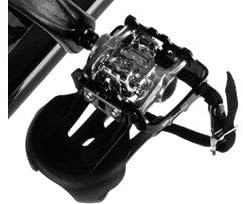
ചിത്രം 5: Close-up of the mixed SPD-trekking pedals, designed for compatibility with various cycling shoes.

ചിത്രം 6: മറ്റൊന്ന് view of the pedals, highlighting the strap mechanism for securing feet during intense workouts.
3.5 Placement and Transport
Place the bike on a flat, stable surface. The integrated transport wheels allow for easy relocation within your home.
4. പ്രവർത്തന നിർദ്ദേശങ്ങൾ
4.1 കൺസോൾ പ്രവർത്തനങ്ങൾ
The LCD screen provides various workout data and program options. Use the 'up', 'down', 'start/stop', 'enter', and 'reset' buttons to navigate and control your workout.
- ആരംഭിക്കുക/നിർത്തുക: Begins or pauses your workout.
- മുകളിലേക്ക്/താഴേക്ക്: Adjusts intensity levels or navigates menu options.
- നൽകുക: തിരഞ്ഞെടുക്കലുകൾ സ്ഥിരീകരിക്കുന്നു.
- പുന et സജ്ജമാക്കുക: Clears current workout data or returns to the main menu.
4.2 പരിശീലന പരിപാടികൾ
The console offers a variety of pre-defined programs and customization options:
- 12 Pre-defined Programs: Each with 24 intensity levels.
- 4 Heart Rate Control (HRC) Programs: Automatically adjust training intensity to maintain your heart rate within a selected target zone.
- 5 User Programs (uPrg): Create and save your personalized training profiles.
- Random Program: The display generates a new, random program for varied workouts.
- Recovery Test (RT): Helps assess your physical condition through a controlled recovery process.
- Fitness Test: Evaluates your fitness level.
4.3 3-Way Braking System
The i.SPADA 2 H9355I features a versatile 3-way braking system, allowing you to choose your preferred resistance method:
- Magnetic Braking System: Provides quiet operation and smooth resistance changes.
- Friction System: Offers 100% accuracy and a direct feel, similar to outdoor cycling.
- Combination System: Utilizes both magnetic and friction systems for a comprehensive and challenging workout without limits.
4.4 കണക്റ്റിവിറ്റി
The bike is Apple/Android compatible and features Bluetooth connectivity, allowing integration with fitness apps and devices for enhanced training tracking and control.
5. പരിപാലനം
Regular maintenance ensures the longevity and optimal performance of your BH Fitness i.SPADA 2 H9355I.
- വൃത്തിയാക്കൽ: പരസ്യം ഉപയോഗിച്ച് ബൈക്ക് തുടയ്ക്കുകamp ഓരോ ഉപയോഗത്തിനു ശേഷവും വിയർപ്പും പൊടിയും നീക്കം ചെയ്യാൻ തുണി ഉപയോഗിക്കുക. ഉരച്ചിലുകൾ ഉള്ള ക്ലീനറുകൾ ഒഴിവാക്കുക.
- PolyV-Belt: The PolyV-belt drive system is designed to be powerful, quiet, and maintenance-free. No lubrication or tension adjustments are typically required.
- പരിശോധനകൾ: Periodically check all nuts, bolts, and moving parts for tightness and wear. Tighten any loose fasteners.
- പെഡലുകൾ: Ensure pedals are securely attached and straps are in good condition.
6. പ്രശ്നപരിഹാരം
If you encounter issues with your i.SPADA 2 H9355I, refer to the following common problems and solutions:
-
ഇഷ്യൂ: The bike makes unusual noises (e.g., squeaking, grinding).
പരിഹാരം: Check all assembly points for tightness. Ensure the bike is on a level surface. If the noise persists, contact customer support as internal components may require inspection. -
ഇഷ്യൂ: The console display is difficult to read or has no backlight.
പരിഹാരം: The console may not feature a backlight. Ensure you are exercising in a well-lit area. Check battery levels if the display is completely off or dim. Some consoles are designed without internal illumination. -
ഇഷ്യൂ: Resistance feels inconsistent or too high/low.
പരിഹാരം: For magnetic systems, ensure the resistance knob/buttons are functioning correctly. For friction systems, check the brake pad for wear. If using the combination system, verify both mechanisms are engaging properly. -
ഇഷ്യൂ: Parts feel loose or have broken (e.g., saddle screw, crank arm).
പരിഹാരം: Immediately cease use of the bike. Do not attempt to use the equipment with broken or damaged parts. Contact BH Fitness customer support for replacement parts and professional assistance. Attempting repairs with incorrect parts or methods can void your warranty and pose a safety risk.
7 സ്പെസിഫിക്കേഷനുകൾ
| ഫീച്ചർ | സ്പെസിഫിക്കേഷൻ |
|---|---|
| മോഡൽ നമ്പർ | H9355I |
| അളവുകൾ (L x W x H) | 130 സെ.മീ x 59 സെ.മീ x 116 സെ.മീ |
| ഉൽപ്പന്ന ഭാരം | 57 കി.ഗ്രാം |
| പരമാവധി ഉപയോക്തൃ ഭാരം | 150 kg (Note: Some specifications indicate 130 kg. Refer to your product's specific documentation for the exact limit.) |
| ഡ്രൈവ് സിസ്റ്റം | പോളിവി-ബെൽറ്റ് |
| പ്രതിരോധ സംവിധാനം | 3-Way (Magnetic, Friction, Combination) |
| മെറ്റീരിയൽ | അലോയ് സ്റ്റീൽ |
| പവർ ഉറവിടം | Battery-driven (for console) |
| പ്രത്യേക സവിശേഷതകൾ | Adjustable Saddle & Handlebar, Mixed SPD-Trekking Pedals, Bottle Holder, Transport Wheels, Bluetooth Connectivity |
8. വാറൻ്റിയും പിന്തുണയും
For warranty information, please refer to the documentation included with your purchase or visit the official BH Fitness webസൈറ്റ്. വാറന്റി നിബന്ധനകൾ സാധാരണയായി ഒരു നിശ്ചിത കാലയളവിലേക്കുള്ള നിർമ്മാണ വൈകല്യങ്ങൾ ഉൾക്കൊള്ളുന്നു.
If you require technical assistance, replacement parts, or have questions not covered in this manual, please contact BH Fitness customer support. Have your model number (H9355I) and proof of purchase ready when contacting support.
You can usually find contact details for customer support on the manufacturer's webസൈറ്റിലോ നിങ്ങളുടെ ഉൽപ്പന്ന പാക്കേജിംഗിലോ.