
ആമുഖം
This manual provides essential information for the installation, operation, and maintenance of your Cisco SG550X-24-K9-NA 24-Port Stackable Managed Ethernet Switch. This device is designed to support demanding network environments with advanced capabilities and superior performance.

Figure 1: Cisco SG550X-24-K9-NA 24-Port Stackable Managed Ethernet Switch.
സജ്ജമാക്കുക
Follow these steps to set up your Cisco SG550X-24-K9-NA switch.
1 അൺപാക്കിംഗും പ്രാരംഭ പരിശോധനയും
Carefully unpack the switch and all included components. Inspect for any signs of damage during shipping. If any components are missing or damaged, contact your vendor immediately.
ഉൾപ്പെടുത്തിയ ഘടകങ്ങൾ:
- Cisco SG550X-24 Switch
- പവർ കോർഡ്
- Rack-Mount kit
- റബ്ബർ പാദങ്ങൾ
- DB-9 to RJ45 Serial Cable
- ചൈന RoHS ഉള്ള പോയിന്റർ കാർഡ്
- സാങ്കേതിക പിന്തുണാ കോൺടാക്റ്റുകൾ
- ദ്രുത ആരംഭ ഗൈഡ്
2. ഫിസിക്കൽ ഇൻസ്റ്റലേഷൻ
The switch can be installed on a desktop or mounted in a standard equipment rack using the provided rack-mount kit. Ensure adequate ventilation around the device.
3. നെറ്റ്വർക്ക് കണക്ഷൻ
Connect your network devices to the 24 Gigabit Ethernet ports. The switch also features 4 x 10G SFP+ uplinks for high-speed connections.
4. പവർ ഓൺ
Connect the power cord to the switch and a suitable power outlet. The switch will power on automatically.
5. പ്രാരംഭ കോൺഫിഗറേഷൻ
For simplified setup, utilize the Cisco Business App. This application facilitates plug-and-play (PnP), auto-discovery, and zero-touch deployment, allowing for quick network integration. Alternatively, you can use the on-box WebUI or CLI for configuration.
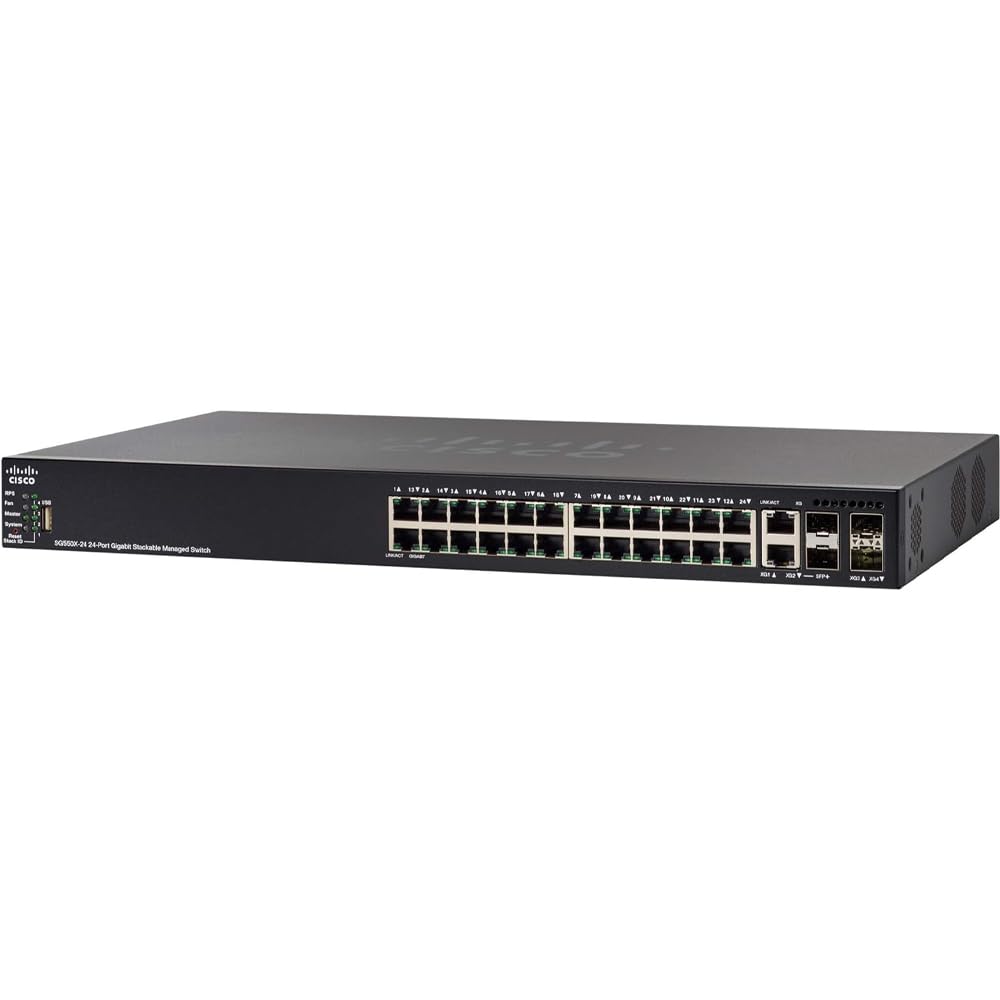
Figure 2: Front panel of the Cisco SG550X-24-K9-NA switch showing ports and indicators.
പ്രവർത്തന നിർദ്ദേശങ്ങൾ
The Cisco SG550X-24-K9-NA is a managed switch offering extensive features for network control and optimization.
Network Port Configuration
- ഇഥർനെറ്റ് പോർട്ടുകൾ: 24 ports supporting 10/100/1000 Mbps speeds.
- അപ്ലിങ്ക് പോർട്ടുകൾ: 4 x 10G SFP+ uplinks for high-bandwidth connections.
മാനേജ്മെന്റും നിയന്ത്രണവും
The switch can be managed through various interfaces:
- Web ഉപയോക്തൃ ഇന്റർഫേസ് (WebUI): Access the intuitive web-based interface for graphical configuration and monitoring.
- കമാൻഡ് ലൈൻ ഇന്റർഫേസ് (CLI): വികസിത ഉപയോക്താക്കൾക്ക്, സ്വിച്ച് ക്രമീകരണങ്ങളിൽ CLI സൂക്ഷ്മമായ നിയന്ത്രണം നൽകുന്നു.
- എസ്എൻഎംപി: Simple Network Management Protocol support for integration with network management systems.
- സിസ്കോ ഫൈൻഡ്ഐടി നെറ്റ്വർക്ക് മാനേജർ: A tool for simplified network management and troubleshooting.
- Auto Smartports: Automatically configures port settings based on the connected device type.
Advanced Layer 2+/Layer 3 Features
The SG550X-24-K9-NA supports a comprehensive set of features to enhance network performance and security:
- സ്റ്റാറ്റിക് റൂട്ടിംഗ്: Manual configuration of network routes.
- സേവനത്തിൻ്റെ ഗുണനിലവാരം (QoS): നിർണായക ആപ്ലിക്കേഷനുകൾക്കായി നെറ്റ്വർക്ക് ട്രാഫിക്കിന് മുൻഗണന നൽകുക.
- Voice/Guest VLAN: Separate voice and guest traffic for improved security and performance.
- GVRP (GARP VLAN Registration Protocol): Automates VLAN registration and propagation.
- MSTP (Multiple Spanning Tree Protocol): Prevents network loops and provides path redundancy.
- IGMP സ്നൂപ്പിംഗ്: Optimizes multicast traffic delivery.
- Time-based Access Control Lists (ACLs): Control network access based on time schedules.
- Dynamic Routing (RIP, VRRP): Automatically adjusts routing paths for network resilience.
- Policy-based Routing: Routes traffic based on defined policies.
- IGMP ക്വയർ: Manages multicast groups.
- 802.1x and Web-based Authentication: Robust user authentication for network access.
- IPv6 First-Hop Security: Protects against IPv6 network attacks.
- ഡൈനാമിക് ARP പരിശോധന: Defends against ARP spoofing attacks.
വീഡിയോ 1: ഒരു ഓവർview of Cisco small business product solutions, demonstrating ease of setup and management for network devices like the SG550X-24-K9-NA switch.
മെയിൻ്റനൻസ്
Regular maintenance ensures optimal performance and longevity of your Cisco SG550X-24-K9-NA switch.
ഫേംവെയർ അപ്ഡേറ്റുകൾ
Keep the switch firmware updated to benefit from the latest features, performance enhancements, and security patches. Firmware updates are typically available through the Cisco support portal.
ശാരീരിക പരിശോധന
Periodically inspect the switch for dust accumulation, especially around ventilation areas. Ensure all cable connections are secure. The switch incorporates a fan and power hardware redundancy for increased availability.
നെറ്റ്വർക്ക് സുരക്ഷ
Leverage Cisco's cloud security platforms, such as Umbrella, to provide always up-to-date protection against cyber threats, safeguarding your network and connected devices.
Software Fixes
Free software fixes are provided for the term of the product's warranty, ensuring your device remains secure and functional.
ട്രബിൾഷൂട്ടിംഗ്
This section provides general guidance for common issues. For detailed troubleshooting, refer to the comprehensive documentation available on the Cisco support webസൈറ്റ് അല്ലെങ്കിൽ സാങ്കേതിക പിന്തുണയുമായി ബന്ധപ്പെടുക.
പവർ ഇല്ല
- പവർ കോർഡ് സ്വിച്ചിലേക്കും പ്രവർത്തിക്കുന്ന ഒരു പവർ ഔട്ട്ലെറ്റിലേക്കും സുരക്ഷിതമായി ബന്ധിപ്പിച്ചിട്ടുണ്ടെന്ന് ഉറപ്പാക്കുക.
- പ്രവർത്തനക്ഷമതയ്ക്കായി പവർ ഉറവിടം പരിശോധിക്കുക.
നെറ്റ്വർക്ക് കണക്റ്റിവിറ്റി പ്രശ്നങ്ങൾ
- Ensure Ethernet cables are properly connected to the correct ports on both the switch and the connected device.
- Check the link/activity LEDs on the switch ports for status.
- Verify IP address configurations on connected devices.
- If using VLANs, ensure devices are assigned to the correct VLANs.
മന്ദഗതിയിലുള്ള നെറ്റ്വർക്ക് പ്രകടനം
- Check for network congestion using the switch's monitoring tools (WebUI/CLI).
- സ്വിച്ച് പോർട്ടും ബന്ധിപ്പിച്ച ഉപകരണവും തമ്മിൽ ഡ്യൂപ്ലെക്സ് ക്രമീകരണങ്ങൾ പൊരുത്തപ്പെടുന്നുണ്ടെന്ന് ഉറപ്പാക്കുക.
- Verify that QoS policies are correctly configured to prioritize critical traffic.
Accessing Management Interface
- Confirm your management station is on the same network segment or has a route to the switch's management IP address.
- Verify the switch's management IP address.
- Clear your browser's cache if experiencing issues with the Webയുഐ.
സ്പെസിഫിക്കേഷനുകൾ
| ഫീച്ചർ | വിശദാംശങ്ങൾ |
|---|---|
| ബ്രാൻഡ് | സിസ്കോ |
| മോഡൽ നമ്പർ | SG550X-24-K9-NA |
| തുറമുഖങ്ങളുടെ എണ്ണം | 24 |
| ഇഥർനെറ്റ് പോർട്ട് കോൺഫിഗറേഷൻ | 24-പോർട്ട് 10/100/1000 |
| അപ്ലിങ്കുകൾ | 4 x 10G എസ്എഫ്പി+ |
| സ്വിച്ച് തരം | നിയന്ത്രിച്ചു |
| സ്റ്റാക്കബിലിറ്റി | 8 യൂണിറ്റുകൾ വരെ |
| ഡാറ്റ കൈമാറ്റ നിരക്ക് | സെക്കൻഡിൽ 1 ജിഗാബൈറ്റ്സ് (ഓരോ പോർട്ടിലും) |
| വാല്യംtage | 48 വോൾട്ട് (DC) |
| നിലവിലെ റേറ്റിംഗ് | 4 Amps |
| Case Material Type | ലോഹം |
| ഇനത്തിൻ്റെ ഭാരം | 8 പൗണ്ട് |
| നിറം | കറുപ്പ് |
| ജിടിഐഎൻ / യുപിസി | 882658808739 |
വാറൻ്റിയും പിന്തുണയും
വാറൻ്റി വിവരങ്ങൾ
The Cisco SG550X-24-K9-NA switch comes with a പരിമിതമായ ആജീവനാന്ത വാറൻ്റി. This warranty includes next-business-day replacement for eligible hardware failures and free software fixes for the term of the warranty.
സാങ്കേതിക സഹായം
One year of technical support is included with your purchase. For assistance, refer to the technical support contacts provided in the product packaging or visit the official Cisco support website. The Cisco FindIT Network Manager can also assist with diagnostics and support.
For the most up-to-date support resources and documentation, please visit Cisco Small Business Support.