
Awei A880BL
Awei A880BL Wireless Sports Headset User Manual
Model: A880BL
ആമുഖം
Thank you for choosing the Awei A880BL Wireless Sports Headset. This manual will guide you through the features, setup, and operation of your new headset. Please read it carefully before use and retain it for future reference.

Image: The Awei A880BL Wireless Sports Headset with a blue connecting cable, designed for in-ear use with ear hooks for secure fit.
പ്രധാനപ്പെട്ട സുരക്ഷാ വിവരങ്ങൾ
- ഹെഡ്സെറ്റ് തീവ്രമായ താപനിലയിലോ ഈർപ്പത്തിലോ തുറന്നുകാട്ടരുത്.
- ഹെഡ്സെറ്റ് താഴെയിടുകയോ ശക്തമായ ആഘാതങ്ങൾക്ക് വിധേയമാക്കുകയോ ചെയ്യുന്നത് ഒഴിവാക്കുക.
- ഹെഡ്സെറ്റ് ഡിസ്അസംബ്ലിംഗ് ചെയ്യുകയോ പരിഷ്ക്കരിക്കുകയോ ചെയ്യരുത്. ഇത് വാറന്റി അസാധുവാക്കും.
- കുട്ടികളിൽ നിന്നും വളർത്തുമൃഗങ്ങളിൽ നിന്നും ഹെഡ്സെറ്റ് അകറ്റി നിർത്തുക.
- നൽകിയിരിക്കുന്ന ചാർജിംഗ് കേബിളോ സാക്ഷ്യപ്പെടുത്തിയ തത്തുല്യമായതോ മാത്രം ഉപയോഗിക്കുക.
- ഉയർന്ന ശബ്ദത്തിൽ ദീർഘനേരം കേൾക്കുന്നത് കേൾവിക്ക് തകരാറുണ്ടാക്കാം.
പാക്കേജ് ഉള്ളടക്കം
നിങ്ങളുടെ പാക്കേജിൽ എല്ലാ ഇനങ്ങളും ഉണ്ടോ എന്ന് ദയവായി പരിശോധിക്കുക:
- Awei A880BL Wireless Sports Headset
- യുഎസ്ബി ചാർജിംഗ് കേബിൾ
- ഒന്നിലധികം വലുപ്പത്തിലുള്ള ഇയർ ടിപ്പുകൾ
- ഉപയോക്തൃ മാനുവൽ (ഈ പ്രമാണം)

Image: Contents of the Awei A880BL package, showing the black headset with yellow cable, a white USB charging cable, three pairs of gold-colored ear tips, and a small yellow instruction card, all next to the product box.
ഉൽപ്പന്നം കഴിഞ്ഞുview
The Awei A880BL headset features a secure over-ear hook design, in-ear earbuds, and an integrated control panel for easy access to functions.
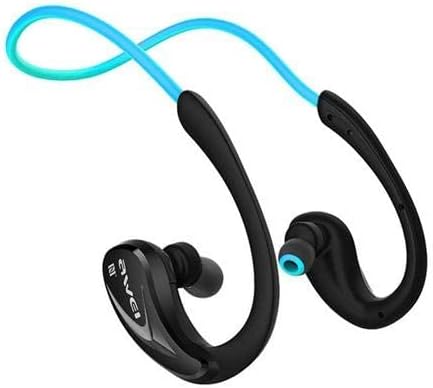
ചിത്രം: ഒരു ക്ലോസ്-അപ്പ് view of one side of the Awei A880BL headset, highlighting the in-ear earbud and the ergonomic ear hook design.
സജ്ജമാക്കുക
1. ഹെഡ്സെറ്റ് ചാർജ് ചെയ്യുന്നു
Before first use, fully charge the headset. Connect the USB charging cable to the headset's charging port and a power source (e.g., computer USB port or USB wall adapter). The indicator light will show charging status and turn off or change color when fully charged.
2. ബ്ലൂടൂത്ത് ജോടിയാക്കൽ
- ഹെഡ്സെറ്റ് ഓഫാണെന്ന് ഉറപ്പാക്കുക.
- Press and hold the Multi-function button (usually the power button) until the indicator light flashes red and blue alternately, indicating pairing mode.
- നിങ്ങളുടെ ഉപകരണത്തിൽ (സ്മാർട്ട്ഫോൺ, ടാബ്ലെറ്റ് മുതലായവ), ബ്ലൂടൂത്ത് പ്രവർത്തനക്ഷമമാക്കി ലഭ്യമായ ഉപകരണങ്ങൾക്കായി തിരയുക.
- Select "Awei A880BL" from the list of found devices.
- Once paired, the indicator light will flash blue slowly or turn solid blue.
3. NFC Speed Pairing (if supported by your device)
The Awei A880BL supports NFC for quick pairing with compatible devices.
- Ensure NFC is enabled on your device and the headset is in pairing mode or powered on.
- Tap your NFC-enabled device against the NFC area on the headset (refer to product diagram if available for exact location).
- Confirm the pairing request on your device.
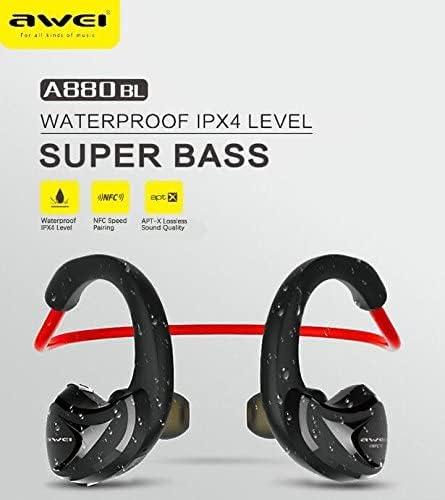
Image: A graphic highlighting key features of the Awei A880BL, including "WATERPROOF IPX4 LEVEL", "NFC Speed Pairing", and "APT-X Lossless Sound Quality".
4. ഹെഡ്സെറ്റ് ധരിക്കുക
For optimal comfort and sound quality, ensure the headset is worn correctly.
- ഘട്ടം 1: Hold the headset with both hands, with the earbuds facing inwards.
- ഘട്ടം 2: Gently place the earbuds into your ears, guiding the ear hooks over the top of your ears.
- ഘട്ടം 3: Adjust the flexible cable behind your neck for a secure and comfortable fit.
- ഘട്ടം 4: The headset should sit comfortably and securely, even during physical activity.

Image: A four-panel image demonstrating the steps to correctly wear the Awei A880BL headset, showing how to position the earbuds and adjust the neckband.
പ്രവർത്തന നിർദ്ദേശങ്ങൾ
പവർ ഓൺ/ഓഫ്
- പവർ ഓൺ: Press and hold the Multi-function button for approximately 3 seconds until you hear a power-on prompt and the indicator light flashes blue.
- പവർ ഓഫ്: Press and hold the Multi-function button for approximately 5 seconds until you hear a power-off prompt and the indicator light turns red and then off.
സംഗീത പ്ലേബാക്ക്
- പ്ലേ/താൽക്കാലികമായി നിർത്തുക: മൾട്ടി-ഫംഗ്ഷൻ ബട്ടൺ ചുരുക്കി അമർത്തുക.
- അടുത്ത ട്രാക്ക്: വോളിയം അപ്പ് (+) ബട്ടൺ ദീർഘനേരം അമർത്തുക.
- മുമ്പത്തെ ട്രാക്ക്: വോളിയം ഡൗൺ (-) ബട്ടൺ ദീർഘനേരം അമർത്തുക.
- വോളിയം കൂട്ടുക: വോളിയം അപ്പ് (+) ബട്ടൺ ചുരുക്കി അമർത്തുക.
- വോളിയം താഴേക്ക്: വോളിയം ഡൗൺ (-) ബട്ടൺ ചുരുക്കി അമർത്തുക.
കോൾ മാനേജുമെന്റ്
- മറുപടി കോൾ: Short press the Multi-function button when a call comes in.
- കോൾ അവസാനിപ്പിക്കുക: കോൾ ചെയ്യുമ്പോൾ മൾട്ടി-ഫംഗ്ഷൻ ബട്ടൺ ഹ്രസ്വമായി അമർത്തുക.
- കോൾ നിരസിക്കുക: ഒരു കോൾ വരുമ്പോൾ മൾട്ടി-ഫംഗ്ഷൻ ബട്ടൺ ദീർഘനേരം അമർത്തുക.
- അവസാന നമ്പർ വീണ്ടും ഡയൽ ചെയ്യുക: മൾട്ടി-ഫംഗ്ഷൻ ബട്ടൺ ഇരട്ട-അമർത്തുക.
വോയ്സ് അസിസ്റ്റൻ്റ്
- വോയ്സ് അസിസ്റ്റന്റിനെ സജീവമാക്കുക: Triple-press the Multi-function button (functionality depends on your connected device).
പരിപാലനവും പരിചരണവും
- വൃത്തിയാക്കൽ: മൃദുവായതും ഉണങ്ങിയതുമായ തുണി ഉപയോഗിച്ച് ഹെഡ്സെറ്റ് തുടയ്ക്കുക. അബ്രാസീവ് ക്ലീനറുകളോ ലായകങ്ങളോ ഉപയോഗിക്കരുത്.
- സംഭരണം: ഹെഡ്സെറ്റ് നേരിട്ട് സൂര്യപ്രകാശം ഏൽക്കാത്തതും ഉയർന്ന താപനില ഏൽക്കാത്തതുമായ ഒരു തണുത്ത വരണ്ട സ്ഥലത്ത് സൂക്ഷിക്കുക.
- ബാറ്ററി കെയർ: To prolong battery life, charge the headset regularly, even if not in frequent use. Avoid fully discharging the battery for extended periods.
- ജല പ്രതിരോധം: The Awei A880BL is rated IPX4 waterproof, meaning it is resistant to splashing water from any direction. It is suitable for sports and light rain but should not be submerged in water.
ട്രബിൾഷൂട്ടിംഗ്
| പ്രശ്നം | പരിഹാരം |
|---|---|
| ഹെഡ്സെറ്റ് ഓണാക്കുന്നില്ല. | ഹെഡ്സെറ്റ് പൂർണ്ണമായും ചാർജ് ചെയ്തിട്ടുണ്ടെന്ന് ഉറപ്പാക്കുക. ഒരു പവർ സ്രോതസ്സുമായി ബന്ധിപ്പിച്ച് വീണ്ടും ശ്രമിക്കുക. |
| ഉപകരണവുമായി ജോടിയാക്കാൻ കഴിയില്ല. |
|
| ശബ്ദമില്ല അല്ലെങ്കിൽ കുറഞ്ഞ ശബ്ദമില്ല. |
|
| ഇടവിട്ടുള്ള കണക്ഷൻ. |
|
സ്പെസിഫിക്കേഷനുകൾ
| ഫീച്ചർ | വിശദാംശങ്ങൾ |
|---|---|
| മോഡൽ നമ്പർ | A880BL |
| കണക്റ്റിവിറ്റി | Wireless (Bluetooth, NFC) |
| ഹെഡ്ഫോൺ തരം | In-ear, Sports Headset (with ear hooks) |
| മൈക്രോഫോൺ | അതെ |
| നോയ്സ് റദ്ദാക്കൽ | സജീവ ശബ്ദ റദ്ദാക്കൽ (ANC) |
| ഫ്രീക്വൻസി റെസ്പോൺസ് റേഞ്ച് | 20 - 22000 ഹെർട്സ് |
| സംവേദനക്ഷമത | 110 ± 3 ഡിബി |
| പ്രതിരോധം | 16 ഓം |
| ജല പ്രതിരോധം | IPX4 Level (Splash-proof) |
| പിന്തുണയ്ക്കുന്ന ഓഡിയോ കോഡെക്കുകൾ | APT-X |
| നിയന്ത്രണ തരം | Button Control (Volume, Play/Pause, Call, Voice Assistant) |
| ചാർജിംഗ് പോർട്ട് | USB |
| കേബിൾ നീളം | 0.6 meters (Charging cable) |
| ഭാരം | 30 ഗ്രാം |
| മെറ്റീരിയൽ | പ്ലാസ്റ്റിക് |
| സൗണ്ട് സിസ്റ്റം | സമതുലിതമായ അർമേച്ചർ ഡ്രൈവർ |
| ആപ്പ് പിന്തുണ | അതെ |
| മെമ്മറി കാർഡ് പിന്തുണ | ഇല്ല |
വാറൻ്റിയും പിന്തുണയും
For warranty information and technical support, please refer to the warranty card included in your package or contact Awei customer service through their official webസൈറ്റ് അല്ലെങ്കിൽ അംഗീകൃത വിതരണക്കാർ. വാങ്ങിയതിന്റെ തെളിവായി നിങ്ങളുടെ വാങ്ങൽ രസീത് സൂക്ഷിക്കുക.
Ask a question about this manual
Ask about setup, troubleshooting, compatibility, parts, safety, or missing instructions. Manuals+ will review the question and use this page’s manual context to help answer it.