
1. ആമുഖം
വാങ്ങിയതിന് നന്ദി.asing the AUNA KCD-20 Under-Cabinet Kitchen Radio System. This manual provides essential information for the safe and efficient operation of your device. Please read these instructions carefully before use and retain them for future reference.
2. സുരക്ഷാ നിർദ്ദേശങ്ങൾ
- വൈദ്യുതി വിതരണം വോള്യവുമായി പൊരുത്തപ്പെടുന്നുണ്ടെന്ന് ഉറപ്പാക്കുകtagഇ യൂണിറ്റിൽ വ്യക്തമാക്കിയിട്ടുണ്ട്.
- തീയോ വൈദ്യുതാഘാതമോ തടയാൻ യൂണിറ്റ് മഴയിലോ ഈർപ്പത്തിലോ തുറന്നുകാട്ടരുത്.
- സി തുറക്കരുത്.asing. എല്ലാ സേവനങ്ങളും യോഗ്യതയുള്ള ഉദ്യോഗസ്ഥർക്ക് റഫർ ചെയ്യുക.
- താപ സ്രോതസ്സുകൾക്ക് സമീപമോ നേരിട്ടുള്ള സൂര്യപ്രകാശത്തിലോ യൂണിറ്റ് സ്ഥാപിക്കുന്നത് ഒഴിവാക്കുക.
- യൂണിറ്റിന് ചുറ്റും മതിയായ വായുസഞ്ചാരം ഉറപ്പാക്കുക.
- ശക്തമായ കാന്തികക്ഷേത്രങ്ങളിൽ നിന്ന് യൂണിറ്റിനെ അകറ്റി നിർത്തുക.
- മൃദുവായതും ഉണങ്ങിയതുമായ തുണി ഉപയോഗിച്ച് മാത്രം യൂണിറ്റ് വൃത്തിയാക്കുക.
3. പാക്കേജ് ഉള്ളടക്കം
എല്ലാ ഇനങ്ങളും നിലവിലുണ്ടോ എന്നും നല്ല നിലയിലാണെന്നും ദയവായി പരിശോധിക്കുക:
- AUNA KCD-20 Main Unit
- റിമോട്ട് കൺട്രോൾ
- വയർ ആന്റിന
- ഡ്രില്ലിംഗ് ഗൈഡ്
- Mounting Kit (screws, spacers)
- User Manual (English and German)
4. ഉൽപ്പന്നം കഴിഞ്ഞുview
The AUNA KCD-20 is a versatile under-cabinet kitchen radio system designed for space-saving installation. It features an FM radio with RDS, a CD/MP3 player, USB port, and AUX input, along with an alarm and timer functions.

ചിത്രം 4.1: ഫ്രണ്ട് view of the AUNA KCD-20 unit, showing the CD tray, display, control buttons, and volume knobs.

ചിത്രം 4.2: വിശദമായി view of the front panel, highlighting the CD compartment, USB port, AUX input, and various function buttons.

ചിത്രം 4.3: Close-up of the USB port with a USB drive inserted, demonstrating its accessibility for media playback.
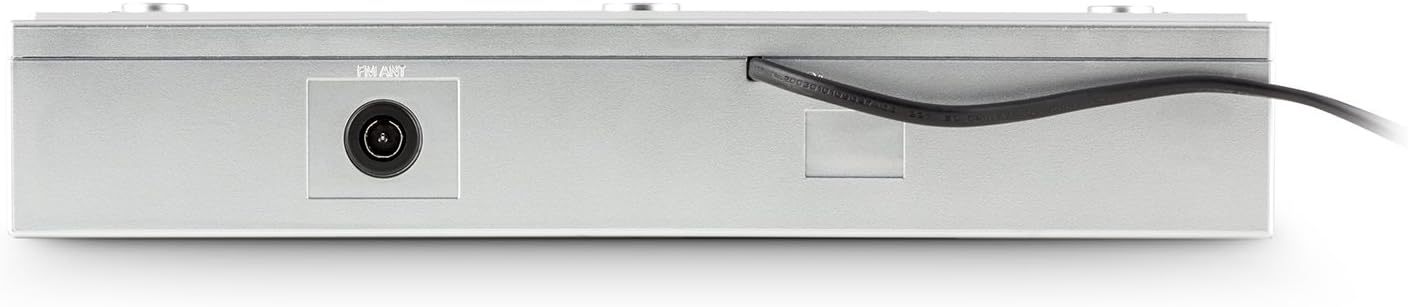
ചിത്രം 4.4: പിൻഭാഗം view of the unit, showing the power cable and antenna input for FM reception.

ചിത്രം 4.5: Diagram illustrating the dimensions of the AUNA KCD-20 unit: 32cm (width) x 6cm (height) x 28.5cm (depth).
5. സജ്ജീകരണവും ഇൻസ്റ്റാളേഷനും
The AUNA KCD-20 is designed for under-cabinet mounting to save space. Follow these steps for installation:
- ലൊക്കേഷൻ തിരഞ്ഞെടുക്കുക: Select a suitable flat surface under a kitchen cabinet, ensuring enough space for the unit and access to power.
- ഡ്രില്ലിംഗ് പോയിന്റുകൾ അടയാളപ്പെടുത്തുക: Use the provided drilling guide to mark the screw positions on the underside of the cabinet.
- തുളകൾ: Carefully drill pilot holes at the marked positions.
- മൗണ്ടിംഗ് ബ്രാക്കറ്റുകൾ അറ്റാച്ചുചെയ്യുക: Secure the mounting brackets (if separate) or the unit directly using the supplied screws and spacers. Ensure the unit is level and securely fastened.
- ആന്റിന ബന്ധിപ്പിക്കുക: Connect the wire antenna to the FM antenna input on the rear of the unit. Position the antenna for optimal reception.
- പവർ കണക്ഷൻ: പവർ കേബിൾ ഒരു മതിൽ ഔട്ട്ലെറ്റിലേക്ക് പ്ലഗ് ചെയ്യുക.

ചിത്രം 5.1: The AUNA KCD-20 unit installed neatly under a kitchen cabinet, demonstrating its space-saving design.
6. പ്രവർത്തന നിർദ്ദേശങ്ങൾ
6.1 അടിസ്ഥാന പ്രവർത്തനം
- പവർ ഓൺ/ഓഫ്: അമർത്തുക പവർ ബട്ടൺ () യൂണിറ്റ് ഓണാക്കാനോ ഓഫാക്കാനോ.
- വോളിയം നിയന്ത്രണം: ഉപയോഗിക്കുക വോളിയം - ഒപ്പം VOL+ വോളിയം ക്രമീകരിക്കാനുള്ള ബട്ടണുകൾ.
- ഫംഗ്ഷൻ തിരഞ്ഞെടുക്കൽ: അമർത്തുക ഫങ്ഷൻ button to cycle through modes: FM Radio, CD, USB, AUX.
6.2 എഫ്എം റേഡിയോ പ്രവർത്തനം
- ഉപയോഗിച്ച് FM മോഡിലേക്ക് മാറുക ഫങ്ഷൻ ബട്ടൺ.
- യാന്ത്രിക സ്കാൻ: അമർത്തിപ്പിടിക്കുക PLAY MODE/RDS SEARCH button to automatically scan and store available FM stations. The unit can store up to 20 stations.
- സ്വമേധയാലുള്ള ട്യൂണിംഗ്: ഉപയോഗിക്കുക ഒഴിവാക്കുക/ട്യൂൺ ചെയ്യുക ബട്ടണുകൾ (|< / >> |) to manually tune to frequencies.
- പ്രീസെറ്റ് സ്റ്റേഷനുകൾ: ഉപയോഗിക്കുക FOLDER/PRE ബട്ടണുകൾ (^ / v) to navigate through stored preset stations.
- ആർഡിഎസ് പ്രവർത്തനം: When available, RDS (Radio Data System) will display station information such as program type, song title, or artist. Press DISPLAY/ID3/RDS MODE to cycle through RDS information.
6.3 സിഡി/എംപി3 പ്ലേബാക്ക്
- Switch to CD mode using the ഫങ്ഷൻ ബട്ടൺ.
- Gently insert a CD into the CD slot with the label side facing up. The unit will automatically load the disc and begin playback.
- പ്ലേ/താൽക്കാലികമായി നിർത്തുക: അമർത്തുക പ്ലേ/താൽക്കാലികമായി നിർത്തുക ബട്ടൺ (II) to pause or resume playback.
- ട്രാക്കുകൾ ഒഴിവാക്കുക: ഉപയോഗിക്കുക ഒഴിവാക്കുക/ട്യൂൺ ചെയ്യുക ബട്ടണുകൾ (|< / >> |) മുമ്പത്തെ അല്ലെങ്കിൽ അടുത്ത ട്രാക്കിലേക്ക് പോകാൻ.
- ഫാസ്റ്റ് ഫോർവേഡ്/റിവൈൻഡ്: അമർത്തിപ്പിടിക്കുക ഒഴിവാക്കുക/ട്യൂൺ ചെയ്യുക ഒരു ട്രാക്കിനുള്ളിൽ വേഗത്തിൽ മുന്നോട്ട് പോകാനോ റിവൈൻഡ് ചെയ്യാനോ ഉള്ള ബട്ടണുകൾ.
- MP3 Folder Navigation: For MP3 CDs, use the FOLDER/PRE buttons to navigate between folders.
- ആവർത്തന പ്രവർത്തനം: അമർത്തുക ആവർത്തിക്കുക button to repeat the current track, current folder (for MP3), or all tracks.
6.4 യുഎസ്ബി പ്ലേബാക്ക്
- Insert a USB flash drive into the USB port on the front of the unit.
- ഉപയോഗിച്ച് USB മോഡിലേക്ക് മാറുക ഫങ്ഷൻ button. The unit will automatically detect the USB drive and begin playing MP3 files.
- Playback controls (Play/Pause, Skip Tracks, Fast Forward/Rewind, Folder Navigation, Repeat) are similar to CD/MP3 playback.
6.5 AUX ഇൻപുട്ട്
- Connect an external audio device (e.g., smartphone, MP3 player, tablet) to the 3.5mm AUX input jack on the front of the unit using an audio cable (not supplied).
- ഉപയോഗിച്ച് AUX മോഡിലേക്ക് മാറുക ഫങ്ഷൻ ബട്ടൺ.
- Audio will now be played through the unit's speakers. Control playback from your external device.
6.6 Clock, Alarm, and Timer Functions
- ക്ലോക്ക് ക്രമീകരിക്കുക: സ്റ്റാൻഡ്ബൈ മോഡിൽ, അമർത്തിപ്പിടിക്കുക MEM/CLK-ADJ to enter clock setting mode. Use the ഒഴിവാക്കുക/ട്യൂൺ ചെയ്യുക buttons to adjust hours and minutes, and MEM/CLK-ADJ സ്ഥിരീകരിക്കാൻ.
- അലാറം സജ്ജീകരിക്കുന്നു: അമർത്തുക അലാറം ബട്ടൺ. ഉപയോഗിക്കുക ഒഴിവാക്കുക/ട്യൂൺ ചെയ്യുക to set the alarm time and അലാറം to confirm. You can choose to wake up to FM radio or a buzzer.
- സ്ലീപ്പ് ടൈമർ: അമർത്തുക ഉറങ്ങുക button repeatedly to set a sleep timer (e.g., 15, 30, 60, 90 minutes). The unit will automatically turn off after the set time.
- Kitchen Timer (Egg Timer): അമർത്തുക ടൈമർ button to set a countdown timer for cooking. Use ഒഴിവാക്കുക/ട്യൂൺ ചെയ്യുക സമയം ക്രമീകരിക്കാൻ.
6.7 സമനില ക്രമീകരണങ്ങൾ
അമർത്തുക പ്രീസെറ്റ് ഇക്യു button repeatedly to cycle through preset equalizer modes: Neutral, Classic, Rock, Pop, Jazz, or Off.
6.8 വിദൂര നിയന്ത്രണം
The included remote control allows for convenient operation of all functions from a distance. Ensure the remote has working batteries and is pointed towards the unit's front panel.
7. പരിപാലനം
- വൃത്തിയാക്കൽ: മൃദുവായതും ഉണങ്ങിയതുമായ തുണി ഉപയോഗിച്ച് യൂണിറ്റ് തുടയ്ക്കുക. അബ്രാസീവ് ക്ലീനറുകളോ ലായകങ്ങളോ ഉപയോഗിക്കരുത്.
- സിഡി ലെൻസ് കെയർ: സിഡി പ്ലേബാക്ക് പ്രശ്നങ്ങൾ ഉണ്ടായാൽ, വാണിജ്യപരമായി ലഭ്യമായ ഒരു സിഡി ലെൻസ് ക്ലീനർ ഡിസ്ക് ഉപയോഗിക്കുക.
- സംഭരണം: യൂണിറ്റ് ദീർഘനേരം സൂക്ഷിക്കുകയാണെങ്കിൽ, അത് വൈദ്യുതിയിൽ നിന്ന് വിച്ഛേദിച്ച് തണുത്തതും വരണ്ടതുമായ സ്ഥലത്ത് സൂക്ഷിക്കുക.
8. പ്രശ്നപരിഹാരം
| പ്രശ്നം | സാധ്യമായ കാരണം | പരിഹാരം |
|---|---|---|
| ശക്തിയില്ല | പവർ കേബിൾ ബന്ധിപ്പിച്ചിട്ടില്ല; പവർ ഔട്ട്ലെറ്റ് തകരാറിലാണ്. | പവർ കേബിൾ കണക്ഷൻ പരിശോധിക്കുക; മറ്റൊരു ഔട്ട്ലെറ്റ് പരീക്ഷിക്കുക. |
| ശബ്ദമില്ല | Volume too low; incorrect function selected. | Increase volume; press ഫങ്ഷൻ to select correct mode. |
| മോശം എഫ്എം സ്വീകരണം | ആന്റിന ശരിയായി സ്ഥാപിച്ചിട്ടില്ല അല്ലെങ്കിൽ ബന്ധിപ്പിച്ചിട്ടില്ല. | Adjust the wire antenna position; ensure it is fully connected. |
| സിഡി പ്ലേ ചെയ്യുന്നില്ല / ഡിസ്ക് പിശക് | Disc inserted incorrectly; disc dirty or scratched; incompatible disc format. | Re-insert disc correctly; clean disc; ensure it is an audio CD or MP3 CD. |
| USB തിരിച്ചറിഞ്ഞില്ല | USB drive not formatted correctly; incompatible file types; drive too large. | USB FAT32 ഫോർമാറ്റ് ചെയ്തിട്ടുണ്ടെന്ന് ഉറപ്പാക്കുക; MP3 മാത്രം. files are supported; try a different USB drive. |
| റിമോട്ട് കൺട്രോൾ പ്രവർത്തിക്കുന്നില്ല | ബാറ്ററികൾ തീർന്നു; റിമോട്ടിനും യൂണിറ്റിനും ഇടയിലുള്ള തടസ്സം. | Replace remote control batteries; remove any obstructions. |
9 സ്പെസിഫിക്കേഷനുകൾ
- ബ്രാൻഡ്: ഔന
- മോഡൽ: KCD-20
- ഉൽപ്പന്ന അളവുകൾ: 32 cm (W) x 6 cm (H) x 28.5 cm (D)
- ഭാരം: ഏകദേശം 2.62 കി.ഗ്രാം
- ഊർജ്ജ സ്രോതസ്സ്: കോർഡഡ് ഇലക്ട്രിക്
- ട്യൂണർ സാങ്കേതികവിദ്യ: FM with RDS support
- റേഡിയോ പ്രീസെറ്റുകൾ: 20 സ്റ്റേഷനുകൾ
- പ്ലേബാക്ക് ഫോർമാറ്റുകൾ: CD, MP3 (from CD and USB)
- കണക്റ്റിവിറ്റി: USB (MP3 compatible), 3.5mm AUX input, FM antenna input
- പ്രത്യേക സവിശേഷതകൾ: Programmable alarm, sleep timer, kitchen timer, preset equalizer, illuminated volume buttons, remote control.
10. വാറൻ്റിയും പിന്തുണയും
AUNA products are manufactured to high-quality standards. In the unlikely event of a defect or issue, please refer to your purchase documentation for warranty details. For technical support or service inquiries, please contact your retailer or the AUNA customer service department.
ഏതെങ്കിലും വാറന്റി ക്ലെയിമുകൾക്കായി നിങ്ങളുടെ വാങ്ങിയതിന്റെ തെളിവ് സൂക്ഷിക്കുക.


