
AUNA PL-8983-8978
AUNA Elegance Tower Bluetooth 2.0 HiFi Set Instruction Manual
Model: PL-8983-8978
1. ആമുഖം
Thank you for choosing the AUNA Elegance Tower Bluetooth 2.0 HiFi Set. This system combines a powerful stereo amplifier with a versatile CD/MP3 player and radio tuner, offering multiple connectivity options including Bluetooth, USB, and AUX inputs. This manual provides essential information for the safe and efficient operation of your device. Please read it thoroughly before use and retain it for future reference.
2. സുരക്ഷാ നിർദ്ദേശങ്ങൾ
സുരക്ഷിതമായ പ്രവർത്തനം ഉറപ്പാക്കാൻ, ദയവായി ഇനിപ്പറയുന്ന സുരക്ഷാ മുൻകരുതലുകൾ പാലിക്കുക:
- വൈദ്യുതി വിതരണം: Connect the unit only to an AC 230V ~ 50Hz power supply.
- വെൻ്റിലേഷൻ: ആവശ്യത്തിന് വായുസഞ്ചാരം ഉറപ്പാക്കുക. വായുസഞ്ചാര ദ്വാരങ്ങൾ തടയരുത്.
- ഈർപ്പം: മഴ, ഈർപ്പം, അല്ലെങ്കിൽ തുള്ളി/തെറിക്കുന്ന ദ്രാവകങ്ങൾ എന്നിവയിൽ യൂണിറ്റ് തുറന്നുകാട്ടരുത്.
- താപ സ്രോതസ്സുകൾ: റേഡിയേറ്ററുകൾ, ഹീറ്റ് രജിസ്റ്ററുകൾ, സ്റ്റൗകൾ അല്ലെങ്കിൽ ചൂട് ഉൽപ്പാദിപ്പിക്കുന്ന മറ്റ് ഉപകരണങ്ങൾ പോലുള്ള താപ സ്രോതസ്സുകളിൽ നിന്ന് അകന്നു നിൽക്കുക.
- സേവനം: യൂണിറ്റ് സ്വയം സർവീസ് ചെയ്യാൻ ശ്രമിക്കരുത്. എല്ലാ സർവീസിംഗും യോഗ്യതയുള്ള സർവീസ് ഉദ്യോഗസ്ഥരെ ഏൽപ്പിക്കുക.
- വൃത്തിയാക്കൽ: വൃത്തിയാക്കുന്നതിന് മുമ്പ് വൈദ്യുതിയിൽ നിന്ന് വിച്ഛേദിക്കുക. ഉണങ്ങിയ തുണി മാത്രം ഉപയോഗിക്കുക.
- ഒബ്ജക്റ്റ്/ലിക്വിഡ് എൻട്രി: Do not insert objects or spill liquids into the unit openings.
3. പാക്കേജ് ഉള്ളടക്കം
എല്ലാ ഇനങ്ങളും നിലവിലുണ്ടെന്നും നല്ല നിലയിലാണെന്നും ഉറപ്പാക്കുക:
- 1 x HiFi Ampജീവപര്യന്തം
- 1 x MP3 CD Player
- 1 x Ampലൈഫയർ റിമോട്ട് കൺട്രോൾ
- 1 x CD Player Remote Control
- 1 x യൂസർ മാനുവൽ (ഇംഗ്ലീഷ്, ജർമ്മൻ)
4. ഉൽപ്പന്നം കഴിഞ്ഞുview
The AUNA Elegance Tower HiFi Set consists of two main units: a stereo amplifier and a CD/MP3 player with radio functionality. Below are illustrations and descriptions of their front and rear panels.
4.1 Overall System View

ചിത്രം 1: The AUNA Elegance Tower Bluetooth 2.0 HiFi Set, with the CD player unit positioned above the amplifier unit. Both units feature a brushed silver finish and blue illuminated standby buttons.
4.2 CD/MP3 Player Front Panel

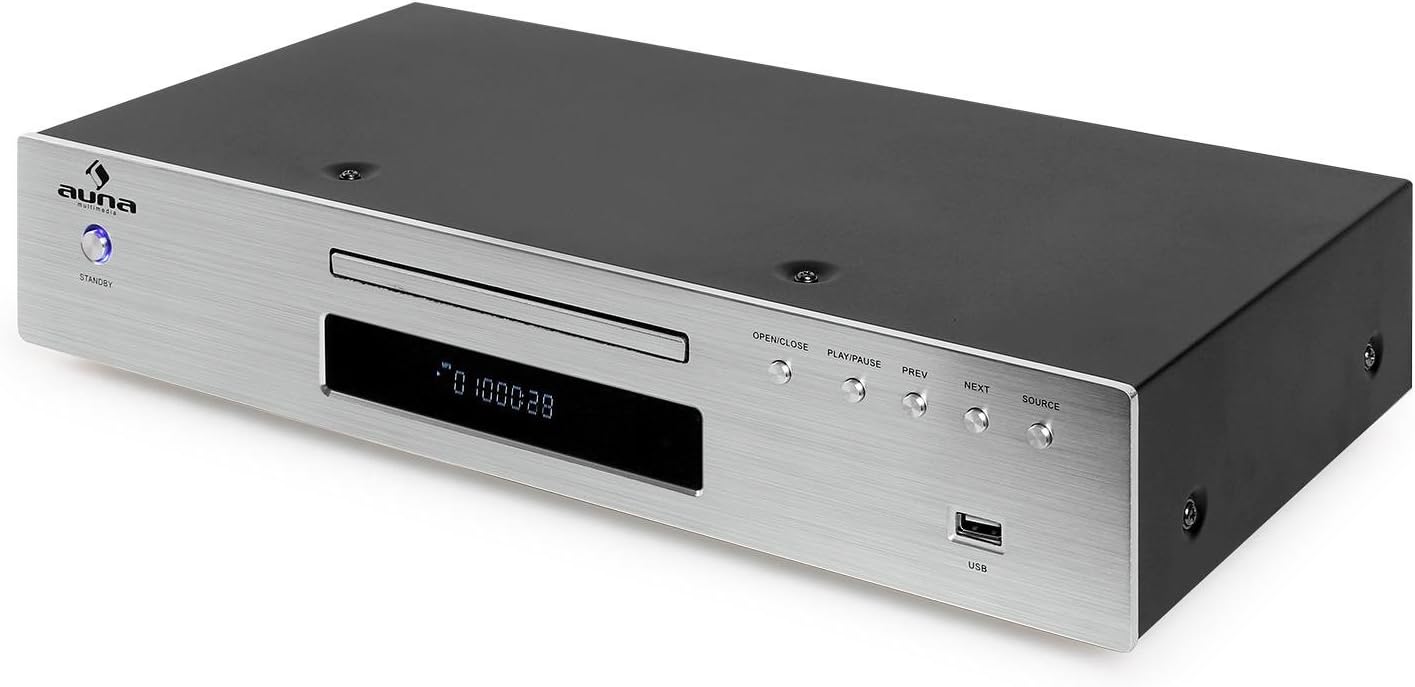
ചിത്രം 2: Front panel of the CD/MP3 player. Features include a standby button, CD tray, digital display, control buttons (OPEN/CLOSE, PLAY/PAUSE, PREV, NEXT, SOURCE), and a USB input port.
4.3 CD/MP3 Player Rear Panel

ചിത്രം 3: Rear panel of the CD/MP3 player. Connections include Line Output (RCA L/R), FM antenna input, Optical Digital Output (TOSLINK), Coaxial Digital Output (S/P DIF), and the AC power input with an ON/OFF switch.
4.4 Ampലൈഫയർ ഫ്രണ്ട് പാനൽ
ചിത്രം 4: Front panel of the amplifier. Controls include a standby button, input selector buttons (CD, DVD, AUX, Bluetooth), a large volume knob, bass, treble, and balance adjustment knobs, and a 3.5mm headphone jack.
4.5 Ampലൈഫയർ റിയർ പാനൽ

ചിത്രം 5: Rear panel of the amplifier. Connections include speaker terminals (Right/Left), REC.L/R output, and multiple audio input options: AUX (RCA L/R), CD (RCA L/R), DVD (RCA L/R). Also features the AC power input with an ON/OFF switch.
4.6 വിദൂര നിയന്ത്രണം

ചിത്രം 6: The remote control for the AUNA HiFi system, featuring various buttons for source selection, playback control, volume adjustment, and numerical track selection.
5. സജ്ജീകരണം
Follow these steps to set up your AUNA Elegance Tower HiFi Set:
5.1 പ്ലേസ്മെൻ്റ്
സ്ഥാപിക്കുക amplifier and CD player units on a stable, flat surface. Ensure there is sufficient space around the units for proper ventilation.
5.2 Connecting the CD Player to the Ampജീവപര്യന്തം
- Connect an RCA audio cable (not included) from the LINE OUTPUT (RCA L/R) on the rear of the CD player to the CD INPUT (RCA L/R) യുടെ പിൻഭാഗത്ത് ampജീവൻ.
5.3 സ്പീക്കറുകൾ ബന്ധിപ്പിക്കുന്നു
- ഇതിലേക്ക് നിങ്ങളുടെ നിഷ്ക്രിയ സ്പീക്കറുകൾ ബന്ധിപ്പിക്കുക SPEAKER TERMINALS (RIGHT/LEFT) യുടെ പിൻഭാഗത്ത് amplifier. Ensure correct polarity (+ to + and - to -) for each speaker. The amplifier supports speakers with an impedance of 8-16 ohms.
5.4 Connecting Other Audio Sources
You can connect additional audio devices to the ampജീവപര്യന്തം:
- AUX ഇൻപുട്ട്: Use an RCA audio cable to connect external devices (e.g., turntable with pre-amp, cassette deck) to the AUX INPUT (RCA L/R).
- DVD Input: Use an RCA audio cable to connect a DVD player or other audio source to the DVD INPUT (RCA L/R).
5.5 എഫ്എം ആന്റിന ബന്ധിപ്പിക്കുന്നു
നൽകിയ എഫ്എം ആന്റിനയുമായി ബന്ധിപ്പിക്കുക എഫ്എം ആൻ്റിന ഇൻപുട്ട് on the rear of the CD player for radio reception.
5.6 പവർ കണക്ഷൻ
- രണ്ടും ഉറപ്പാക്കുക amplifier and CD player are switched OFF using their respective rear panel power switches.
- Connect the power cables of both units to a suitable AC 230V ~ 50Hz wall outlet.
6. പ്രവർത്തന നിർദ്ദേശങ്ങൾ
6.1 പവർ ഓൺ/ഓഫ്
- Switch on both units using the main power switches on their rear panels.
- അമർത്തുക സ്റ്റാൻഡ് ബൈ button on the front panel of each unit to turn them on or put them into standby mode.
6.2 ഉറവിട തിരഞ്ഞെടുപ്പ്
ന് amplifier, press the corresponding input button (CD, DVD, AUX, Bluetooth) to select your desired audio source.
6.3 സിഡി പ്ലേബാക്ക്
- തിരഞ്ഞെടുക്കുക CD ഇൻപുട്ട് ampജീവൻ.
- അമർത്തുക തുറക്കുക/അടയ്ക്കുക button on the CD player (or its remote) to open the disc tray.
- Place a CD (CD, CD-R, CD-RW, MP3 CD) into the tray with the label side up.
- അമർത്തുക തുറക്കുക/അടയ്ക്കുക again to close the tray. Playback should start automatically.
- ഉപയോഗിക്കുക പ്ലേ/താൽക്കാലികമായി നിർത്തുക, PREV, ഒപ്പം അടുത്തത് പ്ലേബാക്ക് നിയന്ത്രണത്തിനുള്ള ബട്ടണുകൾ.
6.4 യുഎസ്ബി പ്ലേബാക്ക്

ചിത്രം 7: A USB flash drive inserted into the USB port on the front panel of the CD player, indicating its readiness for MP3 playback.
- MP3 അടങ്ങിയ യുഎസ്ബി ഫ്ലാഷ് ഡ്രൈവ് ചേർക്കുക fileഎസ് USB port on the front of the CD player.
- അമർത്തുക ഉറവിടം button on the CD player until USB is selected.
- Playback should begin automatically. Use the playback controls (PLAY/PAUSE, PREV, NEXT) to navigate.
6.5 ബ്ലൂടൂത്ത് ജോടിയാക്കൽ

ചിത്രം 8: The AUNA amplifier unit with a smartphone nearby, illustrating the wireless Bluetooth connectivity feature.
- തിരഞ്ഞെടുക്കുക ബ്ലൂടൂത്ത് ഇൻപുട്ട് amplifier. The Bluetooth indicator will flash.
- നിങ്ങളുടെ സ്മാർട്ട്ഫോണിലോ ടാബ്ലെറ്റിലോ കമ്പ്യൂട്ടറിലോ ബ്ലൂടൂത്ത് പ്രവർത്തനക്ഷമമാക്കുക.
- ഇതിനായി തിരയുക available devices and select "AUNA Elegance" (or similar) from the list.
- ജോടിയാക്കിക്കഴിഞ്ഞാൽ, ബ്ലൂടൂത്ത് ഇൻഡിക്കേറ്റർ സ്ഥിരമായി പ്രകാശിക്കും. ഇപ്പോൾ നിങ്ങൾക്ക് വയർലെസ് ആയി ഓഡിയോ സ്ട്രീം ചെയ്യാൻ കഴിയും.
6.6 AUX/DVD Input
- തിരഞ്ഞെടുക്കുക ഓക്സ് or ഡിവിഡി ഇൻപുട്ട് amplifier, depending on which input your external device is connected to.
- നിങ്ങളുടെ ബന്ധിപ്പിച്ച ബാഹ്യ ഉപകരണത്തിൽ പ്ലേബാക്ക് ആരംഭിക്കുക.
6.7 ഹെഡ്ഫോൺ ഉപയോഗം
ഇതിലേക്ക് ഹെഡ്ഫോണുകൾ ബന്ധിപ്പിക്കുക 3.5എംഎം ഹെഡ്ഫോൺ ജാക്ക് മുൻവശത്ത് amplifier. Speaker output will be muted automatically.
6.8 ടോൺ നിയന്ത്രണങ്ങൾ
ഉപയോഗിക്കുക ബാസ്സ്, ട്രെബിൾ, ഒപ്പം ബാലൻസ് knobs on the amplifier to adjust the audio output to your preference.
7. പരിപാലനം
7.1 വൃത്തിയാക്കൽ
Before cleaning, ensure both units are powered off and disconnected from the mains. Use a soft, dry cloth to wipe the surfaces. Do not use abrasive cleaners, waxes, or solvents as they may damage the finish.
7.2 സംഭരണം
If storing the unit for an extended period, disconnect it from the power supply and store it in a cool, dry place, away from direct sunlight and extreme temperatures.
8. പ്രശ്നപരിഹാരം
If you encounter issues, refer to the following table before contacting support:
| പ്രശ്നം | സാധ്യമായ കാരണം | പരിഹാരം |
|---|---|---|
| ശക്തിയില്ല | Power cable not connected; Rear power switch off; Standby mode | Check power cable connection; Ensure rear power switch is ON; Press front STANDBY button |
| ശബ്ദമില്ല | Incorrect input selected; Volume too low; Speakers not connected; Mute activated | Select correct input; Increase volume; Check speaker connections; Deactivate mute on remote |
| സിഡി പ്ലേ ചെയ്യുന്നില്ല | ഡിസ്ക് തെറ്റായി ചേർത്തു; ഡിസ്ക് വൃത്തികേടായി/പോറലായി; പിന്തുണയ്ക്കാത്ത ഡിസ്ക് ഫോർമാറ്റ് | Insert disc correctly; Clean or replace disc; Ensure disc is CD, CD-R, CD-RW, or MP3 CD |
| ബ്ലൂടൂത്ത് കണക്റ്റ് ചെയ്യുന്നില്ല | Bluetooth input not selected; Device too far; Pairing mode not active | Select Bluetooth input on amplifier; Move device closer; Re-initiate pairing on both devices |
| യുഎസ്ബി പ്ലേ ചെയ്യുന്നില്ല | USB source not selected; Unsupported file format; USB drive not formatted correctly | Select USB source on CD player; Ensure files are MP3; Check USB drive formatting |
9 സ്പെസിഫിക്കേഷനുകൾ
- ബ്രാൻഡ്: ഔന
- മോഡൽ നമ്പർ: PL-8983-8978
- നിറം: വെള്ളി
- കണക്റ്റിവിറ്റി ടെക്നോളജി: USB, Bluetooth, RCA, 3.5mm Jack, Optical, Coaxial, FM Antenna
- അനുയോജ്യമായ ഉപകരണങ്ങൾ: പേഴ്സണൽ കമ്പ്യൂട്ടർ, സ്മാർട്ട്ഫോൺ, ടാബ്ലെറ്റ്
- പിന്തുണയ്ക്കുന്ന ഓഡിയോ ഫോർമാറ്റുകൾ: സിഡി, സിഡി-ആർ, സിഡി-ആർഡബ്ല്യു, എംപി 3
- ഡിസ്കുകളുടെ എണ്ണം: 1 (CD Player)
- ചാനലുകളുടെ എണ്ണം: 2 (സ്റ്റീരിയോ)
- Amplifier Max. Power: 600 വാട്ട്സ്
- Ampആജീവനാന്ത പ്രതിരോധം: 8-16 ഓംസ്
- Amplifier Dimensions (WxHxD): ഏകദേശം. 42 x 8.5 x 25 സെ
- Ampലൈഫയർ ഭാരം: ഏകദേശം 3.2 കിലോ
- CD Player Dimensions (WxHxD): ഏകദേശം. 42.5 x 8.5 x 22.5 സെ
- CD Player Weight: ഏകദേശം 3 കിലോ
- വൈദ്യുതി വിതരണം: എസി 230V ~ 50Hz
10. വാറൻ്റിയും പിന്തുണയും
This product is covered by a manufacturer's warranty. For detailed warranty terms and conditions, please refer to the documentation provided at the time of purchase or contact your retailer. For technical support or service inquiries, please contact the AUNA customer service department or your local distributor.
Ask a question about this manual
Ask about setup, troubleshooting, compatibility, parts, safety, or missing instructions. Manuals+ will review the question and use this page’s manual context to help answer it.