
Rii RK202
Rii RK202 Gaming Keyboard User Manual
മോഡൽ: RK202
1. ആമുഖം
The Rii RK202 Gaming Keyboard is designed to provide an enhanced experience for both gaming and general typing. It features a full-size layout with 105 keys, multi-color LED backlighting, and dedicated multimedia functions. This manual provides detailed instructions for setup, operation, maintenance, and troubleshooting to ensure optimal performance and longevity of your keyboard.
2. സജ്ജീകരണം
2.1 പാക്കേജ് ഉള്ളടക്കം
- Rii RK202 Gaming Keyboard (with integrated USB cable)
2.2 കീബോർഡ് ബന്ധിപ്പിക്കുന്നു
- Locate an available USB port on your computer, laptop, gaming console (PS4, Xbox One), Smart TV, or other compatible device.
- Insert the USB connector of the Rii RK202 keyboard firmly into the USB port.
- The keyboard is plug-and-play. Your operating system should automatically detect and install the necessary drivers. No additional software installation is typically required.
The keyboard is compatible with Windows 95/98/XP/2000/ME/VISTA/7/8/9/10, Google Android TV Box, HTPC, IPTV, Mac OS (with limited backlight functionality), Chrome OS, and all versions of Raspberry Pi.

Image: The Rii RK202 Gaming Keyboard connected to a device via its integrated USB cable.
3. പ്രവർത്തന നിർദ്ദേശങ്ങൾ
3.1 അടിസ്ഥാന കീബോർഡ് പ്രവർത്തനങ്ങൾ
The Rii RK202 features a standard QWERTY layout with 105 keys, including a numeric keypad and function keys (F1-F12). It supports 19-key anti-ghosting for accurate input during fast-paced gaming.
3.2 മൾട്ടിമീഡിയ കീകൾ
The keyboard includes dedicated multimedia functions accessible via the Fn key combined with the F-keys. These shortcuts allow quick control over media playback and system functions.

Image: A visual guide to the multimedia functions (Fn + F1-F12) on the Rii RK202 keyboard.
- Fn+F1: മ്യൂസിക് പ്ലെയർ
- Fn+F2: വോളിയം ഡൗൺ
- Fn+F3: വോളിയം കൂട്ടുക
- Fn+F4: നിശബ്ദമാക്കുക
- Fn+F5: പ്ലേബാക്ക് നിർത്തുക
- Fn+F6: മുമ്പത്തെ ട്രാക്ക്
- Fn+F7: പ്ലേ/താൽക്കാലികമായി നിർത്തുക
- Fn+F8: അടുത്ത ട്രാക്ക്
- Fn+F9: ഇമെയിൽ
- Fn+F10: Web ഹോം പേജ്
- Fn+F11: കമ്പ്യൂട്ടർ ലോക്ക് ചെയ്യുക
- Fn+F12: കാൽക്കുലേറ്റർ
3.3 ബാക്ക്ലൈറ്റ് നിയന്ത്രണം
The Rii RK202 keyboard features 7-color LED backlighting with adjustable brightness and various lighting modes.

Image: A visual guide to controlling the LED backlight, including brightness adjustment and mode changes.
- Turn Backlight ON/OFF: അമർത്തുക Fn + * (asterisk key, located near the right Shift key).
- തെളിച്ചം ക്രമീകരിക്കുക: അമർത്തുക Fn + PgUp തെളിച്ചം വർദ്ധിപ്പിക്കാൻ (4 ലെവലുകൾ). അമർത്തുക Fn + PgDn തെളിച്ചം കുറയ്ക്കാൻ.
- ലൈറ്റിംഗ് മോഡ് മാറ്റുക: അമർത്തുക Fn + ലൈറ്റ് ബൾബ് കീ (located next to the right Shift key) to cycle through static color, breathing mode, and off.
കുറിപ്പ്: The backlight function is not supported on MacOS systems.
3.4 ഓട്ടോമാറ്റിക് സ്ലീപ്പ് മോഡ്
To conserve energy, the keyboard will automatically enter a sleep mode if there is no interaction for approximately 10 minutes. The backlight will turn off. To reactivate the keyboard, simply press any key, and it will return to operational mode.
3.5 Integrated Smartphone Holder
The keyboard features a built-in slot designed to hold a smartphone, providing convenient access to your device while using the keyboard.
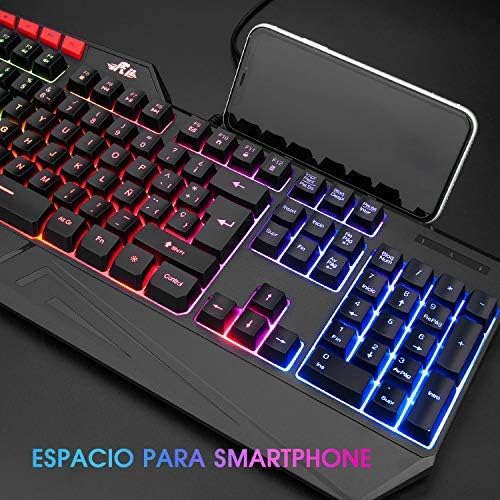
Image: The Rii RK202 keyboard featuring its integrated smartphone holder, with a phone placed in the slot.
4. പരിപാലനം
4.1 കീബോർഡ് വൃത്തിയാക്കൽ
- വൃത്തിയാക്കുന്നതിന് മുമ്പ് നിങ്ങളുടെ ഉപകരണത്തിൽ നിന്ന് കീബോർഡ് വിച്ഛേദിക്കുക.
- Use a soft, dry, lint-free cloth to gently wipe the surface of the keys and the keyboard body.
- കഠിനമായ അഴുക്കോ അഴുക്കോ വേണ്ടി, നേരിയ തോതിൽ dampen the cloth with water or a mild, non-abrasive cleaning solution. Ensure the cloth is not dripping wet.
- Avoid spraying cleaning solutions directly onto the keyboard. Do not allow any liquid to seep into the key switches or internal components.
- താക്കോലുകൾക്കിടയിൽ നിന്ന് പൊടിയും അവശിഷ്ടങ്ങളും നീക്കം ചെയ്യാൻ കംപ്രസ് ചെയ്ത വായു ഉപയോഗിക്കുക.
- Ensure the keyboard is completely dry before reconnecting it to your device.
4.2 പൊതു പരിചരണം
- Avoid exposing the keyboard to extreme temperatures, direct sunlight, or high humidity.
- Do not drop or subject the keyboard to strong impacts.
- Keep liquids away from the keyboard to prevent damage.
5. പ്രശ്നപരിഹാരം
5.1 കീബോർഡ് പ്രതികരിക്കുന്നില്ല
- യുഎസ്ബി കണക്ഷൻ പരിശോധിക്കുക: Ensure the USB cable is securely plugged into both the keyboard and the device. Try unplugging and re-plugging the cable.
- വ്യത്യസ്ത USB പോർട്ട് പരീക്ഷിക്കുക: Connect the keyboard to a different USB port on your device.
- മറ്റൊരു ഉപകരണത്തിൽ പരീക്ഷിക്കുക: If possible, test the keyboard on another computer or compatible device to determine if the issue is with the keyboard or your original device.
- ഉപകരണം പുനരാരംഭിക്കുക: നിങ്ങളുടെ കമ്പ്യൂട്ടറോ ഉപകരണമോ പുനരാരംഭിക്കുക.
5.2 ബാക്ക്ലൈറ്റ് പ്രവർത്തിക്കുന്നില്ല
- ബാക്ക്ലൈറ്റ് സജീവമാക്കുക: Ensure the backlight is turned on by pressing Fn + *.
- തെളിച്ചം ക്രമീകരിക്കുക: ഉപയോഗിച്ച് തെളിച്ചം വർദ്ധിപ്പിക്കുക Fn + PgUp.
- Check Lighting Mode: ലൈറ്റിംഗ് മോഡുകളിലൂടെ സൈക്കിൾ ചെയ്യുക ഉപയോഗിച്ച് Fn + ലൈറ്റ് ബൾബ് കീ.
- MacOS Compatibility: Remember that backlight functionality is not supported on MacOS systems.
5.3 Specific Keys Not Registering
- ക്ലീൻ അണ്ടർ കീകൾ: Use compressed air to remove any debris or dust that might be lodged under the unresponsive keys.
- സോഫ്റ്റ്വെയർ വൈരുദ്ധ്യം: Check if any recently installed software or drivers are causing conflicts.
- If the issue persists after trying these steps, contact customer support for further assistance.
6 സ്പെസിഫിക്കേഷനുകൾ
| ഫീച്ചർ | വിശദാംശങ്ങൾ |
|---|---|
| മോഡൽ നമ്പർ | RK202 |
| അളവുകൾ (L x W x H) | 47.5 x 21.49 x 3 സെ.മീ (18.7 x 8.46 x 1.18 ഇഞ്ച്) |
| ഭാരം | 840 ഗ്രാം (1.85 പൗണ്ട്) |
| കണക്റ്റിവിറ്റി | വയർഡ് യുഎസ്ബി |
| കീ എണ്ണം | 105 കീകൾ |
| ആൻ്റി-ഗോസ്റ്റിംഗ് | 19 കീകൾ |
| ബാക്ക്ലൈറ്റ് | 7-color LED with adjustable brightness and modes |
| മെറ്റീരിയൽ | എബിഎസ് പ്ലാസ്റ്റിക് |
| പ്രധാന ആയുസ്സ് | 50 ദശലക്ഷം ക്ലിക്കുകൾ വരെ |
| അനുയോജ്യത | Windows (95/98/XP/2000/ME/VISTA/7/8/9/10), PC, Laptop, Google Android TV Box, HTPC, IPTV, Smart TV, Mac OS (limited backlight), Chrome OS, Raspberry Pi |
7. വാറൻ്റി വിവരങ്ങൾ
Please refer to the warranty policy provided by your retailer or the manufacturer's official website for detailed information regarding warranty coverage, terms, and conditions. Keep your proof of purchase for any warranty claims.
8. ഉപഭോക്തൃ പിന്തുണ
For technical assistance, troubleshooting not covered in this manual, or other inquiries, please visit the official Rii website or contact your point of purchase. Ensure you have your product model number (RK202) available when seeking support.
Ask a question about this manual
Ask about setup, troubleshooting, compatibility, parts, safety, or missing instructions. Manuals+ will review the question and use this page’s manual context to help answer it.