
1. ആമുഖം
The TechCare Massager BD20458 is a versatile TENS (Transcutaneous Electrical Nerve Stimulation) and EMS (Electrical Muscle Stimulation) device designed for drug-free pain relief and muscle stimulation. It delivers low-voltage electrical pulses to stimulate nerve fibers, which can help block pain signals and promote muscle recovery. This manual provides essential information for the safe and effective use of your device.
2 സുരക്ഷാ വിവരങ്ങൾ
WARNING: Please read all safety instructions and precautions in the User Manual and Video Guide thoroughly before using this device.
- Do not use if you have a pacemaker, defibrillator, or any implanted metallic or electronic device.
- Consult a physician before use if you have any medical conditions, including but not limited to heart disease, epilepsy, cancer, or are pregnant.
- Do not apply pads over open wounds, rashes, swollen, red, infected, or inflamed skin areas.
- കുട്ടികൾക്ക് ലഭ്യമാകാതെ സൂക്ഷിക്കുക.
- എന്തെങ്കിലും അസ്വസ്ഥതയോ പ്രതികൂല പ്രതികരണങ്ങളോ അനുഭവപ്പെട്ടാൽ ഉടൻ ഉപയോഗം നിർത്തുക.
3. പാക്കേജ് ഉള്ളടക്കം
Your TechCare Massager BD20458 package includes the following items:
- 1 Main Device (TENS/EMS Unit)
- 1 Pair (2) Large Electrode Pads
- 3 Pairs (6) Medium Electrode Pads
- 1 Pair (2) Small Electrode Pads
- 1 ചാർജർ കേബിൾ
- 1 Wall AC Adaptor
- 1 ബെൽറ്റ് ക്ലിപ്പ്
- 1 Pad & Wire Holder
- 2 Electrode Leads
- 1 ഉപയോക്തൃ മാനുവൽ
- 1 Pad Placement Guide
- 1 യാത്രാ കേസ്
- 1 Pair of Reflexology Slippers

Figure 3.1: Complete package contents of the TechCare Massager BD20458.
4. ഉൽപ്പന്നം കഴിഞ്ഞുview
The TechCare Massager BD20458 features a user-friendly interface with a large display and intuitive controls. It offers dual channels, allowing for independent intensity control for two separate sets of pads or muscle groups.

ചിത്രം 4.1: മുൻവശവും വശവും views of the TENS EMS unit with key features labeled.
The device is equipped with a built-in rechargeable lithium battery, providing up to 12 hours of continuous use on a single charge. It can be conveniently charged via the included wall adapter or a computer USB port.
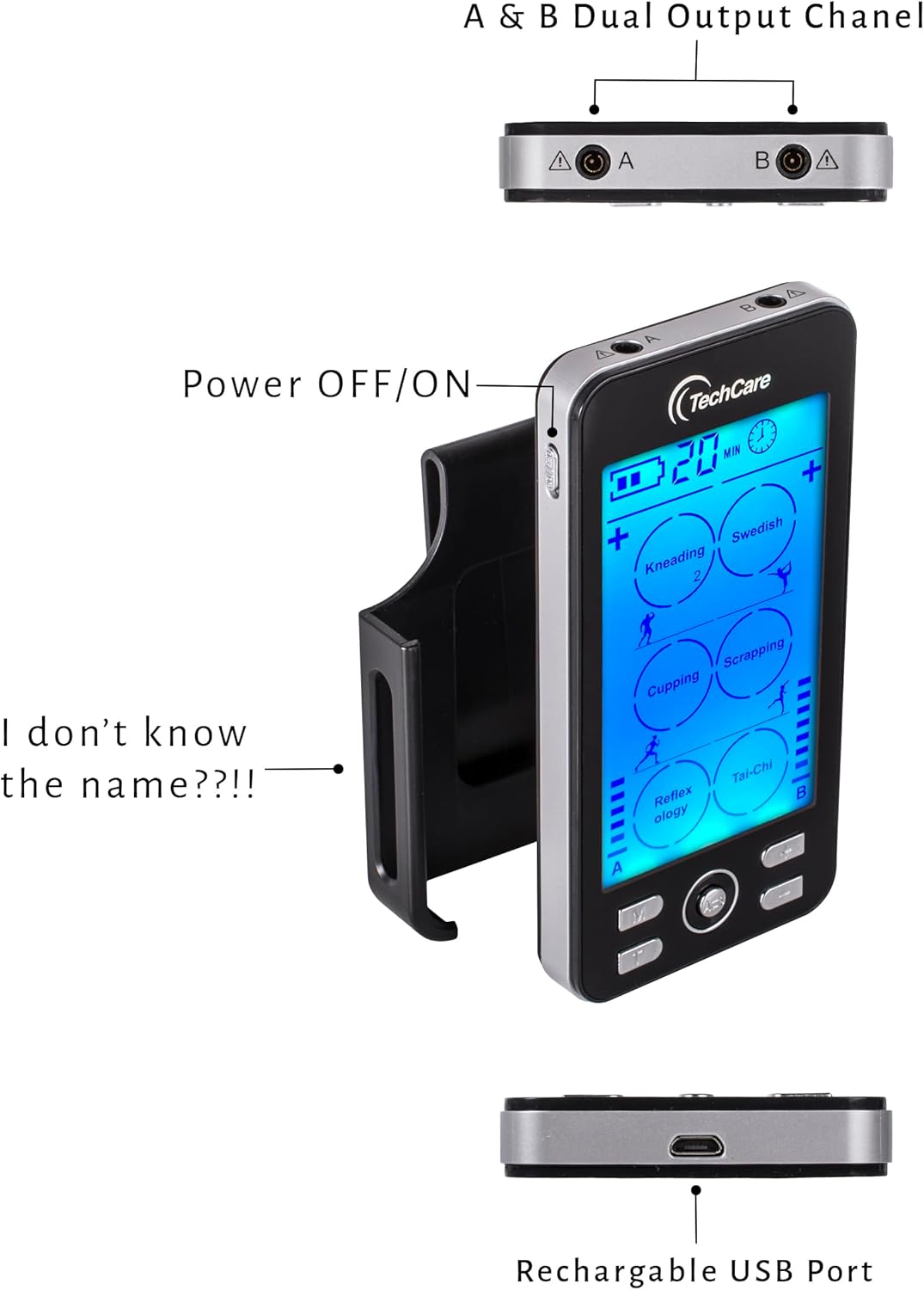
ചിത്രം 4.2: വശം view highlighting the power button, belt clip, and charging port.
The included reflexology slippers can be connected to the device for foot stimulation, offering a unique application for pain relief and relaxation.

Figure 4.3: Reflexology slippers included with the unit.
5. സജ്ജീകരണം
- ഉപകരണം ചാർജ് ചെയ്യുക: Before first use, fully charge the device using the provided charger cable and wall AC adaptor. The battery indicator on the screen will show charging status.
- Connect Electrode Leads: Insert the electrode leads into the A and/or B output ports located at the top of the main device.
- ഇലക്ട്രോഡ് പാഡുകൾ ഘടിപ്പിക്കുക: Connect the electrode pads to the ends of the electrode leads. Ensure a secure connection.
- Attach Reflexology Slippers (Optional): If using the reflexology slippers, connect the electrode leads to the metal studs on the slippers.

Figure 5.1: Connecting electrode leads to reflexology slippers.
6. പ്രവർത്തന നിർദ്ദേശങ്ങൾ
- പവർ ഓൺ: Press and hold the power button on the side of the device to turn it on.
- പ്ലേസ് പാഡുകൾ: Ensure the electrode pads are placed firmly on clean, dry skin in the desired treatment area. The device has a safety feature and will not deliver intensity if pads are not properly placed on the skin.
- മോഡ് തിരഞ്ഞെടുക്കുക: Press the 'M' button to cycle through the 24 available massage modes. Each mode offers a different pulse duration and sensation (e.g., Kneading, Swedish, Cupping, Scrapping, Reflexology, Tai-Chi).
- തീവ്രത ക്രമീകരിക്കുക: Use the '+' and '-' buttons for each channel (A and B) to adjust the intensity level. There are 20 intensity levels. Start with a low intensity and gradually increase until you feel a comfortable, yet effective, sensation.
- ടൈമർ സജ്ജമാക്കുക: The device features an adjustable timer from 10 to 60 minutes. Use the timer button to select your desired treatment duration.
- ഡ്യുവൽ ചാനൽ പ്രവർത്തനം: The device supports dual channels (A and B), allowing you to use two sets of pads simultaneously with independent mode and intensity settings. This is ideal for treating different areas or applying varied sensations.
- പവർ ഓഫ്: സെഷനുശേഷം ഉപകരണം ഓഫാക്കാൻ പവർ ബട്ടൺ അമർത്തിപ്പിടിക്കുക.
7. Pad Placement Guide
Proper electrode pad placement is crucial for effective and safe treatment. Refer to the included Pad Placement Guide for detailed diagrams and recommendations for various body areas. Generally, place pads on either side of the area of pain or muscle you wish to stimulate. For a single muscle group, place one pad at the beginning and one at the end of the muscle.

ചിത്രം 7.1: ഉദാample pad placement guide for common treatment areas.
8. പരിപാലനം
- ക്ലീനിംഗ് പാഡുകൾ: Gently wipe the adhesive side of the pads with a damp cloth after each use to remove any residue. Allow them to air dry. Do not use harsh chemicals.
- സംഭരണം: Store the device and pads in the provided EVA travel case in a cool, dry place away from direct sunlight. Ensure pads are re-attached to their protective film.
- ബാറ്ററി കെയർ: ബാറ്ററി ലൈഫ് വർദ്ധിപ്പിക്കാൻ, ഉപകരണം ഇടയ്ക്കിടെ പൂർണ്ണമായും ഡിസ്ചാർജ് ചെയ്യുന്നത് ഒഴിവാക്കുക. തുടർച്ചയായ ഉപയോഗത്തിലല്ലെങ്കിൽ പോലും പതിവായി ചാർജ് ചെയ്യുക.

Figure 8.1: Device and accessories stored in the travel case.
9. പ്രശ്നപരിഹാരം
- സംവേദനമില്ല അല്ലെങ്കിൽ ദുർബലമായ സംവേദനം:
- Ensure pads are firmly attached to the skin. The device will not activate without proper skin contact.
- Check that electrode leads are securely plugged into the device and pads.
- Increase the intensity level using the '+' button for the active channel.
- Ensure the device is adequately charged.
- പാഡുകൾ ഒട്ടിപ്പിടിക്കുന്നില്ല:
- Clean the adhesive side of the pads with a damp തുണി.
- Ensure skin is clean and dry before application.
- Replace pads if they have lost their adhesiveness after extended use.
- ഉപകരണം ഓണാക്കുന്നില്ല:
- ഉപകരണം പൂർണ്ണമായി ചാർജ്ജ് ചെയ്തിട്ടുണ്ടെന്ന് ഉറപ്പാക്കുക.
- കുറച്ച് സെക്കൻഡ് നേരത്തേക്ക് പവർ ബട്ടൺ അമർത്തിപ്പിടിക്കുക.
10 സ്പെസിഫിക്കേഷനുകൾ
| മോഡൽ നമ്പർ | BD20458 |
| പവർ ഉറവിടം | ബാറ്ററി പവർ (1 ലിഥിയം അയൺ ബാറ്ററി ആവശ്യമാണ്) |
| ഇനത്തിൻ്റെ ഭാരം | 5 ഔൺസ് |
| മെറ്റീരിയൽ | പ്ലാസ്റ്റിക് |
| പാക്കേജ് അളവുകൾ | 12.13 x 6.81 x 6.46 ഇഞ്ച് |
| നിർമ്മാതാവ് | ടെക്കെയർ മസാജർമാർ |
11. വാറൻ്റിയും പിന്തുണയും
The TechCare Massager BD20458 comes with a ലൈഫ് ടൈം വാറൻ്റി. For any product inquiries, technical support, or warranty claims, please contact TechCare Massager customer service through their official webഉൽപ്പന്നം വാങ്ങിയ സൈറ്റ് അല്ലെങ്കിൽ റീട്ടെയിലർ.
12. നിയമപരമായ നിരാകരണം
Statements regarding dietary supplements have not been evaluated by the FDA and are not intended to diagnose, treat, cure, or prevent any disease or health condition. This device is intended for personal use and should not replace professional medical advice or treatment.