
ആമുഖം
വാങ്ങിയതിന് നന്ദി.asing the Bud Light Bluetooth Can Speaker. This portable wireless speaker is designed to provide clear audio with a compact and unique design. This manual provides instructions for setting up, operating, maintaining, and troubleshooting your speaker to ensure optimal performance.
പാക്കേജ് ഉള്ളടക്കം
പാക്കേജിൽ ഇനിപ്പറയുന്ന ഇനങ്ങൾ ഉണ്ടോ എന്ന് പരിശോധിക്കുക:
- Bud Light Bluetooth Can Speaker
- യുഎസ്ബി ചാർജിംഗ് കേബിൾ
- ഉപയോക്തൃ മാനുവൽ

Image: The Bud Light Bluetooth Can Speaker shown in its clear retail packaging.
ഉൽപ്പന്നം കഴിഞ്ഞുview
Familiarize yourself with the speaker's components:
- വൈദ്യുതി സ്വിച്ച്: Located at the base, used to turn the speaker ON or OFF.
- ചാർജിംഗ് പോർട്ട്: സ്പീക്കർ ചാർജ് ചെയ്യുന്നതിനുള്ള മൈക്രോ യുഎസ്ബി പോർട്ട്.
- LED സൂചകം: ചാർജിംഗ് സ്റ്റാറ്റസും ബ്ലൂടൂത്ത് ജോടിയാക്കൽ സ്റ്റാറ്റസും കാണിക്കുന്നു.
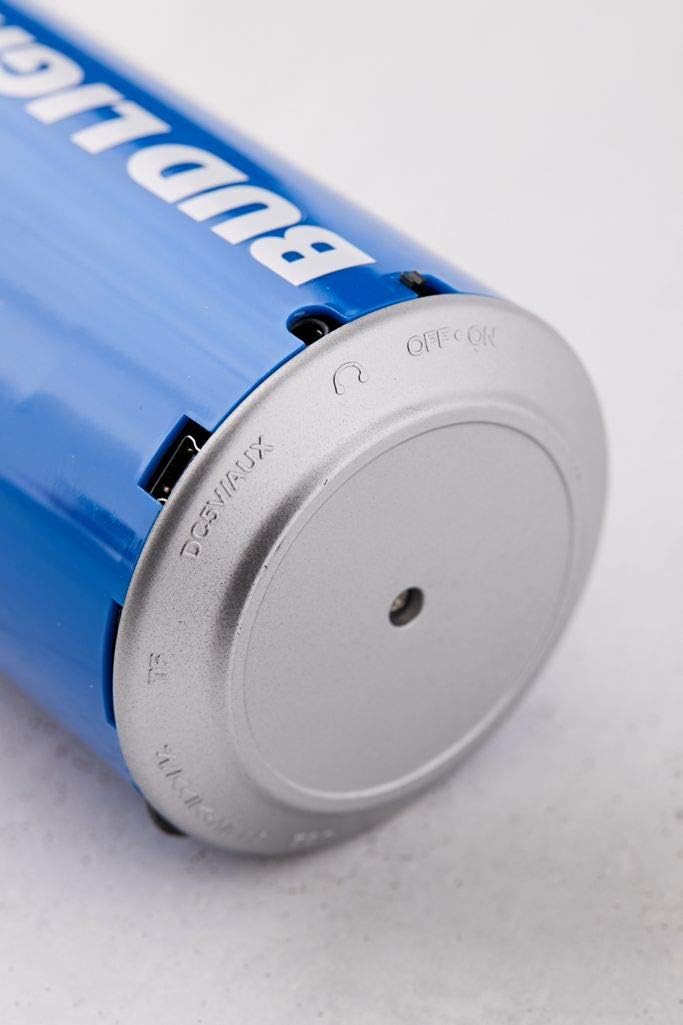
ചിത്രം: ഒരു ക്ലോസ്-അപ്പ് view of the speaker's base, highlighting the 'OFF ON' switch and the charging port.
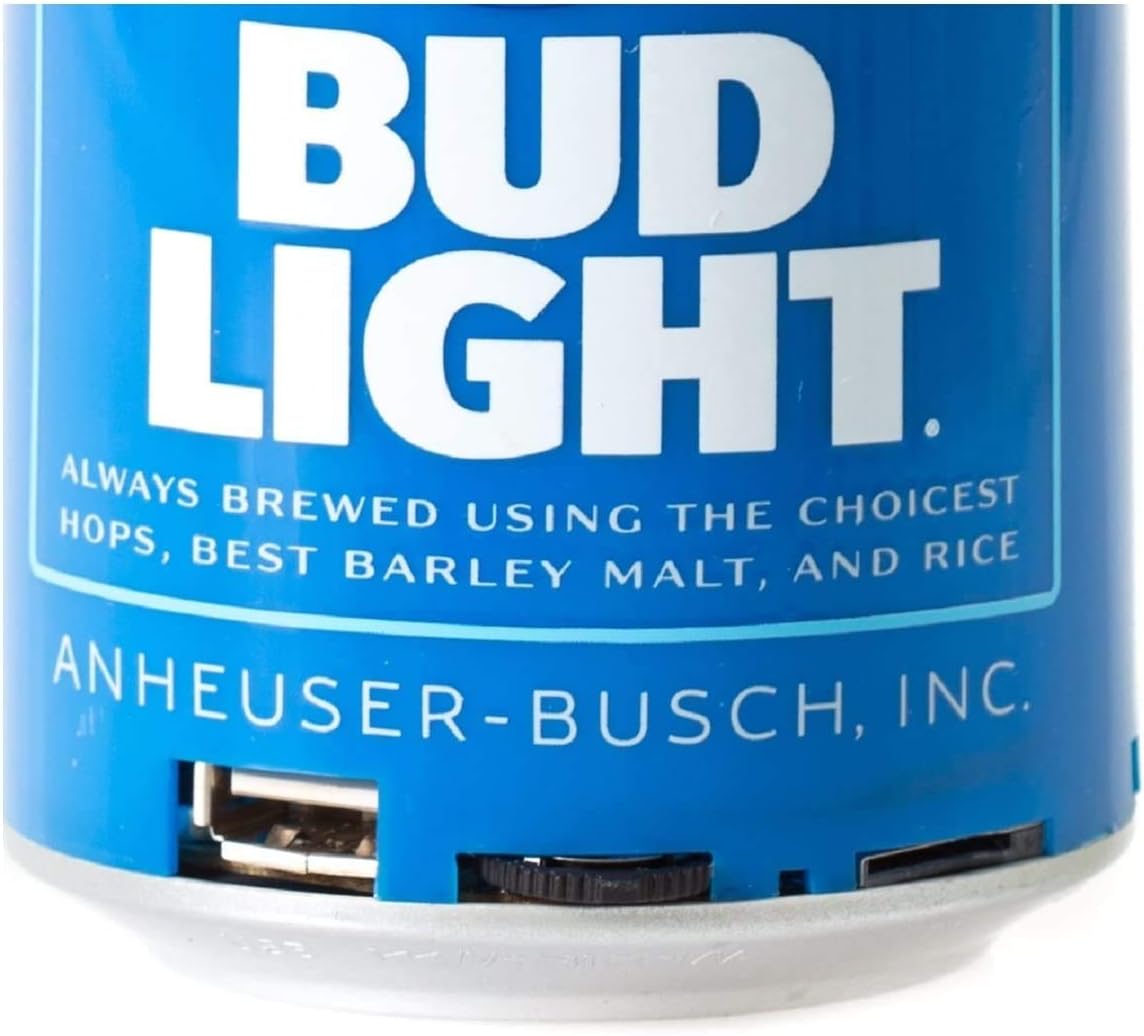
ചിത്രം: വിശദമായ ഒരു ചിത്രം view of the speaker's bottom section, showing the USB charging port and the power switch.
സജ്ജമാക്കുക
1. സ്പീക്കറിൽ നിന്ന് നിരക്ക് ഈടാക്കുന്നു
- Connect the small end of the USB charging cable to the charging port on the speaker's base.
- USB ചാർജിംഗ് കേബിളിന്റെ വലിയ അറ്റം ഒരു USB പവർ അഡാപ്റ്ററുമായി (ഉൾപ്പെടുത്തിയിട്ടില്ല) അല്ലെങ്കിൽ ഒരു കമ്പ്യൂട്ടറിന്റെ USB പോർട്ടുമായി ബന്ധിപ്പിക്കുക.
- The LED indicator will illuminate during charging and turn off once fully charged.
- സാധാരണയായി ഒരു പൂർണ്ണ ചാർജ് ഏകദേശം 2-3 മണിക്കൂർ എടുക്കും.
2. പവർ ഓൺ/ഓഫ്
- To turn ON the speaker, slide the power switch located at the base to the 'ON' position. You will hear an audible prompt.
- To turn OFF the speaker, slide the power switch to the 'OFF' position.
പ്രവർത്തന നിർദ്ദേശങ്ങൾ
1. ബ്ലൂടൂത്ത് ജോടിയാക്കൽ
The speaker is compatible with all Bluetooth-enabled devices.
- Ensure the speaker is charged and powered ON. The LED indicator will flash, indicating it is in pairing mode.
- On your device (smartphone, tablet, etc.), go to the Bluetooth settings and enable Bluetooth.
- ഇതിനായി തിരയുക available devices. The speaker will appear as "Bud Light Speaker" or similar.
- Select the speaker from the list to connect. Once paired, the LED indicator will stop flashing and remain solid, and you will hear a confirmation tone.
- പാസ്വേഡ് ആവശ്യപ്പെടുകയാണെങ്കിൽ, "0000" എന്ന് നൽകുക.

Image: The Bud Light Bluetooth Can Speaker positioned next to a smartphone displaying a music application, illustrating a successful Bluetooth connection.
2. ഓഡിയോ പ്ലേബാക്ക്
- Once paired, audio from your device will play through the speaker.
- Control volume and track selection directly from your connected device.
3. പോർട്ടബിലിറ്റി
The compact and lightweight design allows for easy transport, making it suitable for various outdoor and indoor environments.

Image: The Bud Light Bluetooth Can Speaker being held in a hand, demonstrating its compact size and portability.

Image: The Bud Light Bluetooth Can Speaker placed on a beach towel, illustrating its use in an outdoor setting.
മെയിൻ്റനൻസ്
- വൃത്തിയാക്കൽ: സ്പീക്കർ തുടയ്ക്കാൻ മൃദുവായതും ഉണങ്ങിയതുമായ തുണി ഉപയോഗിക്കുക. അബ്രാസീവ് ക്ലീനറുകളോ ലായകങ്ങളോ ഉപയോഗിക്കരുത്.
- സംഭരണം: നേരിട്ടുള്ള സൂര്യപ്രകാശത്തിൽ നിന്നും കടുത്ത താപനിലയിൽ നിന്നും മാറി തണുത്തതും വരണ്ടതുമായ സ്ഥലത്ത് സ്പീക്കർ സൂക്ഷിക്കുക.
- ജല പ്രതിരോധം: ഈ സ്പീക്കർ വാട്ടർപ്രൂഫ് അല്ല. വെള്ളത്തിലോ അമിതമായ ഈർപ്പത്തിലോ സമ്പർക്കം ഒഴിവാക്കുക.
ട്രബിൾഷൂട്ടിംഗ്
| പ്രശ്നം | സാധ്യമായ കാരണം | പരിഹാരം |
|---|---|---|
| സ്പീക്കർ ഓണാക്കുന്നില്ല. | ബാറ്ററി തീർന്നു. | നൽകിയിരിക്കുന്ന USB കേബിൾ ഉപയോഗിച്ച് സ്പീക്കർ ചാർജ് ചെയ്യുക. |
| ബ്ലൂടൂത്ത് ഉപകരണവുമായി ജോടിയാക്കാൻ കഴിയില്ല. | സ്പീക്കർ ജോടിയാക്കൽ മോഡിലല്ല അല്ലെങ്കിൽ ഉപകരണത്തിന്റെ ബ്ലൂടൂത്ത് ഓഫാണ്. | Ensure speaker is ON and LED is flashing. Turn ON Bluetooth on your device and search again. |
| ശബ്ദമില്ല അല്ലെങ്കിൽ കുറഞ്ഞ ശബ്ദമില്ല. | Volume on device is low or speaker is not connected. | Increase volume on your connected device. Ensure speaker is properly paired. |
| മോശം ഓഡിയോ നിലവാരം. | Device is too far from speaker or interference. | Move device closer to the speaker (within 10 meters). Avoid obstacles between devices. |
സ്പെസിഫിക്കേഷനുകൾ
- ബ്രാൻഡ്: ബഡ് ലൈറ്റ്
- മോഡൽ: ബ്ലൂടൂത്ത് കാൻ സ്പീക്കർ
- സ്പീക്കർ പരമാവധി ഔട്ട്പുട്ട് പവർ: 3 വാട്ട്സ്
- കണക്റ്റിവിറ്റി ടെക്നോളജി: ബ്ലൂടൂത്ത്, യുഎസ്ബി
- ഓഡിയോ putട്ട്പുട്ട് മോഡ്: സ്റ്റീരിയോ, സറൗണ്ട്
- മൗണ്ടിംഗ് തരം: ഫ്രീസ്റ്റാൻഡിംഗ്
- അനുയോജ്യത: All Bluetooth-enabled devices (Apple iPhone, Samsung Galaxy, Tablets, Smartphones) and non-Bluetooth devices (MP3 players via USB).
വാറൻ്റിയും പിന്തുണയും
For warranty information or technical support, please refer to the contact details provided with your purchase documentation or visit the official Bud Light accessories webസൈറ്റ്. വാറന്റി ക്ലെയിമുകൾക്കായി നിങ്ങളുടെ വാങ്ങലിന്റെ തെളിവ് സൂക്ഷിക്കുക.