
1. ആമുഖം
വാങ്ങിയതിന് നന്ദി.asing the Auna Dr. Bang Portable Bluetooth Speaker. This manual provides essential information for the safe and efficient operation of your device. Please read it thoroughly before use and retain it for future reference.
The Auna Dr. Bang is a versatile portable speaker featuring Bluetooth connectivity, USB and AUX inputs, and integrated LED lighting, designed for various audio playback scenarios.
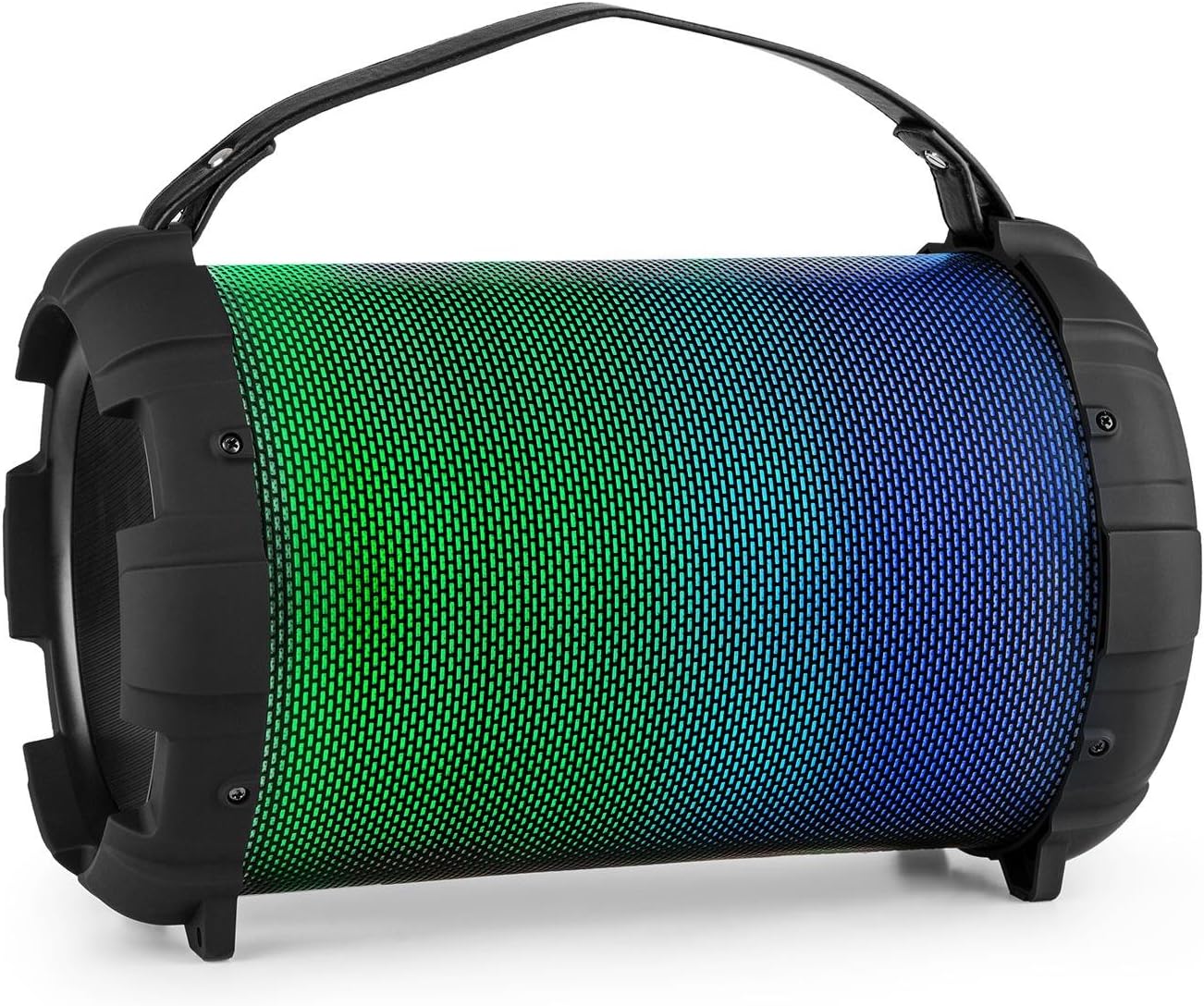
Image: The Auna Dr. Bang portable speaker, showcasing its cylindrical design and vibrant green and blue LED illumination on the front grille.
2. സുരക്ഷാ നിർദ്ദേശങ്ങൾ
- ഉപകരണം പ്രവർത്തിപ്പിക്കുന്നതിന് മുമ്പ് എല്ലാ നിർദ്ദേശങ്ങളും വായിക്കുക.
- വെള്ളം, ഈർപ്പം, തീവ്രമായ താപനില എന്നിവയിൽ നിന്ന് ഉപകരണം അകറ്റി നിർത്തുക.
- ഉപകരണം സ്വയം തുറക്കാനോ നന്നാക്കാനോ ശ്രമിക്കരുത്. എല്ലാ സേവനങ്ങളും യോഗ്യതയുള്ള ഉദ്യോഗസ്ഥരെ ഏൽപ്പിക്കുക.
- Use only the specified charging cable and power adapter (not included).
- കേൾവിക്ക് കേടുപാടുകൾ സംഭവിക്കുന്നത് തടയാൻ, ഉയർന്ന അളവിലുള്ള അളവിൽ ദീർഘനേരം എക്സ്പോഷർ ചെയ്യുന്നത് ഒഴിവാക്കുക.
- പ്രവർത്തന സമയത്ത് സ്പീക്കറിന് ചുറ്റും ശരിയായ വായുസഞ്ചാരം ഉറപ്പാക്കുക.
- പ്രാദേശിക നിയന്ത്രണങ്ങൾ അനുസരിച്ച് ഉപകരണവും അതിന്റെ ബാറ്ററിയും ഉത്തരവാദിത്തത്തോടെ നിർമാർജനം ചെയ്യുക.
3. ഉൽപ്പന്നം കഴിഞ്ഞുview
Familiarize yourself with the various parts and controls of your Auna Dr. Bang speaker.

ചിത്രം: വിശദമായത് view of the speaker's control panel, showing buttons for mode, track control, play/pause, microphone inputs, volume, echo, AUX in, USB port, and DC 5V charging port.
നിയന്ത്രണ പാനൽ ലേഔട്ട്:
- M/F Button: Mode/Function selection (Bluetooth, USB, AUX).
- മുമ്പത്തെ ട്രാക്ക് ബട്ടൺ: മുമ്പത്തെ ട്രാക്കിനായി ഷോർട്ട് പ്രസ്സ് ചെയ്യുക, വോളിയം കുറയ്ക്കാൻ ദീർഘനേരം അമർത്തുക.
- പ്ലേ/താൽക്കാലികമായി നിർത്തുക ബട്ടൺ: ഓഡിയോ പ്ലേ ചെയ്യുക അല്ലെങ്കിൽ താൽക്കാലികമായി നിർത്തുക.
- അടുത്ത ട്രാക്ക് ബട്ടൺ: അടുത്ത ട്രാക്കിനായി ഷോർട്ട് പ്രസ്സ് ചെയ്യുക, വോളിയം കൂട്ടാൻ ദീർഘനേരം അമർത്തുക.
- LED ഡിസ്പ്ലേ: നിലവിലെ മോഡും സ്റ്റാറ്റസും കാണിക്കുന്നു.
- USB പോർട്ട്: യുഎസ്ബി ഫ്ലാഷ് ഡ്രൈവ് പ്ലേബാക്കിനായി.
- ഓക്സ് ഇൻ: 3.5mm ഓഡിയോ ഇൻപുട്ട്.
- ഡിസി 5 വി: പോർട്ട് ചാർജ് ചെയ്യുന്നു.
- ഓൺ/ഓഫ് സ്വിച്ച്: സ്പീക്കർ ഓൺ/ഓഫ് ചെയ്യുക.
- MIC 1 ഇൻപുട്ട്: 6.3mm microphone input 1.
- MIC 2 ഇൻപുട്ട്: 6.3mm microphone input 2.
- MIC ECHO Knob: മൈക്രോഫോൺ എക്കോ ഇഫക്റ്റ് ക്രമീകരിക്കുക.
- MIC VOL നോബ്: മൈക്രോഫോൺ വോളിയം ക്രമീകരിക്കുക.
4. സജ്ജീകരണം
4.1. സ്പീക്കറിൽ നിന്ന് നിരക്ക് ഈടാക്കുന്നു
Before first use, fully charge the speaker. Connect the provided USB charging cable to the DC 5V port on the speaker and the other end to a compatible USB power adapter (not included) or a computer's USB port.
- ചാർജ് ചെയ്യുമ്പോൾ LED ഇൻഡിക്കേറ്റർ പ്രകാശിക്കും.
- ചാർജിംഗ് സമയം വ്യത്യാസപ്പെടാം.
- Disconnect the charger once fully charged to preserve battery life.

Image: Close-up of the USB charging cable and a 3.5mm AUX cable, illustrating the connectivity options for the speaker.
4.2. പവർ ഓൺ/ഓഫ്
To power on the speaker, slide the ഓൺ/ഓഫ് സ്വിച്ച് to the "ON" position. The LED display will light up, indicating the current mode. To power off, slide the switch to the "OFF" position.
5. പ്രവർത്തന നിർദ്ദേശങ്ങൾ
5.1. ബ്ലൂടൂത്ത് ജോടിയാക്കൽ
- Power on the speaker. It will automatically enter Bluetooth pairing mode, indicated by "BLUE" flashing on the LED display.
- നിങ്ങളുടെ മൊബൈൽ ഉപകരണത്തിൽ (സ്മാർട്ട്ഫോൺ, ടാബ്ലെറ്റ് മുതലായവ) ബ്ലൂടൂത്ത് പ്രവർത്തനക്ഷമമാക്കുക.
- ഇതിനായി തിരയുക available Bluetooth devices and select "Auna Dr. Bang" from the list.
- Once paired, the speaker will emit a confirmation tone, and "BLUE" will stop flashing.
- ഇപ്പോൾ നിങ്ങളുടെ ഉപകരണത്തിൽ നിന്ന് സ്പീക്കറിലൂടെ ഓഡിയോ പ്ലേ ചെയ്യാൻ കഴിയും.
Note: The speaker will attempt to reconnect to the last paired device automatically when powered on.
5.2. USB പ്ലേബാക്ക്
- Insert a USB flash drive (formatted to FAT32) containing MP3 audio fileയുഎസ്ബി പോർട്ടിലേക്ക് എസ്.
- The speaker will automatically switch to USB mode and begin playing audio. If not, press the M/F Button USB മോഡ് തിരഞ്ഞെടുക്കാൻ.
- ഉപയോഗിക്കുക മുമ്പത്തെ ട്രാക്ക് ഒപ്പം അടുത്ത ട്രാക്ക് ട്രാക്കുകൾ നാവിഗേറ്റ് ചെയ്യുന്നതിനുള്ള ബട്ടണുകൾ.
- ഉപയോഗിക്കുക പ്ലേ/താൽക്കാലികമായി നിർത്തുക പ്ലേബാക്ക് നിയന്ത്രിക്കാനുള്ള ബട്ടൺ.
5.3. AUX ഇൻപുട്ട്
- 3.5mm ഓഡിയോ കേബിളിന്റെ ഒരു അറ്റം (ഉൾപ്പെടുത്തിയിട്ടില്ല) സ്പീക്കറിലെ AUX IN പോർട്ടുമായി ബന്ധിപ്പിക്കുക.
- മറ്റേ അറ്റം നിങ്ങളുടെ ബാഹ്യ ഉപകരണത്തിന്റെ (ഉദാ: MP3 പ്ലെയർ, ലാപ്ടോപ്പ്) ഓഡിയോ ഔട്ട്പുട്ടുമായി ബന്ധിപ്പിക്കുക.
- അമർത്തുക M/F Button AUX മോഡ് തിരഞ്ഞെടുക്കാൻ.
- Control audio playback and volume from your external device.
5.4. മൈക്രോഫോൺ ഉപയോഗം
- Connect a microphone (not included) to either the MIC 1 or MIC 2 ഇൻപുട്ട്.
- ഉപയോഗിച്ച് മൈക്രോഫോൺ വോളിയം ക്രമീകരിക്കുക MIC VOL നോബ്.
- ഉപയോഗിച്ച് എക്കോ ഇഫക്റ്റ് ക്രമീകരിക്കുക എംഐസി എക്കോ നോബ്.
- You can use the microphones simultaneously with music playback from Bluetooth, USB, or AUX modes.
5.5. എൽഇഡി ലൈറ്റ് മോഡുകൾ
The speaker features integrated LED lights that can change color. Specific controls for LED modes are not detailed on the control panel image, but typically these speakers cycle through modes automatically or via a dedicated button (if present and not labeled). Observe the speaker for automatic light changes or consult the manufacturer's website for advanced light control if available.

Image: The Auna Dr. Bang speaker with its front grille illuminated in shades of purple and red, demonstrating its dynamic LED lighting feature.
6. പരിപാലനം
6.1. വൃത്തിയാക്കൽ
- സ്പീക്കറിന്റെ പുറംഭാഗം മൃദുവായതും ഉണങ്ങിയതുമായ തുണി ഉപയോഗിച്ച് തുടയ്ക്കുക.
- അബ്രാസീവ് ക്ലീനറുകൾ, മെഴുക്, ലായകങ്ങൾ എന്നിവ ഉപയോഗിക്കരുത്.
- ഏതെങ്കിലും ദ്വാരങ്ങളിൽ ഈർപ്പം കയറുന്നത് ഒഴിവാക്കുക.
6.2. സംഭരണം
- നേരിട്ടുള്ള സൂര്യപ്രകാശത്തിൽ നിന്നും കടുത്ത താപനിലയിൽ നിന്നും മാറി തണുത്തതും വരണ്ടതുമായ സ്ഥലത്ത് സ്പീക്കർ സൂക്ഷിക്കുക.
- If storing for an extended period, charge the battery periodically (e.g., every 3-6 months) to maintain its health.
7. പ്രശ്നപരിഹാരം
| പ്രശ്നം | സാധ്യമായ കാരണം | പരിഹാരം |
|---|---|---|
| ശക്തിയില്ല | ബാറ്ററി തീർന്നു; പവർ സ്വിച്ച് ഓഫാണ്. | Charge the speaker; Ensure the ON/OFF switch is in the "ON" position. |
| ശബ്ദമില്ല | ശബ്ദം വളരെ കുറവാണ്; തെറ്റായ മോഡ് തിരഞ്ഞെടുത്തു; ഉപകരണം ജോടിയാക്കിയിട്ടില്ല (ബ്ലൂടൂത്ത്); കേബിൾ ബന്ധിപ്പിച്ചിട്ടില്ല (AUX). | Increase speaker and device volume; Press M/F button to select correct mode; Re-pair Bluetooth device; Check AUX cable connection. |
| ബ്ലൂടൂത്ത് കണക്റ്റ് ചെയ്യുന്നില്ല | സ്പീക്കർ ജോടിയാക്കൽ മോഡിലല്ല; ഉപകരണം വളരെ അകലെയാണ്; തടസ്സം. | Ensure speaker is in Bluetooth mode and "BLUE" is flashing; Move device closer to speaker; Turn off other Bluetooth devices. |
| മൈക്രോഫോൺ പ്രവർത്തിക്കുന്നില്ല | Microphone not connected; MIC VOL knob too low; Microphone faulty. | Ensure microphone is securely plugged into MIC 1 or MIC 2; Increase MIC VOL; Test with another microphone if possible. |
8 സ്പെസിഫിക്കേഷനുകൾ
| ബ്രാൻഡ്: | ഔന |
| മോഡൽ: | BTS16-Dr. Bang LED V2 |
| അളവുകൾ: | 22 x 31.5 x 22 സെ.മീ |
| ഭാരം: | 2.8 കി.ഗ്രാം |
| ഔട്ട്പുട്ട് പവർ: | 40 വാട്ട്സ് |
| കണക്റ്റിവിറ്റി ടെക്നോളജി: | ഓക്സിലറി, ബ്ലൂടൂത്ത്, യുഎസ്ബി |
| വയർലെസ് കമ്മ്യൂണിക്കേഷൻ ടെക്നോളജി: | ബ്ലൂടൂത്ത് |
| ഊർജ്ജ സ്രോതസ്സ്: | DC & ബാറ്ററി |
| Battery Nominal Power: | 2600 mAh |
| നിറം: | Black - Multicolor LED |
9. വാറണ്ടിയും പിന്തുണയും
For warranty information and technical support, please refer to the documentation provided with your purchase or visit the official Auna webസൈറ്റ്. ഏതെങ്കിലും വാറന്റി ക്ലെയിമുകൾക്ക് നിങ്ങളുടെ വാങ്ങലിന്റെ തെളിവ് സൂക്ഷിക്കുക.
Auna Official Store: Visit Auna Store on Amazon