
ആമുഖം
This manual provides essential instructions for the safe and efficient operation, maintenance, and care of your Weston Pro Series Digital Dehydrator, Model 28-0301-W. Please read all instructions thoroughly before using the appliance to ensure proper function and to prevent injury or damage.
പ്രധാനപ്പെട്ട സുരക്ഷാ നിർദ്ദേശങ്ങൾ
ഇലക്ട്രിക്കൽ വീട്ടുപകരണങ്ങൾ ഉപയോഗിക്കുമ്പോൾ, താഴെപ്പറയുന്നവ ഉൾപ്പെടെ, തീ, വൈദ്യുത ആഘാതം, പരിക്കുകൾ എന്നിവയുടെ അപകടസാധ്യത കുറയ്ക്കുന്നതിന് അടിസ്ഥാന സുരക്ഷാ മുൻകരുതലുകൾ എല്ലായ്പ്പോഴും പാലിക്കണം:
- എല്ലാ നിർദ്ദേശങ്ങളും വായിക്കുക.
- ചൂടുള്ള പ്രതലങ്ങളിൽ തൊടരുത്. ഹാൻഡിലുകളോ നോബുകളോ ഉപയോഗിക്കുക.
- വൈദ്യുത ആഘാതത്തിൽ നിന്ന് പരിരക്ഷിക്കുന്നതിന്, ചരടുകളോ പ്ലഗുകളോ ഉപകരണങ്ങളോ വെള്ളത്തിലോ മറ്റ് ദ്രാവകത്തിലോ മുക്കരുത്.
- കുട്ടികളോ സമീപത്തോ ഏതെങ്കിലും ഉപകരണം ഉപയോഗിക്കുമ്പോൾ സൂക്ഷ്മ മേൽനോട്ടം ആവശ്യമാണ്.
- ഉപയോഗത്തിലില്ലാത്തപ്പോഴും വൃത്തിയാക്കുന്നതിന് മുമ്പും ഔട്ട്ലെറ്റിൽ നിന്ന് അൺപ്ലഗ് ചെയ്യുക. ഭാഗങ്ങൾ ധരിക്കുന്നതിനോ എടുക്കുന്നതിനോ മുമ്പ് തണുപ്പിക്കാൻ അനുവദിക്കുക.
- കേടായ കോർഡ് അല്ലെങ്കിൽ പ്ലഗ് ഉപയോഗിച്ച് ഒരു ഉപകരണവും പ്രവർത്തിപ്പിക്കരുത്, അല്ലെങ്കിൽ ഉപകരണം തകരാറിലായതിന് ശേഷം അല്ലെങ്കിൽ ഏതെങ്കിലും വിധത്തിൽ കേടായി. പരിശോധനയ്ക്കോ അറ്റകുറ്റപ്പണികൾക്കോ ക്രമീകരണത്തിനോ വേണ്ടി അടുത്തുള്ള അംഗീകൃത സേവന സൗകര്യത്തിലേക്ക് ഉപകരണം തിരികെ നൽകുക.
- അപ്ലയൻസ് നിർമ്മാതാവ് ശുപാർശ ചെയ്യാത്ത ആക്സസറി അറ്റാച്ച്മെൻ്റുകളുടെ ഉപയോഗം പരിക്കുകൾക്ക് കാരണമാകാം.
- വെളിയിൽ ഉപയോഗിക്കരുത്.
- മേശയുടെയോ കൗണ്ടറിൻ്റെയോ അരികിൽ ചരട് തൂങ്ങിക്കിടക്കാനോ ചൂടുള്ള പ്രതലങ്ങളിൽ തൊടാനോ അനുവദിക്കരുത്.
- ചൂടുള്ള വാതകത്തിലോ ഇലക്ട്രിക് ബർണറിലോ ചൂടാക്കിയ അടുപ്പിലോ വയ്ക്കരുത്.
- ചൂടുള്ള എണ്ണയോ മറ്റ് ചൂടുള്ള ദ്രാവകങ്ങളോ അടങ്ങിയ ഉപകരണം നീക്കുമ്പോൾ അതീവ ജാഗ്രത പാലിക്കണം.
- ആദ്യം എപ്പോഴും പ്ലഗ് ഉപകരണത്തിൽ ഘടിപ്പിക്കുക, തുടർന്ന് വയർ ഔട്ട്ലെറ്റിൽ കോർഡ് പ്ലഗ് ചെയ്യുക. വിച്ഛേദിക്കാൻ, ഏതെങ്കിലും നിയന്ത്രണം "ഓഫ്" ആക്കുക, തുടർന്ന് വയർ ഔട്ട്ലെറ്റിൽ നിന്ന് പ്ലഗ് നീക്കം ചെയ്യുക.
- ഉദ്ദേശിച്ച ഉപയോഗത്തിനല്ലാതെ ഉപകരണം ഉപയോഗിക്കരുത്.
ഉൽപ്പന്നം കഴിഞ്ഞുview
The Weston Pro Series Digital Dehydrator is designed for efficient food preservation, featuring a commercial-style steel alloy cabinet and a large drying capacity.

ചിത്രം: മുൻവശം view of the Weston Pro Series Digital Dehydrator, showcasing അതിന്റെ സ്റ്റെയിൻലെസ് സ്റ്റീൽ ഫിനിഷും നിയന്ത്രണ പാനലും.
പ്രധാന സവിശേഷതകൾ:
- Commercial Style Cabinet: Constructed from durable steel alloy.
- വലിയ ശേഷി: Up to 28 square feet of drying space with 12 trays.
- ശക്തമായ ചൂടാക്കൽ: 1600 watt heating element (110 volt, 60 Hz).
- ഡിജിറ്റൽ ടൈമർ: 12-hour digital timer with automatic shut-off.
- ക്രമീകരിക്കാവുന്ന തെർമോസ്റ്റാറ്റ്: Temperature control up to 160°F.
- ഇന്റീരിയർ ലൈറ്റുകൾ: For monitoring drying progress without opening the door.
- Drip Reservoir: Collects moisture and drips for easier cleaning.

Image: The dehydrator with its door open, revealing the 12 removable drying trays and the interior heating element.
സജ്ജമാക്കുക
- അൺപാക്ക് ചെയ്യുന്നു: Carefully remove the dehydrator and all its components from the packaging. Retain packaging for future storage or shipping.
- പ്രാരംഭ ക്ലീനിംഗ്: Before first use, wash all removable parts (trays, drip tray) in warm, soapy water. Wipe the interior and exterior of the dehydrator with a damp തുണി. അസംബ്ലി ചെയ്യുന്നതിന് മുമ്പ് എല്ലാ ഭാഗങ്ങളും പൂർണ്ണമായും ഉണങ്ങിയെന്ന് ഉറപ്പാക്കുക.
- പ്ലേസ്മെൻ്റ്: Place the dehydrator on a stable, level, heat-resistant surface. Ensure there is adequate air circulation around the unit, at least 6 inches (15 cm) from walls or other appliances. Do not place near heat sources or in direct sunlight.
- ട്രേ ഇൻസ്റ്റാളേഷൻ: Insert the 12 drying trays into the designated slots inside the dehydrator. Ensure they are seated correctly.
- പവർ കണക്ഷൻ: Plug the power cord into a grounded 110-volt, 60 Hz electrical outlet.
പ്രവർത്തന നിർദ്ദേശങ്ങൾ
Preparing Food for Dehydration:
- Wash and prepare food items as desired (e.g., slice fruits and vegetables evenly, marinate jerky).
- Arrange food in a single layer on the drying trays, ensuring there is space between pieces for air circulation. Do not overlap food.

Image: The dehydrator loaded with various sliced fruits and vegetables on its trays, ready for the dehydration process.
നിയന്ത്രണ പാനൽ ഉപയോഗിക്കുന്നത്:
The control panel is located at the top of the unit and features digital controls for time, temperature, power, and interior lights.
- പവർ ഓൺ/ഓഫ്: അമർത്തുക പവർ യൂണിറ്റ് ഓണാക്കാനോ ഓഫാക്കാനോ ഉള്ള ബട്ടൺ.
- താപനില സജ്ജമാക്കുക: അമർത്തുക TEMP ബട്ടൺ, തുടർന്ന് ഉപയോഗിക്കുക UP ഒപ്പം താഴേക്ക് buttons to adjust the desired drying temperature (up to 160°F).
- ടൈമർ സജ്ജമാക്കുക: അമർത്തുക സമയം ബട്ടൺ, തുടർന്ന് ഉപയോഗിക്കുക UP ഒപ്പം താഴേക്ക് buttons to set the drying duration (up to 12 hours). The unit will automatically shut off when the timer expires.
- ഇന്റീരിയർ ലൈറ്റുകൾ: അമർത്തുക ലൈറ്റുകൾ button to turn the interior illumination on or off, allowing you to monitor progress without opening the door.
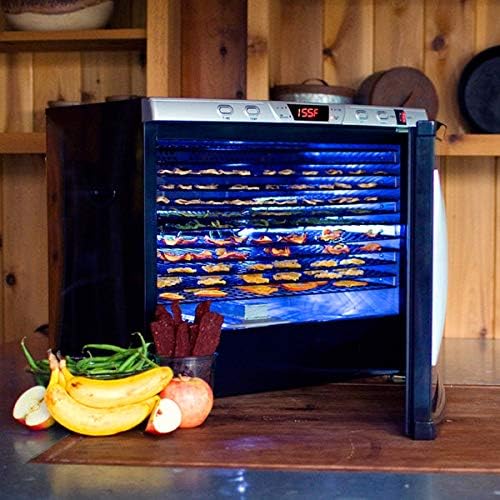
Image: The dehydrator with its interior lights activated, providing visibility of the food drying on the trays.
ഉണക്കൽ പ്രക്രിയ:
Once temperature and time are set, the dehydrator will begin operation. Periodically check the food for desired dryness. Drying times vary based on food type, thickness, and moisture content.
പരിപാലനവും ശുചീകരണവും
പതിവായി വൃത്തിയാക്കുന്നത് ഡീഹൈഡ്രേറ്ററിന്റെ മികച്ച പ്രകടനം ഉറപ്പാക്കുകയും അതിന്റെ ആയുസ്സ് വർദ്ധിപ്പിക്കുകയും ചെയ്യുന്നു.
- എപ്പോഴും യൂണിറ്റ് അൺപ്ലഗ് ചെയ്യുക പവർ ഔട്ട്ലെറ്റിൽ നിന്ന് നീക്കം ചെയ്ത് വൃത്തിയാക്കുന്നതിന് മുമ്പ് പൂർണ്ണമായും തണുക്കാൻ അനുവദിക്കുക.
- Trays and Drip Tray: Remove the drying trays and drip tray. Wash them in warm, soapy water. Rinse thoroughly and dry completely. കുറിപ്പ്: ഈ ഭാഗങ്ങൾ ഡിഷ്വാഷർ സുരക്ഷിതമല്ല.
- ഇൻ്റീരിയർ: പരസ്യം ഉപയോഗിച്ച് ഇന്റീരിയർ പ്രതലങ്ങൾ തുടയ്ക്കുകamp cloth. For stubborn residue, use a mild detergent solution, then wipe with a clean, damp തുണി. അടുത്ത ഉപയോഗത്തിന് മുമ്പ് ഇന്റീരിയർ പൂർണ്ണമായും ഉണങ്ങിയെന്ന് ഉറപ്പാക്കുക.
- പുറം: Wipe the exterior cabinet with a soft, damp തുണി. അബ്രാസീവ് ക്ലീനറുകളോ സ്കോറിംഗ് പാഡുകളോ ഉപയോഗിക്കരുത്, കാരണം അവ ഫിനിഷിന് കേടുവരുത്തും.
- സംഭരണം: ഉപയോഗത്തിലില്ലാത്തപ്പോൾ വൃത്തിയുള്ളതും വരണ്ടതുമായ സ്ഥലത്ത് ഡീഹൈഡ്രേറ്റർ സൂക്ഷിക്കുക.
ട്രബിൾഷൂട്ടിംഗ്
നിങ്ങളുടെ ഡീഹൈഡ്രേറ്ററിൽ പ്രശ്നങ്ങൾ നേരിടുകയാണെങ്കിൽ, ഇനിപ്പറയുന്ന പൊതുവായ പ്രശ്നങ്ങളും പരിഹാരങ്ങളും പരിശോധിക്കുക:
| പ്രശ്നം | സാധ്യമായ കാരണം | പരിഹാരം |
|---|---|---|
| ഡീഹൈഡ്രേറ്റർ ഓണാകുന്നില്ല. |
|
|
| Unit not heating or not holding set temperature. |
|
|
| ഭക്ഷണം തുല്യമായി ഉണങ്ങുന്നില്ല. |
|
|
ഈ പരിഹാരങ്ങൾ പരീക്ഷിച്ചതിനു ശേഷവും പ്രശ്നം നിലനിൽക്കുകയാണെങ്കിൽ, ഉപഭോക്തൃ പിന്തുണയുമായി ബന്ധപ്പെടുക.
സ്പെസിഫിക്കേഷനുകൾ
| ബ്രാൻഡ് | വെസ്റ്റൺ |
| മോഡൽ നമ്പർ | 28-0301-ഡബ്ല്യു |
| മെറ്റീരിയൽ | Alloy Steel (cabinet), Food Safe (trays) |
| നിറം | വെള്ളി |
| വാട്ട്tage | 1600 Watts (110 Volt, 60 Hz) |
| ഇനത്തിൻ്റെ ഭാരം | 71.4 പൗണ്ട് |
| ഉൽപ്പന്ന അളവുകൾ | 23.75 x 28 x 26 ഇഞ്ച് |
| ട്രേകളുടെ എണ്ണം | 12 |
| താപനില പരിധി | 160°F വരെ |
| യു.പി.സി | 812830022882 |
വാറൻ്റി വിവരങ്ങൾ
The Weston Pro Series Digital Dehydrator Model 28-0301-W comes with a 5 വർഷത്തെ നിർമ്മാതാവിന്റെ വാറന്റി. സാധാരണ ഗാർഹിക ഉപയോഗത്തിൽ മെറ്റീരിയലുകളിലും നിർമ്മാണത്തിലും ഉണ്ടാകുന്ന തകരാറുകൾ ഈ വാറന്റി ഉൾക്കൊള്ളുന്നു. വാറന്റി ക്ലെയിമുകൾക്കായി നിങ്ങളുടെ വാങ്ങലിന്റെ തെളിവ് സൂക്ഷിക്കുക.
For detailed warranty terms and conditions, please refer to the documentation included with your product or contact Weston customer support.
ഉപഭോക്തൃ പിന്തുണ
For technical assistance, parts, or warranty inquiries, please contact Weston customer support.
- Webസൈറ്റ്: Visit the official Weston webപിന്തുണാ ഉറവിടങ്ങൾക്കും ബന്ധപ്പെടാനുള്ള വിവരങ്ങൾക്കുമുള്ള സൈറ്റ്.
- ഓൺലൈൻ സ്റ്റോർ: കൂടുതൽ വിവരങ്ങളും ഉൽപ്പന്നങ്ങളും ഇവിടെ കണ്ടെത്താം Weston Store on Amazon.