
എച്ച്എംഎഫ് 49702-02
HMF 49702-02 Compact Safe User Manual
മോഡൽ: 49702-02
1. ആമുഖം
Thank you for choosing the HMF 49702-02 Compact Safe. This safe is designed to provide secure storage for your valuables, featuring advanced fingerprint and electronic passcode locking mechanisms, along with a traditional key override. Its compact design makes it ideal for discreet placement in various environments. Please read this manual carefully before operating the safe to ensure proper use and maximum security.

Figure 1: HMF 49702-02 Compact Safe (Closed)
2. സുരക്ഷാ നിർദ്ദേശങ്ങൾ
സുരക്ഷിതമായ പ്രവർത്തനം ഉറപ്പാക്കുന്നതിനും കേടുപാടുകൾ തടയുന്നതിനും, ദയവായി ഇനിപ്പറയുന്ന സുരക്ഷാ മാർഗ്ഗനിർദ്ദേശങ്ങൾ പാലിക്കുക:
- Keep Emergency Keys Secure: Store the emergency override keys in a safe place, away from the safe itself, and not inside the safe.
- ബാറ്ററി സുരക്ഷ: Use only the specified battery type (4x AA batteries, not included). Do not mix old and new batteries, or different types of batteries. Remove batteries if the safe will not be used for an extended period.
- ഈർപ്പം ഒഴിവാക്കുക: Do not expose the safe to water or high humidity.
- ശരിയായ സ്ഥാനം: Place the safe on a stable, level surface. For added security, consider mounting it as described in Section 3.3.
- No Flammable Materials: Do not store flammable liquids or other hazardous materials inside the safe.
3. സജ്ജീകരണം
3.1 പാക്കേജ് ഉള്ളടക്കം
പാക്കേജിൽ ഇനിപ്പറയുന്ന ഇനങ്ങൾ ഉണ്ടോ എന്ന് പരിശോധിക്കുക:
- HMF 49702-02 Compact Safe Unit
- അടിയന്തര ഓവർറൈഡ് കീകൾ (2x)
- Mounting Hardware (Screws and Wall Plugs)
- ഉപയോക്തൃ മാനുവൽ (ഈ പ്രമാണം)
3.2 ബാറ്ററി ഇൻസ്റ്റാളേഷൻ
The safe requires 4x AA batteries (not included) for the electronic lock and fingerprint scanner. The battery compartment is located inside the safe.
- Open the safe using one of the emergency keys (refer to Section 4.4 for key operation).
- Locate the battery compartment cover on the inside of the door or back panel.
- Remove the cover and insert 4x AA batteries, ensuring correct polarity (+/-).
- ബാറ്ററി കമ്പാർട്ട്മെൻ്റ് കവർ മാറ്റിസ്ഥാപിക്കുക.
3.3 Initial Opening
Upon first use, the safe must be opened with the emergency key.
- Insert one of the emergency keys into the keyhole on the control panel.
- Turn the key clockwise to unlock.
- Lift the lid to open the safe.

Figure 2: Emergency Key Operation
3.4 സേഫ് ഘടിപ്പിക്കൽ
The HMF 49702-02 safe features pre-drilled holes for secure mounting to a wall or floor, enhancing its security against theft.
- Open the safe and locate the pre-drilled mounting holes on the bottom or back panel.
- Position the safe in the desired location and mark the drilling points through the holes.
- Drill pilot holes into the wall or floor using an appropriate drill bit for your surface type.
- Align the safe with the drilled holes and secure it using the provided mounting hardware (screws and wall plugs).
- Ensure the safe is firmly attached before closing and locking it.
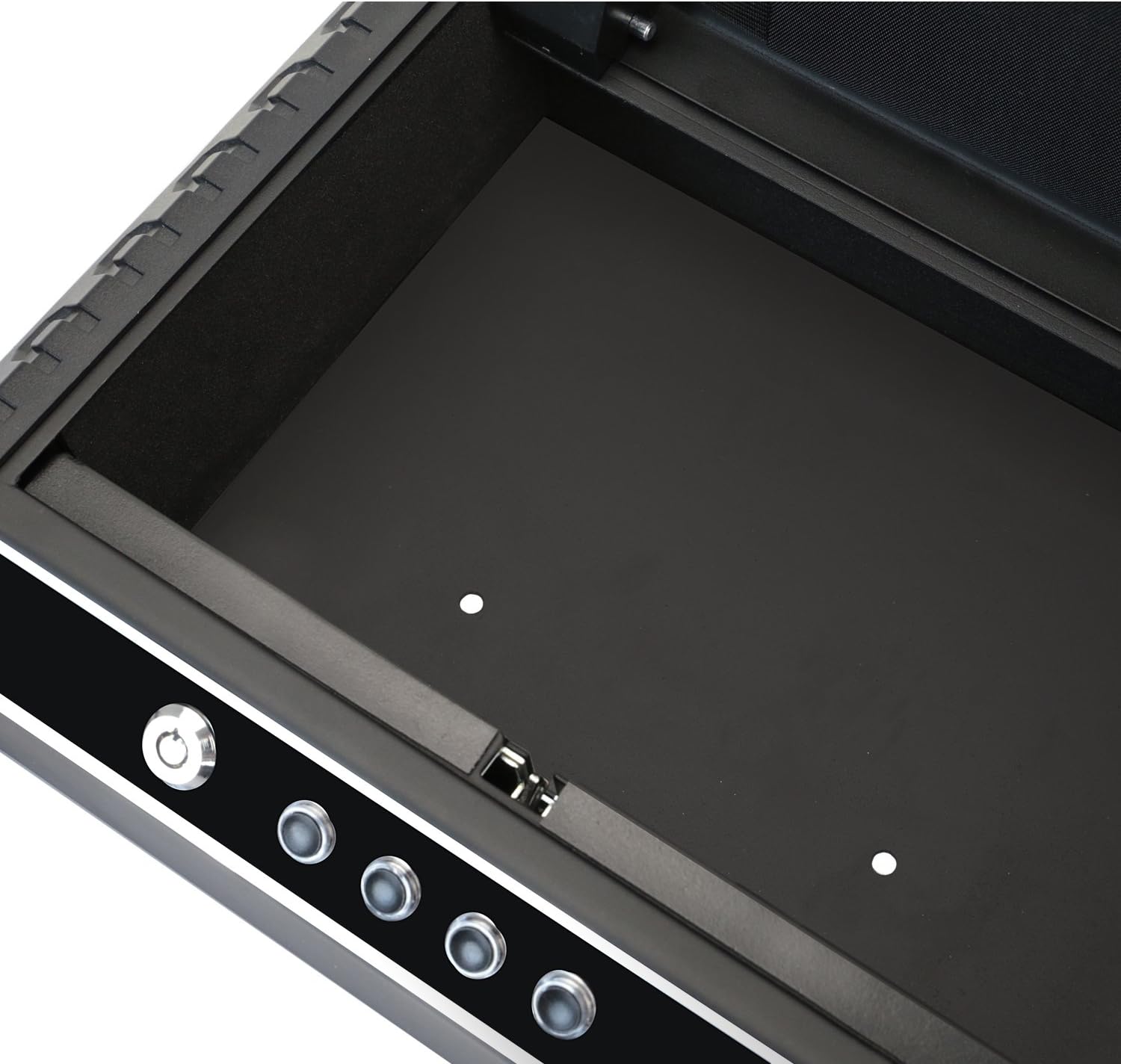
Figure 3: Interior with Mounting Holes
4. സേഫ് പ്രവർത്തിപ്പിക്കൽ
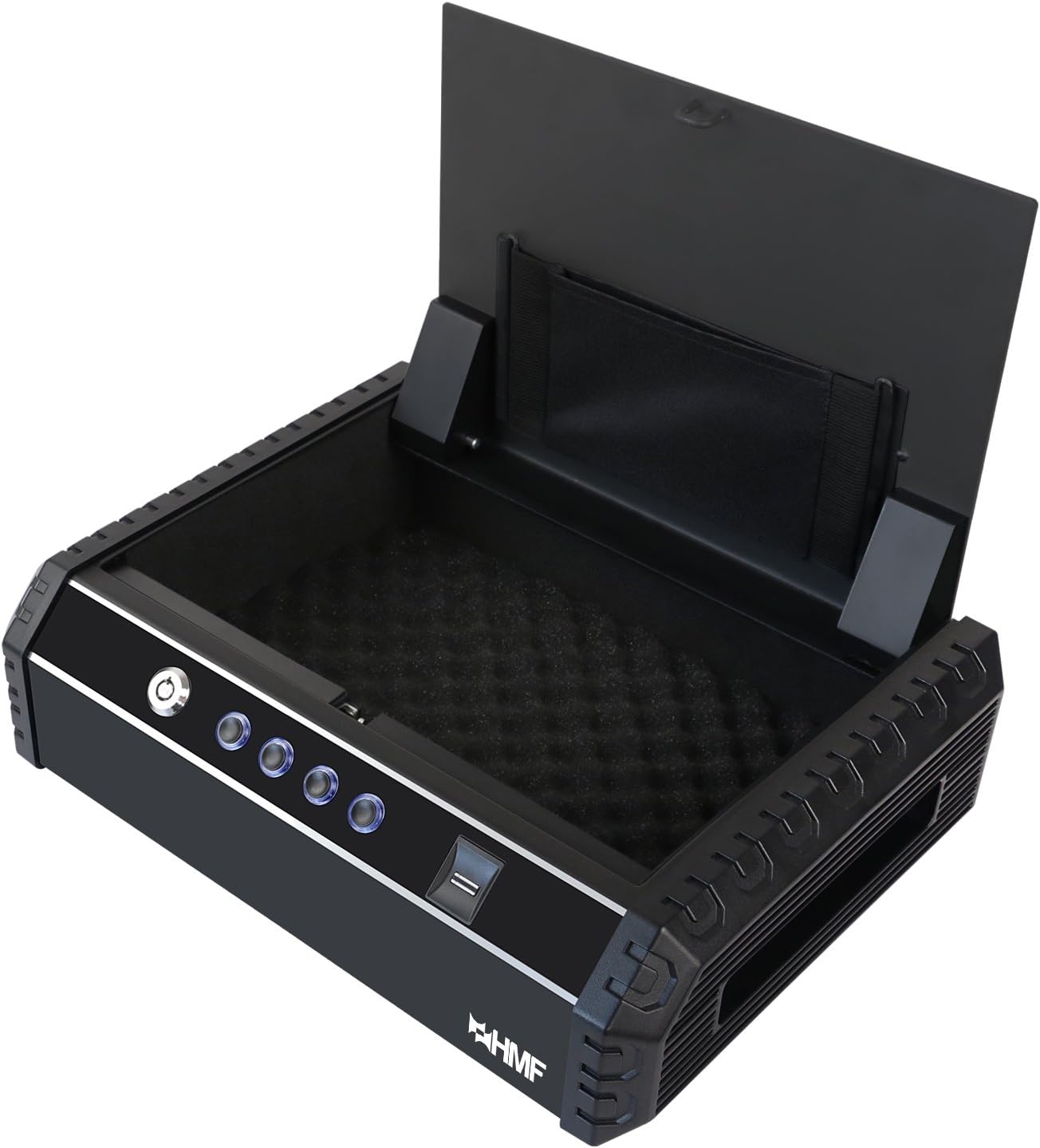
Figure 4: HMF 49702-02 Compact Safe (Open, Empty)

Figure 5: HMF 49702-02 Compact Safe (Open, with Contents)
4.1 Programming Fingerprints
സേഫിൽ 20 വരെ അദ്വിതീയ വിരലടയാളങ്ങൾ സൂക്ഷിക്കാൻ കഴിയും.
- With the safe open, press the programming button (usually located inside the battery compartment or near it). The indicator light will flash.
- Place the finger you wish to register on the fingerprint scanner. Lift and repeat several times until the indicator light confirms successful registration (e.g., a green light or beep).
- Repeat for additional fingers or users.

Figure 6: Using the Fingerprint Sensor
4.2 Programming the Passcode
The safe supports a single electronic passcode.
- With the safe open, press the programming button.
- Enter your desired passcode (typically 4-8 digits) using the numeric buttons on the control panel.
- Press the '#' or 'ENTER' button to confirm. The indicator light will confirm successful programming.
4.3 Opening with Fingerprint
- Place a registered finger firmly on the fingerprint scanner.
- If the fingerprint is recognized, the safe will unlock, and the lid will pop open.
4.4 Opening with Passcode
- Enter your programmed passcode using the numeric buttons.
- '#' അല്ലെങ്കിൽ 'ENTER' ബട്ടൺ അമർത്തുക.
- If the passcode is correct, the safe will unlock, and the lid will pop open.
4.5 അടിയന്തര കീ ഉപയോഗിച്ച് തുറക്കൽ
Use the emergency key if batteries are dead or if you forget your passcode/fingerprint.
- Insert one of the emergency keys into the keyhole on the control panel.
- Turn the key clockwise to unlock.
- Lift the lid to open the safe.
4.6 അലാറം പ്രവർത്തനം
The safe is equipped with an alarm that will sound if an incorrect passcode or unregistered fingerprint is entered multiple times (typically 3-5 consecutive incorrect attempts). The alarm will sound for approximately 1 minute. To deactivate the alarm, enter the correct passcode or use a registered fingerprint/emergency key.
4.7 Muting Tones
The safe may have an option to mute keypress sounds and/or the alarm sound. Refer to the specific instructions provided with your safe for the exact button sequence to enable or disable these tones.
5. പരിപാലനം
- ബാറ്ററി മാറ്റിസ്ഥാപിക്കൽ: Replace batteries when the low battery indicator light appears or if the safe fails to open electronically. Always replace all 4 batteries simultaneously.
- വൃത്തിയാക്കൽ: സേഫിന്റെ പുറംഭാഗം മൃദുവായ, ഡി-ടച്ച് ഉപയോഗിച്ച് വൃത്തിയാക്കുക.amp cloth. Do not use abrasive cleaners or solvents. Keep the fingerprint scanner clean and free of dust or debris.
- പ്രധാന പരിചരണം: Keep emergency keys clean and dry. Do not force them into the lock.
6. പ്രശ്നപരിഹാരം
| പ്രശ്നം | സാധ്യമായ കാരണം | പരിഹാരം |
|---|---|---|
| വിരലടയാളം പതിച്ചാൽ സേഫ് തുറക്കില്ല. | Finger not properly placed; unregistered finger; low batteries. | Ensure finger covers the sensor completely; register your fingerprint; replace batteries. |
| Safe does not open with passcode. | Incorrect passcode entered; low batteries. | Re-enter correct passcode; replace batteries. |
| അലാറം ഇടയ്ക്കിടെ മുഴങ്ങുന്നു. | Multiple incorrect attempts. | Ensure correct passcode/fingerprint is used. |
| നിയന്ത്രണ പാനലിൽ നിന്ന് പ്രതികരണമില്ല. | ഡെഡ് ബാറ്ററികൾ. | Replace batteries immediately. Use emergency key to open. |
7 സ്പെസിഫിക്കേഷനുകൾ
- മോഡൽ നമ്പർ: 49702-02
- ബാഹ്യ അളവുകൾ (L x W x H): 37.0 x 27.5 x 10.0 സെ.മീ (14.57 x 10.83 x 3.94 ഇഞ്ച്)
- ഭാരം: 5 കിലോഗ്രാം (11.02 പൗണ്ട്)
- ലോക്കിംഗ് മെക്കാനിസം: Fingerprint, Electronic Passcode, Emergency Key
- ഊർജ്ജ സ്രോതസ്സ്: 4x AA ബാറ്ററികൾ (ഉൾപ്പെടുത്തിയിട്ടില്ല)
- വിരലടയാള ശേഷി: 20 വിരലടയാളങ്ങൾ വരെ
- പാസ്കോഡ് ദൈർഘ്യം: 4-8 അക്കങ്ങൾ
- മെറ്റീരിയൽ: ഉരുക്ക്

ചിത്രം 7: വശം View of the Safe
8. വാറൻ്റിയും പിന്തുണയും
വാറന്റി വിവരങ്ങൾക്കോ സാങ്കേതിക പിന്തുണയ്ക്കോ, ദയവായി നിർമ്മാതാവിന്റെ ഉദ്യോഗസ്ഥനെ കാണുക. webസൈറ്റിൽ ബന്ധപ്പെടുക അല്ലെങ്കിൽ അവരുടെ ഉപഭോക്തൃ സേവന വിഭാഗവുമായി ബന്ധപ്പെടുക. വാങ്ങിയതിന്റെ തെളിവായി നിങ്ങളുടെ വാങ്ങൽ രസീത് സൂക്ഷിക്കുക.
Ask a question about this manual
Ask about setup, troubleshooting, compatibility, parts, safety, or missing instructions. Manuals+ will review the question and use this page’s manual context to help answer it.