
1. ആമുഖം
The Vgate VS890S is a versatile diagnostic scan tool designed to read and clear trouble codes from your vehicle's On-Board Diagnostics (OBD-II) system. It supports all OBD-II protocols, including CAN, J1850 PWM, J1850 VPW, ISO9141, and KWP2000. This manual provides detailed instructions for the proper use and maintenance of your VS890S scanner.
2 സുരക്ഷാ വിവരങ്ങൾ
Always observe safety precautions when working on a vehicle. Improper use of diagnostic tools can lead to personal injury or damage to the vehicle. Ensure the vehicle is in a safe, well-ventilated area. Do not wear loose clothing or jewelry when working near moving engine parts. Keep the scanner away from water and extreme temperatures.
3. ഉൽപ്പന്നം കഴിഞ്ഞുview
The Vgate VS890S features a user-friendly interface with a clear LCD display and intuitive button layout. Familiarize yourself with the device's components before operation.
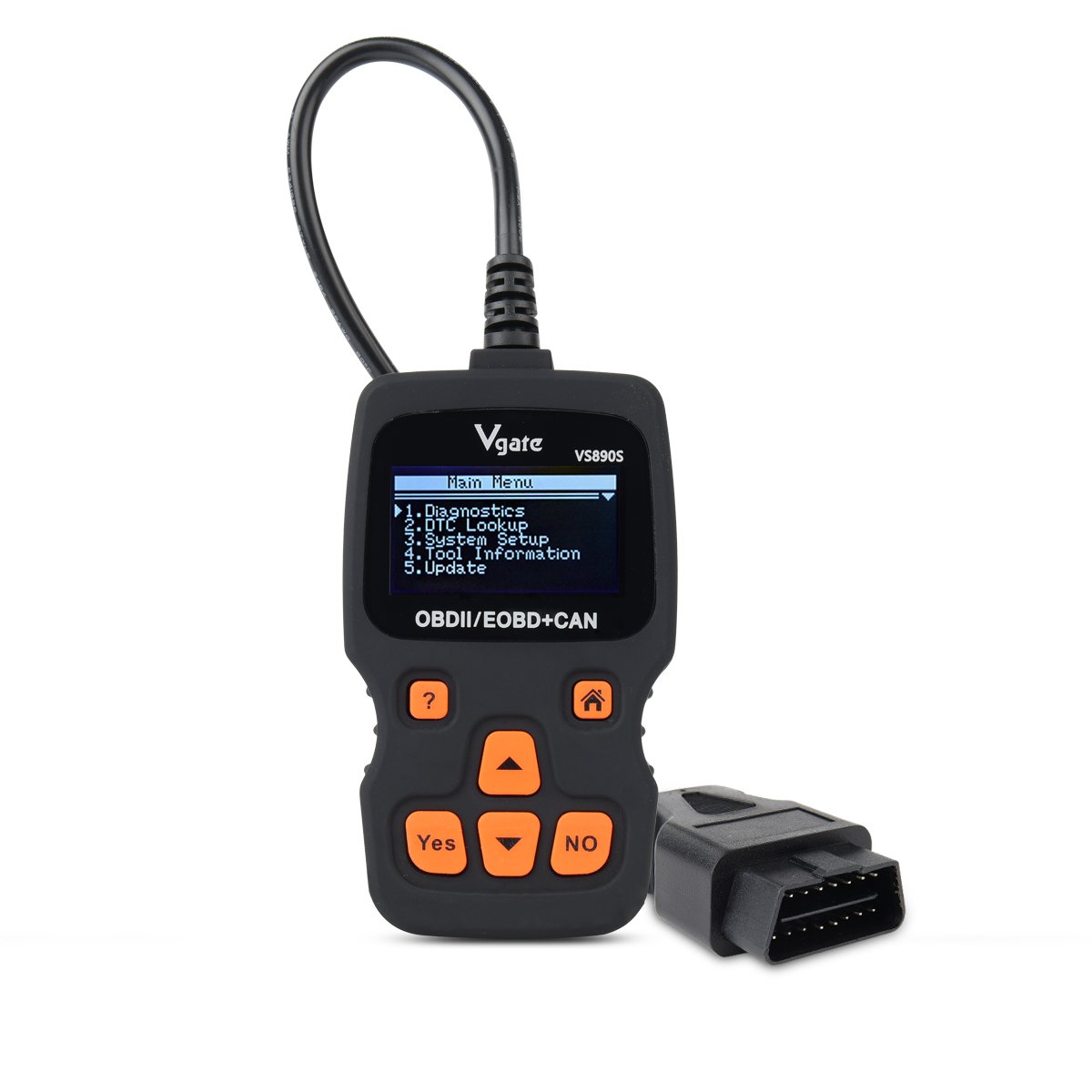
Figure 3.1: Vgate VS890S device with labeled buttons and dimensions. The image shows the front view of the scanner with its display and control buttons, along with a side profile indicating its thickness.
3.1. നിയന്ത്രണങ്ങളും സൂചകങ്ങളും
- സഹായ ബട്ടൺ (?): Provides on-screen assistance or information.
- ഹോം ബട്ടൺ (ഹൗസ് ഐക്കൺ): പ്രധാന മെനുവിലേക്ക് മടങ്ങുന്നു.
- Yes Button: തിരഞ്ഞെടുക്കലുകളോ പ്രവർത്തനങ്ങളോ സ്ഥിരീകരിക്കുന്നു.
- No Button: Cancels selections or actions.
- Roll Up (Up Arrow): Navigates upwards through menu options or increases values.
- Roll Down (Down Arrow): Navigates downwards through menu options or decreases values.
4. സജ്ജീകരണം
Follow these steps to prepare your VS890S scanner for use.
4.1. ഉപകരണം ബന്ധിപ്പിക്കുന്നു
- വാഹനത്തിന്റെ 16-പിൻ ഡാറ്റ ലിങ്ക് കണക്റ്റർ (DLC) കണ്ടെത്തുക. ഇത് സാധാരണയായി ഡ്രൈവറുടെ വശത്തുള്ള ഡാഷ്ബോർഡിനടിയിൽ കാണപ്പെടുന്നു.
- വാഹനത്തിന്റെ ഇഗ്നിഷൻ ഓഫ് പൊസിഷനിൽ ആണെന്ന് ഉറപ്പാക്കുക.
- Firmly plug the VS890S connector into the vehicle's DLC.
- വാഹനത്തിന്റെ ഇഗ്നിഷൻ ഓൺ സ്ഥാനത്തേക്ക് തിരിക്കുക (എഞ്ചിൻ ഓഫ്). സ്കാനർ യാന്ത്രികമായി പവർ ഓൺ ആകും.
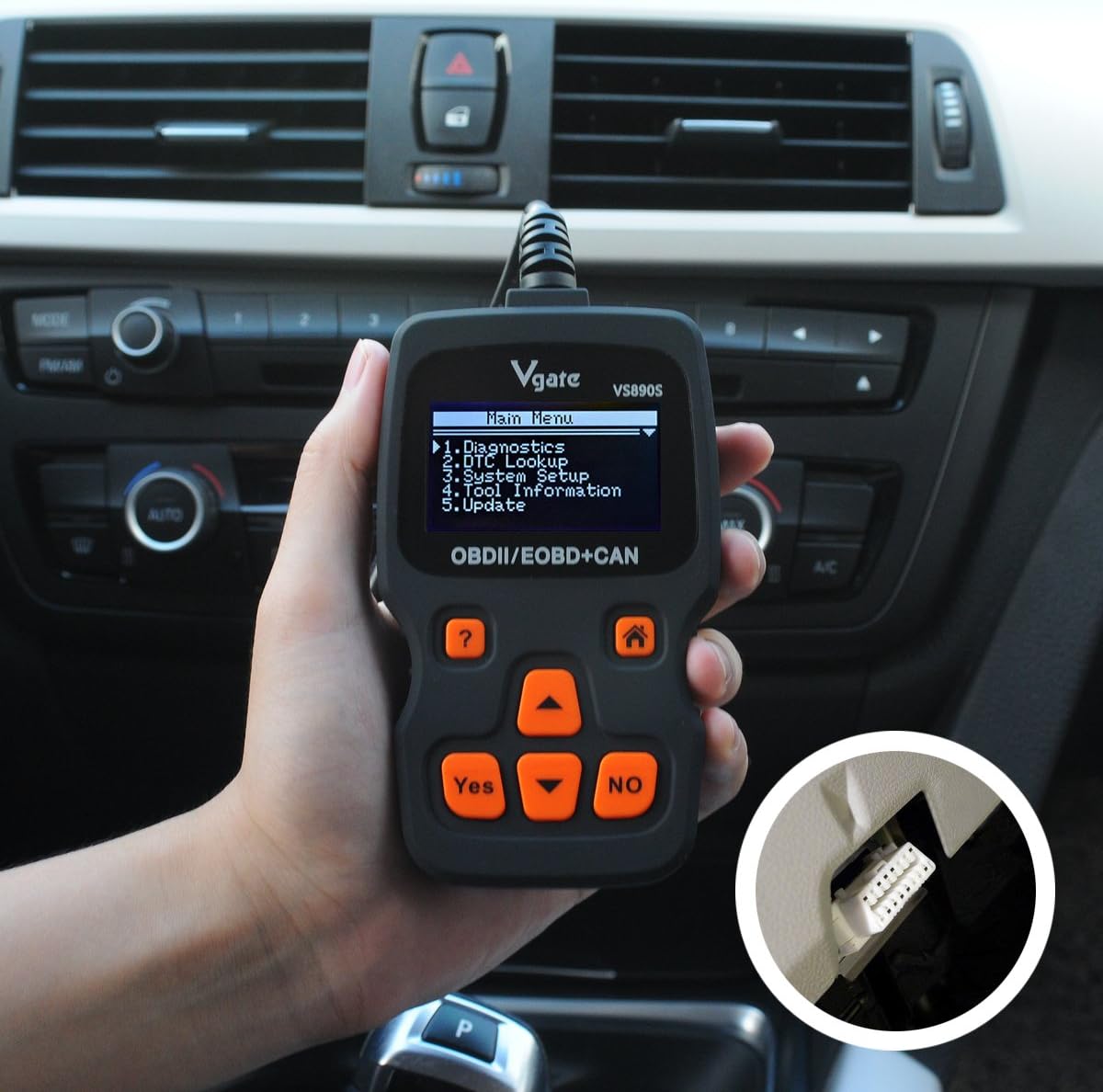
Figure 4.1: The Vgate VS890S scanner connected to a vehicle's OBD-II port, located under the dashboard. The image shows a hand holding the scanner with its cable plugged into the car's diagnostic port.
5. പ്രവർത്തന നിർദ്ദേശങ്ങൾ
This section details the various functions and how to navigate the Vgate VS890S.

Figure 5.1: Various screen displays of the Vgate VS890S, including the Main Menu, DTC Lookup, System Setup, and Language selection screens.
5.1. പ്രധാന മെനു നാവിഗേഷൻ
Upon powering on, the device will display the Main Menu. Use the റോൾ അപ്പ് ഒപ്പം താഴേക്ക് ഉരുട്ടുക buttons to navigate through the options, and the അതെ തിരഞ്ഞെടുക്കാനുള്ള ബട്ടൺ.
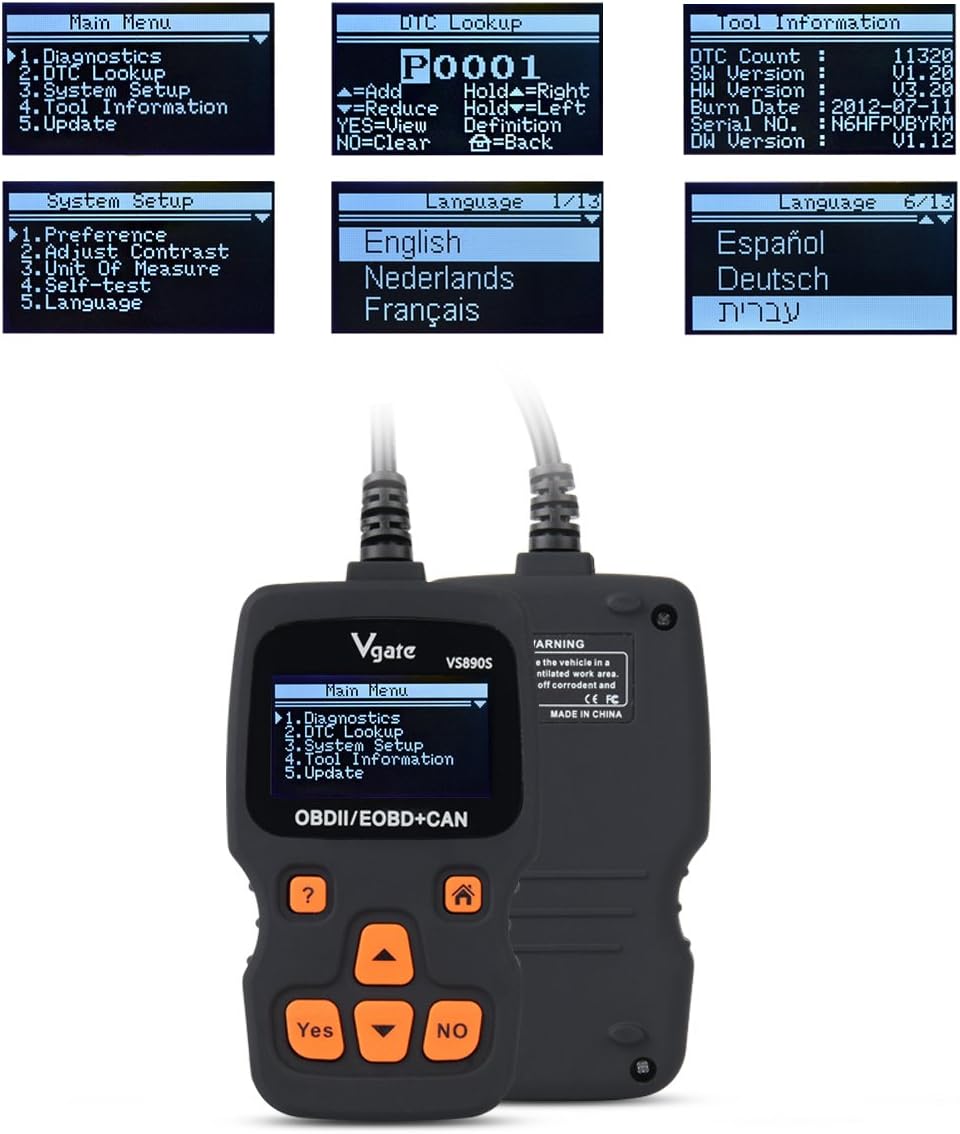
Figure 5.2: The Vgate VS890S displaying the Main Menu with options such as Diagnostics, DTC Lookup, System Setup, Tool Information, and Update.
- രോഗനിർണയം: Accesses vehicle diagnostic functions, including reading and clearing trouble codes, viewing live data, and more.
- DTC ലുക്ക്അപ്പ്: Allows you to manually enter a Diagnostic Trouble Code (DTC) to view അതിന്റെ നിർവചനം.
- സിസ്റ്റം സജ്ജീകരണം: Configures device settings such as language, display contrast, and units of measurement.
- ടൂൾ വിവരങ്ങൾ: Displays details about the scanner, including software version and serial number.
- അപ്ഡേറ്റ്: Used for updating the device's firmware (requires connection to a computer).
5.2. Reading and Clearing Trouble Codes
- പ്രധാന മെനുവിൽ നിന്ന് തിരഞ്ഞെടുക്കുക ഡയഗ്നോസ്റ്റിക്സ് ഒപ്പം അമർത്തുക അതെ.
- The scanner will establish communication with the vehicle. This may take a few moments.
- കണക്റ്റുചെയ്തുകഴിഞ്ഞാൽ, തിരഞ്ഞെടുക്കുക കോഡുകൾ വായിക്കുക വരെ view any stored Diagnostic Trouble Codes (DTCs).
- കോഡുകൾ മായ്ക്കാൻ, തിരഞ്ഞെടുക്കുക കോഡുകൾ മായ്ക്കുക ഒപ്പം അമർത്തുക അതെ. Confirm the action when prompted. Note: Clearing codes will turn off the Check Engine Light (MIL) but will not fix the underlying problem. Address the issue before clearing codes.
5.3. ഡിടിസി ലുക്ക്അപ്പ്
If you have a DTC from another source, you can use the DTC Lookup function to get its definition.
- പ്രധാന മെനുവിൽ നിന്ന് തിരഞ്ഞെടുക്കുക ഡിടിസി ലുക്ക്അപ്പ് ഒപ്പം അമർത്തുക അതെ.
- ഉപയോഗിക്കുക റോൾ അപ്പ് ഒപ്പം താഴേക്ക് ഉരുട്ടുക buttons to select characters and the അതെ button to confirm each character.
- Once the full DTC is entered, the definition will be displayed.
5.4. സിസ്റ്റം സജ്ജീകരണം
Customize your scanner's settings.
- പ്രധാന മെനുവിൽ നിന്ന് തിരഞ്ഞെടുക്കുക സിസ്റ്റം സജ്ജീകരണം ഒപ്പം അമർത്തുക അതെ.
- ഓപ്ഷനുകൾ ഉൾപ്പെടുന്നു:
- മുൻഗണന: Adjust general settings.
- Adjust Contrast: Modify screen brightness for better visibility.
- അളവുകോൽ: Switch between Metric and Imperial units.
- സ്വയം പരിശോധന: Perform a self-diagnostic check of the scanner.
- ഭാഷ: Select your preferred operating language. The device supports multiple languages including English, Spanish, German, and French.
- ഉപയോഗിക്കുക റോൾ അപ്പ് ഒപ്പം താഴേക്ക് ഉരുട്ടുക buttons to select an option, then press അതെ to enter its sub-menu or confirm a change.
5.5. ടൂൾ വിവരങ്ങൾ
View details about your VS890S scanner.
- പ്രധാന മെനുവിൽ നിന്ന് തിരഞ്ഞെടുക്കുക ടൂൾ വിവരങ്ങൾ ഒപ്പം അമർത്തുക അതെ.
- The screen will display information such as DTC Count, Software Version (SW Version), Hardware Version (HW Version), Burn Date, Serial Number, and Diagnostic Software Version (DW Version).
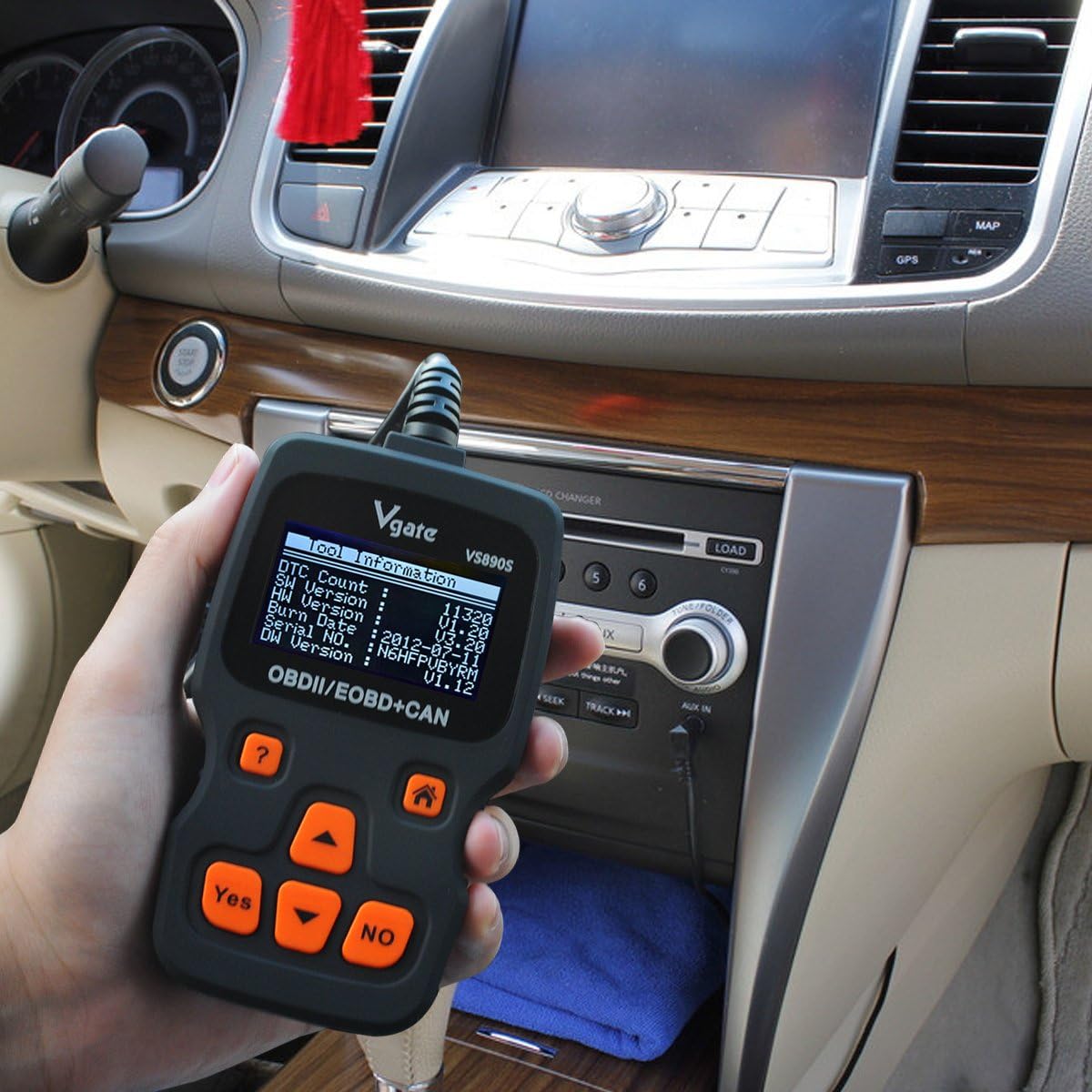
Figure 5.3: The Vgate VS890S displaying the 'Tool Information' screen, showing details like software and hardware versions, and serial number.
6. പരിപാലനം
Proper care ensures the longevity and reliability of your Vgate VS890S scanner.
- വൃത്തിയാക്കൽ: ഒരു സോഫ്റ്റ് ഉപയോഗിക്കുക, ഡിamp സ്കാനറിന്റെ പുറംഭാഗം വൃത്തിയാക്കാൻ തുണി ഉപയോഗിക്കുക. അബ്രസീവ് ക്ലീനറുകളോ ലായകങ്ങളോ ഉപയോഗിക്കരുത്.
- സംഭരണം: ഉപകരണം വരണ്ടതും തണുത്തതുമായ ഒരു അന്തരീക്ഷത്തിൽ സൂക്ഷിക്കുക, നേരിട്ടുള്ള സൂര്യപ്രകാശത്തിൽ നിന്നും തീവ്രമായ താപനിലയിൽ നിന്നും അകറ്റി നിർത്തുക.
- കേബിൾ കെയർ: Avoid bending or crimping the diagnostic cable excessively. Always grasp the connector when plugging or unplugging, not the cable itself.
7. പ്രശ്നപരിഹാരം
If you encounter issues with your VS890S, refer to the following common problems and solutions.
| പ്രശ്നം | സാധ്യമായ കാരണം | പരിഹാരം |
|---|---|---|
| സ്കാനർ പവർ ഓൺ ചെയ്യുന്നില്ല. | Loose connection to DLC; Vehicle ignition off; Vehicle not OBD-II compliant. | Ensure cable is securely connected. Turn ignition to ON. Verify vehicle is OBD-II compliant (most vehicles 1996 and newer). |
| വാഹനവുമായുള്ള ആശയവിനിമയ പിശക്. | Faulty connection; Vehicle's ECU is not responding; Incorrect protocol. | Check cable connection. Ensure ignition is ON. Try on another OBD-II compliant vehicle if possible. |
| Cannot clear trouble codes. | Ignition not ON; Underlying fault still present; Specific codes cannot be cleared by generic scanner. | Ensure ignition is ON. Repair the underlying issue first. Some manufacturer-specific codes may require a specialized tool. |
| Screen is dim or unreadable. | Contrast setting is too low. | Go to System Setup > Adjust Contrast to increase brightness. |
8 സ്പെസിഫിക്കേഷനുകൾ
Technical specifications for the Vgate VS890S diagnostic scanner.
- ബ്രാൻഡ്: വിഗേറ്റ്
- മോഡൽ നമ്പർ: VS890s
- ഇനത്തിൻ്റെ ഭാരം: 11.7 ഔൺസ്
- പാക്കേജ് അളവുകൾ: 9.37 x 5.98 x 1.38 ഇഞ്ച്
- ഊർജ്ജ സ്രോതസ്സ്: ബാറ്ററി പവർ (OBD-II പോർട്ട് വഴി)
- സ്ക്രീൻ വലിപ്പം: 2.4 ഇഞ്ച് (എൽസിഡി)
- പിന്തുണയ്ക്കുന്ന പ്രോട്ടോക്കോളുകൾ: CAN, J1850 PWM, J1850 VPW, ISO9141, KWP2000
- ഉപയോക്തൃ ഇൻ്റർഫേസ്: Multi-language (supports up to 13 languages)
9. വാറൻ്റിയും പിന്തുണയും
For warranty information or technical support, please refer to the documentation included with your purchase or contact Vgate customer service. Keep your purchase receipt as proof of purchase.