
1. ആമുഖം
വാങ്ങിയതിന് നന്ദി.asing the LONPOO LP-077 Multi-Region DVD Player. This manual provides essential information for setting up, operating, and maintaining your new DVD player. Please read it thoroughly before use to ensure proper functionality and to maximize your viewഅനുഭവം.
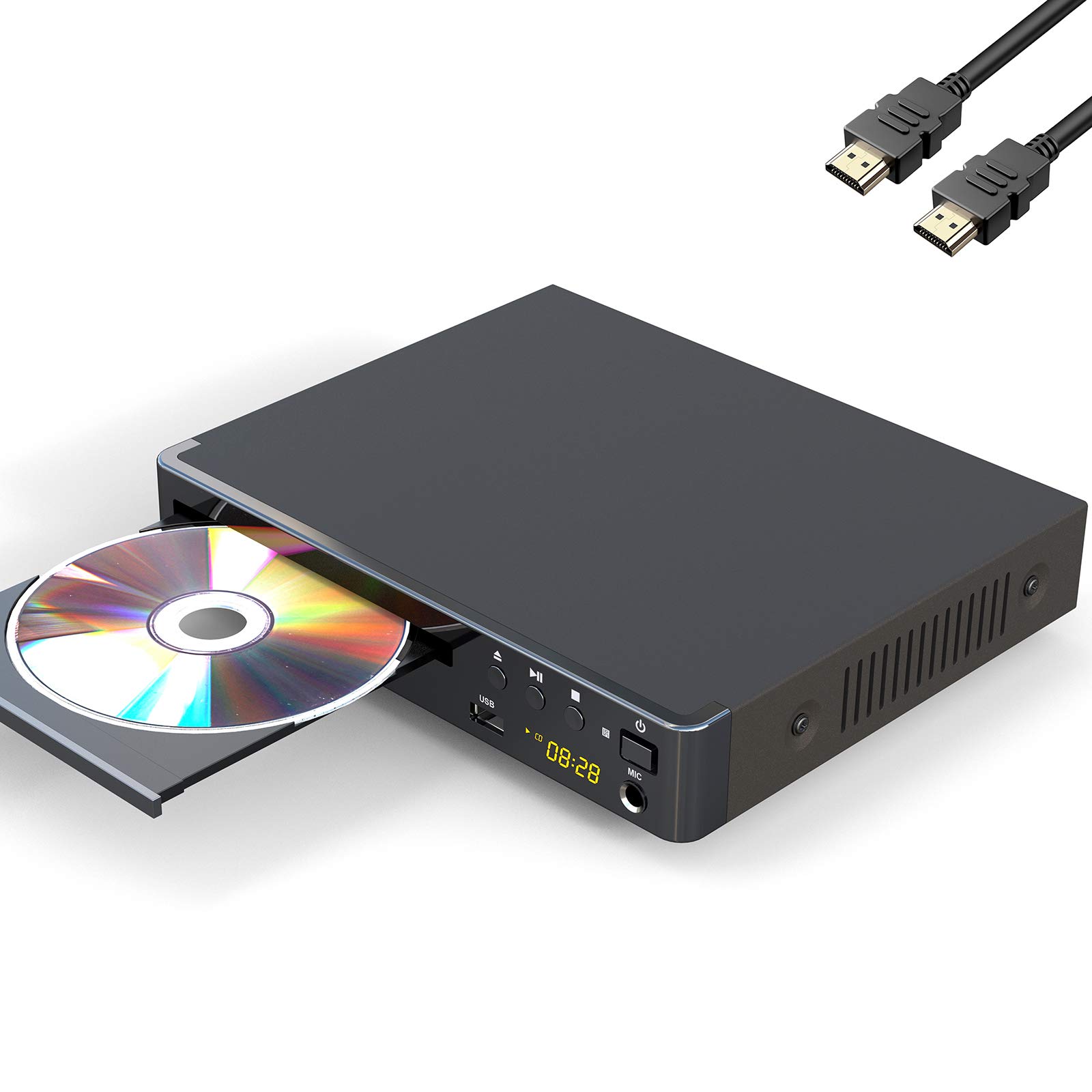
Image 1: The LONPOO LP-077 Multi-Region DVD Player.
2. പാക്കേജ് ഉള്ളടക്കം
താഴെ ലിസ്റ്റ് ചെയ്തിരിക്കുന്ന എല്ലാ ഇനങ്ങളും നിങ്ങളുടെ പാക്കേജിൽ ഉൾപ്പെടുത്തിയിട്ടുണ്ടെന്ന് ഉറപ്പാക്കുക:
- 1 x LONPOO LP-077 DVD Player
- 1 x HDMI കേബിൾ
- 1 x RCA കേബിൾ
- 1 x ഉപയോക്തൃ മാനുവൽ (ഈ പ്രമാണം)
- 1 x Remote Control (requires 2 AAA batteries, not included)
3. ഉൽപ്പന്ന സവിശേഷതകൾ
The LONPOO LP-077 DVD Player offers a range of features for versatile media playback:
- Multi-Region Playback: Compatible with DVDs from any country or region worldwide.
- കോംപാക്റ്റ് ഡിസൈൻ: A space-saving 2-channel HD DVD player with an easy-to-read digital display. Note: This is not a Blu-ray player.
- USB മീഡിയ പ്ലേബാക്ക്: Built-in USB 2.0 port supports flash drives up to 32GB for playing digital media (AVI(Xvid), VOB, MP3, JPG) on your TV. Note: Does not support USB 3.0 or MP4 file USB വഴി പ്ലേബാക്ക്.
- Video System Compatibility: Supports PAL/NTSC/Auto TV systems and progressive scan.
- വീക്ഷണ അനുപാതങ്ങൾ: Selectable 16:9 and 4:3 aspect ratios for optimal viewing.
- കണക്റ്റിവിറ്റി: HDMI, RCA, and USB connection options.
- റിമോട്ട് കൺട്രോൾ: Full-function remote control included for convenient operation.
4 സുരക്ഷാ വിവരങ്ങൾ
സുരക്ഷിതമായ പ്രവർത്തനം ഉറപ്പാക്കുന്നതിനും കേടുപാടുകൾ തടയുന്നതിനും, ദയവായി ഇനിപ്പറയുന്നവ നിരീക്ഷിക്കുക:
- മഴയോ ഈർപ്പമോ യൂണിറ്റ് തുറന്നുകാട്ടരുത്.
- വെന്റിലേഷൻ തുറക്കൽ തടയരുത്.
- അസ്ഥിരമായ പ്രതലങ്ങളിൽ യൂണിറ്റ് സ്ഥാപിക്കുന്നത് ഒഴിവാക്കുക.
- ഇടിമിന്നൽ ഉണ്ടാകുമ്പോഴോ ദീർഘനേരം ഉപയോഗിക്കാതിരിക്കുമ്പോഴോ പവർ കോഡ് വിച്ഛേദിക്കുക.
- എല്ലാ സേവനങ്ങളും യോഗ്യതയുള്ള ഉദ്യോഗസ്ഥർക്ക് റഫർ ചെയ്യുക.
5. സജ്ജീകരണം
5.1 ഒരു ടെലിവിഷനുമായി ബന്ധിപ്പിക്കുന്നു
Your DVD player can be connected to your TV using either an HDMI cable or an RCA cable.
HDMI കണക്ഷൻ (മികച്ച നിലവാരത്തിന് ശുപാർശ ചെയ്യുന്നു)
- Connect one end of the HDMI cable to the HDMI OUT port on the DVD player.
- നിങ്ങളുടെ ടെലിവിഷനിൽ ലഭ്യമായ ഒരു HDMI IN പോർട്ടിലേക്ക് HDMI കേബിളിന്റെ മറ്റേ അറ്റം ബന്ധിപ്പിക്കുക.
- Select the corresponding HDMI input on your TV using its remote control.
RCA Connection (Standard Definition)
- Connect the yellow plug of the RCA cable to the VIDEO OUT (yellow) port on the DVD player.
- Connect the red and white plugs of the RCA cable to the AUDIO OUT (red and white) ports on the DVD player.
- Connect the other end of the RCA cable's yellow plug to the VIDEO IN (yellow) port on your television.
- Connect the other end of the RCA cable's red and white plugs to the AUDIO IN (red and white) ports on your television.
- Select the corresponding AV input on your TV using its remote control.
5.2 പവർ കണക്ഷൻ
Plug the power cord of the DVD player into a standard electrical outlet.
5.3 വിദൂര നിയന്ത്രണ സജ്ജീകരണം
ശരിയായ ധ്രുവീകരണം ഉറപ്പാക്കിക്കൊണ്ട്, റിമോട്ട് കൺട്രോളിലേക്ക് രണ്ട് AAA ബാറ്ററികൾ (ഉൾപ്പെടുത്തിയിട്ടില്ല) തിരുകുക.

ചിത്രം 2: ഉദാample setup of a DVD player connected to a television for home entertainment.
6. പ്രവർത്തന നിർദ്ദേശങ്ങൾ
6.1 അടിസ്ഥാന ഡിസ്ക് പ്ലേബാക്ക്
- അമർത്തുക പവർ button on the DVD player or remote control to turn on the unit.
- അമർത്തുക തുറക്കുക/അടയ്ക്കുക ഡിസ്ക് ട്രേ തുറക്കാനുള്ള ബട്ടൺ.
- Place a DVD, CD, SVCD, or VCD disc onto the tray with the label side facing up.
- അമർത്തുക തുറക്കുക/അടയ്ക്കുക ഡിസ്ക് ട്രേ അടയ്ക്കാൻ വീണ്ടും ബട്ടൺ അമർത്തുക. പ്ലെയർ സ്വയമേവ ഡിസ്ക് വായിക്കാൻ തുടങ്ങും.
- Use the remote control's playback buttons (കളിക്കുക, താൽക്കാലികമായി നിർത്തുക, നിർത്തുക, FF, REW) to control playback.
6.2 യുഎസ്ബി മീഡിയ പ്ലേബാക്ക്
- Insert a USB 2.0 flash drive (up to 32GB) into the USB port on the front of the DVD player.
- The player should automatically detect the USB device and display a menu. If not, press the DVD / USB button on the remote to switch to USB mode.
- നിങ്ങളുടെ വഴി നാവിഗേറ്റ് ചെയ്യുക files (AVI(Xvid), VOB, MP3, JPG) using the arrow keys on the remote and press പ്രവേശിക്കുക തിരഞ്ഞെടുത്ത് കളിക്കാൻ.
6.3 സിസ്റ്റം ക്രമീകരണങ്ങൾ
To access and adjust system settings:
- അമർത്തുക സജ്ജമാക്കുക റിമോട്ട് കൺട്രോളിലെ ബട്ടൺ.
- Use the arrow keys to navigate through the menu options (e.g., TV System, Aspect Ratio, Audio Settings).
- അമർത്തുക പ്രവേശിക്കുക തിരഞ്ഞെടുപ്പുകൾ സ്ഥിരീകരിക്കുന്നതിനും സജ്ജമാക്കുക മെനുവിൽ നിന്ന് പുറത്തുകടക്കാൻ വീണ്ടും.
7. പരിപാലനം
7.1 യൂണിറ്റ് വൃത്തിയാക്കൽ
Wipe the exterior of the DVD player with a soft, dry cloth. Do not use liquid cleaners or abrasive materials.
7.2 ഡിസ്ക് കെയർ
Handle discs by their edges. Clean discs with a soft, lint-free cloth, wiping from the center outwards. Avoid touching the playback surface.
8. പ്രശ്നപരിഹാരം
നിങ്ങളുടെ ഡിവിഡി പ്ലെയറിൽ പ്രശ്നങ്ങൾ നേരിടുകയാണെങ്കിൽ, ഇനിപ്പറയുന്ന പൊതുവായ പ്രശ്നങ്ങളും പരിഹാരങ്ങളും പരിശോധിക്കുക:
| പ്രശ്നം | സാധ്യമായ കാരണം | പരിഹാരം |
|---|---|---|
| ശക്തിയില്ല | പവർ കോർഡ് ബന്ധിപ്പിച്ചിട്ടില്ല; പവർ ഔട്ട്ലെറ്റ് തകരാറിലാണ്. | പവർ കോർഡ് സുരക്ഷിതമായി പ്ലഗ് ഇൻ ചെയ്തിട്ടുണ്ടെന്ന് ഉറപ്പാക്കുക. മറ്റൊരു ഉപകരണം ഉപയോഗിച്ച് ഔട്ട്ലെറ്റ് പരിശോധിക്കുക. |
| ചിത്രം/ശബ്ദമില്ല | Incorrect TV input selected; cables loose or damaged. | നിങ്ങളുടെ ടിവിയിൽ ശരിയായ HDMI/AV ഇൻപുട്ട് തിരഞ്ഞെടുക്കുക. എല്ലാ കേബിൾ കണക്ഷനുകളും പരിശോധിക്കുക. |
| ഡിസ്ക് പ്ലേ ചെയ്യുന്നില്ല | Disc inserted incorrectly; disc dirty or scratched; unsupported disc format. | Insert disc with label side up. Clean or replace the disc. Ensure the disc type is supported (DVD, CD, SVCD, VCD). |
| റിമോട്ട് കൺട്രോൾ പ്രവർത്തിക്കുന്നില്ല | Batteries depleted or inserted incorrectly; obstruction between remote and player. | Replace batteries, ensuring correct polarity. Remove any obstructions. Point remote directly at the player. |
| USB ഉപകരണം തിരിച്ചറിഞ്ഞില്ല. | Unsupported USB version or capacity; unsupported file ഫോർമാറ്റ്. | Ensure USB is 2.0 and up to 32GB. Verify file formats are AVI(Xvid), VOB, MP3, or JPG. |
9 സ്പെസിഫിക്കേഷനുകൾ
| ഫീച്ചർ | വിവരണം |
|---|---|
| ബ്രാൻഡ് | ലോൺപൂ |
| മോഡൽ നമ്പർ | LP-077 |
| മീഡിയ തരം | CD, DVD, SVCD, VCD |
| പ്രത്യേക ഫീച്ചർ | Compact, Multi-Region |
| കണക്റ്റർ തരം | HDMI |
| കണക്റ്റിവിറ്റി ടെക്നോളജി | എച്ച്ഡിഎംഐ, ആർസിഎ, യുഎസ്ബി |
| നിറം | ചാരനിറം |
| ഇൻപുട്ട് വീഡിയോ അനുയോജ്യത | NTSC (PAL/Auto selectable) |
| ചാനലുകളുടെ എണ്ണം | 2 |
| File ഫോർമാറ്റുകൾ (USB) | Video: AVI(Xvid), VOB; Audio: MP3; Image: JPG (USB 2.0 up to 32GB, no MP4) |
10. വാറൻ്റിയും പിന്തുണയും
Your LONPOO LP-077 DVD Player comes with the following:
- 18-മാസ വാറന്റി: സാധാരണ ഉപയോഗത്തിലുള്ള നിർമ്മാണ വൈകല്യങ്ങളും തകരാറുകളും ഇതിൽ ഉൾപ്പെടുന്നു.
- 90 ദിവസത്തെ പണം തിരികെ നൽകൽ ഗ്യാരണ്ടി: നിങ്ങളുടെ വാങ്ങലിൽ നിങ്ങൾ തൃപ്തനല്ലെങ്കിൽ, 90 ദിവസത്തിനുള്ളിൽ അത് തിരികെ നൽകുന്നതിലൂടെ മുഴുവൻ റീഫണ്ടും ലഭിക്കും.
- ആജീവനാന്ത സാങ്കേതിക പിന്തുണ: For any questions or assistance, please contact our customer support team.
For technical support or warranty claims, please refer to the contact information provided on the LONPOO official webസൈറ്റ് അല്ലെങ്കിൽ നിങ്ങളുടെ വാങ്ങൽ ഡോക്യുമെന്റേഷൻ.