
1. ആമുഖം
Thank you for choosing the Maclean MC-760 Double Arm TV Wall Mount. This manual provides detailed instructions for the safe and correct installation, operation, and maintenance of your new TV wall mount. Please read this manual thoroughly before installation and keep it for future reference. This mount is designed to securely hold LED, Plasma, and LCD televisions with screen diagonals from 26 to 55 inches and a maximum weight of 30 kg.

ചിത്രം 1.1: കഴിഞ്ഞുview of the Maclean MC-760 Double Arm TV Wall Mount.
2 സുരക്ഷാ വിവരങ്ങൾ
മുന്നറിയിപ്പ്: Improper installation or use of this product can result in serious injury or damage. Please follow all instructions carefully.
- മൗണ്ടിംഗ് ഉപരിതലത്തിന് മൗണ്ടിന്റെയും ടെലിവിഷന്റെയും സംയുക്ത ഭാരം സുരക്ഷിതമായി താങ്ങാൻ കഴിയുമെന്ന് ഉറപ്പാക്കുക.
- Always use a stud finder to locate wall studs for secure mounting on wooden stud walls.
- പരമാവധി ഭാര ശേഷി 30 കിലോഗ്രാം (66 പൗണ്ട്) കവിയരുത്.
- Do not exceed the maximum VESA compatibility of 400x400 mm.
- ഇൻസ്റ്റാളേഷൻ സമയത്ത് ഉചിതമായ ഉപകരണങ്ങൾ ഉപയോഗിക്കുക, സുരക്ഷാ ഗിയർ ധരിക്കുക.
- ഇൻസ്റ്റലേഷൻ പ്രക്രിയയുടെ ഏതെങ്കിലും ഭാഗത്തെക്കുറിച്ച് നിങ്ങൾക്ക് ഉറപ്പില്ലെങ്കിൽ, യോഗ്യതയുള്ള ഒരു പ്രൊഫഷണലിനെ സമീപിക്കുക.
3. പാക്കേജ് ഉള്ളടക്കം
Before beginning installation, verify that all components are present and undamaged. Refer to the image below for a visual representation of the included hardware.

Image 3.1: Included mounting hardware, screws, and anchors.
പാക്കേജിൽ സാധാരണയായി ഉൾപ്പെടുന്നു:
- Wall plate assembly
- TV bracket arms (2 pieces)
- Various screws (M4, M6, M8) for TV attachment
- Wall anchors and lag bolts for wall mounting
- Washers and spacers
- ഇൻസ്ട്രക്ഷൻ മാനുവൽ (ഈ പ്രമാണം)
കുറിപ്പ്: Some users have reported issues with the quality of included screws. It is recommended to check the screws for durability or consider purchasing higher-quality screws from a hardware store if concerns arise, especially for wall mounting.
4 സ്പെസിഫിക്കേഷനുകൾ
| ഫീച്ചർ | സ്പെസിഫിക്കേഷൻ |
|---|---|
| മോഡൽ | MC-760 |
| സ്ക്രീൻ വലിപ്പം അനുയോജ്യത | 26 - 55 ഇഞ്ച് |
| പരമാവധി ഭാരം ശേഷി | 30 കി.ഗ്രാം (66 പൗണ്ട്) |
| VESA അനുയോജ്യത | 100x100, 200x100, 200x200, 200x300, 300x300, 200x400, 300x400, 400x400 mm |
| ടിൽറ്റ് ആംഗിൾ | +/- 15 ഡിഗ്രി |
| സ്വിവൽ ആംഗിൾ | 180 degrees (depending on TV size) |
| Wall Distance (Adjustable) | 70 മില്ലിമീറ്റർ മുതൽ 460 മില്ലിമീറ്റർ വരെ |
| മെറ്റീരിയൽ | High-quality metal construction |
| നിറം | കറുപ്പ് |

Image 4.1: Dimensional drawing of the MC-760 mount, showing key measurements and articulation ranges.
5. സജ്ജീകരണവും ഇൻസ്റ്റാളേഷനും
This section guides you through the installation process. It is recommended to have a second person assist with mounting the TV.
5.1 ടൂളുകൾ ആവശ്യമാണ്
- പെൻസിൽ
- Drill with appropriate drill bits for wall type (wood/concrete)
- സ്റ്റഡ് ഫൈൻഡർ (മര സ്റ്റഡ് ചുവരുകൾക്ക്)
- ലെവൽ
- ഫിലിപ്സ് ഹെഡ് സ്ക്രൂഡ്രൈവർ
- Socket wrench (for lag bolts)
5.2 Wall Mounting the Bracket
- മൗണ്ടിംഗ് ലൊക്കേഷൻ നിർണ്ണയിക്കുക: Choose a suitable location on your wall. Use a stud finder to locate the center of two adjacent wooden studs if mounting on a wood stud wall. For concrete or brick walls, ensure the wall is solid and capable of supporting the weight.
- ഡ്രിൽ ഹോളുകൾ അടയാളപ്പെടുത്തുക: Hold the wall plate assembly against the wall at the desired height. Use a level to ensure it is straight. Mark the drill hole locations with a pencil.
- ഡ്രിൽ പൈലറ്റ് ദ്വാരങ്ങൾ: Drill pilot holes at the marked locations. The size of the drill bit will depend on your wall type and the lag bolts/anchors provided.
- Insert Wall Anchors (if applicable): For concrete or brick walls, insert the plastic wall anchors into the drilled holes. Tap them gently with a hammer until flush with the wall surface.
- വാൾ പ്ലേറ്റ് ഘടിപ്പിക്കുക: Align the wall plate with the pilot holes. Insert the lag bolts through the wall plate and into the wall/anchors. Tighten the lag bolts securely with a socket wrench. Do not overtighten.
5.3 ടിവിയിൽ ബ്രാക്കറ്റുകൾ ഘടിപ്പിക്കൽ
- ടിവി സ്ക്രൂകൾ തിരഞ്ഞെടുക്കുക: Choose the correct diameter and length of screws (M4, M6, or M8) that fit your TV's VESA mounting holes. Use washers and spacers if necessary to ensure the screws do not bottom out or damage internal components.
- ടിവി ബ്രാക്കറ്റുകൾ ഘടിപ്പിക്കുക: Carefully place your TV face down on a soft, clean surface. Align the two vertical TV bracket arms with the VESA mounting holes on the back of your TV. Secure them using the selected screws and a Phillips head screwdriver. Ensure the brackets are evenly spaced and securely fastened.
5.4 Mounting TV to Wall Bracket
- Hook TV onto Wall Plate: With assistance, carefully lift the TV with the attached brackets. Hook the TV brackets onto the horizontal arms of the wall plate assembly. Ensure both brackets are securely seated.
- സുരക്ഷിത ടിവി: Locate the safety screws or locking mechanisms on the bottom of the TV brackets. Tighten these screws to prevent the TV from accidentally lifting off the wall mount.

Image 5.1: Visual guide for key installation steps, including marking, drilling, and securing the TV.
6. മൗണ്ട് പ്രവർത്തിപ്പിക്കൽ
The Maclean MC-760 mount offers flexible viewing ഓപ്ഷനുകൾ.
6.1 Adjusting Swivel
Gently grasp the sides of your TV and pivot it left or right to achieve the desired viewing angle. The double arm design allows for a wide 180-degree swivel range, depending on your TV's size and wall clearance.
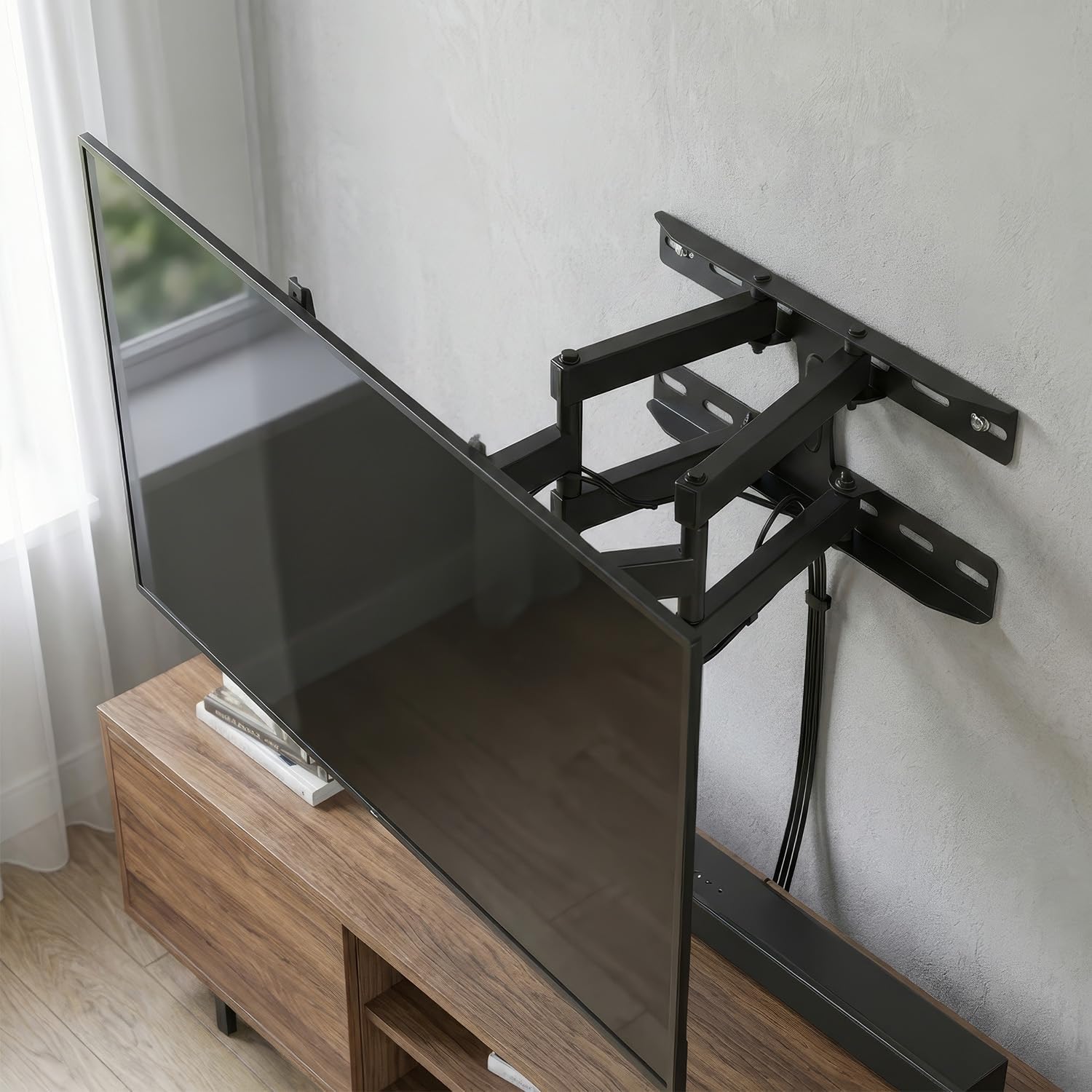
Image 6.1: TV extended and swiveled to an angled viewസ്ഥാനം.
6.2 Adjusting Tilt
To adjust the vertical tilt, loosen the tilt adjustment knobs or bolts located on the TV brackets (usually on the sides). Tilt the TV to your preferred angle (up to +/- 15 degrees), then re-tighten the knobs/bolts to secure the position.
6.3 Adjusting Wall Distance
The double arm allows you to extend or retract the TV from the wall, offering an adjustable wall distance from 70mm to 460mm. Gently push or pull the TV to move it closer or further from the wall.

Image 6.2: TV retracted close to the wall for a flush appearance.
7. പരിപാലനം
Regular maintenance ensures the longevity and safety of your TV mount.
- വൃത്തിയാക്കൽ: മൃദുവായതും ഉണങ്ങിയതുമായ തുണി ഉപയോഗിച്ച് മൗണ്ട് തുടയ്ക്കുക. അബ്രാസീവ് ക്ലീനറുകളോ ലായകങ്ങളോ ഉപയോഗിക്കരുത്, കാരണം അവ ഫിനിഷിന് കേടുവരുത്തും.
- ആനുകാലിക പരിശോധനകൾ: Periodically check all screws and bolts to ensure they remain tight and secure. Over time, vibrations or adjustments can cause fasteners to loosen.
- ലൂബ്രിക്കേഷൻ: If the swivel or tilt mechanisms become stiff, a small amount of silicone-based lubricant can be applied to the moving parts.
8. പ്രശ്നപരിഹാരം
If you encounter issues with your Maclean MC-760 mount, refer to the following common problems and solutions:
- ടിവി നിലവാരമില്ലാത്തതാണ്: Ensure the wall plate is perfectly level during installation. If the TV brackets allow for minor adjustments, use them to level the TV. Otherwise, you may need to re-adjust the wall plate.
- TV sags or tilts unexpectedly: This often indicates that the tilt adjustment screws are not sufficiently tightened. Re-tighten them firmly. If the issue persists, verify that the TV's weight does not exceed the mount's capacity.
- Difficulty swiveling or extending: Check for any obstructions behind the TV or mount. Ensure all pivot points are free of debris. If stiff, apply a small amount of silicone lubricant.
- ചുമരിൽ മൗണ്ട് അയഞ്ഞതായി തോന്നുന്നു: Immediately remove the TV from the mount. Re-check all wall mounting bolts for tightness. If the wall anchors are compromised, you may need to relocate the mount or use stronger anchors.
- Screws stripping during installation: This can occur with lower-quality screws or if excessive force is applied. If a screw head strips, it may need to be extracted and replaced with a higher-quality screw. Always use the correct screwdriver bit size.
9. വാറൻ്റി വിവരങ്ങൾ
Maclean products are typically covered by a manufacturer's warranty against defects in materials and workmanship. The specific terms and duration of the warranty may vary by region and retailer. Please retain your proof of purchase. For detailed warranty information, refer to the documentation included with your purchase or visit the official Maclean webസൈറ്റ്.
10. ഉപഭോക്തൃ പിന്തുണ
If you have any questions, require technical assistance, or need to report a missing or damaged part, please contact Maclean customer support. Contact information can usually be found on the product packaging, the official Maclean webസൈറ്റ്, അല്ലെങ്കിൽ നിങ്ങളുടെ റീട്ടെയിലർ വഴി.