
1. ആമുഖം
The Cubii JR1 is a compact, ergonomic under-desk elliptical designed to facilitate physical activity while seated. This manual provides essential information for the safe and effective use of your Cubii JR1, including assembly, operation, maintenance, and troubleshooting.
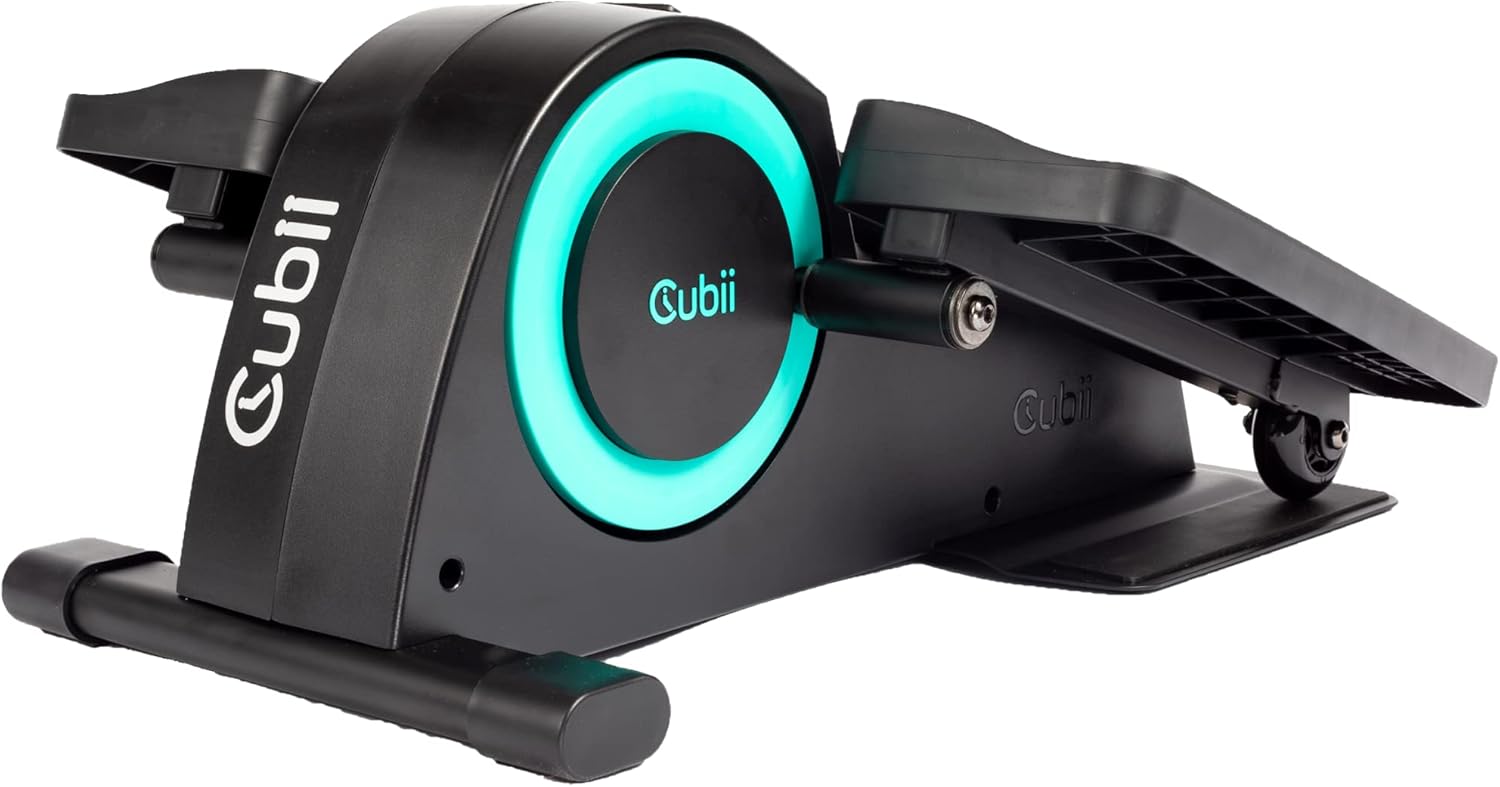
2. സുരക്ഷാ മാർഗ്ഗനിർദ്ദേശങ്ങൾ
- Consult with a healthcare professional before beginning any new exercise program.
- Ensure the Cubii JR1 is placed on a stable, level surface.
- Maintain a clear area around the device during use.
- The maximum recommended user weight for this device is 150 pounds.
- കൈകളും കാലുകളും ചലിക്കുന്ന ഭാഗങ്ങളിൽ നിന്ന് അകറ്റി നിർത്തുക.
- Do not stand on the device. It is designed for seated use only.
- If you experience pain or discomfort, discontinue use immediately.
3. പാക്കേജ് ഉള്ളടക്കം
പാക്കേജിൽ എല്ലാ ഘടകങ്ങളും ഉണ്ടെന്ന് ഉറപ്പാക്കുക:
- Cubii JR1 Main Unit
- ഇടത് പെഡൽ
- വലത് പെഡൽ
- സ്ക്രൂഡ്രൈവർ
- നിർദ്ദേശ മാനുവൽ (ഈ പ്രമാണം)
4. അസംബ്ലി നിർദ്ദേശങ്ങൾ
The Cubii JR1 requires minimal assembly. Follow these steps to attach the pedals:
- പാക്കേജിംഗിൽ നിന്ന് എല്ലാ ഘടകങ്ങളും ശ്രദ്ധാപൂർവ്വം നീക്കം ചെയ്യുക.
- Identify the left and right pedals. They are typically marked.
- Align the left pedal with the left crank arm on the main unit.
- Insert the provided screws and tighten them securely using the included screwdriver.
- Repeat the process for the right pedal on the right crank arm.
- Ensure both pedals are firmly attached before use.

5. ഓപ്പറേഷൻ
5.1 പ്ലേസ്മെൻ്റ്
Position the Cubii JR1 under your desk or in front of your chair. Ensure there is enough space for your knees to move freely without hitting the underside of the desk.

5.2 പ്രതിരോധം ക്രമീകരിക്കുന്നു
The Cubii JR1 features 8 levels of resistance. To adjust the resistance, turn the dial located on the front of the unit. Turn clockwise for increased resistance and counter-clockwise for decreased resistance. Start with a lower resistance level and gradually increase as your fitness improves.

5.3 എൽസിഡി ഡിസ്പ്ലേ ഉപയോഗിക്കുന്നത്
The built-in LCD display tracks various metrics during your exercise session, including:
- കലോറി കത്തിച്ചു
- Strides Pedaled
- ദൂരം സഞ്ചരിച്ചു
- സമയം കഴിഞ്ഞു
Press the button on the display to cycle through the different metrics or to reset the data.
5.4 Mobile App Integration
The Cubii mobile app can be used to manually enter data from your LCD display to track progress over time. Download the Cubii app from your device's app store for additional features and workout tracking capabilities.

6. സവിശേഷതകൾ
- ഡെസ്ക് ഡിസൈനിന് കീഴിൽ: Compact and ergonomic for use while seated.
- Low Impact Exercise: Provides a smooth, joint-friendly motion.
- ക്രമീകരിക്കാവുന്ന പ്രതിരോധം: 8 levels to customize workout intensity.
- Integrated LCD Display: Tracks calories, strides, distance, and time.
- ശാന്തമായ പ്രവർത്തനം: ഉപയോഗ സമയത്ത് കുറഞ്ഞ ശബ്ദത്തിനായി രൂപകൽപ്പന ചെയ്തിരിക്കുന്നു.
- മൊബൈൽ ആപ്പ് അനുയോജ്യത: Manual data entry for progress tracking.
7. പരിപാലനം
Regular maintenance ensures the longevity and optimal performance of your Cubii JR1:
- വൃത്തിയാക്കൽ: പരസ്യം ഉപയോഗിച്ച് യൂണിറ്റ് തുടച്ചുമാറ്റുകamp ഓരോ ഉപയോഗത്തിനു ശേഷവും തുണി ഉപയോഗിക്കുക. ഉരച്ചിലുകൾ ഉണ്ടാക്കുന്ന ക്ലീനറുകളോ ലായകങ്ങളോ ഒഴിവാക്കുക.
- പരിശോധന: എല്ലാ സ്ക്രൂകളും കണക്ഷനുകളും ഇറുകിയതാണെന്ന് ഉറപ്പാക്കാൻ ഇടയ്ക്കിടെ പരിശോധിക്കുക. ആവശ്യമെങ്കിൽ വീണ്ടും മുറുക്കുക.
- സംഭരണം: ഉപയോഗത്തിലില്ലാത്തപ്പോൾ നേരിട്ട് സൂര്യപ്രകാശം ഏൽക്കാത്ത ഒരു തണുത്ത വരണ്ട സ്ഥലത്ത് യൂണിറ്റ് സൂക്ഷിക്കുക.
8. പ്രശ്നപരിഹാരം
If you encounter issues with your Cubii JR1, refer to the following common problems and solutions:
| പ്രശ്നം | സാധ്യമായ കാരണം | പരിഹാരം |
|---|---|---|
| Squeaking or noise during operation | New unit, components settling, or loose parts. | A slight squeal may occur when starting, which often dissipates as the machine warms up. Ensure all screws are tightened. If persistent, contact customer support. |
| Unit slides on the floor during use | Smooth flooring surface. | Place the unit on a non-slip mat or carpet. Cubii offers a Grippii Floor Mat designed to prevent sliding. |
| LCD ഡിസ്പ്ലേ പ്രവർത്തിക്കുന്നില്ല | Battery depletion or loose connection. | Check and replace the battery in the LCD unit. Ensure the display is securely connected. |
9. ഉൽപ്പന്ന സവിശേഷതകൾ
| സ്പെസിഫിക്കേഷൻ | വിശദാംശങ്ങൾ |
|---|---|
| മോഡലിൻ്റെ പേര് | JR1 |
| ബ്രാൻഡ് | ക്യൂബി |
| ഉൽപ്പന്ന അളവുകൾ (LxWxH) | 23.15" x 17.56" x 10" |
| മെറ്റീരിയൽ | മെറ്റൽ, പ്ലാസ്റ്റിക് |
| പ്രതിരോധ സംവിധാനം | മാനുവൽ |
| പരമാവധി ഭാരം ശുപാർശ | 150 പൗണ്ട് |
| പ്രതിരോധ നിലകളുടെ എണ്ണം | 8 |
| യു.പി.സി | 861062000243, 852811008030 |
| ഭാഗം നമ്പർ | 01386 |
10. വാറൻ്റി വിവരങ്ങൾ
The Cubii JR1 comes with a warranty. Please refer to the specific warranty details provided on the product packaging or contact Cubii customer support for more information regarding coverage and terms.
11. ബന്ധപ്പെടലും പിന്തുണയും
For further assistance, technical support, or inquiries regarding your Cubii JR1, please visit the official Cubii webസൈറ്റ് അല്ലെങ്കിൽ നിങ്ങളുടെ ഉൽപ്പന്ന പാക്കേജിംഗിൽ നൽകിയിരിക്കുന്ന കോൺടാക്റ്റ് വിവരങ്ങൾ റഫർ ചെയ്യുക.