
ആമുഖം
This manual provides detailed instructions for the installation, operation, and maintenance of your Minolta MNCD53-S Car Dashboard Camera. Please read this manual thoroughly before using the device to ensure proper functionality and safety.
The Minolta MNCD53-S is designed to record your road trips in full 1080P HD resolution, featuring a 140-degree wide-angle lens, Wide Dynamic Range (WDR), G-Sensor for emergency recording, and loop recording capabilities. Review footage on the integrated 3.0-inch LCD screen.
ബോക്സിൽ എന്താണുള്ളത്
- Minolta MNCD53-S Car Dashboard Camera
- SD കാർഡ് (8GB ഉൾപ്പെടുത്തിയിരിക്കുന്നു)
- പൗച്ച്
- USB കേബിൾ
- നിർദ്ദേശ മാനുവൽ (ഈ പ്രമാണം)
- വാറൻ്റി കാർഡ്
സുരക്ഷാ വിവരങ്ങൾ
- Do not operate the camera or adjust settings while driving. Always pull over to a safe location before making any adjustments.
- Ensure the camera is securely mounted and does not obstruct your view of the road or interfere with airbag deployment.
- Avoid exposing the camera to extreme temperatures, direct sunlight for prolonged periods, or excessive moisture.
- Use only the provided power cable and accessories to prevent damage to the device or vehicle.
- വ്യക്തമായ റെക്കോർഡിംഗുകൾ ഉറപ്പാക്കാൻ ലെൻസ് വൃത്തിയായി സൂക്ഷിക്കുക.
- The internal battery is primarily for saving emergency files and maintaining settings. The camera requires continuous power from the vehicle's lighter socket for daily operation.
ഉൽപ്പന്നം കഴിഞ്ഞുview
The Minolta MNCD53-S dash camera is designed for reliable in-car video recording. Below are its key features and a visual representation.
- Full HD 1080P Video Recording: വ്യക്തമായ വീഡിയോ ഫൂ പകർത്തുന്നുtage.
- 140° വൈഡ് ആംഗിൾ ലെൻസ്: വിശാലമായത് നൽകുന്നു view റോഡിൻ്റെ.
- 3.0-ഇഞ്ച് LCD സ്ക്രീൻ: തത്സമയം view, പ്ലേബാക്ക്, മെനു നാവിഗേഷൻ.
- ജി-സെൻസർ: Automatically detects sudden impacts or movements and locks the current video file തിരുത്തിയെഴുതുന്നത് തടയാൻ.
- ലൂപ്പ് റെക്കോർഡിംഗ്: Continuously records, overwriting the oldest unlocked fileമെമ്മറി കാർഡ് നിറയുമ്പോൾ s.
- ചലനം കണ്ടെത്തൽ: Starts recording automatically when motion is detected in front of the camera (useful when parked).
- വൈഡ് ഡൈനാമിക് റേഞ്ച് (WDR): Improves video quality in varying light conditions, such as bright sunlight and shadows.
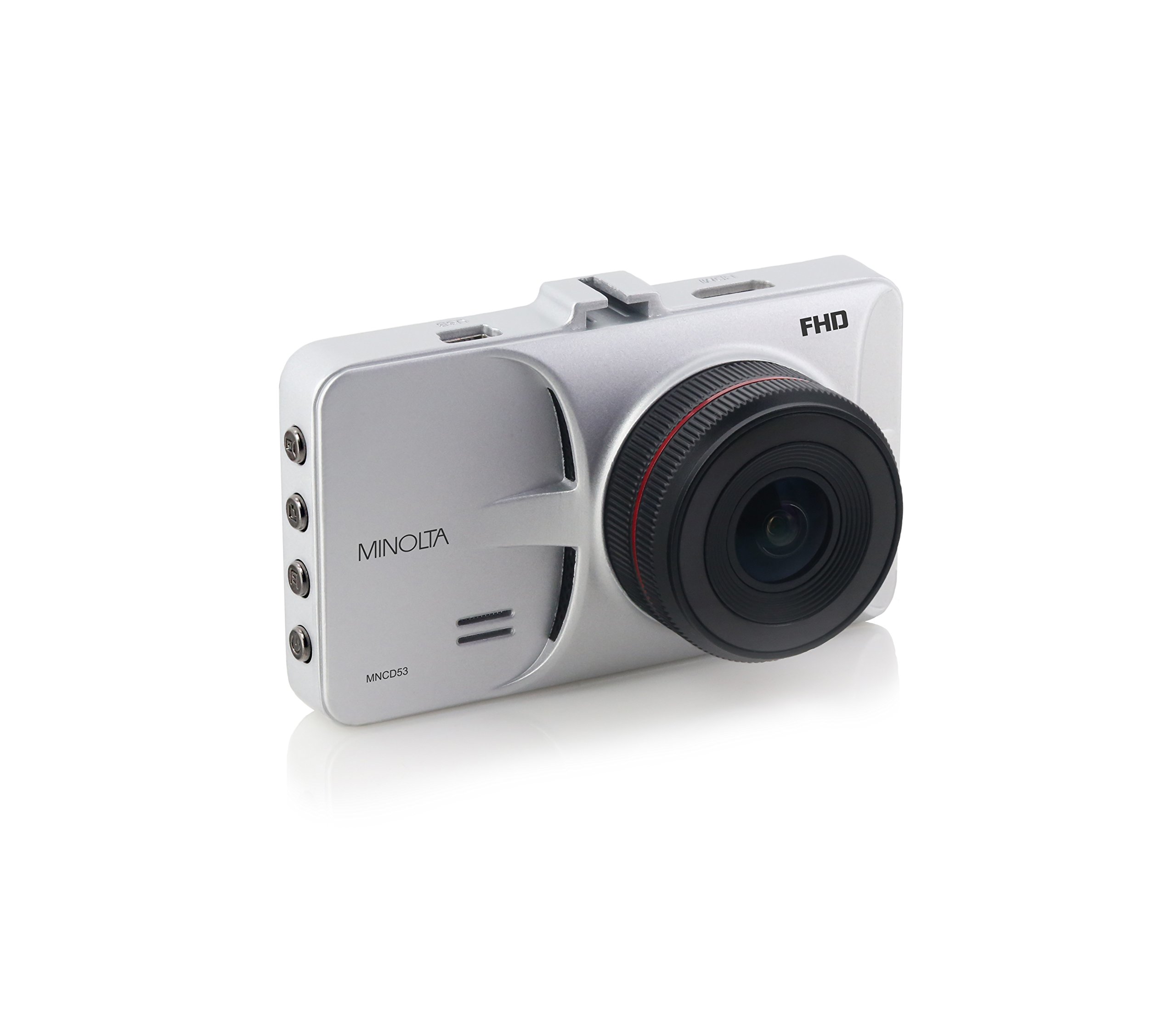
ചിത്രം 1: മുൻഭാഗം view of the Minolta MNCD53-S Car Dashboard Camera, showing the 3.0-inch LCD screen displaying a city night scene.
സജ്ജമാക്കുക
- SD കാർഡ് ചേർക്കുക: Locate the SD card slot on the camera. Gently insert the provided 8GB SD card (or another compatible Class 10 or higher microSD card, up to 32GB) until it clicks into place. Ensure the camera is off before inserting or removing the SD card.
- ക്യാമറ ഘടിപ്പിക്കുന്നു:
- Attach the suction cup mount to the camera.
- Clean the desired area on your windshield. Ensure it does not obstruct your view or interfere with safety features.
- സക്ഷൻ കപ്പ് വിൻഡ്ഷീൽഡിന് നേരെ ദൃഢമായി അമർത്തി ലോക്കിംഗ് മെക്കാനിസത്തിൽ ഘടിപ്പിച്ച് അത് ഉറപ്പിക്കുക.
- Adjust the camera angle to capture the road ahead.

Figure 2: The Minolta MNCD53-S Car Dashboard Camera mounted on a car windshield, showing the driver's perspective of the road.
- പവർ കണക്ഷൻ:
- Connect the provided USB power cable to the camera's power input port.
- Plug the other end of the power cable into your vehicle's 12V lighter socket.
- The camera will typically power on automatically when the vehicle starts and power off when the vehicle is turned off.
- പ്രാരംഭ പവർ ഓൺ: The camera should power on automatically when connected to power. If not, press and hold the power button.
- തീയതിയും സമയവും സജ്ജമാക്കുക: Access the camera's menu settings to set the correct date and time. This is crucial for accurate timestamps on your recordings. Refer to the "Operating Instructions" section for general menu navigation.
പ്രവർത്തന നിർദ്ദേശങ്ങൾ
Familiarize yourself with the camera's buttons and menu system for optimal use.
അടിസ്ഥാന റെക്കോർഡിംഗ്
- When the camera is powered on, it typically begins recording automatically. A red indicator or icon on the screen usually signifies active recording.
- Recordings are saved in segments (e.g., 3 or 5 minutes) due to loop recording.
- To manually start/stop recording, press the designated record button (refer to your camera's physical buttons).
മെനു നാവിഗേഷൻ
The camera features a menu system accessible via physical buttons. Common buttons include:
- മെനു ബട്ടൺ: Enters the settings menu.
- അപ്പ്/ഡൗൺ ബട്ടണുകൾ: മെനു ഓപ്ഷനുകളിലൂടെ നാവിഗേറ്റ് ചെയ്യുക.
- ശരി/സ്ഥിരീകരിക്കുക ബട്ടൺ: Selects an option or confirms a setting.
- മോഡ് ബട്ടൺ: Switches between video recording, photo mode, and playback mode.
Key Settings to Adjust:
- തീയതി/സമയം: കൃത്യമായ സമയക്രമീകരണത്തിനായി നിലവിലെ തീയതിയും സമയവും സജ്ജമാക്കുകamps.
- ലൂപ്പ് റെക്കോർഡിംഗ്: Adjust the duration of video segments (e.g., 1, 3, 5 minutes).
- ജി-സെൻസർ സെൻസിറ്റിവിറ്റി: Adjust sensitivity for emergency recording. Higher sensitivity means it will trigger more easily.
- ചലനം കണ്ടെത്തൽ: Enable or disable this feature. Use with caution when parked as it can drain the battery or fill the SD card quickly.
- WDR: Enable or disable Wide Dynamic Range for improved image quality in varied lighting.
പ്ലേബാക്ക്
- Switch to playback mode using the Mode button.
- Use the navigation buttons to browse through recorded video files.
- Press the OK/Confirm button to play a selected video.
- ലേക്ക് view files on a computer, remove the SD card and insert it into a card reader, or connect the camera directly to a computer via USB.
ഫോട്ടോ മോഡ്
- Switch to photo mode using the Mode button.
- Press the record/shutter button to capture still images.
മെയിൻ്റനൻസ്
- ലെൻസ് വൃത്തിയാക്കൽ: Use a soft, lint-free cloth to gently wipe the camera lens. Avoid abrasive materials or harsh chemicals.
- സ്ക്രീൻ വൃത്തിയാക്കൽ: Use a microfiber cloth to clean the LCD screen.
- SD കാർഡ് മാനേജുമെന്റ്:
- Regularly format the SD card (e.g., once a month) within the camera's settings to ensure optimal performance and prevent data corruption.
- പ്രധാനപ്പെട്ട foo ബാക്കപ്പ് ചെയ്യുകtage to a computer before formatting.
- Replace the SD card if you notice frequent errors or degraded performance.
- സംഭരണം: If storing the camera for an extended period, remove it from the windshield and store it in its pouch in a cool, dry place.
ട്രബിൾഷൂട്ടിംഗ്
| പ്രശ്നം | സാധ്യമായ കാരണം | പരിഹാരം |
|---|---|---|
| ക്യാമറ പവർ ഓൺ ചെയ്യുന്നില്ല. | No power from vehicle; faulty power cable; internal battery depleted. | Check vehicle's lighter socket and fuse. Ensure power cable is securely connected. Try a different power source or cable if available. The internal battery is for emergency files, not sustained operation. |
| Camera stops recording or does not record continuously. | SD card full; SD card error; G-Sensor triggered too often; motion detection enabled. | Format the SD card. Use a Class 10 or higher SD card. Adjust G-Sensor sensitivity. Disable motion detection if not needed while driving. |
| വീഡിയോ footage മങ്ങിയതോ അവ്യക്തമോ ആണ്. | Protective film on lens; dirty lens; incorrect focus (unlikely for fixed focus); poor lighting. | Remove any protective film. Clean the lens with a soft cloth. Ensure WDR is enabled in challenging light conditions. |
| Date and time settings reset. | Internal battery depleted. | Ensure the camera is consistently powered by the vehicle to allow the internal battery to maintain charge for settings. Re-enter date and time. |
| Suction mount does not hold. | Dirty windshield; cold temperatures; worn suction cup. | Clean the windshield and suction cup thoroughly. Warm the windshield slightly in cold weather. Replace the mount if it is damaged. |
സ്പെസിഫിക്കേഷനുകൾ
| ഫീച്ചർ | വിശദാംശങ്ങൾ |
|---|---|
| മോഡലിൻ്റെ പേര് | MNCD53-S |
| വീഡിയോ ക്യാപ്ചർ റെസല്യൂഷൻ | 1080p ഫുൾ എച്ച്ഡി |
| യഥാർത്ഥ ആംഗിൾ View | 140 ഡിഗ്രി |
| സ്ക്രീൻ വലിപ്പം | 3 ഇഞ്ച് എൽസിഡി |
| പ്രത്യേക സവിശേഷതകൾ | Loop Recording, Motion Sensing, G-Sensor, Wide Dynamic Range (WDR) |
| കണക്റ്റിവിറ്റി ടെക്നോളജി | USB കേബിൾ |
| അനുയോജ്യമായ ഓപ്പറേറ്റിംഗ് സിസ്റ്റങ്ങൾ | Windows 7 / 8 / 10, Mac OS 10.8 / 10.9 / 10.10 |
| മൗണ്ടിംഗ് തരം | സക്ഷൻ മൗണ്ട് |
| ഫ്ലാഷ് മെമ്മറി തരം | SD (supports up to 32GB, Class 10 recommended) |
| ബാറ്ററി തരം | Lithium Ion (internal, for emergency files and settings) |
| ഇനത്തിൻ്റെ ഭാരം | 0.3 പൗണ്ട് |
| നിർമ്മാതാവ് | മിനോൾട്ട |
| യു.പി.സി | 084438960143 |
വാറൻ്റിയും പിന്തുണയും
വാറൻ്റി വിവരങ്ങൾ
The Minolta MNCD53-S Car Dashboard Camera comes with a 1-വർഷ പരിമിത വാറൻ്റി വാങ്ങിയ തീയതി മുതൽ. സാധാരണ ഉപയോഗത്തിലുള്ള നിർമ്മാണ വൈകല്യങ്ങളും പ്രവർത്തനക്ഷമതയും ഈ വാറന്റി ഉൾക്കൊള്ളുന്നു. ദുരുപയോഗം, അപകടങ്ങൾ, അനധികൃത പരിഷ്കാരങ്ങൾ അല്ലെങ്കിൽ പ്രകൃതി ദുരന്തങ്ങൾ എന്നിവ മൂലമുണ്ടാകുന്ന നാശനഷ്ടങ്ങൾക്ക് ഇത് പരിരക്ഷ നൽകുന്നില്ല.
വാറൻ്റി ക്ലെയിമുകൾക്കായി നിങ്ങളുടെ വാങ്ങിയതിൻ്റെ തെളിവ് സൂക്ഷിക്കുക.
ഉപഭോക്തൃ പിന്തുണ
For technical assistance, troubleshooting not covered in this manual, or warranty inquiries, please contact Minolta customer support. Refer to the warranty card or the official Minolta webഏറ്റവും പുതിയ ബന്ധപ്പെടാനുള്ള വിവരങ്ങൾക്കായി സൈറ്റ്.
When contacting support, please have your product model number (MNCD53-S) and proof of purchase readily available.