
ആമുഖം
വാങ്ങിയതിന് നന്ദി.asing the 2BOOM Portable Wireless Bluetooth Speaker System. This manual provides detailed instructions for setting up, operating, and maintaining your speaker. Please read this manual thoroughly before using the product to ensure proper function and longevity.
പാക്കേജ് ഉള്ളടക്കം
എല്ലാ ഇനങ്ങളും ഉണ്ടെന്ന് ഉറപ്പാക്കാൻ പാക്കേജ് ഉള്ളടക്കങ്ങൾ പരിശോധിക്കുക:
- 1 x 2BOOM Twister Speaker (Model: BX311R)
- 1 x ഓഡിയോ കേബിൾ
- 1 x ചാർജിംഗ് കേബിൾ
- 1 x ഉപയോക്തൃ മാനുവൽ
Note: This unit does not come with an attachable carry strap.
ഉൽപ്പന്നം കഴിഞ്ഞുview

ചിത്രം 1: മുൻഭാഗം view of the 2BOOM Twister speaker, showcasing its cylindrical design with red end caps and a black carbon fiber textured body.

Figure 2: Diagram highlighting the key features of the speaker, including Deep Digital Bass, FM Radio capability, Colorful Light FX, and a Bluetooth range of 32.8 feet.

ചിത്രം 3: വിശദമായി view of the speaker's control panel, indicating the location and function of the DC5V charging port, AUX input, OFF/ON switch, Mode button, Previous/Volume -, Play/Pause, Next/Volume +, MIC-VOL, Microphone input, USB input, and TF Card slot.

ചിത്രം 4: കോണാകൃതിയിലുള്ളത് view of the speaker's top, providing a clear perspective of the control panel and its various buttons and ports.
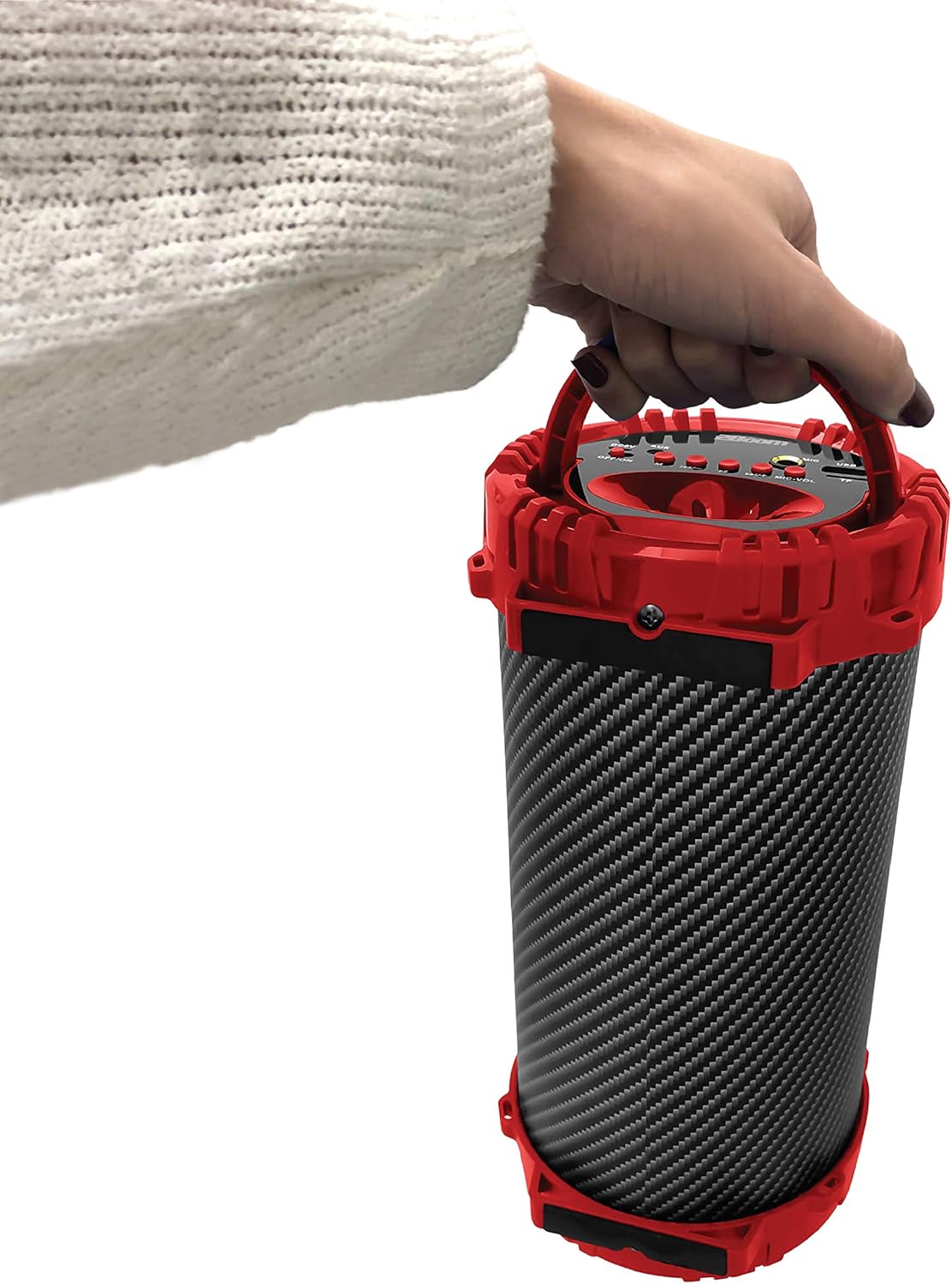
Figure 5: Image demonstrating the portability of the speaker, held by hand using its integrated carry handle.
സജ്ജമാക്കുക
സ്പീക്കറെ കുറ്റപ്പെടുത്തുന്നു
Before first use, fully charge the speaker. Connect the provided charging cable to the DC5V port on the speaker (refer to Figure 3) and the other end to a USB power adapter (not included) or a computer's USB port. The charging indicator light will illuminate during charging and turn off when fully charged.
പവർ ചെയ്യുന്നത് ഓൺ/ഓഫ്
Locate the OFF/ON switch on the control panel (refer to Figure 3). Slide the switch to the "ON" position to power on the speaker. Slide it to the "OFF" position to power off the speaker.
പ്രവർത്തന നിർദ്ദേശങ്ങൾ
ബ്ലൂടൂത്ത് കണക്ഷൻ
- Ensure the speaker is powered on. It will automatically enter Bluetooth pairing mode.
- On your Bluetooth-enabled device (smartphone, tablet, MP3 player), enable Bluetooth and search for available devices.
- Select "2BOOM Twister" from the list of devices.
- Once connected, the speaker will emit an audible confirmation. Your device will automatically remember the speaker for future connections.
- The Bluetooth connection range is up to 33 feet (10 meters).
മോഡ് തിരഞ്ഞെടുക്കൽ
Press the "M" (Mode) button on the control panel (refer to Figure 3) to cycle through available modes: Bluetooth, FM Radio, AUX, USB, and TF Card.
എഫ്എം റേഡിയോ ഓപ്പറേഷൻ
- "M" ബട്ടൺ ഉപയോഗിച്ച് FM റേഡിയോ മോഡിലേക്ക് മാറുക.
- ലഭ്യമായ എഫ്എം സ്റ്റേഷനുകൾ സ്വയമേവ സ്കാൻ ചെയ്ത് സംരക്ഷിക്കാൻ "പ്ലേ/പോസ്" ബട്ടൺ അമർത്തിപ്പിടിക്കുക.
- Use the "Previous/Volume -" and "Next/Volume +" buttons to navigate between saved stations.
AUX ഇൻപുട്ട്
Connect an external audio device (e.g., MP3 player, computer) to the AUX port on the speaker (refer to Figure 3) using the provided audio cable. Switch to AUX mode using the "M" button. Audio will now play through the speaker from your connected device.
യുഎസ്ബി ഇൻപുട്ട്
MP3 ഓഡിയോ അടങ്ങിയ ഒരു USB ഫ്ലാഷ് ഡ്രൈവ് ഇടുക. files into the USB port (refer to Figure 3). The speaker will automatically switch to USB mode and begin playing the audio files.
TF കാർഡ് ഇൻപുട്ട്
MP3 ഓഡിയോ അടങ്ങിയ ഒരു TF (മൈക്രോഎസ്ഡി) കാർഡ് ചേർക്കുക files into the TF Card slot (refer to Figure 3). The speaker will automatically switch to TF Card mode and begin playing the audio files.
Microphone Input (Karaoke Function)
Connect a microphone (not included) to the MIC input port (refer to Figure 3). Adjust the microphone volume using the "MIC-VOL" knob. You can sing along to music playing from any source (Bluetooth, AUX, USB, TF Card, FM Radio).
Volume Control and Track Navigation
- വോളിയം കൂട്ടുക: Press and hold the "Next/Volume +" button.
- വോളിയം താഴേക്ക്: Press and hold the "Previous/Volume -" button.
- Next Track/Station: Short press the "Next/Volume +" button.
- Previous Track/Station: Short press the "Previous/Volume -" button.
- പ്ലേ/താൽക്കാലികമായി നിർത്തുക: Short press the "Play/Pause" button.
മെയിൻ്റനൻസ്
- വൃത്തിയാക്കൽ: സ്പീക്കറിന്റെ പുറംഭാഗം വൃത്തിയാക്കാൻ മൃദുവായതും ഉണങ്ങിയതുമായ തുണി ഉപയോഗിക്കുക. അബ്രസീവ് ക്ലീനറുകളോ ലായകങ്ങളോ ഉപയോഗിക്കരുത്.
- സംഭരണം: നേരിട്ടുള്ള സൂര്യപ്രകാശത്തിൽ നിന്നും കടുത്ത താപനിലയിൽ നിന്നും മാറി തണുത്തതും വരണ്ടതുമായ സ്ഥലത്ത് സ്പീക്കർ സൂക്ഷിക്കുക.
- ജല പ്രതിരോധം: This speaker is NOT waterproof. Avoid exposing it to water or excessive moisture.
- ബാറ്ററി കെയർ: ബാറ്ററി ലൈഫ് വർദ്ധിപ്പിക്കാൻ, ബാറ്ററി ഇടയ്ക്കിടെ പൂർണ്ണമായും ഡിസ്ചാർജ് ചെയ്യുന്നത് ഒഴിവാക്കുക. ദീർഘനേരം ഉപയോഗത്തിലില്ലെങ്കിൽ പോലും സ്പീക്കർ പതിവായി ചാർജ് ചെയ്യുക.
ട്രബിൾഷൂട്ടിംഗ്
| പ്രശ്നം | സാധ്യമായ കാരണം | പരിഹാരം |
|---|---|---|
| സ്പീക്കർ പവർ ഓൺ ചെയ്യുന്നില്ല. | ബാറ്ററി കുറവാണ് അല്ലെങ്കിൽ തീർന്നു. | Charge the speaker using the provided charging cable. |
| ബ്ലൂടൂത്ത് ഉപകരണവുമായി ജോടിയാക്കാൻ കഴിയില്ല. | Bluetooth is not enabled on your device; speaker is not in pairing mode; device is out of range. | Ensure Bluetooth is on and the speaker is in pairing mode. Move device closer to the speaker (within 33 feet). |
| സ്പീക്കറിൽ നിന്ന് ശബ്ദമില്ല. | Volume is too low; incorrect mode selected; audio cable not fully connected. | Increase speaker and device volume. Ensure correct mode (Bluetooth, AUX, etc.) is selected. Check cable connections. |
| എഫ്എം റേഡിയോ റിസപ്ഷൻ മോശമാണ്. | ദുർബലമായ സിഗ്നൽ; പരിസ്ഥിതി ഇടപെടൽ. | Try repositioning the speaker. Perform an auto-scan for stations again. |
സ്പെസിഫിക്കേഷനുകൾ
| ഫീച്ചർ | വിശദാംശങ്ങൾ |
|---|---|
| മോഡൽ | ബിഎക്സ് 311ആർ |
| ബ്രാൻഡ് | 2ബൂം |
| സബ് വൂഫർ വ്യാസം | 4 ഇഞ്ച് |
| കണക്റ്റിവിറ്റി ടെക്നോളജി | ബ്ലൂടൂത്ത്, യുഎസ്ബി, വയർലെസ്സ് |
| പരമാവധി ബ്ലൂടൂത്ത് ശ്രേണി | 33 അടി (10 മീറ്റർ) |
| ഓഡിയോ put ട്ട്പുട്ട് മോഡ് | സ്റ്റീരിയോ |
| പവർ ഉറവിടം | ബാറ്ററി പവർ |
| മെറ്റീരിയൽ തരം | പ്ലാസ്റ്റിക് |
| നിറം | ചുവപ്പ് |
| ഇനത്തിൻ്റെ ഭാരം | 1.65 പൗണ്ട് (ഏകദേശം 748.43 ഗ്രാം) |
| ഉൽപ്പന്ന അളവുകൾ (L x W x H) | 25.4 x 16.51 x 15.24 സെ.മീ |
| പ്രത്യേക സവിശേഷതകൾ | FM Radio, Microphone Input, USB/TF Card Playback |
വാറൻ്റിയും പിന്തുണയും
The 2BOOM Twister Speaker comes with an UNLIMITED 2BOOM warranty when bought from Tech Direct Worldwide. For warranty claims, technical support, or any inquiries regarding your product, please contact the retailer or manufacturer directly.
വാറന്റി ആവശ്യങ്ങൾക്കായി നിങ്ങളുടെ വാങ്ങിയതിന്റെ തെളിവ് സൂക്ഷിക്കുക.