
1. ആമുഖം
Thank you for choosing the Intelbras RC 5003 FRS Radio Communicator. This device is designed for reliable and clear communication, suitable for various applications. This manual provides essential information for the proper setup, operation, and maintenance of your radio communicators. Please read it thoroughly before use.
2 സുരക്ഷാ വിവരങ്ങൾ
- ഉപകരണം വെള്ളത്തിൽ മുക്കരുത് അല്ലെങ്കിൽ അമിതമായ ഈർപ്പത്തിന് വിധേയമാക്കരുത്.
- Do not attempt to open or modify the radio communicator. Repairs should only be performed by authorized personnel.
- Use only Intelbras approved batteries and charging accessories.
- ഉയർന്ന താപനിലയിൽ നിന്നും നേരിട്ടുള്ള സൂര്യപ്രകാശത്തിൽ നിന്നും ഉപകരണം അകറ്റി നിർത്തുക.
- പ്രാദേശിക നിയന്ത്രണങ്ങൾ അനുസരിച്ച് ബാറ്ററികൾ നീക്കം ചെയ്യുക.
- Avoid using the radio communicator while driving or operating heavy machinery to prevent distractions.
3. പാക്കേജ് ഉള്ളടക്കം
പാക്കേജിൽ ഇനിപ്പറയുന്ന ഇനങ്ങൾ ഉണ്ടോ എന്ന് പരിശോധിക്കുക:
- 3 x Intelbras RC 5003 Radio Communicators
- 3 x പവർ അഡാപ്റ്ററുകൾ
- 3 x USB കേബിളുകൾ
- 3 x ബെൽറ്റ് ക്ലിപ്പുകൾ
- 3 x ഇയർഫോണുകൾ
- 1 x ഉപയോക്തൃ മാനുവൽ (ഈ പ്രമാണം)
4. ഉൽപ്പന്നം കഴിഞ്ഞുview
Familiarize yourself with the main components of your Intelbras RC 5003 radio communicator.
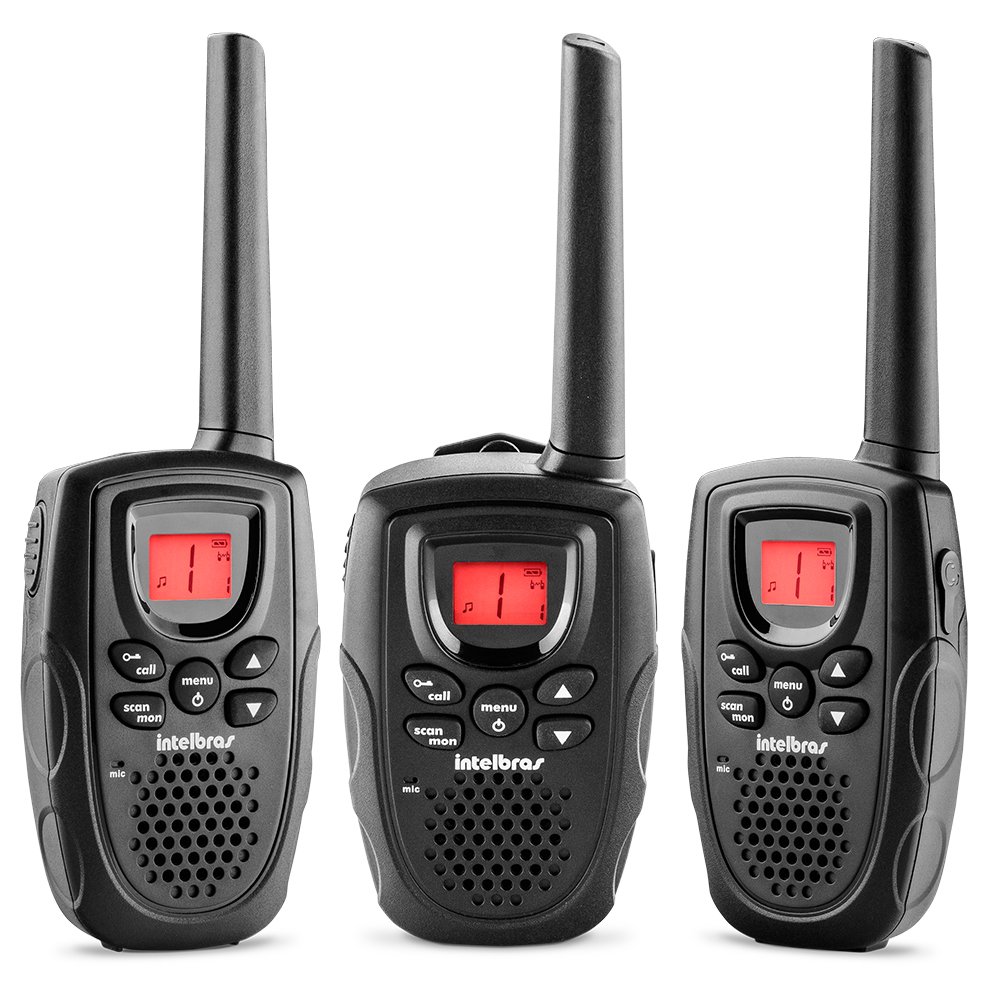
ചിത്രം 1: ഫ്രണ്ട് view of the Intelbras RC 5003 Radio Communicator, showing the display, speaker, microphone, and main control buttons.
പ്രധാന ഘടകങ്ങൾ:
- ആൻ്റിന: സിഗ്നലുകൾ കൈമാറുന്നതിനും സ്വീകരിക്കുന്നതിനും.
- സ്പീക്കർ: ഔട്ട്പുട്ടുകൾക്ക് ഓഡിയോ ലഭിച്ചു.
- തിളക്കമുള്ള ഡിസ്പ്ലേ: Shows channel, battery level, and other status indicators.
- പവർ/വോളിയം നോബ്: യൂണിറ്റ് ഓൺ/ഓഫ് ചെയ്ത് വോളിയം ക്രമീകരിക്കുന്നു.
- ചാനൽ അപ്/ഡൗൺ ബട്ടണുകൾ: Selects operating channels.
- PTT (പുഷ്-ടു-ടോക്ക്) ബട്ടൺ: പ്രക്ഷേപണം ചെയ്യാൻ അമർത്തിപ്പിടിക്കുക, കേൾക്കാൻ വിടുക.
- മെനു ബട്ടൺ: Accesses settings and features.
- യുഎസ്ബി ചാർജിംഗ് പോർട്ട്: For connecting the USB cable for charging.
5. സജ്ജീകരണം
5.1. ബാറ്ററി ഇൻസ്റ്റാളേഷൻ
The Intelbras RC 5003 comes with rechargeable batteries pre-installed. If you need to replace them, ensure the radio is off, open the battery compartment cover on the back, insert the new batteries according to the polarity markings, and close the cover securely.
5.2. ബാറ്ററികൾ ചാർജ് ചെയ്യുന്നു
Before initial use, fully charge the radio communicator's batteries.
- Connect the USB cable to the charging port on the radio communicator.
- നൽകിയിരിക്കുന്ന പവർ അഡാപ്റ്ററുമായി USB കേബിളിന്റെ മറ്റേ അറ്റം ബന്ധിപ്പിക്കുക.
- പവർ അഡാപ്റ്റർ ഒരു സാധാരണ ഇലക്ട്രിക്കൽ ഔട്ട്ലെറ്റിലേക്ക് പ്ലഗ് ചെയ്യുക.
- The display will indicate charging status. A full charge takes approximately 6 hours.
- ചാർജിംഗ് പൂർത്തിയായിക്കഴിഞ്ഞാൽ ചാർജർ വിച്ഛേദിക്കുക.
6. പ്രവർത്തന നിർദ്ദേശങ്ങൾ
6.1. പവർ ഓൺ/ഓഫ്, വോളിയം ക്രമീകരണം
- പവർ ഓണാക്കാൻ: ഒരു ക്ലിക്ക് കേൾക്കുന്നത് വരെ പവർ/വോളിയം നോബ് ഘടികാരദിശയിൽ തിരിക്കുക.
- പവർ ഓഫ് ചെയ്യാൻ: ഒരു ക്ലിക്ക് കേൾക്കുന്നത് വരെ പവർ/വോളിയം നോബ് എതിർ ഘടികാരദിശയിൽ തിരിക്കുക.
- വോളിയം ക്രമീകരിക്കുന്നതിന്: വോളിയം കൂട്ടാൻ പവർ/വോളിയം നോബ് ഘടികാരദിശയിലും കുറയ്ക്കാൻ എതിർ ഘടികാരദിശയിലും തിരിക്കുക.
6.2 ചാനൽ തിരഞ്ഞെടുക്കൽ
The RC 5003 operates on 26 channels within the frequency range of 462.5625 MHz to 467.7125 MHz.
- Press the Menu button to enter channel selection mode.
- Use the Channel Up/Down buttons to select your desired channel (1-26).
- Press the PTT button or wait a few seconds for the selection to be confirmed.
- ആശയവിനിമയത്തിനായി നിങ്ങളുടെ ഗ്രൂപ്പിലെ എല്ലാ റേഡിയോകളും ഒരേ ചാനലിലേക്ക് സജ്ജീകരിച്ചിട്ടുണ്ടെന്ന് ഉറപ്പാക്കുക.
6.3. പ്രക്ഷേപണവും സ്വീകരണവും
- കൈമാറാൻ: Press and hold the PTT button. Speak clearly into the microphone. Release the PTT button to finish transmitting.
- സ്വീകരിക്കാൻ: PTT ബട്ടൺ അമർത്തിയിട്ടില്ലെന്ന് ഉറപ്പാക്കുക. തിരഞ്ഞെടുത്ത ചാനലിൽ റേഡിയോ സ്വയമേവ ട്രാൻസ്മിഷനുകൾ സ്വീകരിക്കും.
6.4. VOX ഫംഗ്ഷൻ (വോയ്സ് ഓപ്പറേറ്റഡ് എക്സ്ചേഞ്ച്)
The VOX function allows hands-free transmission by detecting your voice.
- Press the Menu button repeatedly until the VOX setting appears on the display.
- Use the Channel Up/Down buttons to select a sensitivity level (1-3, where 3 is most sensitive).
- Press the PTT button or wait to confirm the setting.
- When VOX is active, the radio will transmit automatically when you speak.
6.5. Call Tones
The RC 5003 offers 10 different call tones to alert other users.
- Press the Menu button repeatedly until the Call Tone setting appears.
- Use the Channel Up/Down buttons to cycle through the 10 available tones.
- Press the PTT button or wait to confirm your selection.
- To send a call tone, briefly press the Call button (if available, or refer to specific button mapping in your device).
6.6. ബാറ്ററി ലെവൽ ഇൻഡിക്കേറ്റർ
The luminous display includes an indicator for the current battery level. Recharge the device when the indicator shows low battery to ensure uninterrupted communication.
7. പരിപാലനം
7.1. വൃത്തിയാക്കൽ
- Wipe the radio communicator with a soft, damp തുണി.
- കഠിനമായ രാസവസ്തുക്കളോ ഉരച്ചിലുകൾ ഉപയോഗിക്കരുത്.
- ചാർജ് ചെയ്യുന്നതിനോ സൂക്ഷിക്കുന്നതിനോ മുമ്പ് ഉപകരണം ഉണങ്ങിയെന്ന് ഉറപ്പാക്കുക.
7.2. സംഭരണം
- ഉപയോഗത്തിലില്ലാത്തപ്പോൾ തണുത്തതും ഉണങ്ങിയതുമായ സ്ഥലത്ത് ഉപകരണം സൂക്ഷിക്കുക.
- For long-term storage, ensure batteries are partially charged (around 50%) to prolong their lifespan.
8. പ്രശ്നപരിഹാരം
| പ്രശ്നം | സാധ്യമായ കാരണം | പരിഹാരം |
|---|---|---|
| റേഡിയോ ഓൺ ചെയ്യുന്നില്ല. | കുറഞ്ഞതോ തീർന്നതോ ആയ ബാറ്ററി. | കുറഞ്ഞത് 6 മണിക്കൂറെങ്കിലും ബാറ്ററി ചാർജ് ചെയ്യുക. |
| സ്വീകരിക്കാനോ കൈമാറാനോ കഴിയില്ല. | തെറ്റായ ചാനൽ തിരഞ്ഞെടുത്തു. | എല്ലാ റേഡിയോകളും ഒരേ ചാനലിലാണെന്ന് ഉറപ്പാക്കുക. |
| പരിധിക്ക് പുറത്ത്. | Move closer to the other radio communicator. | |
| മോശം ഓഡിയോ നിലവാരം. | കുറഞ്ഞ ബാറ്ററി. | ബാറ്ററി റീചാർജ് ചെയ്യുക. |
| Obstructions or interference. | Move to an open area or away from sources of interference. | |
| VOX not activating. | VOX sensitivity too low. | Increase VOX sensitivity level (1-3). |
9 സ്പെസിഫിക്കേഷനുകൾ
- മോഡൽ: ആർസി 5003
- ചാനലുകൾ: 26
- ഫ്രീക്വൻസി ശ്രേണി: 462.5625 MHz മുതൽ 467.7125 MHz വരെ
- കോൾ ടോണുകൾ: 10
- VOX പ്രവർത്തനം: Yes, with 3 sensitivity levels
- ഡിസ്പ്ലേ: തിളങ്ങുന്ന
- ബാറ്ററി സൂചകം: അതെ
- ചാർജിംഗ്: USB cable, approximately 6 hours for full charge
- അളവുകൾ (H x W x D): 19.6 x 6.65 x 2.7 സെ.മീ (ഏകദേശം)
- ഭാരം: 300 ഗ്രാം (ഏകദേശം)
- ഊർജ്ജ സ്രോതസ്സ്: Rechargeable batteries (included)
10. വാറൻ്റിയും പിന്തുണയും
For warranty information, technical support, or service inquiries, please refer to the warranty card included with your product or visit the official Intelbras webസൈറ്റ്. വാറന്റി ക്ലെയിമുകൾക്കായി നിങ്ങളുടെ വാങ്ങലിന്റെ തെളിവ് സൂക്ഷിക്കുക.
Intelbras Official Webസൈറ്റ്: www.intelbras.com.br