
ആമുഖം
The Marmitek BoomBoom 100 is a versatile 2-in-1 Bluetooth audio device designed to enhance your audio experience. It functions as both a Bluetooth audio receiver and a Bluetooth audio transmitter. In receiver mode (RX), it allows you to stream music wirelessly from your smartphone, tablet, or computer to your existing audio system (e.g., Hi-Fi, home cinema). In transmitter mode (TX), it enables you to send audio wirelessly from an audio source (e.g., TV, CD player) to Bluetooth headphones or speakers. It supports high-quality audio codecs like AAC, aptX, and aptX Low Latency for superior sound and minimal delay.
പാക്കേജ് ഉള്ളടക്കം
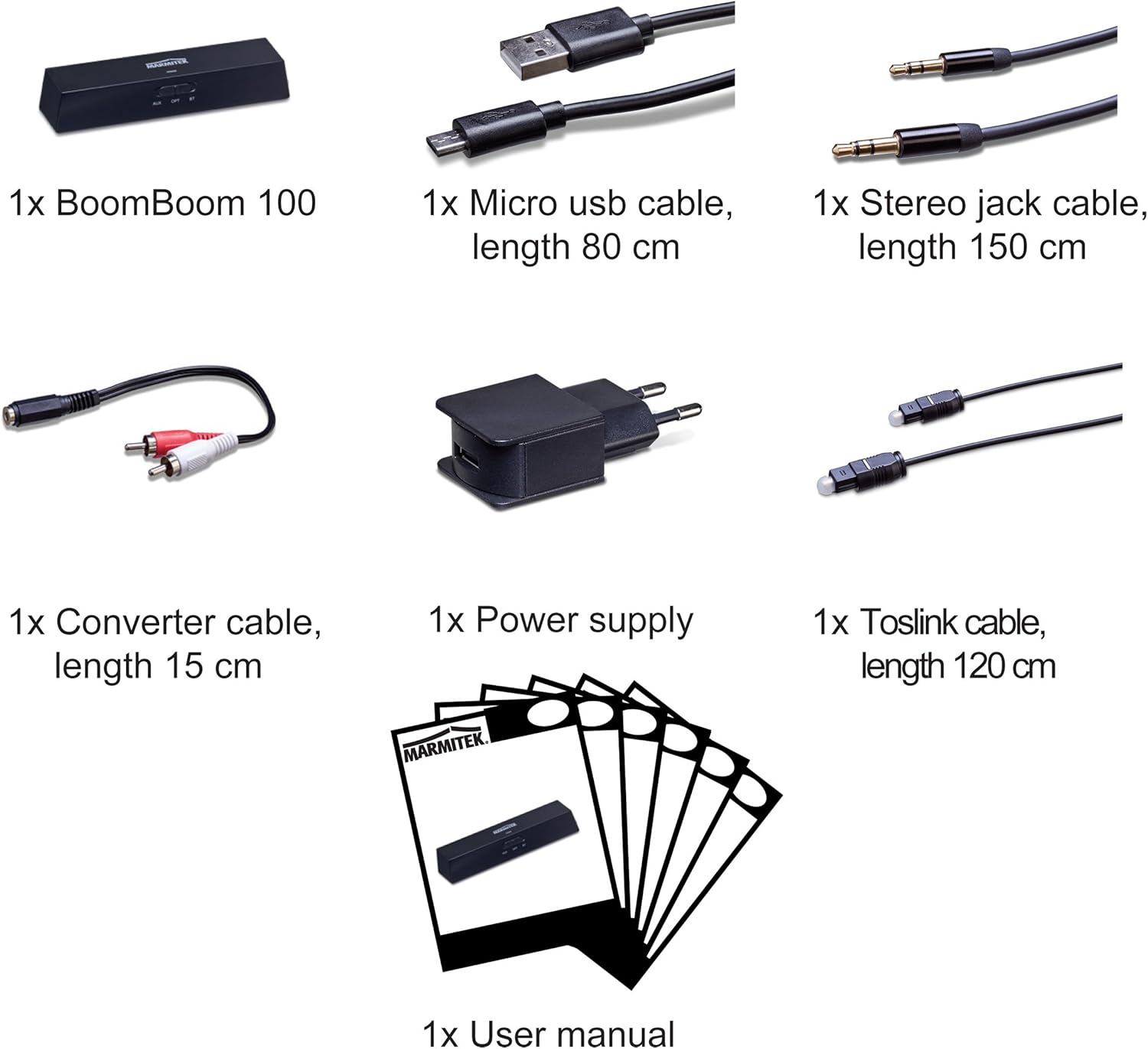
പാക്കേജിംഗിൽ എല്ലാ ഇനങ്ങളും ഉണ്ടെന്ന് ദയവായി പരിശോധിക്കുക:
- 1x Marmitek BoomBoom 100 unit
- 1x Micro USB to USB cable (80 cm)
- 1x Stereo jack cable (3.5mm to 3.5mm, 150 cm)
- 1x Converter cable (3.5mm jack to RCA, 15 cm)
- 1x Power supply (USB wall adapter)
- 1x Toslink (optical) audio cable (120 cm)
- 1x ഉപയോക്തൃ മാനുവൽ
ഉൽപ്പന്നം കഴിഞ്ഞുview
Familiarize yourself with the ports and controls on your BoomBoom 100 device.


സജ്ജമാക്കുക
1. പവർ കണക്ഷൻ
- Connect the Micro USB end of the provided USB cable to the 5V/500mA port on the BoomBoom 100.
- Connect the standard USB end of the cable to the included USB power adapter.
- Plug the USB power adapter into a wall outlet. The device will power on.
2. റിസീവർ മോഡ് (RX) സജ്ജീകരണം
Use this mode to stream audio from a Bluetooth device (e.g., smartphone) to a non-Bluetooth audio system (e.g., Hi-Fi system).
- Set the TX/OFF/RX switch on the BoomBoom 100 to the RX സ്ഥാനം.
- Connect the BoomBoom 100 to your audio system using one of the following methods:
- അനലോഗ് ഓഡിയോ: Use the 3.5mm stereo jack cable or the 3.5mm to RCA converter cable. Connect one end to the '3.5mm AUX Audio Out' port on the BoomBoom 100 and the other end to an available audio input on your Hi-Fi system.
- ഡിജിറ്റൽ ഒപ്റ്റിക്കൽ ഓഡിയോ: Use the Toslink optical cable. Connect one end to the 'Digital Optical Audio Out' port on the BoomBoom 100 and the other end to an available optical input on your audio system.
- Ensure your audio system is set to the correct input source.
3. ട്രാൻസ്മിറ്റർ മോഡ് (TX) സജ്ജീകരണം
Use this mode to transmit audio from a non-Bluetooth audio source (e.g., TV) to Bluetooth headphones or speakers.
- Set the TX/OFF/RX switch on the BoomBoom 100 to the TX സ്ഥാനം.
- Connect your audio source to the BoomBoom 100 using one of the following methods:
- അനലോഗ് ഓഡിയോ: Use the 3.5mm stereo jack cable or the 3.5mm to RCA converter cable. Connect one end to the '3.5mm AUX Audio In' port on the BoomBoom 100 and the other end to an available audio output on your TV or audio source.
- ഡിജിറ്റൽ ഒപ്റ്റിക്കൽ ഓഡിയോ: Use the Toslink optical cable. Connect one end to the 'Digital Optical Audio In' port on the BoomBoom 100 and the other end to an available optical output on your TV or audio source.

പ്രവർത്തിക്കുന്നു
ബ്ലൂടൂത്ത് ജോടിയാക്കൽ
After connecting the BoomBoom 100 as described in the Setup section, you need to pair your Bluetooth devices.
- Ensure the BoomBoom 100 is powered on and in the desired mode (RX or TX). The LED indicator will flash, indicating it is in pairing mode.
- On your Bluetooth device (e.g., smartphone, headphones), enable Bluetooth and search for available devices.
- കണ്ടെത്തിയ ഉപകരണങ്ങളുടെ പട്ടികയിൽ നിന്ന് "BoomBoom 100" തിരഞ്ഞെടുക്കുക.
- Once connected, the LED indicator on the BoomBoom 100 will turn solid.
Multipair Party Mode (Connect 2 Headphones)
In transmitter mode (TX), the BoomBoom 100 allows you to connect two Bluetooth headphones simultaneously for shared listening.
- Pair the first pair of Bluetooth headphones as described above.
- Once the first headphones are connected, put the second pair of Bluetooth headphones into pairing mode.
- The BoomBoom 100 will automatically search for and connect to the second pair of headphones.
- Both headphones will now receive audio from the connected source.
Audio Codecs (AAC, aptX, aptX Low Latency)
The BoomBoom 100 supports advanced audio codecs to ensure high-quality sound and minimal latency:
- CCA: Advanced Audio Coding, commonly used by Apple devices, provides efficient compression with good audio quality.
- aptX: A high-quality audio codec that delivers CD-like audio over Bluetooth.
- aptX കുറഞ്ഞ ലേറ്റൻസി: This codec significantly reduces audio delay, ensuring that audio and video remain synchronized, which is ideal for watching TV or movies. For aptX Low Latency to function, both the transmitter (BoomBoom 100) and the receiving device (e.g., headphones) must support it.
മെയിൻ്റനൻസ്
To ensure the longevity and optimal performance of your Marmitek BoomBoom 100, follow these maintenance guidelines:
- മൃദുവായതും ഉണങ്ങിയതുമായ തുണി ഉപയോഗിച്ച് തുടച്ച് ഉപകരണം വൃത്തിയായി സൂക്ഷിക്കുക. ലിക്വിഡ് ക്ലീനറുകളോ ലായകങ്ങളോ ഉപയോഗിക്കുന്നത് ഒഴിവാക്കുക.
- Protect the device from moisture, water, and extreme temperatures.
- ദീർഘനേരം ഉപകരണത്തെ നേരിട്ട് സൂര്യപ്രകാശം ഏൽപ്പിക്കരുത്.
- ഉപകരണം ഉപേക്ഷിക്കുകയോ ശക്തമായ ആഘാതങ്ങൾക്ക് വിധേയമാക്കുകയോ ചെയ്യരുത്.
- ഉപയോഗത്തിലില്ലാത്തപ്പോൾ തണുത്തതും ഉണങ്ങിയതുമായ സ്ഥലത്ത് ഉപകരണം സൂക്ഷിക്കുക.
ട്രബിൾഷൂട്ടിംഗ്
If you encounter issues with your BoomBoom 100, refer to the following common problems and solutions:
| പ്രശ്നം | സാധ്യമായ പരിഹാരം |
|---|---|
| പവർ ഇല്ല/ഉപകരണം ഓണാകുന്നില്ല | Ensure the USB power cable is securely connected to both the BoomBoom 100 and the power adapter, and the adapter is plugged into a working wall outlet. Try a different USB port or power adapter. |
| ബ്ലൂടൂത്ത് ഉപകരണം ജോടിയാക്കാൻ കഴിയില്ല | Make sure the BoomBoom 100 is in the correct mode (RX or TX) and its LED is flashing, indicating pairing mode. Ensure your Bluetooth device is also in pairing mode and within range (typically 10 meters). Turn off and on Bluetooth on your device, or restart both devices. |
| No audio output/input | Verify that all audio cables (3.5mm AUX, Optical) are correctly and securely connected to the appropriate input/output ports on both the BoomBoom 100 and your audio equipment. Check the input selection switch on the BoomBoom 100 (AUX, OPT, BT) and ensure your audio system is set to the correct input source. Adjust volume levels on all connected devices. |
| Audio delay (lip-sync issues) | If experiencing delay in TX mode, ensure both the BoomBoom 100 and your Bluetooth headphones/speakers support aptX Low Latency. If not, some delay may be inherent. |
| Poor audio quality or intermittent connection | Reduce the distance between the BoomBoom 100 and the paired Bluetooth device. Remove any obstacles that might interfere with the Bluetooth signal (e.g., thick walls, large metal objects). Avoid placing the device near other wireless devices that might cause interference. |
സ്പെസിഫിക്കേഷനുകൾ
| ബ്രാൻഡ് | മാർമിറ്റെക് |
| മോഡൽ നമ്പർ | 8330 |
| ഉൽപ്പന്ന അളവുകൾ | 2.5 x 10.5 x 2 സെ.മീ |
| ഇനത്തിൻ്റെ ഭാരം | 25 ഗ്രാം (0.03 കിലോഗ്രാം) |
| കണക്റ്റിവിറ്റി ടെക്നോളജി | ബ്ലൂടൂത്ത് |
| വയർലെസ് തരം | ബ്ലൂടൂത്ത് |
| Audio Input Compatible with Item | 3.5mm AUX, Optical TOSLINK |
| ഓഡിയോ ഔട്ട്പുട്ട് തരം | ബ്ലൂടൂത്ത്, ഓക്സിലറി (3.5mm) |
| ഓഡിയോ put ട്ട്പുട്ട് മോഡ് | സ്റ്റീരിയോ |
| അനുയോജ്യമായ മീഡിയ തരങ്ങൾ | aptX, aptX Low Latency, AAC |
| പവർ ഉറവിടം | 100-240V AC @ 50-60Hz (via USB adapter) |
| അനുയോജ്യമായ ഉപകരണങ്ങൾ | TVs, Personal Computers, Smartphones, Tablets |
| മെറ്റീരിയൽ | പ്ലാസ്റ്റിക് |
| പ്രത്യേക സവിശേഷതകൾ | Built-in Bluetooth, 2-in-1 (Receiver/Transmitter) |
വാറൻ്റി
Marmitek products are designed and manufactured to the highest standards. For information regarding the warranty period and conditions for your BoomBoom 100, please refer to the warranty card included in your product packaging or visit the official Marmitek webസൈറ്റ്.
പിന്തുണ
For further assistance, technical support, or frequently asked questions, please visit the official Marmitek support website. You can typically find detailed product information, updated manuals, and contact options there.


