
1. ആമുഖം
The AUNA Stealth Bar 60 is a compact 2.1 soundbase designed to significantly enhance your home entertainment audio experience. This manual provides essential information for the safe operation, proper setup, and effective maintenance of your device. Please read this manual thoroughly before using the product and retain it for future reference.

ചിത്രം 1.1: The AUNA Stealth Bar 60 soundbase integrated into a home entertainment setup.
2. സുരക്ഷാ നിർദ്ദേശങ്ങൾ
സുരക്ഷിതമായ പ്രവർത്തനം ഉറപ്പാക്കുന്നതിനും കേടുപാടുകൾ തടയുന്നതിനും, ദയവായി ഇനിപ്പറയുന്ന സുരക്ഷാ മുൻകരുതലുകൾ പാലിക്കുക:
- ഉപയോഗിക്കുന്നതിന് മുമ്പ് എല്ലാ നിർദ്ദേശങ്ങളും ശ്രദ്ധാപൂർവ്വം വായിച്ച് ഭാവി റഫറൻസിനായി സൂക്ഷിക്കുക.
- ഉപകരണം വെള്ളം, ഈർപ്പം അല്ലെങ്കിൽ തീവ്രമായ താപനില എന്നിവയിൽ തുറന്നുകാട്ടരുത്.
- യൂണിറ്റിന് ചുറ്റും മതിയായ വായുസഞ്ചാരം ഉറപ്പാക്കുക. വെന്റിലേഷൻ ദ്വാരങ്ങളൊന്നും തടയരുത്.
- Install the device according to the manufacturer's instructions.
- പ്രത്യേകിച്ച് പ്ലഗുകൾ, കൺവീനിയൻസ് റെസെപ്റ്റക്കിളുകൾ, ഉപകരണത്തിൽ നിന്ന് പുറത്തുകടക്കുന്ന ഇടം എന്നിവയിൽ നടക്കുകയോ നുള്ളുകയോ ചെയ്യുന്നതിൽ നിന്ന് പവർ കോർഡ് സംരക്ഷിക്കുക.
- മിന്നൽ കൊടുങ്കാറ്റുകളുടെ സമയത്തോ ദീർഘനേരം ഉപയോഗിക്കാത്ത സമയത്തോ ഉപകരണം അൺപ്ലഗ് ചെയ്യുക.
- എല്ലാ സേവനങ്ങളും യോഗ്യതയുള്ള സേവന ഉദ്യോഗസ്ഥർക്ക് റഫർ ചെയ്യുക. പവർ സപ്ലൈ കോർഡ് അല്ലെങ്കിൽ പ്ലഗ് കേടാകുക, ദ്രാവകം ഒഴുകുകയോ ഉപകരണങ്ങൾ ഉപകരണത്തിലേക്ക് വീഴുകയോ ചെയ്യുക, ഉപകരണം മഴയോ ഈർപ്പമോ സമ്പർക്കം പുലർത്തുക, സാധാരണയായി പ്രവർത്തിക്കാത്തത് എന്നിങ്ങനെയുള്ള ഏതെങ്കിലും വിധത്തിൽ ഉപകരണത്തിന് കേടുപാടുകൾ സംഭവിക്കുമ്പോൾ സേവനം ആവശ്യമാണ്. , അല്ലെങ്കിൽ ഉപേക്ഷിച്ചു.
3. പാക്കേജ് ഉള്ളടക്കം
പെട്ടി ശ്രദ്ധാപൂർവ്വം അൺപാക്ക് ചെയ്യുക, താഴെ പട്ടികപ്പെടുത്തിയിരിക്കുന്ന എല്ലാ ഇനങ്ങളും ഉണ്ടെന്നും നല്ല നിലയിലാണെന്നും ഉറപ്പാക്കുക:
- 1 x AUNA Stealth Bar 60 Soundbase
- 1 x റിമോട്ട് കൺട്രോൾ
- 1 x RCA കേബിൾ
- 1 x Audio Cable (3.5mm AUX)
- 1 x യൂസർ മാനുവൽ (ഇംഗ്ലീഷ്, ജർമ്മൻ)
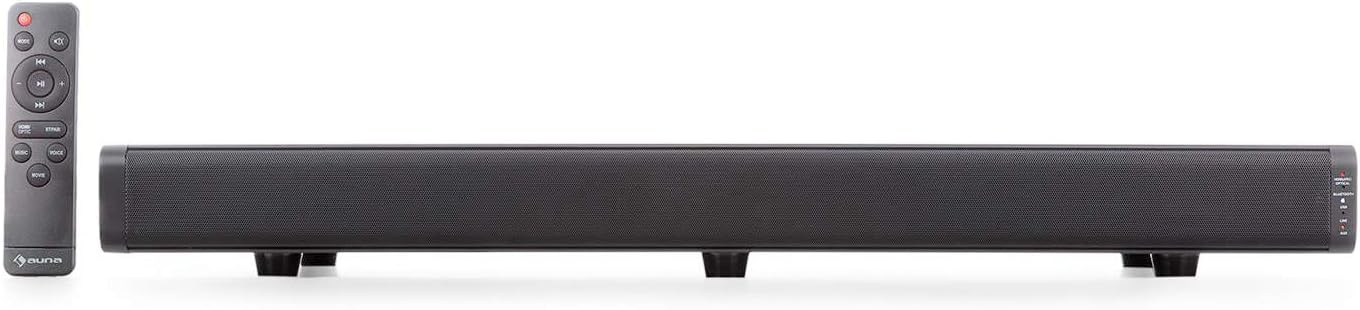
ചിത്രം 3.1: The AUNA Stealth Bar 60 soundbase and its remote control.
4. ഉൽപ്പന്ന സവിശേഷതകൾ
The AUNA Stealth Bar 60 offers a range of features designed for an immersive audio experience:
- 2.1 Compact Soundbase: Designed for TVs between 32-55 inches, supporting a maximum weight of 22kg.
- ബഹുമുഖ കണക്റ്റിവിറ്റി: Includes USB, HDMI (ARC), Optical, and AUX inputs for various digital and analog sources.
- ബ്ലൂടൂത്ത് സ്ട്രീമിംഗ്: Wirelessly stream audio from compatible devices like smartphones and tablets.
- Integrated DSP 3D Surround Stereo: Enhances audio depth and immersion.
- EQ പ്രീസെറ്റുകൾ: Three selectable equalizer modes (Music, Voice, Movie) to optimize sound for different content.
- സൗകര്യപ്രദമായ നിയന്ത്രണം: Operate directly from the unit or via the included remote control.
- USB പോർട്ട് പ്രവർത്തനം: Supports MP3 playback from USB drives (up to 32GB) and can also serve as a charging port for other devices.

ചിത്രം 4.1: ഫ്രണ്ട് view of the AUNA Stealth Bar 60 soundbase.
5. നിയന്ത്രണങ്ങളും കണക്ഷനുകളും
5.1 ഫ്രണ്ട് പാനൽ നിയന്ത്രണങ്ങളും സൂചകങ്ങളും
The right side of the soundbase features control buttons and LED indicators for easy operation and status monitoring.
- പവർ / മോഡ് ബട്ടൺ: Press to power on/off or cycle through input sources (HDMI, Optical, Bluetooth, USB, Line In, AUX).
- PAIR / Play / Pause Button: In Bluetooth mode, press and hold to initiate pairing. Press briefly to play or pause audio.
- VOL+ / Next Track Button: Press to increase volume. In Bluetooth/USB mode, press and hold to skip to the next track.
- VOL- / Previous Track Button: Press to decrease volume. In Bluetooth/USB mode, press and hold to skip to the previous track.
- LED സൂചകങ്ങൾ: Lights indicate the currently selected input source (HDMI, Optical, Bluetooth, USB, Line In, AUX).

ചിത്രം 5.1: Front panel controls and LED indicators.
5.2 സൈഡ്, റിയർ പാനൽ കണക്ഷനുകൾ
The soundbase offers various ports for connecting external audio sources.
- USB പോർട്ട്: For connecting USB storage devices (max 32GB) for MP3 playback or charging external devices.
- LINE IN (AUX) Port: 3.5mm jack for connecting analog audio sources.
- HDMI (ARC) Input: For connecting to a TV's HDMI ARC port to receive audio.
- ഒപ്റ്റിക്കൽ ഇൻപുട്ട്: For connecting to a TV or other device with an optical digital audio output.
- AUX ഇൻപുട്ട്: RCA stereo input for connecting analog audio sources.
- പവർ ഇൻപുട്ട്: പവർ അഡാപ്റ്റർ ബന്ധിപ്പിക്കുന്നതിന്.

ചിത്രം 5.2: USB and Line In ports on the side panel.
6. സജ്ജീകരണം
6.1 പ്ലേസ്മെൻ്റ്
- Place the AUNA Stealth Bar 60 on a stable, flat surface directly below your television.
- Ensure there is adequate space around the soundbase for proper ventilation.
- The soundbase is designed to support TVs weighing up to 22 kg. Do not exceed this weight limit.
6.2 പവറുമായി ബന്ധിപ്പിക്കുന്നു
- Connect the power cable to the Power Input port on the soundbase.
- Plug the other end of the power cable into a suitable wall outlet (110-220 V~ | 50/60 Hz).
6.3 ഓഡിയോ ഉറവിടങ്ങൾ ബന്ധിപ്പിക്കുന്നു
Choose one of the following connection methods based on your TV or audio source:
- എച്ച്ഡിഎംഐ (ARC): Connect an HDMI cable from the soundbase's HDMI (ARC) port to your TV's HDMI (ARC) port. This allows the TV to send audio to the soundbase and often enables control of the soundbase volume with your TV remote.
- ഒപ്റ്റിക്കൽ: Connect an optical audio cable from the soundbase's OPTICAL input to your TV's optical digital audio output.
- ഓക്സ് (ആർസിഎ): Use the provided RCA cable to connect the soundbase's AUX input to the RCA audio output jacks on your TV or other audio device.
- LINE IN (3.5mm): Use the provided 3.5mm audio cable to connect the soundbase's LINE IN port to the headphone jack or 3.5mm audio output of your device.
- USB: Insert a USB flash drive (formatted to FAT32, max 32GB) into the USB port for direct MP3 playback.
7. പ്രവർത്തന നിർദ്ദേശങ്ങൾ
7.1 പവർ ഓൺ/ഓഫ്
അമർത്തുക പവർ / മോഡ് button on the soundbase or the remote control to turn the unit on or off.
7.2 ഉറവിട തിരഞ്ഞെടുപ്പ്
അമർത്തുക മോഡ് button repeatedly on the soundbase or remote control to cycle through the available input sources: HDMI, Optical, Bluetooth, USB, Line In, and AUX. The corresponding LED indicator on the front panel will illuminate to show the active source.
7.3 വോളിയം നിയന്ത്രണം
ഉപയോഗിക്കുക VOL+ ഒപ്പം വോൾ- buttons on the soundbase or remote control to adjust the volume level.
7.4 ബ്ലൂടൂത്ത് ജോടിയാക്കൽ
- Turn on the soundbase and select Bluetooth mode using the മോഡ് button. The Bluetooth LED indicator will flash, indicating it is in pairing mode.
- നിങ്ങളുടെ സ്മാർട്ട്ഫോണിലോ ടാബ്ലെറ്റിലോ മറ്റ് ഉപകരണത്തിലോ ബ്ലൂടൂത്ത് പ്രവർത്തനക്ഷമമാക്കുക.
- ഇതിനായി തിരയുക available devices and select "AUNA Stealth Bar 60" from the list.
- Once successfully paired, the Bluetooth LED indicator on the soundbase will glow solid.
- You can now play audio from your device through the soundbase. Use the PAIR / Play / Pause, VOL+ / Next Track, ഒപ്പം VOL- / Previous Track പ്ലേബാക്ക് നിയന്ത്രണത്തിനുള്ള ബട്ടണുകൾ.
7.5 EQ പ്രീസെറ്റുകൾ
Use the dedicated buttons on the remote control to select one of the three equalizer presets:
- സംഗീതം: Optimized for general music listening.
- ശബ്ദം: Enhances vocal clarity, ideal for news or dialogue-heavy content.
- സിനിമ: Provides a dynamic soundstage for movies and cinematic experiences.
8. പരിപാലനം
Proper care ensures the longevity and performance of your soundbase:
- വൃത്തിയാക്കൽ: Use a soft, dry cloth to clean the exterior of the soundbase. Do not use liquid cleaners, aerosols, or abrasive chemicals, as they may damage the finish.
- വെൻ്റിലേഷൻ: Periodically check that the ventilation openings are clear of dust and debris to prevent overheating.
- സംഭരണം: യൂണിറ്റ് ദീർഘനേരം സൂക്ഷിക്കുകയാണെങ്കിൽ, പവർ ഔട്ട്ലെറ്റിൽ നിന്ന് അത് അൺപ്ലഗ് ചെയ്ത് തണുത്തതും വരണ്ടതുമായ സ്ഥലത്ത്, വെയിലത്ത് അതിന്റെ യഥാർത്ഥ പാക്കേജിംഗിൽ സൂക്ഷിക്കുക.
9. പ്രശ്നപരിഹാരം
If you encounter issues with your AUNA Stealth Bar 60, refer to the following table for common problems and solutions:
| പ്രശ്നം | സാധ്യമായ കാരണം | പരിഹാരം |
|---|---|---|
| ശക്തിയില്ല | പവർ കേബിൾ ബന്ധിപ്പിച്ചിട്ടില്ല; പവർ ഔട്ട്ലെറ്റ് സജീവമല്ല. | പവർ കേബിൾ സുരക്ഷിതമായി ബന്ധിപ്പിച്ചിട്ടുണ്ടെന്ന് ഉറപ്പാക്കുക. പവർ ഔട്ട്ലെറ്റ് പ്രവർത്തിക്കുന്നുണ്ടോ എന്ന് പരിശോധിക്കുക. |
| ശബ്ദമില്ല | Incorrect input source selected; Volume too low; Audio cables not connected properly. | Select the correct input source. Increase the volume. Check all audio cable connections. |
| ബ്ലൂടൂത്ത് കണക്റ്റ് ചെയ്യുന്നില്ല | Soundbase not in pairing mode; Device Bluetooth off; Device too far. | Ensure soundbase is in Bluetooth pairing mode (flashing LED). Turn on Bluetooth on your device. Move device closer to the soundbase. |
| റിമോട്ട് കൺട്രോൾ പ്രവർത്തിക്കുന്നില്ല | Batteries depleted; Obstruction between remote and soundbase. | Replace batteries in the remote control. Ensure there is a clear line of sight to the soundbase's sensor. |
10 സ്പെസിഫിക്കേഷനുകൾ
Technical specifications for the AUNA Stealth Bar 60:
| ഫീച്ചർ | സ്പെസിഫിക്കേഷൻ |
|---|---|
| മോഡൽ നമ്പർ | KTCLJ4O-Q |
| പവർ put ട്ട്പുട്ട് (ആർഎംഎസ്) | 2 x 20W + 40W |
| പ്രതിരോധം | 8 ഓം |
| ബ്ലൂടൂത്ത് പതിപ്പ് | V3.0 + EDR |
| Max USB Storage Size | 32 ജിബി |
| Max TV Load | 22 കി.ഗ്രാം |
| അളവുകൾ (W x H x D) | 68 x 6 x 27 സെ.മീ |
| ഭാരം | 5 കി.ഗ്രാം |
| വൈദ്യുതി വിതരണം | 110-220 V~ | 50/60 ഹെർട്സ് |
| കണക്റ്റിവിറ്റി | HDMI (ARC), USB, Optical, AUX (RCA), Line In (3.5mm) |
| ഇക്യു പ്രീസെറ്റുകൾ | Music, Voice, Movie |
11. വാറൻ്റിയും പിന്തുണയും
For detailed warranty information, terms, and conditions, please refer to the warranty card or documentation included with your purchase. For technical support, service inquiries, or to obtain replacement parts, please visit the official AUNA website or contact your local dealer. Please have your model number (KTCLJ4O-Q) and purchase date available when contacting support.