
Andoer HDV-534K
Andoer HDV-534K 4K 48 MP WiFi Digital Video Camera User Manual
Model: HDV-534K
ആമുഖം
This manual provides comprehensive instructions for the operation and maintenance of your Andoer HDV-534K 4K 48 MP WiFi Digital Video Camera. Please read this manual thoroughly before using the camera to ensure proper functionality and to maximize your user experience.
The Andoer HDV-534K is a high-definition digital video camera capable of recording 4K (2880 x 2160) video at 24 frames per second (interpolated) and capturing still photos at 48MP (9212 x 5184) (interpolated). It features a 3-inch capacitive touchscreen for intuitive control and vivid display.
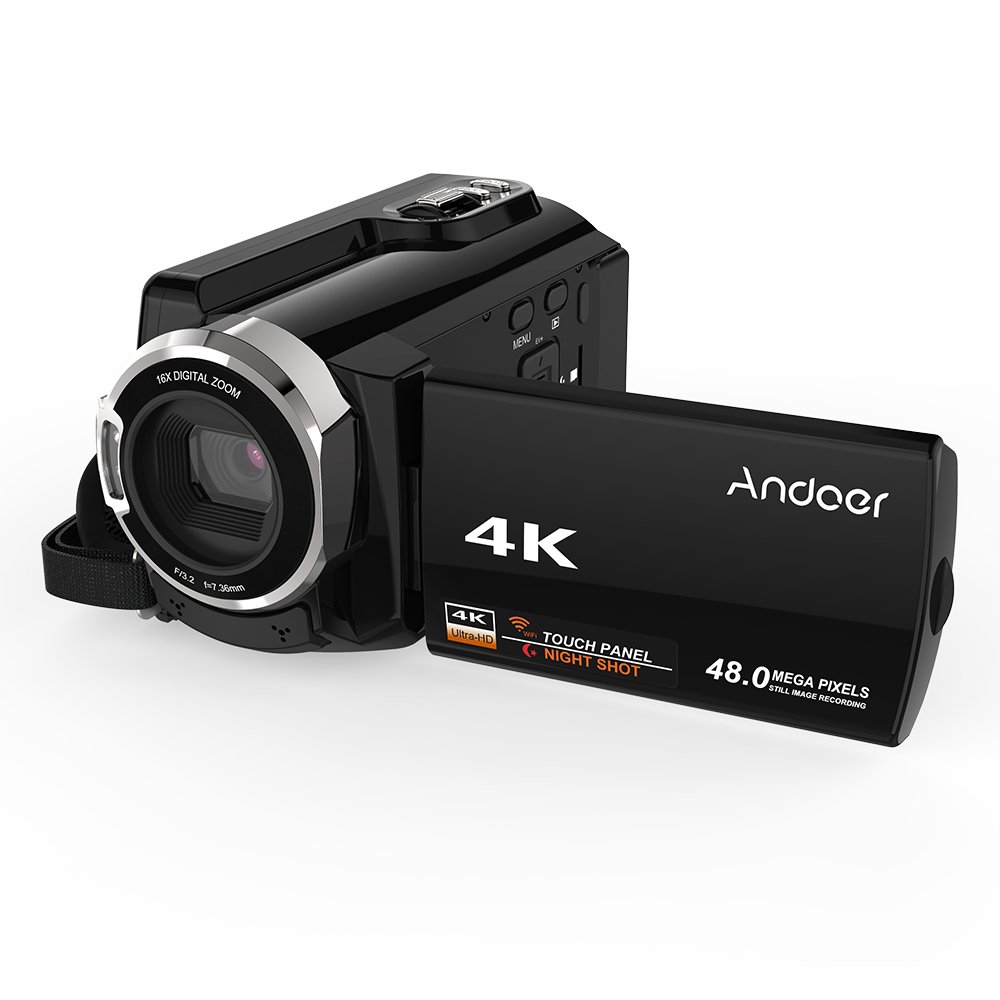
Figure 1: Andoer HDV-534K Digital Video Camera. This image shows the camera from the front-right, with the screen open, displaying the "4K" and "Andoer" branding.
ഉൽപ്പന്ന ഘടകങ്ങളും നിയന്ത്രണങ്ങളും
Familiarize yourself with the various parts and controls of your Andoer HDV-534K camera.

Figure 2: Detailed diagram of the Andoer HDV-534K camera, highlighting key components and controls such as the 3-inch touchscreen, MENU button, Playback button, T/W (Telephoto/Wide) zoom, Photo button, Mode button, Up/EV+, Right/IR, T-Flash Card Slot, AV/USB/HD Port, Left/Timed, Power button, Display/WiFi, Down/EV-, Infrared Light (IR), Lens, Mic, Secure Digital Memory Card Slot, Power Light, Charging Light, Start/Stop button, Strap, and Battery compartment.
പ്രധാന ഘടകങ്ങൾ:
- ലെൻസ്: ചിത്രങ്ങളും വീഡിയോയും പകർത്തുന്നു.
- ഇൻഫ്രാറെഡ് ലൈറ്റ് (IR): Used for night vision recording.
- 3 ഇഞ്ച് കപ്പാസിറ്റീവ് ടച്ച്സ്ക്രീൻ: വേണ്ടി viewമെനുകൾ ഡൗൺലോഡ് ചെയ്യുന്നതിനും നാവിഗേറ്റ് ചെയ്യുന്നതിനും.
- ബാറ്ററി കമ്പാർട്ട്മെൻ്റ്: റീചാർജ് ചെയ്യാവുന്ന ബാറ്ററിയാണ് ഇവിടെ സ്ഥാപിച്ചിരിക്കുന്നത്.
- Secure Digital Memory Card Slot: For inserting SD/SDHC memory cards (not included).
- AV/USB/HD Port: Multi-functional port for connecting to external devices.
- 1/4" Tripod Thread: Located at the bottom for mounting on a tripod.
സജ്ജീകരണ ഗൈഡ്
1 ബാറ്ററി ചാർജ് ചെയ്യുന്നു
Before first use, fully charge the camera's battery. The Andoer HDV-534K uses a 3.8V 2500mAh lithium polymer battery, designed for longer service time.
- Insert the battery into the battery compartment, ensuring correct orientation.
- Connect the camera to a power source using the provided USB cable and power adapter.
- The Charging Light will indicate the charging status. Refer to the camera's display for battery level.

Figure 3: Image showing the camera with the battery inserted, emphasizing the "Bigger Capacity Longer Service Time" feature of the 3.8V 2500mAh lithium polymer battery.
2 ഒരു മെമ്മറി കാർഡ് ചേർക്കുന്നു
The camera requires an SD/SDHC memory card (not included) to store photos and videos.
- Locate the Secure Digital Memory Card Slot on the camera.
- Insert the memory card with the metal contacts facing the correct direction until it clicks into place.
- കാർഡ് നീക്കം ചെയ്യാൻ, അത് പുറത്തേക്ക് വരുന്നത് വരെ സൌമ്യമായി അമർത്തുക.
3. പ്രാരംഭ പവർ ഓൺ
- എൽസിഡി സ്ക്രീൻ തുറക്കുക.
- അമർത്തിപ്പിടിക്കുക ശക്തി button until the camera turns on.
- Follow any on-screen prompts for initial setup, such as setting date and time.
പ്രവർത്തന നിർദ്ദേശങ്ങൾ
വീഡിയോകൾ റെക്കോർഡുചെയ്യുന്നു
- Ensure the camera is in video recording mode. If not, press the മോഡ് മാറാനുള്ള ബട്ടൺ.
- Frame your shot using the 3-inch touchscreen.
- അമർത്തുക ആരംഭിക്കുക/നിർത്തുക റെക്കോർഡിംഗ് ആരംഭിക്കുന്നതിനുള്ള ബട്ടൺ അമർത്തുക. റെക്കോർഡിംഗ് സൂചകം സ്ക്രീനിൽ ദൃശ്യമാകും.
- അമർത്തുക ആരംഭിക്കുക/നിർത്തുക റെക്കോർഡിംഗ് നിർത്താൻ വീണ്ടും ബട്ടൺ.

Figure 4: The Andoer HDV-534K camera held in hand, displaying a 4K Ultra HD picture on its screen, demonstrating its video recording capability.
ഫോട്ടോകൾ എടുക്കുന്നു
- Switch to photo mode by pressing the മോഡ് ബട്ടൺ.
- Compose your shot.
- അമർത്തുക ഫോട്ടോ ഒരു ചിത്രം പകർത്താനുള്ള ബട്ടൺ.
സൂം പ്രവർത്തനം
ക്യാമറയ്ക്ക് 16x ഡിജിറ്റൽ സൂം ഉണ്ട്.
- ഉപയോഗിക്കുക ടി/ഡബ്ല്യു (Telephoto/Wide) button to zoom in (T) or zoom out (W).
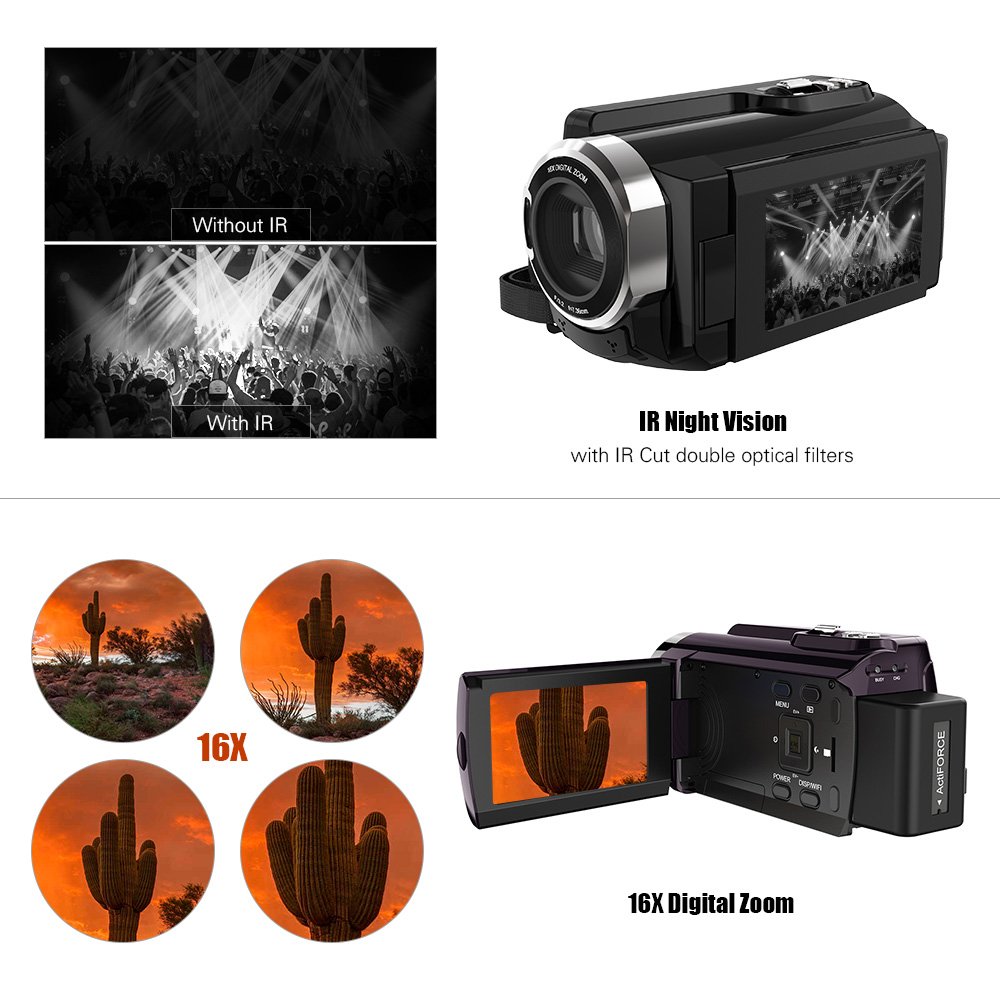
Figure 5: Illustration of the 16x digital zoom capability, showing four magnified views of a cactus, and a comparison of video quality with and without IR night vision.
ഇൻഫ്രാറെഡ് (IR) രാത്രി കാഴ്ച
Activate IR night vision for recording in low-light or dark conditions.
- അമർത്തുക Right/IR button to toggle IR night vision on or off.
Connecting to Other Devices (WiFi & USB/HDMI)
The camera supports WiFi connectivity for wireless transfer and control, and can also connect via AV/USB/HD cable.
- വൈഫൈ: അമർത്തുക Display/WiFi button to activate WiFi. Use the dedicated app on your smartphone or tablet to connect and transfer files.
- AV/USB/HD Cable: Connect the camera to a computer or TV using the appropriate cable for file transfer or direct viewing.

Figure 6: Diagram illustrating the connectivity options of the Andoer HDV-534K, showing connection via AV/USB/HD Cable to a laptop and via WiFi to smartphones.
മെയിൻ്റനൻസ്
ക്യാമറ വൃത്തിയാക്കുന്നു
- ക്യാമറ ബോഡി വൃത്തിയാക്കാൻ മൃദുവായതും ഉണങ്ങിയതുമായ തുണി ഉപയോഗിക്കുക.
- For the lens and touchscreen, use a specialized lens cleaning cloth and solution to avoid scratches.
- വീര്യം കൂടിയ ഡിറ്റർജന്റുകളോ ലായകങ്ങളോ ഉപയോഗിക്കരുത്.
ബാറ്ററി കെയർ
- ഉപയോഗത്തിലില്ലാത്തപ്പോൾ തണുത്തതും ഉണങ്ങിയതുമായ സ്ഥലത്ത് ബാറ്ററി സൂക്ഷിക്കുക.
- ബാറ്ററിയുടെ ആയുസ്സ് വർദ്ധിപ്പിക്കുന്നതിന് ഇടയ്ക്കിടെ പൂർണ്ണമായും ഡിസ്ചാർജ് ചെയ്യുന്നത് ഒഴിവാക്കുക.
- ദീർഘനേരം സൂക്ഷിക്കുകയാണെങ്കിൽ, ബാറ്ററി ഏകദേശം 50% ശേഷിയിലേക്ക് ചാർജ് ചെയ്യുക.
സംഭരണം
- Store the camera in a dust-free environment, preferably in a camera bag.
- ഉയർന്ന താപനിലയും ഉയർന്ന ആർദ്രതയും ഒഴിവാക്കുക.
ട്രബിൾഷൂട്ടിംഗ്
| പ്രശ്നം | സാധ്യമായ കാരണം | പരിഹാരം |
|---|---|---|
| ക്യാമറ പവർ ഓൺ ചെയ്യുന്നില്ല. | ബാറ്ററി തീർന്നു അല്ലെങ്കിൽ തെറ്റായി ചേർത്തിരിക്കുന്നു. | ബാറ്ററി പൂർണ്ണമായും ചാർജ് ചെയ്യുക. ശരിയായ പോളാരിറ്റിയോടെ ബാറ്ററി ചേർത്തിട്ടുണ്ടെന്ന് ഉറപ്പാക്കുക. |
| വീഡിയോ റെക്കോർഡ് ചെയ്യാൻ/ഫോട്ടോ എടുക്കാൻ കഴിയില്ല. | മെമ്മറി കാർഡ് നിറഞ്ഞിരിക്കുന്നു, ചേർത്തിട്ടില്ല, അല്ലെങ്കിൽ കേടായിരിക്കുന്നു. | Check memory card. Delete unnecessary files or insert a new card. Format the card if necessary (this will erase all data). |
| മോശം ഇമേജ്/വീഡിയോ നിലവാരം. | ലെൻസ് വൃത്തികേടാണ്. ആവശ്യത്തിന് വെളിച്ചമില്ല. തെറ്റായ ക്രമീകരണം. | Clean the lens. Ensure adequate lighting or activate IR night vision. Check resolution settings. |
| വൈഫൈ കണക്ഷൻ പ്രശ്നങ്ങൾ. | Incorrect WiFi settings. App issues. | Ensure WiFi is enabled on camera and device. Restart both devices. Reinstall the camera's companion app. |
സ്പെസിഫിക്കേഷനുകൾ
The following are the technical specifications for the Andoer HDV-534K Digital Video Camera:
| ഫീച്ചർ | വിശദാംശങ്ങൾ |
|---|---|
| മോഡൽ | HDV-534K |
| വീഡിയോ ക്യാപ്ചർ റെസല്യൂഷൻ | 4K (2880 x 2160) 24fps (interpolation) |
| ഫോട്ടോ റെസല്യൂഷൻ | 48MP (9212 x 5184) (interpolation) |
| സ്ക്രീൻ വലിപ്പം | 3 Inches Capacitive Touchscreen |
| ഡിജിറ്റൽ സൂം | 16x |
| കണക്റ്റിവിറ്റി ടെക്നോളജി | വൈഫൈ |
| ഫോട്ടോ സെൻസർ ടെക്നോളജി | CMOS |
| പരമാവധി അപ്പേർച്ചർ | 1.8 എഫ് |
| ഫ്ലാഷ് മെമ്മറി തരം | SmartMedia, SDHC |
| വീഡിയോ ക്യാപ്ചർ ഫോർമാറ്റ് | MP4 |
| പിന്തുണയ്ക്കുന്ന ഓഡിയോ ഫോർമാറ്റ് | MP4 (AAC/MP3) |
| ഇനത്തിൻ്റെ ഭാരം | 640 ഗ്രാം |
| നിർമ്മാതാവ് | ചൈന |
| ആദ്യം ലഭ്യമായ തീയതി | 11 ഒക്ടോബർ 2017 |
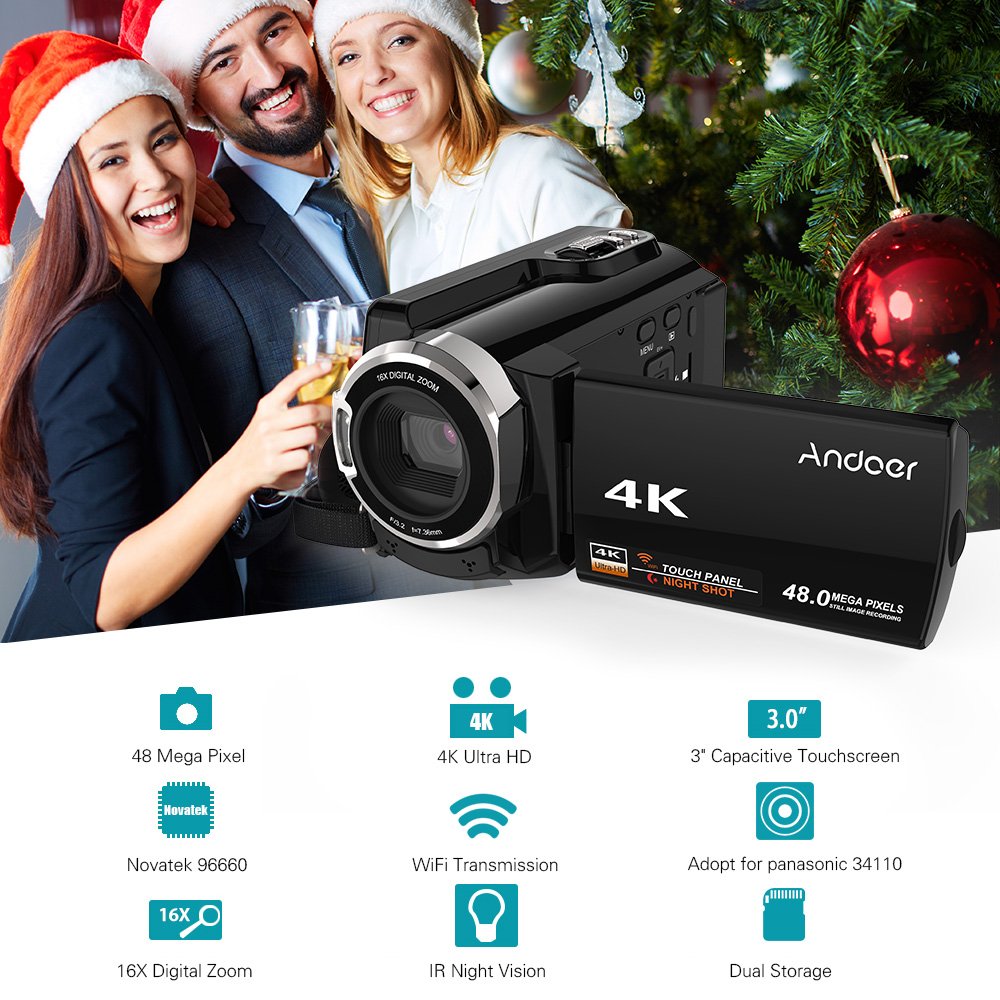
Figure 7: Infographic summarizing key features of the Andoer HDV-534K, including 48 Megapixel, 4K Ultra HD, 3.0" Capacitive Touchscreen, Novatek 96660 processor, 16X Digital Zoom, WiFi Transmission, IR Night Vision, and Dual Storage.
വാറൻ്റിയും പിന്തുണയും
For warranty information and customer support, please refer to the documentation included with your purchase or contact Andoer customer service directly. Specific warranty terms and conditions may vary by region and retailer.
ഏതെങ്കിലും വാറന്റി ക്ലെയിമുകൾക്കായി നിങ്ങളുടെ വാങ്ങിയതിന്റെ തെളിവ് സൂക്ഷിക്കുക.
Ask a question about this manual
Ask about setup, troubleshooting, compatibility, parts, safety, or missing instructions. Manuals+ will review the question and use this page’s manual context to help answer it.