
1. ആമുഖം
This manual provides essential information for the safe and efficient operation of your Lenco L-30BK Belt Drive Turntable. Please read these instructions thoroughly before using the device and retain them for future reference. The Lenco L-30BK is designed for playing vinyl records at 33 and 45 RPM, featuring a built-in preamplifier and USB connectivity for digitizing your vinyl collection.
2 സുരക്ഷാ വിവരങ്ങൾ
- ഊർജ്ജ സ്രോതസ്സ്: വൈദ്യുതി വിതരണം വോളിയം ഉറപ്പാക്കുകtage matches the requirements specified on the unit. Use only the provided power adapter.
- ജലവും ഈർപ്പവും: മഴ, ഈർപ്പം, തുള്ളികൾ/തെറിച്ചിൽ ദ്രാവകങ്ങൾ എന്നിവ യൂണിറ്റിൽ ഏൽപ്പിക്കരുത്. പാത്രങ്ങൾ പോലുള്ള ദ്രാവകങ്ങൾ നിറച്ച വസ്തുക്കൾ യൂണിറ്റിൽ വയ്ക്കരുത്.
- വെൻ്റിലേഷൻ: ആവശ്യത്തിന് വായുസഞ്ചാരം ഉറപ്പാക്കുക. വായുസഞ്ചാര ദ്വാരങ്ങൾ തടയരുത്.
- ചൂട്: റേഡിയേറ്ററുകൾ, ഹീറ്റ് രജിസ്റ്ററുകൾ, സ്റ്റൗകൾ അല്ലെങ്കിൽ മറ്റ് ഉപകരണങ്ങൾ (ഉൾപ്പെടെ) പോലുള്ള താപ സ്രോതസ്സുകളിൽ നിന്ന് യൂണിറ്റ് അകറ്റി നിർത്തുക. ampലൈഫയറുകൾ) ചൂട് ഉത്പാദിപ്പിക്കുന്നത്.
- വൃത്തിയാക്കൽ: വൃത്തിയാക്കുന്നതിന് മുമ്പ് വാൾ ഔട്ട്ലെറ്റിൽ നിന്ന് യൂണിറ്റ് പ്ലഗ് ഊരിയിടുക. മൃദുവായതും ഉണങ്ങിയതുമായ തുണി ഉപയോഗിക്കുക. ലിക്വിഡ് ക്ലീനറുകളോ എയറോസോൾ ക്ലീനറുകളോ ഉപയോഗിക്കരുത്.
- സേവനം: ഈ ഉൽപ്പന്നം സ്വയം സേവിക്കാൻ ശ്രമിക്കരുത്. യോഗ്യതയുള്ള സേവന ഉദ്യോഗസ്ഥർക്ക് എല്ലാ സേവനങ്ങളും റഫർ ചെയ്യുക.
- പ്ലേസ്മെൻ്റ്: Place the turntable on a stable, level surface to prevent vibrations and ensure proper playback.
3. പാക്കേജ് ഉള്ളടക്കം
താഴെ ലിസ്റ്റ് ചെയ്തിരിക്കുന്ന എല്ലാ ഇനങ്ങളും പാക്കേജിൽ ഉൾപ്പെടുത്തിയിട്ടുണ്ടോ എന്ന് ദയവായി പരിശോധിക്കുക:
- Lenco L-30BK Turntable Unit
- പൊടി കവർ
- തളിക
- ഡ്രൈവ് ബെൽറ്റ്
- സ്ലിപ്പ്മാറ്റ്
- എസി പവർ അഡാപ്റ്റർ
- USB കേബിൾ
- ആർസിഎ ഓഡിയോ കേബിൾ
- ഇൻസ്ട്രക്ഷൻ മാനുവൽ
- Pick-up Needle (pre-installed on cartridge)
4. ഉൽപ്പന്നം കഴിഞ്ഞുview
Familiarize yourself with the components of your Lenco L-30BK turntable.

ചിത്രം 4.1: ഫ്രണ്ട് view of the Lenco L-30BK Turntable with the dust cover open, revealing the main components including the platter, tonearm, and control buttons.

ചിത്രം 4.2: Rear panel connections of the Lenco L-30BK, including RCA audio outputs (L/R), USB port, DC12V power input, and the main power switch.
പ്രധാന ഘടകങ്ങൾ:
- പ്ലേറ്റർ: The circular platform where records are placed.
- ടോണെർം: റെക്കോർഡിന്റെ ഗ്രൂവുകൾ വായിക്കുന്ന കാട്രിഡ്ജും സ്റ്റൈലസും പിടിക്കുന്നു.
- Cartridge and Stylus: Converts physical vibrations into electrical signals. The L-30BK features a Movable Magnet Sensor (MMC) with an individually replaceable stylus.
- സ്പീഡ് സെലക്ടർ: Switch to select between 33 and 45 RPM playback speeds.
- യാന്ത്രിക ഷട്ട്-ഓഫ്: ഒരു റെക്കോർഡിന്റെ അവസാനം പ്ലാറ്റർ ഭ്രമണം യാന്ത്രികമായി നിർത്തുന്നു.
- പൊടി കവർ: ഉപയോഗത്തിലില്ലാത്തപ്പോൾ പൊടിയിൽ നിന്ന് ടർടേബിളിനെ സംരക്ഷിക്കുന്നു.
- RCA Audio Outputs (L/R): ഒരു ബാഹ്യ ഉപകരണത്തിലേക്ക് ബന്ധിപ്പിക്കുന്നതിന് ampലൈഫയർ അല്ലെങ്കിൽ സജീവ സ്പീക്കറുകൾ.
- USB പോർട്ട്: For connecting to a computer to digitize vinyl records.
- DC12V പവർ ഇൻപുട്ട്: പവർ അഡാപ്റ്റർ ബന്ധിപ്പിക്കുന്നതിന്.
5. സജ്ജീകരണം
5.1 അൺപാക്കിംഗും പ്ലേസ്മെന്റും
- ടേൺടേബിൾ അതിന്റെ പാക്കേജിംഗിൽ നിന്ന് ശ്രദ്ധാപൂർവ്വം നീക്കം ചെയ്യുക.
- Place the unit on a stable, level surface, away from direct sunlight, heat sources, and excessive dust or vibrations.
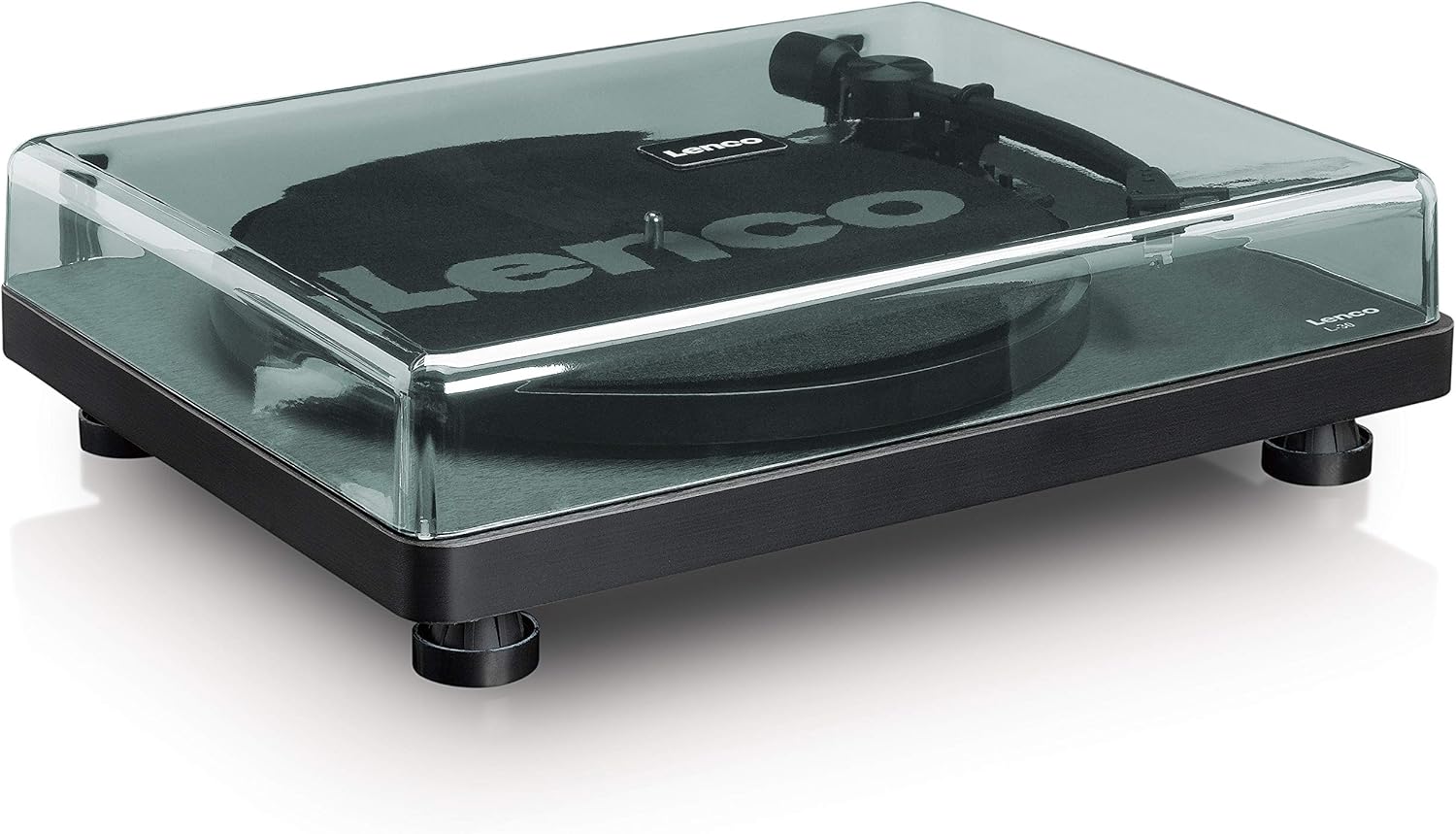
- Install the dust cover by aligning its hinges with the slots on the back of the turntable.

ചിത്രം 5.1: The Lenco L-30BK Turntable with its protective dust cover closed, ready for placement.
5.2 പ്ലാറ്ററും ബെൽറ്റും സ്ഥാപിക്കൽ
- Place the platter onto the turntable spindle.
- Locate the drive belt, typically found underneath the platter or separately packaged.
- Carefully stretch the drive belt around the motor pulley and the inner rim of the platter. Ensure the belt is not twisted.
- സ്ലിപ്പ്മാറ്റ് പ്ലേറ്ററിന് മുകളിൽ വയ്ക്കുക.
5.3 ഓഡിയോ കണക്ഷൻ
The L-30BK has a built-in preamplifier, allowing direct connection to most audio systems.
- Connect the RCA audio cable (red for right channel, white for left channel) from the AUDIO OUT jacks on the rear of the turntable to the LINE IN or AUX IN jacks on your ampലൈഫയർ അല്ലെങ്കിൽ സജീവ സ്പീക്കറുകൾ.
5.4 പവർ കണക്ഷൻ
- Connect the DC12V power adapter to the DC12V POWER input on the rear of the turntable.
- പവർ അഡാപ്റ്റർ അനുയോജ്യമായ ഒരു മതിൽ ഔട്ട്ലെറ്റിലേക്ക് പ്ലഗ് ചെയ്യുക.
5.5 USB Connection (for Digitization)
- To digitize your vinyl records, connect the USB cable from the USB port on the rear of the turntable to an available USB port on your computer (PC or Mac).
6. പ്രവർത്തന നിർദ്ദേശങ്ങൾ
6.1 പവർ ഓൺ/ഓഫ്
- Flip the ON/OFF switch on the rear panel to the 'ON' position to power on the turntable.
- Flip the switch to 'OFF' when not in use.
6.2 ഒരു റെക്കോർഡ് പ്ലേ ചെയ്യുന്നു
- Place a record on the platter, ensuring it is centered.
- Select the appropriate speed (33 or 45 RPM) using the speed selector switch. For 45 RPM singles, place the included adapter on the spindle if needed.
- ക്യൂയിംഗ് ലിവർ ഉപയോഗിച്ച് ടോൺആം ഉയർത്തുക.
- റെക്കോർഡിന്റെ ആവശ്യമുള്ള സ്റ്റാർട്ടിംഗ് ഗ്രൂവിന് മുകളിൽ ടോൺആം സ്വമേധയാ സ്ഥാപിക്കുക.
- Gently lower the tonearm using the cueing lever. The stylus will descend onto the record, and playback will begin.
- At the end of the record, the auto shut-off function will stop the platter rotation. Lift the tonearm and return it to its rest.

ചിത്രം 6.1: Proper technique for lowering the tonearm onto a record for playback.
ചിത്രം 6.2: വിശദമായി view of the Movable Magnet Sensor (MMC) cartridge and stylus assembly.
6.3 Digitizing Records via USB
The L-30BK allows you to convert your vinyl records into digital audio fileഒരു കമ്പ്യൂട്ടർ ഉപയോഗിക്കുന്നു.
- നൽകിയിരിക്കുന്ന USB കേബിൾ ഉപയോഗിച്ച് ടർൺടേബിൾ നിങ്ങളുടെ കമ്പ്യൂട്ടറുമായി ബന്ധിപ്പിക്കുക.
- Download and install audio recording software such as Audacity (available online for free) on your computer.
- Open the recording software and select the USB Audio Device as the input source.
- Start recording in the software, then begin playing your record on the turntable as described in section 6.2.
- Once the record finishes, stop the recording in the software and save your digitized audio file.
7. പരിപാലനം
7.1 ടേൺടേബിൾ വൃത്തിയാക്കൽ
- വൃത്തിയാക്കുന്നതിന് മുമ്പ് എല്ലായ്പ്പോഴും പവർ ഔട്ട്ലെറ്റിൽ നിന്ന് ടർടേബിൾ അഴിക്കുക.
- കാബിനറ്റും പൊടി കവറും തുടയ്ക്കാൻ മൃദുവായതും ഉണങ്ങിയതും ലിന്റ് രഹിതവുമായ ഒരു തുണി ഉപയോഗിക്കുക.
- അബ്രാസീവ് ക്ലീനറുകൾ, മെഴുക് അല്ലെങ്കിൽ ലായകങ്ങൾ എന്നിവ ഉപയോഗിക്കരുത്, കാരണം അവ ഫിനിഷിന് കേടുവരുത്തും.
7.2 Stylus Care and Replacement
- The stylus is a delicate component. Avoid touching it with your fingers.
- Clean the stylus regularly using a soft brush, gently brushing from back to front.
- The stylus should be replaced after approximately 300-500 hours of playback, or if you notice a degradation in sound quality.
- To replace the stylus, carefully pull the old stylus assembly forward and down from the cartridge. Insert the new stylus assembly by pushing it upwards and backwards into the cartridge until it clicks into place.
8. പ്രശ്നപരിഹാരം
If you encounter problems with your turntable, refer to the following common issues and solutions:
| പ്രശ്നം | സാധ്യമായ കാരണം | പരിഹാരം |
|---|---|---|
| ശക്തിയില്ല | Power adapter not connected; Power switch off; Wall outlet faulty. | Ensure power adapter is securely connected; Turn power switch to 'ON'; Test wall outlet with another device. |
| ശബ്ദമോ കുറഞ്ഞ വോളിയമോ ഇല്ല | ആർസിഎ കേബിളുകൾ ശരിയായി ബന്ധിപ്പിച്ചിട്ടില്ല; Amplifier/speakers off or volume low; Input selected incorrectly on ampജീവൻ. | Check RCA cable connections; Turn on amplifier/speakers and adjust volume; Select correct input source on your audio system. |
| വികലമായ ശബ്ദം | Dirty stylus; Damaged stylus; Dirty record; Turntable not on a stable surface. | Clean the stylus; Replace the stylus if damaged; Clean the record; Ensure turntable is on a stable, level surface. |
| റെക്കോർഡ് ഒഴിവാക്കൽ | Dirty or scratched record; Stylus worn or damaged; Turntable not level; External vibrations. | Clean the record; Replace the stylus; Ensure turntable is level; Place turntable away from sources of vibration. |
| USB recording issues | USB cable not connected; Incorrect input selected in software; Software not installed. | Check USB cable connection; Select 'USB Audio Device' as input in recording software; Install Audacity or similar software. |
9 സ്പെസിഫിക്കേഷനുകൾ
| മോഡലിൻ്റെ പേര് | എൽ-30ബികെ |
| ബ്രാൻഡ് | ലെൻകോ |
| ഡ്രൈവ് തരം | ബെൽറ്റ് ഡ്രൈവ് |
| വേഗത | 33 1/3, 45 ആർപിഎം |
| പ്രീampജീവപര്യന്തം | അന്തർനിർമ്മിത |
| കാട്രിഡ്ജ് തരം | Movable Magnet Sensor (MMC) |
| കണക്റ്റിവിറ്റി | USB, RCA Audio Out |
| ഓട്ടോ ഷട്ട്-ഓഫ് | അതെ |
| പ്ലാറ്റർ വ്യാസം | 300 മി.മീ |
| മെറ്റീരിയൽ | Wood (Enclosure) |
| നിറം | കറുപ്പ് |
| ഇനത്തിൻ്റെ ഭാരം | 3.28 കിലോഗ്രാം |
| അളവുകൾ (L x W x H) | 41L x 32W x 12H സെൻ്റീമീറ്റർ |
| സിഗ്നൽ-ടു-നോയിസ് അനുപാതം | 60 ഡി.ബി |
| വാല്യംtage | 240 വോൾട്ട് |
| പവർ ഉറവിടം | കോർഡഡ് ഇലക്ട്രിക് |
10. വാറൻ്റിയും പിന്തുണയും
Lenco products are manufactured to high quality standards. In the event of a defect, your product is covered by the terms of the warranty in your country of purchase. For detailed warranty information, please refer to the warranty card included with your product or visit the official Lenco website. For technical support or service inquiries, please contact Lenco customer service through their official channels.