
1. ആമുഖം
Welcome to the Philco Electronic Bread Maker user manual. This appliance is designed to simplify the bread-making process, allowing you to create a variety of delicious breads, cakes, jams, and more with minimal effort. Please read this manual carefully before using the appliance to ensure safe and efficient operation and to fully understand its features.
2. പ്രധാന സുരക്ഷാ നിർദ്ദേശങ്ങൾ
ഇലക്ട്രിക്കൽ വീട്ടുപകരണങ്ങൾ ഉപയോഗിക്കുമ്പോൾ, താഴെപ്പറയുന്നവ ഉൾപ്പെടെ, തീ, വൈദ്യുത ആഘാതം, പരിക്കുകൾ എന്നിവയുടെ അപകടസാധ്യത കുറയ്ക്കുന്നതിന് അടിസ്ഥാന സുരക്ഷാ മുൻകരുതലുകൾ എല്ലായ്പ്പോഴും പാലിക്കണം:
- ചൂടുള്ള പ്രതലങ്ങളിൽ തൊടരുത്. ഹാൻഡിലുകളോ നോബുകളോ ഉപയോഗിക്കുക.
- വൈദ്യുത ആഘാതത്തിൽ നിന്ന് പരിരക്ഷിക്കുന്നതിന്, ചരട്, പ്ലഗുകൾ, ഉപകരണങ്ങൾ എന്നിവ വെള്ളത്തിലോ മറ്റ് ദ്രാവകത്തിലോ മുക്കരുത്.
- കുട്ടികളോ സമീപത്തോ ഏതെങ്കിലും ഉപകരണം ഉപയോഗിക്കുമ്പോൾ സൂക്ഷ്മ മേൽനോട്ടം ആവശ്യമാണ്.
- ഉപയോഗത്തിലില്ലാത്തപ്പോഴും വൃത്തിയാക്കുന്നതിന് മുമ്പും ഔട്ട്ലെറ്റിൽ നിന്ന് അൺപ്ലഗ് ചെയ്യുക. ഭാഗങ്ങൾ ധരിക്കുന്നതിനോ എടുക്കുന്നതിനോ മുമ്പ് തണുപ്പിക്കാൻ അനുവദിക്കുക.
- കേടായ കോർഡ് അല്ലെങ്കിൽ പ്ലഗ് ഉപയോഗിച്ച് ഒരു ഉപകരണവും പ്രവർത്തിപ്പിക്കരുത്, അല്ലെങ്കിൽ ഉപകരണം തകരാറിലായതിന് ശേഷം അല്ലെങ്കിൽ ഏതെങ്കിലും വിധത്തിൽ കേടായി.
- അപ്ലയൻസ് നിർമ്മാതാവ് ശുപാർശ ചെയ്യാത്ത ആക്സസറി അറ്റാച്ച്മെൻ്റുകളുടെ ഉപയോഗം പരിക്കുകൾക്ക് കാരണമാകാം.
- വെളിയിൽ ഉപയോഗിക്കരുത്.
- ചരട് മേശയുടെയോ കൗണ്ടറിൻ്റെയോ അരികിൽ തൂങ്ങിക്കിടക്കാനോ ചൂടുള്ള പ്രതലങ്ങളിൽ തൊടാനോ അനുവദിക്കരുത്.
- ചൂടുള്ള വാതകത്തിലോ ഇലക്ട്രിക് ബർണറിലോ ചൂടാക്കിയ അടുപ്പിലോ വയ്ക്കരുത്.
- ചൂടുള്ള എണ്ണയോ മറ്റ് ചൂടുള്ള ദ്രാവകങ്ങളോ അടങ്ങിയ ഉപകരണം നീക്കുമ്പോൾ അതീവ ജാഗ്രത പാലിക്കണം.
- വിച്ഛേദിക്കാൻ, ഏതെങ്കിലും നിയന്ത്രണം "ഓഫ്" ആക്കുക, തുടർന്ന് വാൾ ഔട്ട്ലെറ്റിൽ നിന്ന് പ്ലഗ് നീക്കം ചെയ്യുക.
- ഉദ്ദേശിച്ച ഉപയോഗത്തിനല്ലാതെ ഉപകരണം ഉപയോഗിക്കരുത്.

Image: Safety certification logos (INMETRO OCP 0040 and SGS) indicating compliance with safety standards.
3. ഉൽപ്പന്നം കഴിഞ്ഞുview
Familiarize yourself with the components of your Philco Electronic Bread Maker.
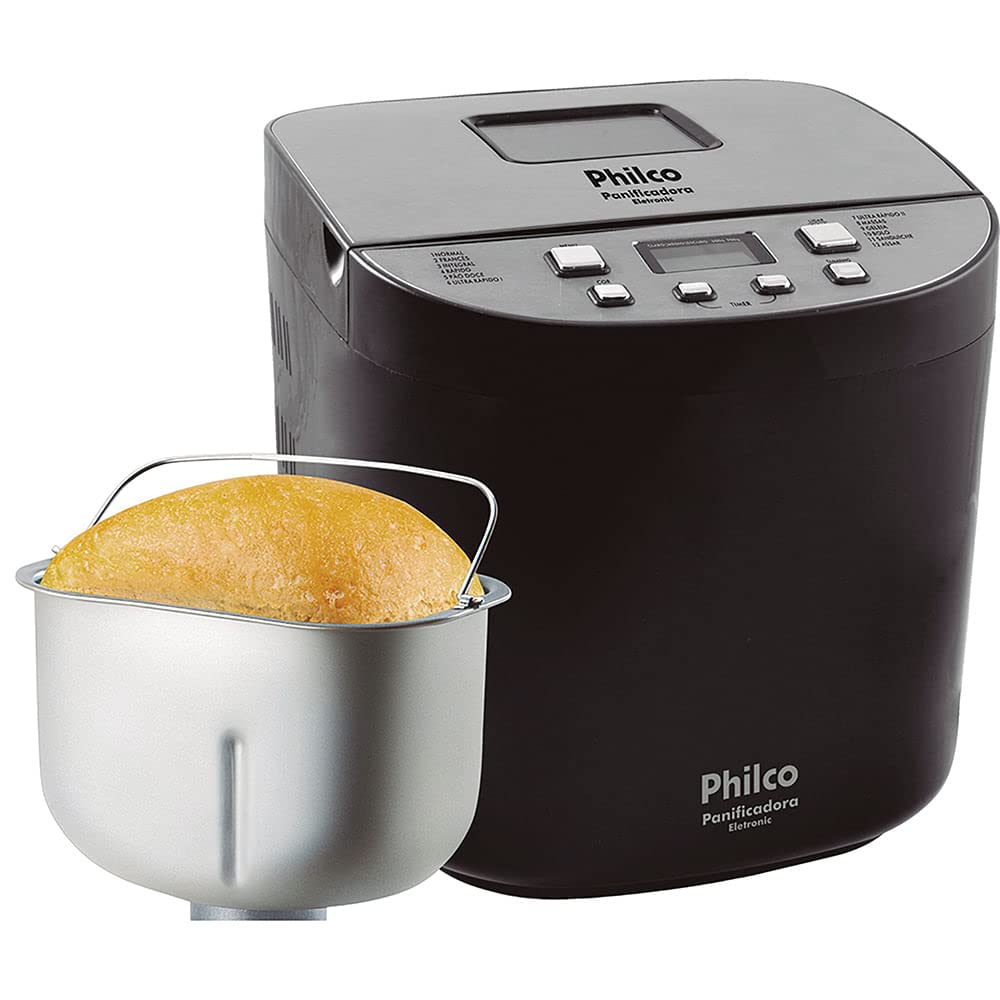
ചിത്രം: മുൻഭാഗം view of the Philco Electronic Bread Maker, showing the main unit, control panel, and viewഇൻ വിൻഡോ.
നിയന്ത്രണ പാനൽ
The control panel allows you to select programs, adjust settings, and start/stop the bread maker.
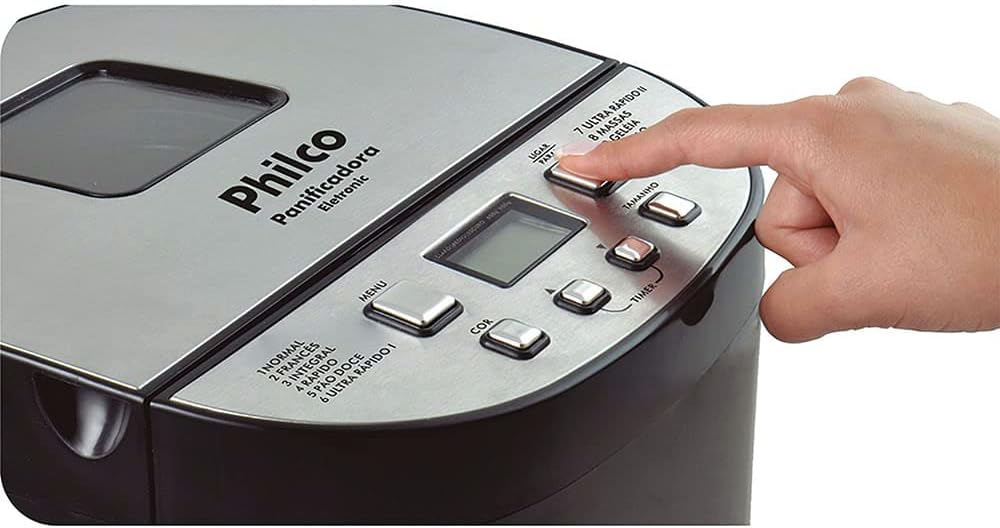
Image: Close-up of the bread maker's control panel, highlighting buttons for MENU, COLOR, TIMER, SIZE, and POWER, along with the digital display.
- മെനു ബട്ടൺ: Selects one of the 12 available programs.
- നിറം ബട്ടൺ: Adjusts the crust color (Light, Medium, Dark).
- TIMER Buttons (+/-): Sets the delay timer for deferred baking.
- SIZE Button: Selects the loaf size (450g, 600g, 900g, 1200g).
- പവർ ബട്ടൺ: Starts or stops the selected program.
- LCD ഡിസ്പ്ലേ: Shows program number, time remaining, and selected settings.
4. സജ്ജീകരണവും ആദ്യ ഉപയോഗവും
4.1 അൺപാക്കിംഗ്
Carefully remove the bread maker and all accessories from the packaging. Retain the packaging for future storage or transport. Check that all parts are present and undamaged.
4.2 പ്രാരംഭ ക്ലീനിംഗ്
Before first use, clean the bread pan, kneading paddle, and measuring accessories with warm, soapy water. Rinse thoroughly and dry completely. Wipe the exterior of the appliance with a damp തുണി.
4.3 പ്ലേസ്മെൻ്റ്
Place the bread maker on a stable, flat, heat-resistant surface, away from direct sunlight and heat sources. Ensure there is adequate ventilation around the appliance.
5. പ്രവർത്തന നിർദ്ദേശങ്ങൾ
5.1 ചേരുവകൾ ചേർക്കൽ
എപ്പോഴും ആദ്യം ദ്രാവക ചേരുവകൾ ചേർക്കുക, തുടർന്ന് ഉണങ്ങിയ ചേരുവകൾ ചേർക്കുക. യീസ്റ്റ് അവസാനം ചേർക്കണം, ദ്രാവകങ്ങളും ഉപ്പും ഒഴിവാക്കി മാവിന്റെ മുകളിൽ ഒരു ചെറിയ ഇൻഡന്റേഷനിൽ ഇടുക.

Image: A hand pouring dry ingredients, likely flour, into the bread maker's non-stick pan.
5.2 പ്രോഗ്രാം തിരഞ്ഞെടുക്കൽ
അമർത്തുക മെനു button repeatedly to cycle through the 12 available programs. The selected program number will be displayed on the LCD screen.
ലഭ്യമായ പ്രോഗ്രാമുകൾ:
- സാധാരണ: For basic bread recipes.
- ഫ്രഞ്ച്: For light bread with a crispy crust.
- മുഴുവൻ ഗോതമ്പ്: For whole wheat bread, typically requiring a longer kneading time.
- അതിവേഗം: For quick bread baking, suitable for smaller loaves.
- SWEET BREAD: For breads with high sugar and fat content.
- ULTRA FAST I: For very quick baking of smaller loaves.
- ULTRA FAST II: For very quick baking of larger loaves.
- കുഴെച്ചതുമുതൽ: റോളുകൾ, പിസ്സ, അല്ലെങ്കിൽ പേസ്ട്രികൾ എന്നിവയ്ക്കായി ബേക്കിംഗ് ചെയ്യാതെ തന്നെ മാവ് തയ്യാറാക്കുന്നു.
- ജാം: വീട്ടിൽ ജാമുകളും മാർമാലേഡുകളും ഉണ്ടാക്കാൻ.
- കേക്ക്: ബേക്കിംഗ് കേക്കുകൾക്കും പെട്ടെന്നുള്ള ബ്രെഡുകൾക്കും.
- സാന്ഡ്വിച്ച്: For light, fluffy sandwich bread.
- ബേക്ക്: മുൻകൂട്ടി തയ്യാറാക്കിയ മാവ് ബേക്കിംഗ് ചെയ്യുന്നതിന് അല്ലെങ്കിൽ കൂടുതൽ ബേക്കിംഗ് സമയത്തിന്.
5.3 Crust Color Selection
After selecting a program, press the നിറം button to choose your desired crust color: Light, Medium, or Dark.
5.4 Loaf Size Selection
അമർത്തുക വലിപ്പം button to select the desired loaf weight: 450g, 600g, 900g, or 1200g. Ensure your recipe quantities match the selected loaf size.
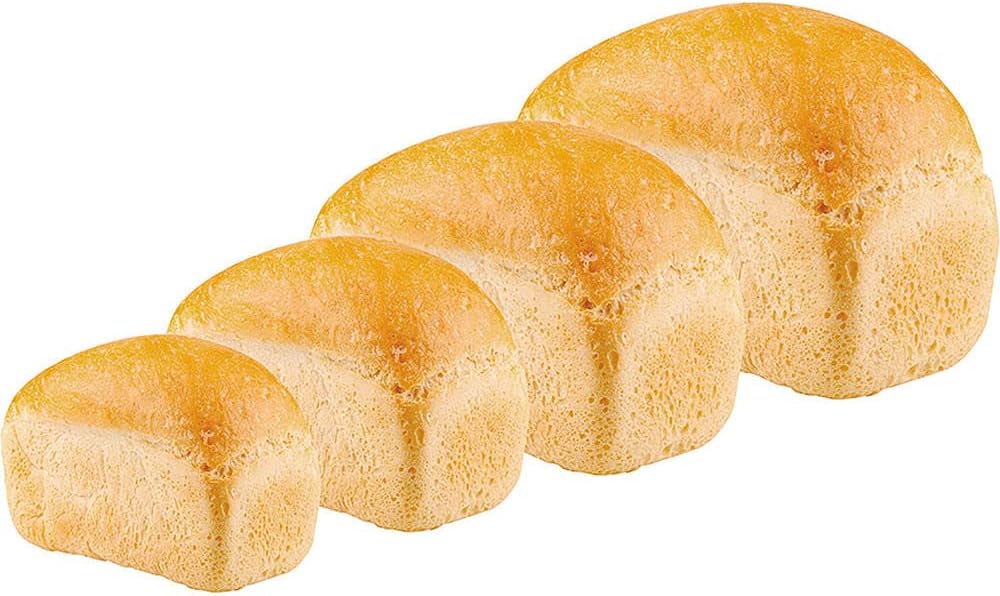
Image: Four baked loaves of bread, demonstrating the different size options available from the bread maker.
5.5 ഡിലേ ടൈമർ ഫംഗ്ഷൻ
The timer function allows you to delay the start of the baking process by up to 13 hours. After selecting the program, crust color, and loaf size, use the ടൈമർ buttons (+/-) to set the desired delay time. The display will show the total time until the bread is ready.
5.6 ഊഷ്മളമായ പ്രവർത്തനം നിലനിർത്തുക
After the baking cycle is complete, the bread maker will automatically switch to a 60-minute keep-warm function. This keeps your bread warm until you are ready to remove it.
5.7 ആരംഭിക്കുന്നതും നിർത്തുന്നതും
അമർത്തുക പവർ button to start the selected program. To stop a program, press and hold the പവർ കുറച്ച് നിമിഷങ്ങൾക്കുള്ള ബട്ടൺ.
5.8 Removing the Bread
Once the program is complete and the keep-warm cycle has finished (or you have manually stopped it), unplug the appliance. Carefully remove the bread pan using oven mitts, as it will be hot. Invert the pan to release the bread. If the kneading paddle remains in the bread, remove it carefully with a non-metallic utensil.

Image: A hand carefully lifting a freshly baked loaf of bread out of the bread maker's non-stick pan using the pan's handle.
6. പരിചരണവും പരിപാലനവും
6.1 Cleaning the Bread Pan and Kneading Paddle
After each use, allow the bread pan and kneading paddle to cool completely. Fill the pan with warm, soapy water and let it soak for 10-15 minutes to loosen any stuck-on dough. Use a soft sponge or cloth to clean. Do not use abrasive cleaners or metal utensils, as this can damage the non-stick coating. Rinse and dry thoroughly.
6.2 പുറംഭാഗം വൃത്തിയാക്കൽ
ബ്രെഡ് മേക്കറിന്റെ പുറംഭാഗം മൃദുവായ, ഡി ക്ലീനർ ഉപയോഗിച്ച് തുടയ്ക്കുക.amp cloth. Do not immerse the appliance in water or spray it with liquids. Ensure no water enters the ventilation openings.
6.3 സംഭരണം
Ensure the appliance is clean, dry, and completely cool before storing. Store it in a dry place, away from direct sunlight and out of reach of children.
7. പ്രശ്നപരിഹാരം
നിങ്ങളുടെ ബ്രെഡ് മേക്കറിൽ പ്രശ്നങ്ങൾ നേരിടുകയാണെങ്കിൽ, ഇനിപ്പറയുന്ന പൊതുവായ പ്രശ്നങ്ങളും പരിഹാരങ്ങളും പരിശോധിക്കുക:
| പ്രശ്നം | സാധ്യമായ കാരണം | പരിഹാരം |
|---|---|---|
| അപ്പം പൊങ്ങുന്നില്ല. | കാലഹരണപ്പെട്ട യീസ്റ്റ്, തെറ്റായ ജല താപനില, വളരെയധികം ഉപ്പ്/പഞ്ചസാര. | Check yeast expiration, use lukewarm water, ensure correct ingredient measurements. |
| ബ്രെഡ് വളരെ കട്ടിയുള്ളതാണ് | Too much flour, not enough liquid, incorrect program. | Measure ingredients precisely, ensure proper liquid-to-flour ratio, select appropriate program. |
| ബ്രെഡിൽ കുടുങ്ങിയ പാഡിൽ കുഴയ്ക്കുന്നു | സാധാരണ സംഭവം. | Allow bread to cool slightly, then carefully remove the paddle with a non-metallic utensil. |
| ഉപകരണം ഓണാക്കുന്നില്ല | പ്ലഗ് ഇൻ ചെയ്തിട്ടില്ല, പവർ ഇല്ലtage, തകരാറുള്ള ഔട്ട്ലെറ്റ്. | Check power cord connection, test outlet with another appliance, ensure power supply. |
| പുക അല്ലെങ്കിൽ കത്തുന്ന മണം | ചൂടാക്കൽ ഘടകത്തിൽ ഭക്ഷണ അവശിഷ്ടങ്ങൾ, ആന്തരിക തകരാറുകൾ. | Unplug immediately. Allow to cool and clean thoroughly. If problem persists, contact support. |
8 സ്പെസിഫിക്കേഷനുകൾ
| ഫീച്ചർ | സ്പെസിഫിക്കേഷൻ |
|---|---|
| മോഡൽ | Eletronic 12 Programs 700W (Part No. 054301004) |
| ബ്രാൻഡ് | ഫിൽക്കോ |
| ശക്തി | 700W |
| വാല്യംtage | 110V |
| പ്രോഗ്രാമുകളുടെ എണ്ണം | 12 |
| ലോഫ് വലുപ്പങ്ങൾ | 450 ഗ്രാം, 600 ഗ്രാം, 900 ഗ്രാം, 1200 ഗ്രാം |
| പുറംതോട് നിറങ്ങൾ | വെളിച്ചം, ഇടത്തരം, ഇരുണ്ടത് |
| ടൈമർ കാലതാമസം | 13 മണിക്കൂർ വരെ |
| ഊഷ്മള പ്രവർത്തനം നിലനിർത്തുക | 60 മിനിറ്റ് |
| മെറ്റീരിയൽ | സ്റ്റെയിൻലെസ് സ്റ്റീൽ (പുറം) |
| നിറം | കറുപ്പ് |
| ഉൽപ്പന്ന ഭാരം | 5.66 കിലോഗ്രാം (5660 ഗ്രാം) |
| ASIN | B076HVLX2G |
9. വാറൻ്റിയും പിന്തുണയും
Your Philco Electronic Bread Maker is covered by a manufacturer's warranty. Please refer to the warranty card included with your purchase for specific terms and conditions. For technical support, service, or replacement parts, please contact Philco customer service through their official webസൈറ്റ് അല്ലെങ്കിൽ നിങ്ങളുടെ ഉൽപ്പന്ന ഡോക്യുമെന്റേഷനിൽ നൽകിയിരിക്കുന്ന ബന്ധപ്പെടാനുള്ള വിവരങ്ങൾ.