
1. ആമുഖം
വാങ്ങിയതിന് നന്ദി.asing the auna TT-Classic Turntable. This manual provides important information regarding the setup, operation, and maintenance of your device. Please read it thoroughly before use to ensure proper functionality and to prevent damage.
The auna TT-Classic is a stylish belt-drive turntable designed to play your favorite vinyl records at 33, 45, and 78 RPM. It features an integrated AudioTechnica MM pickup system for high-quality sound reproduction, built-in stereo speakers, and a USB port for digitizing your vinyl collection to MP3 files.
2. സുരക്ഷാ നിർദ്ദേശങ്ങൾ
- യൂണിറ്റ് പ്രവർത്തിപ്പിക്കുന്നതിന് മുമ്പ് എല്ലാ നിർദ്ദേശങ്ങളും ശ്രദ്ധാപൂർവ്വം വായിക്കുക.
- ഭാവി റഫറൻസിനായി ഈ മാനുവൽ സൂക്ഷിക്കുക.
- Do not expose the unit to rain, moisture, or direct sunlight.
- യൂണിറ്റ് സുസ്ഥിരവും നിരപ്പും ഉള്ള പ്രതലത്തിൽ സ്ഥാപിച്ചിട്ടുണ്ടെന്ന് ഉറപ്പാക്കുക.
- വെൻ്റിലേഷൻ ഓപ്പണിംഗുകളൊന്നും തടയരുത്.
- യൂണിറ്റിനൊപ്പം നൽകിയിട്ടുള്ള പവർ അഡാപ്റ്റർ മാത്രം ഉപയോഗിക്കുക.
- മിന്നൽ കൊടുങ്കാറ്റുകളുടെ സമയത്തോ ദീർഘകാലത്തേക്ക് ഉപയോഗിക്കാത്ത സമയത്തോ യൂണിറ്റ് അൺപ്ലഗ് ചെയ്യുക.
- എല്ലാ സേവനങ്ങളും യോഗ്യതയുള്ള സേവന ഉദ്യോഗസ്ഥർക്ക് റഫർ ചെയ്യുക.
3. പാക്കേജ് ഉള്ളടക്കം
എല്ലാ ഇനങ്ങളും ശ്രദ്ധാപൂർവ്വം അൺപാക്ക് ചെയ്ത് ഇനിപ്പറയുന്നവ നിങ്ങൾക്ക് ലഭിച്ചുവെന്ന് ഉറപ്പാക്കുക:
- 1 x auna TT-Classic Turntable Unit
- 1 x ഫെൽറ്റ് മാറ്റ്
- 1 x Dust Cover (removable)
- 1 x പവർ അഡാപ്റ്റർ (DC 12V)
- 1 x User Manual (German and English)
- 1 x Removable Stylus Lift
Note: This unit may include a pre-installed EU-UK power converter for your convenience.
4. ഉൽപ്പന്നം കഴിഞ്ഞുview
Familiarize yourself with the components of your auna TT-Classic turntable:

ചിത്രം 4.1: മുകളിൽ view of the auna TT-Classic turntable with the dust cover open, revealing the platter, tonearm, and volume control knob.

ചിത്രം 4.2: ഫ്രണ്ട്-ആംഗിൾഡ് view of the auna TT-Classic turntable with the transparent dust cover closed, highlighting its elegant design.

ചിത്രം 4.3: Detail of the volume control knob located on the front right side of the turntable.

ചിത്രം 4.4: Close-up of the tonearm assembly, featuring the AudioTechnica MM pickup system.
പ്രധാന ഘടകങ്ങൾ:
- പ്ലേറ്റർ: റെക്കോർഡുകൾ സ്ഥാപിക്കുന്ന കറങ്ങുന്ന പ്ലാറ്റ്ഫോം.
- ടോണെർം: Holds the cartridge and stylus, which reads the record grooves.
- സ്റ്റൈലസ് (സൂചി): The tip of the cartridge that makes contact with the record.
- പൊടി കവർ: ഉപയോഗത്തിലില്ലാത്തപ്പോൾ പൊടിയിൽ നിന്ന് ടർടേബിളിനെ സംരക്ഷിക്കുന്നു.
- സ്പീഡ് സെലക്ടർ: Allows selection of 33, 45, or 78 RPM.
- വോളിയം നിയന്ത്രണം: Adjusts the output level of the integrated speakers.
- USB പോർട്ട്: For connecting to a computer for digitization.
- ആർസിഎ putട്ട്പുട്ട്: ബാഹ്യ ഉപകരണങ്ങളുമായി ബന്ധിപ്പിക്കുന്നതിന് ampലൈഫയർമാർ അല്ലെങ്കിൽ സ്പീക്കറുകൾ.
- പവർ ഇൻപുട്ട്: For connecting the DC 12V power adapter.
- ഓൺ/ഓഫ് സ്വിച്ച്: യൂണിറ്റ് ഓണാക്കുകയോ ഓഫാക്കുകയോ ചെയ്യുന്നു.
5. സജ്ജീകരണം
നിങ്ങളുടെ ടേൺടേബിൾ സജ്ജീകരിക്കാൻ ഈ ഘട്ടങ്ങൾ പാലിക്കുക:
5.1 അൺപാക്കിംഗും പ്ലേസ്മെന്റും
- ടേൺടേബിൾ അതിന്റെ പാക്കേജിംഗിൽ നിന്ന് ശ്രദ്ധാപൂർവ്വം നീക്കം ചെയ്യുക.
- Place the turntable on a stable, level surface away from direct heat sources, dust, and vibrations.
- Remove any protective packaging materials from the platter and tonearm.
- Place the felt mat onto the platter.
- Install the dust cover by aligning its hinges with the slots on the back of the turntable.
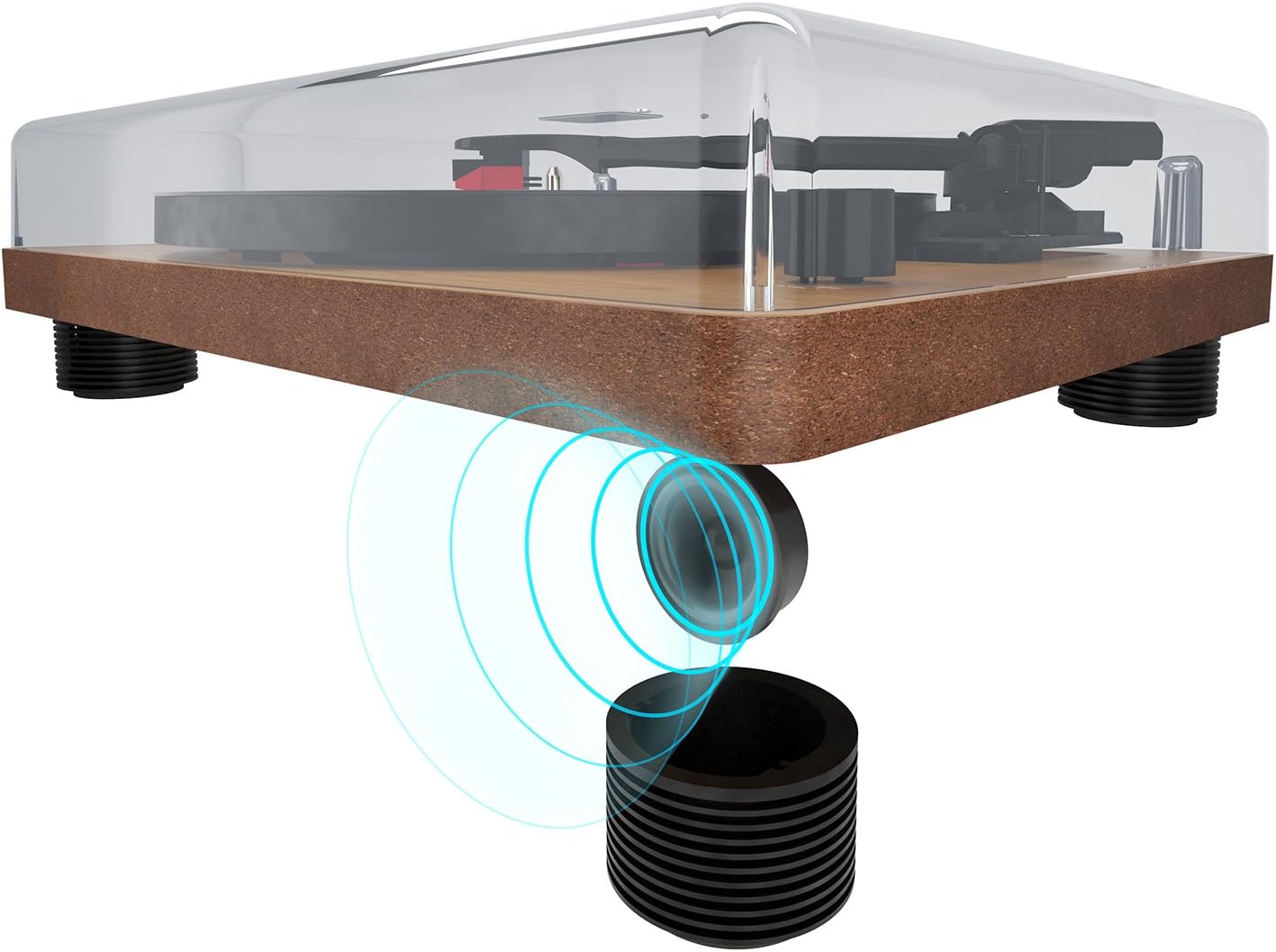
ചിത്രം 5.1: The turntable's feet are designed to minimize vibrations for optimal sound.
5.2 പവർ കണക്ഷൻ
- Ensure the ON/OFF switch on the rear panel is in the OFF position.
- Connect the DC 12V power adapter to the 'DC 12V' input port on the rear of the turntable.
- പവർ അഡാപ്റ്റർ അനുയോജ്യമായ ഒരു മതിൽ ഔട്ട്ലെറ്റിലേക്ക് പ്ലഗ് ചെയ്യുക.
5.3 Audio Connections (Optional)
If you wish to connect the turntable to an external amplifier or powered speakers, use the RCA output ports:
- Connect an RCA cable (not included) to the 'AUDIO' RCA output ports (red for right, white for left) on the rear of the turntable.
- RCA കേബിളിന്റെ മറ്റേ അറ്റം നിങ്ങളുടെ ഉപകരണത്തിലെ അനുബന്ധ ഇൻപുട്ടുമായി ബന്ധിപ്പിക്കുക. ampലൈഫയർ അല്ലെങ്കിൽ പവർഡ് സ്പീക്കറുകൾ.

ചിത്രം 5.2: Rear panel connections: AUDIO (RCA), USB, DC 12V power input, and ON/OFF switch.

ചിത്രം 5.3: Detail of the RCA stereo audio output ports.
6. പ്രവർത്തന നിർദ്ദേശങ്ങൾ
6.1 ഒരു റെക്കോർഡ് പ്ലേ ചെയ്യുന്നു
- Turn on the turntable using the ON/OFF switch on the rear panel.
- Place a record on the platter, ensuring it is centered on the spindle.
- സ്പീഡ് സെലക്ടർ സ്വിച്ച് ഉപയോഗിച്ച് ഉചിതമായ വേഗത (33, 45, അല്ലെങ്കിൽ 78 RPM) തിരഞ്ഞെടുക്കുക.
- ക്യൂയിംഗ് ലിവർ ഉപയോഗിച്ച് ടോൺആം സൌമ്യമായി ഉയർത്തുക.
- റെക്കോർഡിന്റെ ആവശ്യമുള്ള സ്റ്റാർട്ടിംഗ് ഗ്രൂവിന് മുകളിൽ ടോൺആം സ്ഥാപിക്കുക.
- ക്യൂയിംഗ് ലിവർ ഉപയോഗിച്ച് ടോൺആം പതുക്കെ താഴ്ത്തുക. സ്റ്റൈലസ് റെക്കോർഡുമായി സമ്പർക്കം സ്ഥാപിക്കുകയും പ്ലേബാക്ക് ആരംഭിക്കുകയും ചെയ്യും.
- Adjust the volume using the volume control knob on the front of the unit.
- പ്ലേബാക്ക് നിർത്താൻ, ക്യൂയിംഗ് ലിവർ ഉപയോഗിച്ച് ടോൺആം ഉയർത്തി ടോൺആം റെസ്റ്റിലേക്ക് തിരികെ വയ്ക്കുക.

ചിത്രം 6.1: The speed selector switch allows you to choose between 33, 45, and 78 RPM.
6.2 Digitizing Records to MP3 (USB Function)
The auna TT-Classic allows you to convert your vinyl records into MP3 digital fileഒരു കമ്പ്യൂട്ടർ ഉപയോഗിക്കുന്നു.
- Connect the turntable to your computer using a USB cable (not included) via the 'USB' port on the rear panel.
- Download and install suitable audio recording software on your computer (e.g., Audacity, available for free online).
- Follow the instructions of your chosen software to configure it for recording from the turntable (it will typically appear as a USB audio device).
- Start recording in the software, then begin playing your record on the turntable as described in section 6.1.
- Once the record has finished playing, stop the recording in your software and save the audio file MP3 ഫോർമാറ്റിൽ.

ചിത്രം 6.2: The USB port for connecting to a computer for digitization.
7. പരിപാലനം
7.1 ടേൺടേബിൾ വൃത്തിയാക്കൽ
- വൃത്തിയാക്കുന്നതിന് മുമ്പ് എല്ലായ്പ്പോഴും പവർ ഔട്ട്ലെറ്റിൽ നിന്ന് ടർടേബിൾ അഴിക്കുക.
- Use a soft, dry cloth to wipe the dust cover and cabinet. Do not use abrasive cleaners or solvents.
- The platter and tonearm should be handled with extreme care. Use a soft brush or lint-free cloth for delicate areas.
7.2 സ്റ്റൈലസ് കെയർ
- A dirty or worn stylus can damage your records and degrade sound quality.
- Clean the stylus regularly using a soft stylus brush, brushing gently from back to front.
- The stylus should be replaced after approximately 300-500 hours of playback, or if you notice a significant drop in sound quality or increased record wear.
7.3 Belt Drive Maintenance
The auna TT-Classic uses a belt drive system. The drive belt is typically located under the platter. If the platter stops spinning or spins inconsistently, the belt may need to be inspected or replaced. Refer to a qualified technician if you suspect an issue with the belt drive.

ചിത്രം 7.1: Illustration of the belt drive system, responsible for rotating the platter.
8. പ്രശ്നപരിഹാരം
If you encounter any issues with your turntable, consult the following table before seeking professional service:
| പ്രശ്നം | സാധ്യമായ കാരണം | പരിഹാരം |
|---|---|---|
| ശക്തിയില്ല | Power adapter not connected; ON/OFF switch is off; power outlet malfunction. | Ensure power adapter is securely connected and plugged into a working outlet. Turn ON/OFF switch to ON. |
| സ്പീക്കറുകളിൽ നിന്ന് ശബ്ദമില്ല | Volume too low; external amplifier/speakers not connected or off; stylus not making contact. | Increase volume. Check external audio connections and ensure external devices are powered on. Ensure tonearm is lowered correctly. |
| ശബ്ദം വളച്ചൊടിക്കൽ അല്ലെങ്കിൽ ഒഴിവാക്കൽ | Record is dirty or damaged; stylus is dirty or worn; turntable not level; excessive vibration. | Clean the record. Clean or replace the stylus. Ensure turntable is on a stable, level surface. Reduce external vibrations. |
| പ്ലേറ്റർ കറങ്ങുന്നില്ല | Belt dislodged or broken; motor issue. | Inspect the drive belt (under the platter). If dislodged, carefully re-seat it. If broken, replace it. If problem persists, contact support. |
| USB റെക്കോർഡിംഗ് പ്രവർത്തിക്കുന്നില്ല | USB cable not connected; software not configured correctly; driver issues. | Ensure USB cable is connected. Check software settings to ensure the turntable is selected as the input device. Try restarting your computer. |
9 സ്പെസിഫിക്കേഷനുകൾ
| ഫീച്ചർ | സ്പെസിഫിക്കേഷൻ |
|---|---|
| ബ്രാൻഡ് | auna |
| മോഡലിൻ്റെ പേര് | TT-Classic |
| ഡ്രൈവ് തരം | ബെൽറ്റ് ഡ്രൈവ് |
| പിന്തുണയ്ക്കുന്ന വേഗത | 33 1/3, 45, 78 ആർപിഎം |
| പിക്കപ്പ് സിസ്റ്റം | AudioTechnica MM (Moving Magnet) |
| കണക്ഷനുകൾ | 1 x USB Port, RCA Stereo Output |
| പ്രത്യേക സവിശേഷതകൾ | Automatic Start Function (can be deactivated), Removable Dust Cover, Integrated Stereo Speakers, Pitch Control |
| വൈദ്യുതി വിതരണം | DC 12V (Power Adapter Included) |
| മെറ്റീരിയൽ | Plastic, Wood Veneer Finish |
| അളവുകൾ (W x D x H) | 41 x 33 x 12 സെ.മീ (16.1 x 13 x 4.7 ഇഞ്ച്) |
| ഭാരം | 3.2 കി.ഗ്രാം (7.05 പൗണ്ട്) |
| അനുയോജ്യമായ ഉപകരണങ്ങൾ | സ്പീക്കറുകൾ, Ampജീവപര്യന്തം |
10. വാറൻ്റിയും പിന്തുണയും
auna products are designed and manufactured to the highest quality standards. For warranty information and technical support, please refer to the documentation provided with your purchase or visit the official auna webസൈറ്റ്. ഏതെങ്കിലും വാറന്റി ക്ലെയിമുകൾക്ക് നിങ്ങളുടെ വാങ്ങലിന്റെ തെളിവ് സൂക്ഷിക്കുക.
For further assistance, please contact auna customer service.