
AUNA AV2-CD509
AUNA AV2-CD509 HiFi CD Player User Manual
Model: AV2-CD509 | Brand: AUNA
ആമുഖം
Thank you for choosing the AUNA AV2-CD509 HiFi CD Player. This high-performance audio device is designed to provide exceptional sound quality and versatile playback options for your home audio system. It supports various formats including CD, CD-R, CD-RW, and MP3, and features multiple connectivity options such as USB, optical, coaxial, and RCA outputs. This manual provides essential information for setting up, operating, and maintaining your new CD player. Please read it thoroughly before use to ensure proper functionality and longevity of the device.
സുരക്ഷാ നിർദ്ദേശങ്ങൾ
സുരക്ഷിതമായ പ്രവർത്തനം ഉറപ്പാക്കുന്നതിനും കേടുപാടുകൾ തടയുന്നതിനും, ദയവായി ഇനിപ്പറയുന്ന സുരക്ഷാ മുൻകരുതലുകൾ പാലിക്കുക:
- മഴയോ ഈർപ്പമോ ഉപകരണത്തെ തുറന്നുകാട്ടരുത്.
- സി തുറക്കരുത്.asing. ഉള്ളിൽ ഉപയോക്തൃ-സേവനയോഗ്യമായ ഭാഗങ്ങളൊന്നുമില്ല. എല്ലാ സേവനങ്ങളും യോഗ്യതയുള്ള സേവന ഉദ്യോഗസ്ഥരെ ഏൽപ്പിക്കുക.
- അമിതമായി ചൂടാക്കുന്നത് തടയാൻ യൂണിറ്റിന് ചുറ്റും ശരിയായ വായുസഞ്ചാരം ഉറപ്പാക്കുക.
- യൂണിറ്റ് ദീർഘനേരം ഉപയോഗിക്കുന്നില്ലെങ്കിൽ, വാൾ ഔട്ട്ലെറ്റിൽ നിന്ന് പവർ പ്ലഗ് വിച്ഛേദിക്കുക.
- ഭാരമുള്ള വസ്തുക്കൾ യൂണിറ്റിന് മുകളിൽ വയ്ക്കരുത്.
- താപ സ്രോതസ്സുകൾക്ക് സമീപമോ നേരിട്ടുള്ള സൂര്യപ്രകാശത്തിലോ യൂണിറ്റ് സ്ഥാപിക്കുന്നത് ഒഴിവാക്കുക.
- Clean the unit only with a dry, soft cloth. Do not use liquid cleaners.
ഉൽപ്പന്നം കഴിഞ്ഞുview
ഫ്രണ്ട് പാനൽ
The front panel of the AUNA AV2-CD509 features essential controls and indicators for easy operation.

ചിത്രം 1: ഫ്രണ്ട് view of the AUNA AV2-CD509 HiFi CD Player. This image displays the sleek black brushed stainless steel finish, the central disc loading tray, the digital display, and the various control buttons for playback and source selection. A USB port is visible on the right side of the front panel.
- സ്റ്റാൻഡ്ബൈ ബട്ടൺ: യൂണിറ്റ് ഓണാക്കുകയോ ഓഫാക്കുകയോ ചെയ്യുന്നു.
- ഡിസ്ക് ട്രേ: For inserting and removing CDs.
- ഡിസ്പ്ലേ: Shows track information, playback status, and other operational details.
- നിയന്ത്രണ ബട്ടണുകൾ: Include Open/Close, Play/Pause, Stop, Next, Previous, and Source selection.
- യുഎസ്ബി ഇൻപുട്ട്: For connecting USB storage devices to play MP3 files.
പിൻ പാനൽ
The rear panel provides all the necessary audio output connections for integrating the CD player into your existing audio system.
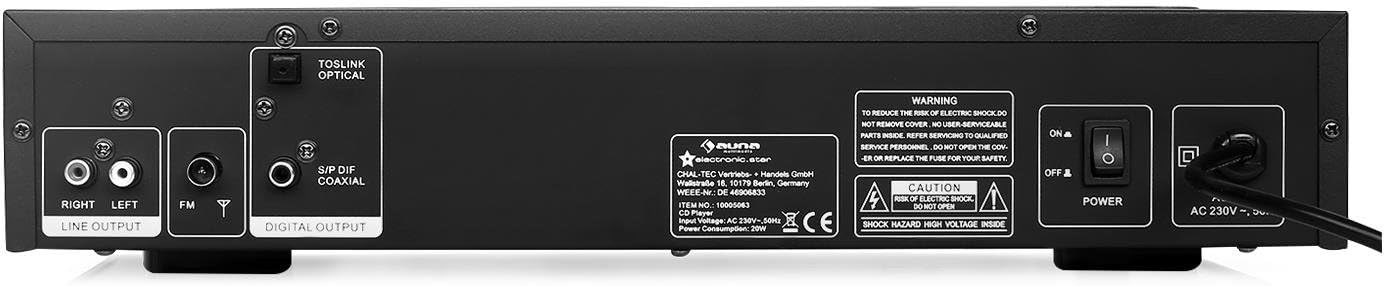
ചിത്രം 2: പിൻഭാഗം view of the AUNA AV2-CD509 HiFi CD Player. This image highlights the connectivity options, including RCA stereo line outputs (Right/Left), an FM antenna input, a TOSLINK optical digital output, and a S/PDIF coaxial digital output. The main power switch and AC power input are also visible.
- RCA Line Output (L/R): Standard analog audio output for connecting to an ampലൈഫയർ അല്ലെങ്കിൽ റിസീവർ.
- Optical Audio Output (TOSLINK): Digital audio output for high-quality connection to compatible audio equipment.
- Coaxial Audio Output (S/PDIF): Digital audio output, an alternative to optical for digital connections.
- എഫ്എം ആന്റിന ഇൻപുട്ട്: For connecting an FM antenna.
- വൈദ്യുതി സ്വിച്ച്: മെയിൻ പവർ ഓൺ/ഓഫ് സ്വിച്ച്.
- എസി പവർ ഇൻപുട്ട്: പവർ കോർഡ് ബന്ധിപ്പിക്കുന്നതിന്.
റിമോട്ട് കൺട്രോൾ
The included remote control provides convenient access to all functions of the CD player from a distance.

ചിത്രം 3: Remote control for the AUNA AV2-CD509 HiFi CD Player. The remote features buttons for power (Standby), source selection, disc tray open/close, playback controls (Play/Pause, Stop, Next, Previous), repeat function, numeric keypad for track selection, USB mode, volume control, and mute.
- സ്റ്റാൻഡ് ബൈ: പവർ ഓൺ/ഓഫ്.
- ഉറവിടം: Selects input source (e.g., CD, USB).
- തുറക്കുക അടക്കുക: ഡിസ്ക് ട്രേ തുറക്കുകയും അടയ്ക്കുകയും ചെയ്യുന്നു.
- പ്ലേ/താൽക്കാലികമായി നിർത്തുക: പ്ലേബാക്ക് ആരംഭിക്കുകയോ താൽക്കാലികമായി നിർത്തുകയോ ചെയ്യുന്നു.
- നിർത്തുക: പ്ലേബാക്ക് നിർത്തുന്നു.
- മുൻകൂർ/അടുത്തത്: മുമ്പത്തെ ട്രാക്കിലേക്കോ അടുത്ത ട്രാക്കിലേക്കോ പോകുന്നു.
- ആവർത്തിക്കുക: നിലവിലുള്ള ട്രാക്ക് അല്ലെങ്കിൽ എല്ലാ ട്രാക്കുകളും ആവർത്തിക്കുന്നു.
- USB: Switches to USB playback mode.
- വോൾ+/വോൾ-: Adjusts volume of compatible connected AUNA ampലൈഫയർ അല്ലെങ്കിൽ റിസീവറുകൾ.
- മ്യൂട്ട്: ഓഡിയോ .ട്ട്പുട്ട് നിശബ്ദമാക്കുന്നു.
- Numeric Keypad (0-9, 10+): Direct track selection.
- എ ബി: Repeats a specific section of a track.
സജ്ജമാക്കുക
Follow these steps to set up your AUNA AV2-CD509 CD Player:
- പ്ലേസ്മെൻ്റ്: Place the CD player on a stable, flat surface away from direct sunlight, heat sources, and excessive dust or moisture. Ensure adequate ventilation around the unit.
- ഓഡിയോ കണക്ഷൻ:
- അനലോഗ് കണക്ഷൻ (RCA): Connect the RCA Line Output (L/R) on the rear panel of the CD player to the corresponding analog audio input (e.g., "CD IN" or "AUX IN") on your ampആർസിഎ കേബിളുകൾ ഉപയോഗിക്കുന്ന ലിഫയർ അല്ലെങ്കിൽ റിസീവർ.
- Digital Connection (Optical or Coaxial): For higher fidelity, connect either the Optical Audio Output or the Coaxial Audio Output from the CD player to a compatible digital audio input on your amplifier, AV receiver, or DAC. Use a high-quality optical (TOSLINK) or coaxial cable.
- പവർ കണക്ഷൻ: Ensure the main power switch on the rear panel is in the "OFF" position. Connect the supplied power cord to the AC Power Input on the rear panel and then plug the other end into a suitable wall outlet (230V, 50Hz).
- പ്രാരംഭ പവർ ഓൺ: Flip the main power switch on the rear panel to the "ON" position. The unit will enter standby mode. Press the "STANDBY" button on the front panel or remote control to turn the unit on.
പ്രവർത്തന നിർദ്ദേശങ്ങൾ
ഒരു സിഡി പ്ലേ ചെയ്യുന്നു
- Turn on the CD player and your ampലൈഫയർ/സ്വീകർത്താവ്.
- Press the "OPEN/CLOSE" button on the front panel or remote control to open the disc tray.
- Place a CD (CD, CD-R, or CD-RW) gently into the disc tray with the label side facing up.
- Press "OPEN/CLOSE" again to close the disc tray. The player will read the disc, and the display will show the total number of tracks and total playing time.
- പ്ലേബാക്ക് ആരംഭിക്കാൻ "പ്ലേ/പാസ്" ബട്ടൺ അമർത്തുക.
- Use the "PREV" and "NEXT" buttons to skip between tracks.
- To pause playback, press "PLAY/PAUSE". Press again to resume.
- To stop playback, press the "STOP" button.
- To repeat a track or the entire disc, press the "REPEAT" button.
- For direct track selection, use the numeric keypad on the remote control.
MP3 പ്ലേ ചെയ്യുന്നു Fileയുഎസ്ബി വഴി എസ്
- Insert a USB storage device (e.g., USB flash drive) containing MP3 files into the USB input port on the front panel.
- Press the "SOURCE" button on the front panel or the "USB" button on the remote control to switch to USB mode.
- The player will automatically scan and begin playing MP3 files.
- Use the "PREV" and "NEXT" buttons to navigate through the MP3 files.
- Playback controls (PLAY/PAUSE, STOP, REPEAT) function similarly to CD playback.
- കുറിപ്പ്: The player supports MP3 files. Ensure your USB device is formatted to FAT32 for optimal compatibility.
റിമോട്ട് കൺട്രോൾ ഉപയോഗിക്കുന്നു
Point the remote control directly at the front panel of the CD player. Ensure there are no obstructions between the remote and the unit. Insert 2 x AAA batteries (not included) into the remote control, observing correct polarity.
മെയിൻ്റനൻസ്
Proper care and maintenance will ensure the longevity of your AUNA AV2-CD509 CD Player.
- യൂണിറ്റ് വൃത്തിയാക്കൽ: മൃദുവായതും ഉണങ്ങിയതുമായ തുണി ഉപയോഗിച്ച് യൂണിറ്റിന്റെ പുറംഭാഗം തുടയ്ക്കുക. അബ്രാസീവ് ക്ലീനറുകൾ, മെഴുക് അല്ലെങ്കിൽ ലായകങ്ങൾ എന്നിവ ഉപയോഗിക്കരുത്, കാരണം അവ ഫിനിഷിന് കേടുവരുത്തും.
- Cleaning the Disc Tray: Keep the disc tray clean and free of dust. Avoid touching the laser lens inside the disc tray.
- ഡിസ്ക് കൈകാര്യം ചെയ്യൽ: Always handle CDs by their edges. Avoid touching the playing surface. Store discs in their cases when not in use to prevent scratches and dust accumulation.
- വെൻ്റിലേഷൻ: Ensure the ventilation openings on the unit are not blocked.
ട്രബിൾഷൂട്ടിംഗ്
If you encounter any issues with your CD player, refer to the following table for common problems and solutions.
| പ്രശ്നം | സാധ്യമായ കാരണം | പരിഹാരം |
|---|---|---|
| ശക്തിയില്ല | Power cord not connected; Main power switch off; Wall outlet not active. | Ensure power cord is securely connected. Turn main power switch ON. Check wall outlet with another device. |
| ശബ്ദമില്ല | Incorrect audio cable connection; Wrong input selected on ampലൈഫയർ; Amplifier volume too low or muted. | Check all audio cable connections. Select the correct input source on your amplifier/receiver. Increase volume or unmute ampജീവൻ. |
| Disc not playing / "NO DISC" error | Disc inserted incorrectly; Disc is dirty or scratched; Disc format not supported. | Insert disc with label side up. Clean disc with a soft, lint-free cloth. Try a different disc. Ensure disc is CD, CD-R, CD-RW, or MP3 CD. |
| USB പ്ലേബാക്ക് പ്രവർത്തിക്കുന്നില്ല | USB device not inserted correctly; USB device not formatted to FAT32; Files not MP3; USB device corrupted. | Ensure USB device is fully inserted. Format USB device to FAT32. Check if files are MP3. Try a different USB device. |
| റിമോട്ട് കൺട്രോൾ പ്രവർത്തിക്കുന്നില്ല | ബാറ്ററികൾ ഡെഡ് അല്ലെങ്കിൽ തെറ്റായി ഇൻസേർട്ട് ചെയ്തിരിക്കുന്നു; റിമോട്ടിനും യൂണിറ്റിനും ഇടയിലുള്ള തടസ്സം; റിമോട്ട് സെൻസർ ബ്ലോക്കുചെയ്തിരിക്കുന്നു. | Replace batteries, ensuring correct polarity. Remove any obstructions. Clean the remote sensor on the unit. |
സ്പെസിഫിക്കേഷനുകൾ
| ഫീച്ചർ | വിശദാംശങ്ങൾ |
|---|---|
| മോഡൽ | AV2-CD509 |
| പിന്തുണയ്ക്കുന്ന ഫോർമാറ്റുകൾ | സിഡി, സിഡി-ആർ, സിഡി-ആർഡബ്ല്യു, എംപി 3 |
| കണക്റ്റിവിറ്റി | 1 x USB input, 1 x Optical audio output, 1 x Coaxial audio output, 1 x RCA audio line output (L/R) |
| വൈദ്യുതി വിതരണം | 230V, 50Hz |
| വൈദ്യുതി ഉപഭോഗം | 80 വാട്ട്സ് |
| അളവുകൾ (W x H x D) | 42.5 x 8.5 x 22.5 സെ.മീ |
| ഭാരം | 4.3 കി.ഗ്രാം |
| മെറ്റീരിയൽ | ബ്രഷ് ചെയ്ത സ്റ്റെയിൻലെസ്സ് സ്റ്റീൽ |
| ഉൾപ്പെടുത്തിയ ഘടകങ്ങൾ | 1 x Device, 1 x Remote control with button batteries |
വാറൻ്റിയും പിന്തുണയും
For warranty information and technical support, please refer to the documentation provided with your purchase or visit the official AUNA webസൈറ്റ്. ഏതെങ്കിലും വാറന്റി ക്ലെയിമുകൾക്ക് നിങ്ങളുടെ വാങ്ങലിന്റെ തെളിവ് സൂക്ഷിക്കുക.
You can also visit the AUNA brand store for more information: AUNA Brand Store.
Ask a question about this manual
Ask about setup, troubleshooting, compatibility, parts, safety, or missing instructions. Manuals+ will review the question and use this page’s manual context to help answer it.