
1. ആമുഖം
This manual provides essential information for the safe and efficient operation of your Martin JEM ZR45 High Endurance Fog Machine. The JEM ZR45 is a high-performance, water-based fog machine designed for demanding applications in large venues and stages, offering exceptional output and reliable performance for professional use.
Please read this manual thoroughly before operating the device to ensure proper setup, usage, and maintenance.
2 സുരക്ഷാ വിവരങ്ങൾ
മുന്നറിയിപ്പ്: ഈ സുരക്ഷാ നിർദ്ദേശങ്ങൾ പാലിക്കുന്നതിൽ പരാജയപ്പെടുന്നത് തീപിടുത്തം, വൈദ്യുതാഘാതം, പരിക്ക് അല്ലെങ്കിൽ ഉൽപ്പന്നത്തിനോ വസ്തുവിനോ കേടുപാടുകൾ എന്നിവയ്ക്ക് കാരണമായേക്കാം.
- യൂണിറ്റ് എപ്പോഴും ഒരു ഗ്രൗണ്ടഡ് പവർ ഔട്ട്ലെറ്റിലേക്ക് ബന്ധിപ്പിക്കുക.
- വൈദ്യുതി വിതരണം വോളിയം ഉറപ്പാക്കുകtage യൂണിറ്റിൽ വ്യക്തമാക്കിയ ആവശ്യകതകളുമായി പൊരുത്തപ്പെടുന്നു.
- പവർ കോർഡ് കേടായെങ്കിൽ മെഷീൻ പ്രവർത്തിപ്പിക്കരുത്.
- Use only Martin JEM fog fluid. Other fluids may cause damage or create a fire hazard.
- Do not block the fog output nozzle.
- Keep a safe distance from the fog output, as the nozzle can reach high temperatures (up to 554°F / 290°C).
- മെഷീനിനു ചുറ്റും മതിയായ വായുസഞ്ചാരം ഉറപ്പാക്കുക.
- Do not immerse the unit in water or expose it to rain or moisture.
- Disconnect from power before cleaning or servicing.
- ഈ ഉൽപ്പന്നം പ്രൊഫഷണൽ ഉപയോഗത്തിന് മാത്രമുള്ളതാണ്.
3. ഉൽപ്പന്നം കഴിഞ്ഞുview ഘടകങ്ങളും
The Martin JEM ZR45 is designed for robust performance and ease of use. Familiarize yourself with its key components.
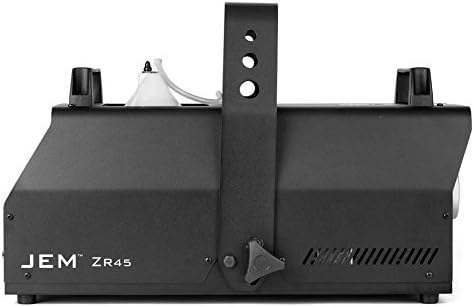
ചിത്രം 3.1: മുൻ വശം view of the JEM ZR45 fog machine. This image shows the main body of the unit with the JEM ZR45 branding visible on the side, and the output nozzle at the front. The integrated hanging bracket is also visible.

ചിത്രം 3.2: കോണാകൃതിയിലുള്ളത് view of the JEM ZR45, highlighting the fluid reservoir. The clear fluid bottle is visible within its compartment on top of the machine, connected to the internal system. The output nozzle is also visible.

ചിത്രം 3.3: പിൻഭാഗം view of the JEM ZR45, showing the fluid reservoir from the back. The fluid bottle is clearly visible, positioned within the machine's top compartment. The rear panel with connections is not fully visible in this shot.

ചിത്രം 3.4: Rear control panel of the JEM ZR45. This image displays the digital display, control buttons (Menu, Fog, Enter, Value), power switch, fuse holder, mains input, and DMX input/output ports (3-pin and 5-pin XLR connectors).

ചിത്രം 3.5: The JEM ZR Series digital remote control. This external remote features a digital display and control buttons (Menu, Fog, Enter, Value) identical to the machine's built-in panel, connected via a long cable with an XLR connector.
പ്രധാന ഘടകങ്ങൾ:
- Fog Output Nozzle: Where the fog is emitted.
- ഫ്ലൂയിഡ് റിസർവോയർ: Holds the fog fluid (5-liter capacity).
- Integrated Hanging Bracket: For truss mounting.
- നിയന്ത്രണ പാനൽ: Digital display and buttons for local control.
- പവർ ഇൻപുട്ട്: Mains power connection.
- DMX ഇൻ/ഔട്ട്: For external control via DMX512.
- റിമോട്ട് കൺട്രോൾ പോർട്ട്: For connecting the included digital remote.
4. സജ്ജീകരണം
4.1 അൺപാക്കിംഗും പരിശോധനയും
- Carefully remove the JEM ZR45 from its packaging.
- Inspect the unit for any signs of damage during transit. If damage is found, contact your supplier immediately.
- Verify that all components are present: JEM ZR45 unit, power cable, and digital remote control.
4.2 ഫ്ലൂയിഡ് ഇൻസ്റ്റലേഷൻ
- Ensure the machine is powered off and disconnected from the mains.
- Open the fluid reservoir compartment.
- Insert a 5-liter bottle of Martin JEM fog fluid into the compartment.
- Connect the quick-connect fitting from the machine to the fluid bottle. Ensure a secure connection.
- Close the fluid reservoir compartment.
കുറിപ്പ്: The fluid sensing system will monitor fluid levels to prevent dry running.
4.3 പ്ലേസ്മെന്റും മൗണ്ടിംഗും
- Place the machine on a stable, level surface, or mount it securely using the integrated hanging bracket.
- Ensure there is adequate clearance (at least 20 inches / 50 cm) around the unit for ventilation.
- The unit can be oriented up to +/-40° from horizontal. Ensure the fluid bottle remains upright enough for proper fluid flow.
- Always use a safety attachment point when truss mounting.
4.4 പവർ കണക്ഷൻ
- Connect the power cable to the mains input on the rear of the unit.
- പവർ കേബിളിന്റെ മറ്റേ അറ്റം ഒരു ഗ്രൗണ്ടഡ് ഇലക്ട്രിക്കൽ ഔട്ട്ലെറ്റിലേക്ക് പ്ലഗ് ചെയ്യുക.
4.5 DMX Control (Optional)
- For DMX control, connect a DMX cable from your DMX controller to the DMX IN port on the JEM ZR45.
- If linking multiple units, connect a DMX cable from the DMX OUT of the first unit to the DMX IN of the next.
- Refer to the DMX address setting section in the full manual for configuring DMX channels.
5. പ്രവർത്തന നിർദ്ദേശങ്ങൾ
5.1 പ്രാരംഭ പവർ-അപ്പ്
- Ensure the fluid reservoir is filled and connected.
- Flip the power switch on the rear of the unit to the 'ON' position.
- The machine will begin its warm-up cycle. The digital display will show the warm-up progress.
- Once warmed up (typically a few minutes), the unit is ready for operation.
5.2 പ്രാദേശിക നിയന്ത്രണം
Use the control panel on the rear of the unit or the wired digital remote control (Figure 3.5) to operate the machine.
- മെനു: മെനു ഓപ്ഷനുകളിലൂടെ നാവിഗേറ്റ് ചെയ്യുന്നു.
- VALUE (Up/Down Arrows): പാരാമീറ്റർ മൂല്യങ്ങൾ ക്രമീകരിക്കുന്നു.
- നൽകുക: തിരഞ്ഞെടുക്കലുകൾ സ്ഥിരീകരിക്കുന്നു.
- മൂടൽമഞ്ഞ്: Activates fog output (can be momentary or continuous depending on settings).
To produce fog, press the മൂടൽമഞ്ഞ് button. The output intensity can be adjusted via the menu settings.
5.3 DMX നിയന്ത്രണം
The JEM ZR45 is fully DMX compatible, including RDM. Once DMX is connected and addressed, the machine can be controlled via your DMX console.
- Set the DMX start address using the unit's control panel.
- Consult the full DMX protocol chart (available in the comprehensive manual) for specific channel assignments for fog output, fan speed, and other functions.
നുറുങ്ങ്: The variable output control allows for precise adjustment of fog intensity, from subtle haze to dense clouds.
6. പരിപാലനം
Regular maintenance ensures the longevity and optimal performance of your JEM ZR45 fog machine.
6.1 വൃത്തിയാക്കൽ
- പുറം: ഒരു സോഫ്റ്റ്, ഡി ഉപയോഗിച്ച് പുറംഭാഗം തുടയ്ക്കുകamp തുണി. ഉരച്ചിലുകളുള്ള ക്ലീനറുകളോ ലായകങ്ങളോ ഉപയോഗിക്കരുത്.
- നോസൽ: Periodically check the fog output nozzle for any blockages. If blockages occur, consult a qualified technician. Do not attempt to clear blockages with sharp objects.
6.2 Fluid System
- Always use genuine Martin JEM fog fluid. Using unauthorized fluids can void the warranty and damage the machine.
- If the machine will be stored for an extended period (more than 30 days), it is recommended to run a cleaning cycle with Martin JEM Cleaner fluid to prevent clogs.
- The fluid sensing system will alert you when fluid levels are low. Replace the fluid bottle promptly to ensure continuous operation.
6.3 സംഭരണം
- Store the machine in a dry, dust-free environment.
- Ensure the fluid bottle is securely closed or removed if storing for very long periods.
7. പ്രശ്നപരിഹാരം
This section addresses common issues you might encounter with your JEM ZR45.
| പ്രശ്നം | സാധ്യമായ കാരണം | പരിഹാരം |
|---|---|---|
| മൂടൽമഞ്ഞ് ഔട്ട്പുട്ട് ഇല്ല |
|
|
| Weak fog output |
|
|
| Machine not responding to DMX |
|
|
If you encounter issues not listed here or if the suggested solutions do not resolve the problem, please contact Martin Professional support.
8 സ്പെസിഫിക്കേഷനുകൾ
| ഫീച്ചർ | വിശദാംശങ്ങൾ |
|---|---|
| മോഡൽ | JEM ZR45 |
| ഹീറ്റ് എക്സ്ചേഞ്ചർ പവർ | 1,800 W (യുഎസ്) |
| Maximum Fog Output | 45,909 ft³ per minute |
| Fluid Reservoir Capacity | 5 ലിറ്റർ |
| Maximum Operating Time (Full Output) | 1.18 മണിക്കൂർ |
| നിയന്ത്രണ ഓപ്ഷനുകൾ | Integrated Digital Remote, Full DMX (RDM compatible), Master/Client link mode |
| നോസൽ താപനില (പരമാവധി) | 554°F (290°C) |
| ആംബിയൻ്റ് ഓപ്പറേറ്റിംഗ് താപനില | 41°F (5°C) മുതൽ 104°F (40°C) |
| ഹൗസിംഗ് മെറ്റീരിയൽ | സ്റ്റീൽ, അലുമിനിയം |
| മൗണ്ടിംഗ് ഓപ്ഷനുകൾ | Floor-standing, Truss mounting (integrated bracket, safety attachment point) |
| ഓറിയൻ്റേഷൻ | Up to +/-40° from horizontal |
| ഇനത്തിൻ്റെ ഭാരം | 44.9 പൗണ്ട് |
| പാക്കേജ് അളവുകൾ | 26.85 x 16.46 x 16.06 ഇഞ്ച് |
9. വാറൻ്റിയും പിന്തുണയും
Martin Professional products are designed for reliability and performance. For specific warranty terms and conditions, please refer to the warranty card included with your product or visit the official Martin Professional webസൈറ്റ്.
For technical support, service, or spare parts, please contact your authorized Martin Professional dealer or distributor. You can find contact information on the official Martin Professional webസൈറ്റ്: www.martin.com
When contacting support, please have your product model (JEM ZR45) and serial number ready.