
1. ആമുഖം
The Marshall MG10G is a compact 10-watt solid-state guitar amplifier designed for practice and home use. It features two channels (Clean and Overdrive), a Contour control for tone shaping, an auxiliary input for connecting external audio devices, and a headphone output for silent practice. This manual provides essential information for the safe and effective operation of your MG10G ampജീവൻ.
2 സുരക്ഷാ വിവരങ്ങൾ
WARNING: SHOCK HAZARD. DO NOT OPEN. TO REDUCE THE RISK OF FIRE OR ELECTRIC SHOCK DO NOT REMOVE COVER. NO USER-SERVICEABLE PARTS INSIDE. REFER SERVICING TO QUALIFIED SERVICE PERSONNEL.
എല്ലായ്പ്പോഴും ഉറപ്പാക്കുക amplifier is connected to a grounded power outlet. Do not expose the amplifier to rain or moisture. Disconnect the power cord before cleaning or if the unit will be unused for extended periods. Ensure adequate ventilation around the ampജീവൻ.
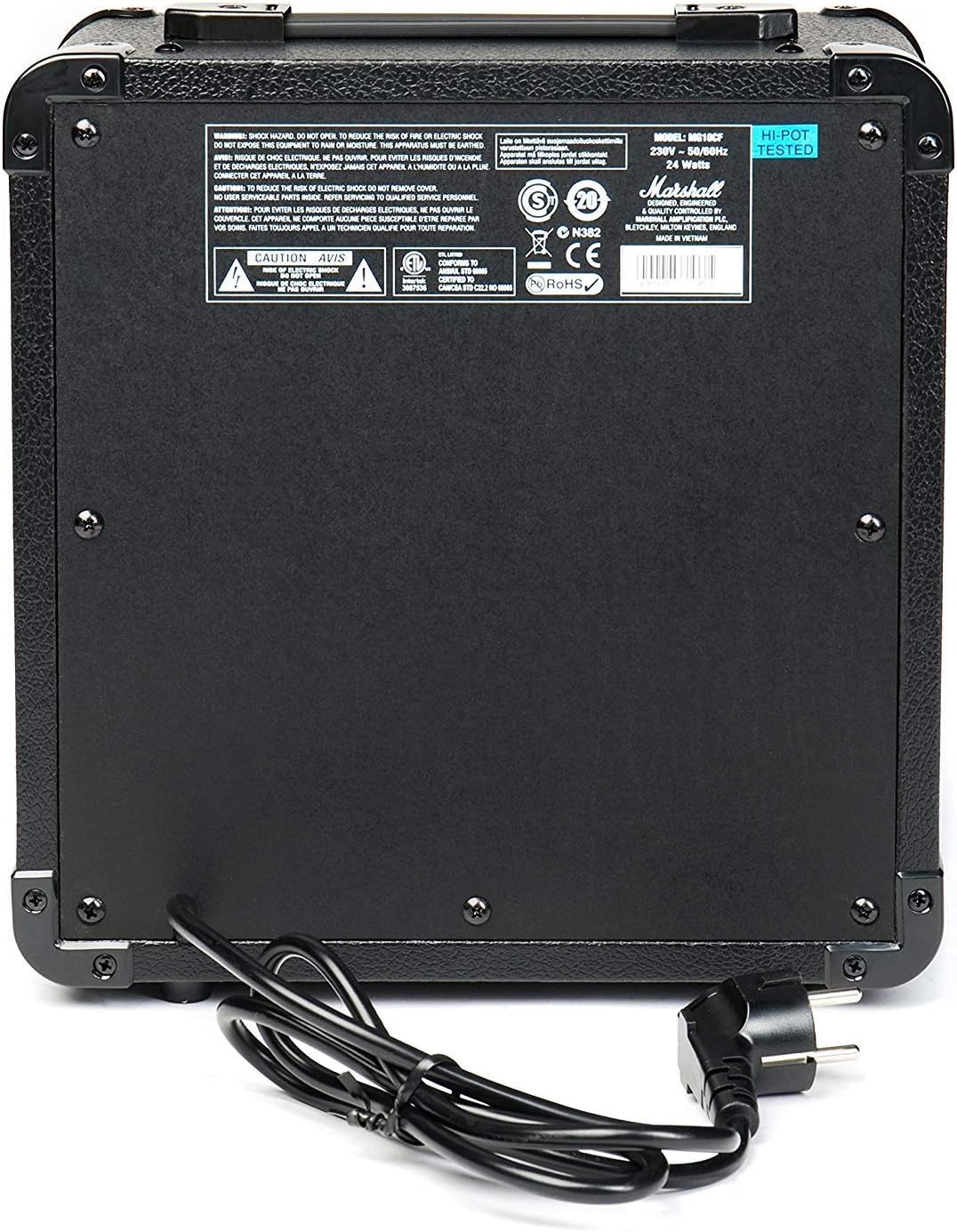
Figure 2.1: Rear panel of the MG10G amplifier, displaying safety warnings and power specifications.
3. ഉൽപ്പന്നം കഴിഞ്ഞുview
The MG10G amplifier features a straightforward control layout for ease of use. Familiarize yourself with the front panel controls and rear panel connections before operation.

Figure 3.1: Front panel of the MG10G ampജീവൻ.
ഫ്രണ്ട് പാനൽ നിയന്ത്രണങ്ങൾ:
- ഇൻപുട്ട്: 1/4" jack for connecting your electric guitar.
- ക്ലീൻ വോളിയം: Controls the volume of the Clean channel.
- ചാനൽ തിരഞ്ഞെടുക്കുക: Button to switch between Clean and Overdrive channels.
- ഓവർഡ്രൈവ് നേട്ടം: Adjusts the amount of distortion on the Overdrive channel.
- ഓവർഡ്രൈവ് വോളിയം: Controls the volume of the Overdrive channel.
- കോണ്ടൂർ: Shapes the mid-range frequencies of your tone. Turning it clockwise scoops the mids, while counter-clockwise adds mids.
- MP3/LINE IN: 3.5mm jack for connecting external audio sources (e.g., MP3 player, phone).
- ഹെഡ്ഫോണുകൾ: 3.5mm jack for connecting headphones for silent practice. Connecting headphones mutes the main speaker.
- പവർ: ഇതിനായുള്ള ഓൺ/ഓഫ് സ്വിച്ച് ampജീവൻ.
പിൻ പാനൽ കണക്ഷനുകൾ:
- വൈദ്യുതി ഇൻപുട്ട്: Connects the supplied power cable to a suitable mains power supply.
4. സജ്ജീകരണം
- ഉറപ്പാക്കുക amplifier's POWER switch is in the OFF position.
- Connect the power cable to the POWER INPUT on the rear panel of the amplifier and then to a grounded electrical outlet.
- നിങ്ങളുടെ ഇലക്ട്രിക് ഗിറ്റാർ ഇതിലേക്ക് ബന്ധിപ്പിക്കുക ഇൻപുട്ട് jack on the front panel using a standard 1/4" instrument cable.
- If desired, connect an external audio device (e.g., MP3 player) to the MP3/LINE IN jack using a 3.5mm stereo cable.
- If desired, connect headphones to the ഹെഡ്ഫോണുകൾ jack for silent practice.
- തിരിയുക ക്ലീൻ വോളിയം ഒപ്പം ഓവർഡ്രൈവ് വോളിയം controls to their minimum settings (fully counter-clockwise).
- മാറുക ampലൈഫയറുടെ പവർ to the ON position. The power indicator light will illuminate.
5. പ്രവർത്തന നിർദ്ദേശങ്ങൾ
5.1 Clean Channel
To use the Clean channel, ensure the ചാനൽ തിരഞ്ഞെടുക്കുക button is disengaged (out position). Adjust the ക്ലീൻ വോളിയം control to achieve your desired output level. This channel provides a clear, un-distorted guitar tone.
5.2 Overdrive Channel
To engage the Overdrive channel, press the ചാനൽ തിരഞ്ഞെടുക്കുക button (in position). Use the ഓവർഡ്രൈവ് നേട്ടം control to adjust the amount of distortion, from a subtle crunch to a heavier, saturated sound. The ഓവർഡ്രൈവ് വോളിയം control sets the output level for this channel.
5.3 Tone Shaping with Contour
ദി കോണ്ടൂർ control allows you to sculpt the mid-range frequencies of your tone. Experiment with this control to find your preferred sound:
- തിരിയുന്നു കോണ്ടൂർ clockwise will scoop the mid-range, often resulting in a more modern, aggressive tone.
- തിരിയുന്നു കോണ്ടൂർ counter-clockwise will boost the mid-range, providing a warmer, fuller sound that can help your guitar cut through a mix.
5.4 Using MP3/LINE IN
Connect an external audio device to the MP3/LINE IN jack. The volume of the external device is controlled by its own volume output. This feature allows you to play along with backing tracks or music.
5.5 ഹെഡ്ഫോൺ ഔട്ട്പുട്ട്
ഹെഡ്ഫോണുകൾ പ്ലഗിൻ ചെയ്യുക ഹെഡ്ഫോണുകൾ jack for silent practice. The amplifier's main speaker will be muted automatically. Adjust the volume using the respective channel volume controls (Clean or Overdrive) or the volume control on your external audio device if using the MP3/LINE IN.
6. പരിപാലനം
- വൃത്തിയാക്കൽ: വിച്ഛേദിക്കുക amplifier from the power supply before cleaning. Use a soft, dry cloth to wipe down the exterior. Do not use abrasive cleaners or solvents.
- സംഭരണം: സംഭരിക്കുക ampനേരിട്ടുള്ള സൂര്യപ്രകാശത്തിൽ നിന്നും തീവ്രമായ താപനിലയിൽ നിന്നും മാറി വരണ്ടതും തണുത്തതുമായ അന്തരീക്ഷത്തിൽ ലിഫയർ സ്ഥാപിക്കുക.
- ഗതാഗതം: കൊണ്ടുപോകുമ്പോൾ amplifier, ensure it is securely packed to prevent damage.
7. പ്രശ്നപരിഹാരം
| പ്രശ്നം | സാധ്യമായ കാരണം | പരിഹാരം |
|---|---|---|
| സ്പീക്കറിൽ നിന്ന് ശബ്ദമില്ല |
|
|
| ദുർബലമായ അല്ലെങ്കിൽ വികലമായ ശബ്ദം |
|
|
| ഹെഡ്ഫോണുകളിൽ നിന്ന് ശബ്ദമില്ല |
|
|
ഈ പരിഹാരങ്ങൾ പരീക്ഷിച്ചതിന് ശേഷവും പ്രശ്നം നിലനിൽക്കുകയാണെങ്കിൽ, ദയവായി യോഗ്യതയുള്ള സേവന ഉദ്യോഗസ്ഥരെ ബന്ധപ്പെടുക.
8 സ്പെസിഫിക്കേഷനുകൾ

Figure 8.1: Dimensions of the MG10G ampജീവൻ.
| ഫീച്ചർ | വിശദാംശങ്ങൾ |
|---|---|
| മോഡലിൻ്റെ പേര് | MG10G |
| Ampജീവിത തരം | സോളിഡ് സ്റ്റേറ്റ് |
| ഔട്ട്പുട്ട് പവർ | 10 വാട്ട്സ് |
| സ്പീക്കർ വലിപ്പം | 6.5 ഇഞ്ച് (16.51 സെ.മീ) |
| ചാനലുകൾ | 2 (Clean, Overdrive) |
| നിയന്ത്രണങ്ങൾ | Clean Volume, Channel Select, Overdrive Gain, Overdrive Volume, Contour, Power |
| ഇൻപുട്ടുകൾ | 1/4" Guitar Input, 3.5mm MP3/Line In |
| ഔട്ട്പുട്ടുകൾ | 3.5എംഎം ഹെഡ്ഫോൺ ഔട്ട്പുട്ട് |
| പവർ ഉറവിടം | Electric Cable (230V~50Hz, 24 Watts) |
| അളവുകൾ (D x W x H) | 31.5 സെ.മീ x 19.8 സെ.മീ x 40 സെ.മീ |
| ഇനത്തിൻ്റെ ഭാരം | 5.13 കിലോഗ്രാം |
| മെറ്റീരിയൽ | മെറ്റൽ, പ്ലാസ്റ്റിക് |
| നിറം | കറുപ്പ് |
| മാതൃരാജ്യം | ചൈന |
9. വാറൻ്റിയും പിന്തുണയും
9.1 വാറൻ്റി വിവരങ്ങൾ
This Marshall MG10G ampലൈഫയർ ഒരു കൂടെ വരുന്നു 1 വർഷത്തെ നിർമ്മാതാവിന്റെ വാറന്റി. Please retain your proof of purchase for warranty claims. The warranty covers manufacturing defects and malfunctions under normal use. It does not cover damage caused by misuse, accidents, unauthorized modifications, or normal wear and tear.
9.2 ഉപഭോക്തൃ പിന്തുണ
For technical assistance, service, or warranty inquiries, please contact your authorized Marshall dealer or visit the official Marshall Ampലിഫിക്കേഷൻ webപിന്തുണാ ഉറവിടങ്ങൾക്കും ബന്ധപ്പെടാനുള്ള വിവരങ്ങൾക്കുമുള്ള സൈറ്റ്.