
1. ആമുഖവും അവസാനവുംview
The Cherry MW4500 is an ergonomic wireless optical mouse designed to provide a natural and comfortable hand position, reducing strain during extended use. Its 45-degree design helps prevent wrist and tendon issues. This manual provides essential information for setting up, operating, and maintaining your MW4500 mouse.

The Cherry MW4500 mouse is designed for ergonomic comfort, fitting naturally in the hand.
പ്രധാന സവിശേഷതകൾ:
- Ergonomic form in a 45° design for reduced wrist strain.
- Precise optical sensor with 3-level adjustable resolution (600/900/1200 dpi).
- Status LED to indicate low battery charge.
- Six buttons and a scroll wheel for enhanced functionality.
- Pleasant and abrasion-proof surface finish for durability and comfort.

The 45-degree ergonomic design of the MW4500 promotes a natural hand position, reducing wrist and tendon strain compared to traditional mice.
2. സജ്ജീകരണ നിർദ്ദേശങ്ങൾ
2.1 ബാറ്ററി ഇൻസ്റ്റാളേഷൻ
- മൗസിന്റെ അടിഭാഗത്ത് ബാറ്ററി കമ്പാർട്ട്മെന്റ് കണ്ടെത്തുക.
- ബാറ്ററി കമ്പാർട്ട്മെൻ്റ് കവർ തുറക്കുക.
- ശരിയായ പോളാരിറ്റി (+/-) ഉറപ്പാക്കിക്കൊണ്ട് രണ്ട് AA ബാറ്ററികൾ ഇടുക.
- ബാറ്ററി കമ്പാർട്ട്മെൻ്റ് കവർ സുരക്ഷിതമായി അടയ്ക്കുക.
2.2 വയർലെസ്സ് റിസീവർ ബന്ധിപ്പിക്കുന്നു
- Remove the nano USB receiver from its storage slot on the underside of the mouse.
- Plug the nano USB receiver into an available USB port on your computer (Laptop, PC, or Mac).
- The mouse will automatically connect to your computer using 2.4 GHz RF technology. No additional drivers are typically required for basic functionality.

Utilizing wireless 2.4 GHz RF technology, the mouse offers plug-and-play convenience with a nano USB receiver that can be stored within the mouse.
3. പ്രവർത്തന നിർദ്ദേശങ്ങൾ
3.1 ബട്ടൺ പ്രവർത്തനങ്ങൾ
- ഇടത് ക്ലിക്ക് ബട്ടൺ: സ്റ്റാൻഡേർഡ് തിരഞ്ഞെടുപ്പും സജീവമാക്കലും.
- റൈറ്റ് ക്ലിക്ക് ബട്ടൺ: സന്ദർഭ മെനുകൾ ആക്സസ് ചെയ്യുന്നു.
- സ്ക്രോൾ വീൽ: ഉള്ളടക്കം ലംബമായി സ്ക്രോൾ ചെയ്യുന്നു. മധ്യ-ക്ലിക്ക് പ്രവർത്തനത്തിനായി അമർത്താനും കഴിയും.
- DPI ക്രമീകരണ ബട്ടൺ: Cycles through resolution settings (600, 900, 1200 dpi).
- Forward/Backward Thumb Buttons: Navigates forward and backward in web browsers or other compatible applications.
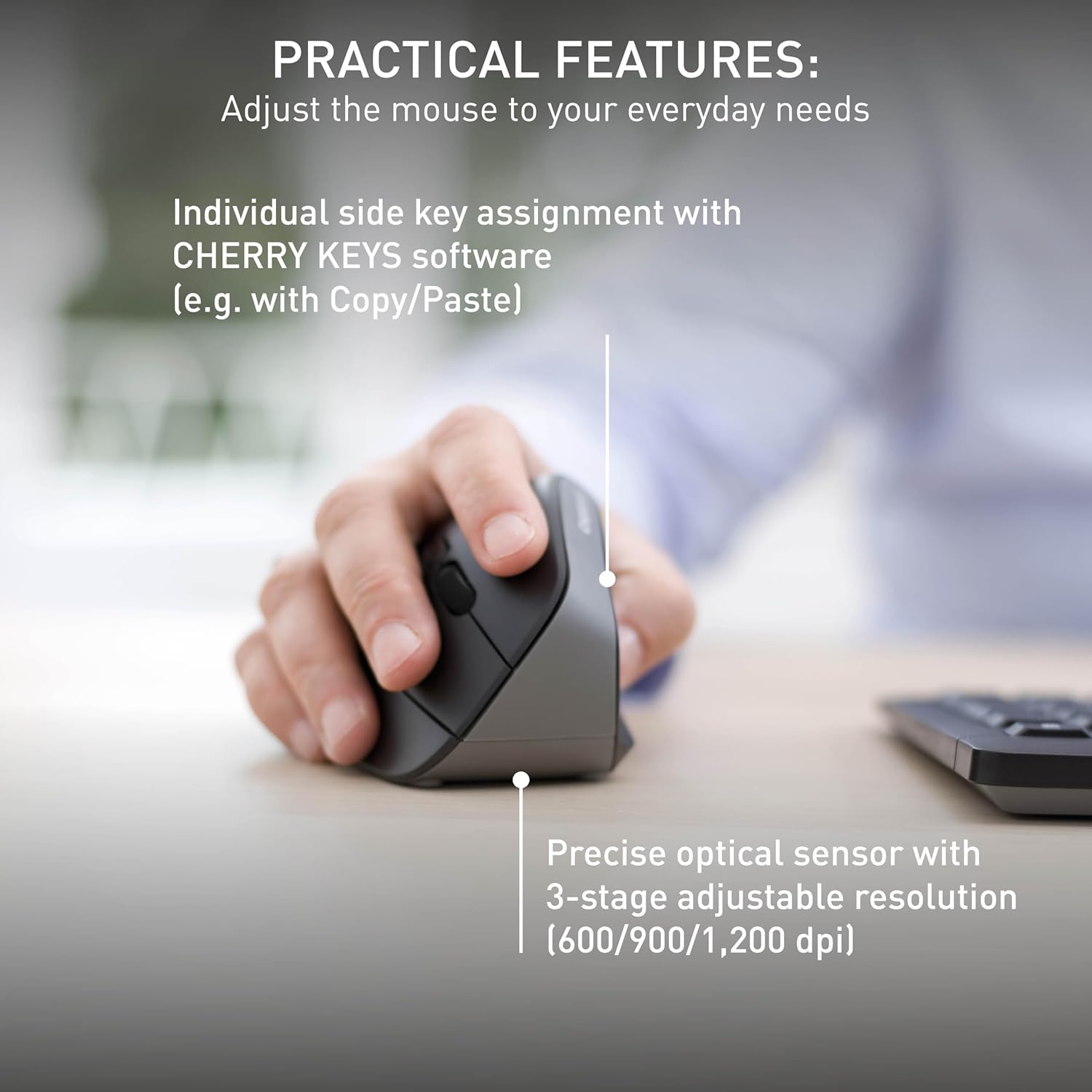
The mouse features a precise optical sensor with a 3-stage adjustable resolution (600/900/1,200 dpi) for customized sensitivity.
3.2 ഡിപിഐ അഡ്ജസ്റ്റ്മെന്റ്
Press the DPI adjustment button located near the scroll wheel to change the mouse's sensitivity. The mouse will cycle through three preset DPI levels: 600, 900, and 1200 dpi. Select the setting that best suits your preference and task.
4. പരിപാലനം
4.1 വൃത്തിയാക്കൽ
To clean your Cherry MW4500 mouse, use a soft, dry cloth. For stubborn dirt, a slightly damp cloth with mild soap can be used. Avoid using harsh chemicals or abrasive materials, as these can damage the abrasion-proof surface finish.
4.2 ബാറ്ററി മാറ്റിസ്ഥാപിക്കൽ
When the status LED on the mouse indicates a low battery charge, it is time to replace the batteries. Follow the battery installation steps in Section 2.1 to replace the two AA batteries. Dispose of old batteries responsibly according to local regulations.
5. പ്രശ്നപരിഹാരം
5.1 മൗസ് പ്രതികരിക്കുന്നില്ല
- ബാറ്ററികൾ പരിശോധിക്കുക: Ensure the batteries are correctly installed and not depleted. Replace if necessary.
- ചെക്ക് റിസീവർ: Make sure the nano USB receiver is securely plugged into a working USB port on your computer. Try a different USB port.
- ദൂരം: Ensure the mouse is within the effective range of the receiver (up to 10 meters).
- ഇടപെടൽ: Move the mouse away from other wireless devices that might cause interference.
5.2 കഴ്സർ ചലനം ക്രമരഹിതമോ കൃത്യതയില്ലാത്തതോ ആണ്.
- ക്ലീൻ സെൻസർ: മൗസിന്റെ അടിവശത്തുള്ള ഒപ്റ്റിക്കൽ സെൻസർ വൃത്തിയുള്ളതും പൊടിയോ അവശിഷ്ടങ്ങളോ ഇല്ലാത്തതുമാണെന്ന് ഉറപ്പാക്കുക.
- ഉപരിതലം: Use the mouse on a suitable, non-reflective surface or a mouse pad.
- DPI ക്രമീകരണം: Adjust the DPI setting using the DPI button to find a comfortable and accurate sensitivity level.
6 സ്പെസിഫിക്കേഷനുകൾ
| ഫീച്ചർ | വിശദാംശങ്ങൾ |
|---|---|
| ബ്രാൻഡ് | ചെറി |
| മോഡലിൻ്റെ പേര് | ചെറി മെഗാവാട്ട് 4500 |
| മോഡൽ നമ്പർ | JW-4500 |
| നിറം | കറുപ്പ് |
| കണക്റ്റിവിറ്റി ടെക്നോളജി | റേഡിയോ ഫ്രീക്വൻസി (2.4 GHz) |
| മൂവ്മെന്റ് ഡിറ്റക്ഷൻ ടെക്നോളജി | ഒപ്റ്റിക്കൽ |
| Mouse Maximum Sensitivity | 1200 Dots per Inch (DPI) |
| ഡിപിഐ ലെവലുകൾ | 3-level adjustable (600, 900, 1200 dpi) |
| ബട്ടൺ അളവ് | 6 (ഇടത്, വലത്, സ്ക്രോൾ വീൽ, DPI, മുന്നോട്ട്, പിന്നിലേക്ക്) |
| കൈ ഓറിയൻ്റേഷൻ | ശരിയാണ് |
| അനുയോജ്യമായ ഉപകരണങ്ങൾ | Personal Computer (Laptop, PC, Mac) |
| ഓപ്പറേറ്റിംഗ് സിസ്റ്റം | വിൻഡോസ് 10, വിൻഡോസ് 7, വിൻഡോസ് 8.1, മാക് ഒഎസ് |
| പവർ ഉറവിടം | ബാറ്ററി പവർ |
| ബാറ്ററി തരം | 2 AA ബാറ്ററികൾ (ഉൾപ്പെടുത്തിയിട്ടില്ല) |
| ബാറ്ററി ശരാശരി ആയുസ്സ് | 6 മാസം |
| വയർലെസ് ശ്രേണി | 10 മീറ്റർ വരെ (32 അടി) |
| ഇനത്തിൻ്റെ ഭാരം | 120 ഗ്രാം |
| എൻക്ലോഷർ മെറ്റീരിയൽ | പ്ലാസ്റ്റിക് |
7. വാറൻ്റിയും പിന്തുണയും
7.1 വാറൻ്റി വിവരങ്ങൾ
The Cherry MW4500 Wireless Vertical Ergonomic Optical Mouse comes with a 3 വർഷത്തെ വാറൻ്റി വാങ്ങിയ തീയതി മുതൽ. വാറന്റി ക്ലെയിമുകൾക്കായി നിങ്ങളുടെ വാങ്ങിയതിന്റെ തെളിവ് സൂക്ഷിക്കുക.
7.2 ഉപഭോക്തൃ പിന്തുണ
For technical assistance, troubleshooting, or further product information, please visit the official Cherry website or contact Cherry customer support through their provided channels.
8. ഉൽപ്പന്ന വീഡിയോ
This official video from Cherry Americas, LLC demonstrates the ergonomic benefits and features of the CHERRY ERGO LINE, including the MW 4500 mouse.