
ആമുഖം
Welcome to the user manual for the iRiver IR-SB200 USB Powered Curved Sound Bar Speaker. This manual provides essential information for setting up, operating, maintaining, and troubleshooting your new sound bar. Please read these instructions carefully to ensure optimal performance and longevity of your device.
ഉൽപ്പന്നം കഴിഞ്ഞുview
The iRiver IR-SB200 is a 2-channel, 12W USB-powered curved sound bar speaker designed to enhance the audio experience for your computer, desktop, TV, or laptop. Its stylish and modern design, combined with powerful sound output, makes it an ideal audio solution for various environments.

മൊത്തത്തിൽ view of the iRiver IR-SB200 curved sound bar speaker, showcasing its sleek design and compact form factor on a desk setup.
പ്രധാന സവിശേഷതകൾ:
- USB പവർ: Conveniently powered via a standard USB port.
- 2-Channel Stereo Sound: Delivers clear and powerful 12W audio.
- വളഞ്ഞ ഡിസൈൻ: Modern aesthetic that complements various setups.
- സംയോജിത നിയന്ത്രണങ്ങൾ: Easy access to volume adjustment.
- സഹായ തുറമുഖങ്ങൾ: Includes headphone and microphone jacks for personal audio and communication.

ക്ലോസ് അപ്പ് view of the front panel of the iRiver IR-SB200 speaker, highlighting the dedicated headphone and microphone input jacks for convenient access.
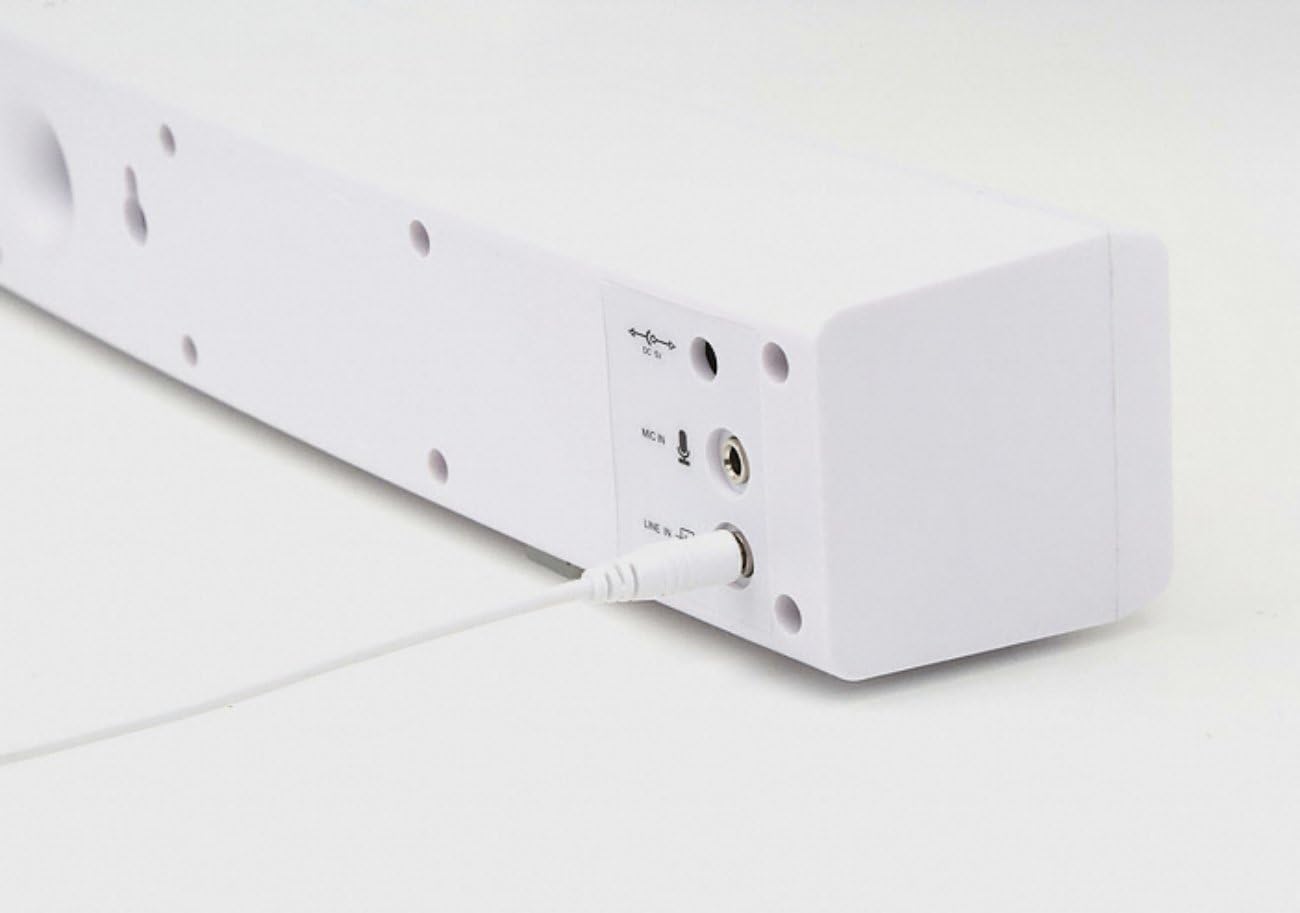
വിശദമായി view of the rear panel of the iRiver IR-SB200 speaker, showing the DC In power port and the Line In audio input port.

സൈഡ് പ്രോfile of the iRiver IR-SB200 speaker, featuring the integrated rotary volume control knob with '+' and '-' indicators for easy adjustment.
സജ്ജീകരണ നിർദ്ദേശങ്ങൾ
സ്പീക്കറെ ബന്ധിപ്പിക്കുന്നു
Follow these steps to connect your iRiver IR-SB200 sound bar to your device:
- പ്ലേസ്മെൻ്റ്: Position the sound bar on a stable, flat surface near your computer, laptop, or TV. Ensure there is adequate space for cable connections.
- പവർ കണക്ഷൻ: Connect the USB power cable from the sound bar to an available USB port on your computer, laptop, TV, or a compatible USB power adapter (5V/1A recommended). The speaker will power on automatically.
- ഓഡിയോ കണക്ഷൻ: Connect the 3.5mm audio cable (Line In) from the sound bar to the audio output jack (headphone jack) of your computer, laptop, or TV.
- കണക്ഷൻ സ്ഥിരീകരിക്കുക: Once connected, ensure both the USB power and 3.5mm audio cables are securely plugged in.
Initial Audio Test
After connecting, play some audio from your device (e.g., music, video) and adjust the volume using the sound bar's control knob or your device's volume settings.
പ്രവർത്തന നിർദ്ദേശങ്ങൾ
പവർ ഓൺ/ഓഫ്
- The sound bar powers on automatically when connected to a powered USB port.
- To power off, disconnect the USB power cable.
വോളിയം നിയന്ത്രണം
- Rotate the knob on the side of the sound bar clockwise to increase the volume.
- ശബ്ദം കുറയ്ക്കാൻ നോബ് എതിർ ഘടികാരദിശയിൽ തിരിക്കുക.
- You can also adjust the volume using your connected device's operating system or media player controls.
Using Headphone and Microphone Jacks
- ഹെഡ്ഫോൺ ജാക്ക്: Plug your headphones into the headphone jack on the front of the sound bar for private listening. This will mute the sound bar's speakers.
- മൈക്രോഫോൺ ജാക്ക്: Connect an external microphone to the microphone jack on the front of the sound bar for voice input. Ensure your device's audio settings are configured to use the external microphone.
മെയിൻ്റനൻസ്
ശരിയായ പരിചരണം നിങ്ങളുടെ സൗണ്ട് ബാറിന്റെ ദീർഘായുസ്സും പ്രകടനവും ഉറപ്പാക്കുന്നു:
- വൃത്തിയാക്കൽ: Use a soft, dry cloth to wipe the exterior of the sound bar. Do not use liquid cleaners, aerosols, or solvents.
- സംഭരണം: ദീർഘനേരം ഉപയോഗിക്കാത്തപ്പോൾ, നേരിട്ടുള്ള സൂര്യപ്രകാശവും കടുത്ത താപനിലയും ഏൽക്കാത്ത തണുത്തതും വരണ്ടതുമായ സ്ഥലത്ത് സൗണ്ട് ബാർ സൂക്ഷിക്കുക.
- ഈർപ്പം ഒഴിവാക്കുക: Keep the sound bar away from water and high humidity to prevent damage to internal components.
- ശ്രദ്ധയോടെ കൈകാര്യം ചെയ്യുക: Avoid dropping or subjecting the sound bar to strong impacts.
ട്രബിൾഷൂട്ടിംഗ്
If you encounter issues with your iRiver IR-SB200 sound bar, refer to the following common problems and solutions:
- ശബ്ദമില്ല:
- USB പവർ കേബിൾ സുരക്ഷിതമായി ബന്ധിപ്പിച്ചിട്ടുണ്ടെന്നും വൈദ്യുതി ലഭിക്കുന്നുണ്ടെന്നും ഉറപ്പാക്കുക.
- Verify the 3.5mm audio cable is firmly plugged into both the sound bar's Line In port and your device's audio output.
- Check the volume level on both the sound bar and your connected device. Increase the volume.
- Confirm that your device's audio output is set to the correct port (e.g., external speakers/headphones).
- If headphones are plugged into the sound bar, unplug them to enable speaker output.
- വികലമായ ശബ്ദം:
- സൗണ്ട് ബാറിലും നിങ്ങളുടെ ഉപകരണത്തിലും ശബ്ദം കുറയ്ക്കുക.
- Ensure audio cables are not damaged or loosely connected.
- Test with a different audio source or device to rule out source issues.
- മൈക്രോഫോൺ പ്രവർത്തിക്കുന്നില്ല:
- Ensure the microphone is correctly plugged into the sound bar's microphone jack.
- Check your device's audio input settings to ensure the external microphone is selected as the input device.
- Test the microphone with another device if possible.
- സ്പീക്കർ പ്രവർത്തിക്കുന്നില്ല:
- Ensure the USB power source is active and providing power. Try a different USB port or power adapter.
- Check the USB cable for any visible damage.
സ്പെസിഫിക്കേഷനുകൾ
Detailed technical specifications for the iRiver IR-SB200 Sound Bar Speaker:
| ഫീച്ചർ | സ്പെസിഫിക്കേഷൻ |
|---|---|
| ബ്രാൻഡ് | iRiver |
| മോഡൽ നമ്പർ | IR-SB200 |
| സ്പീക്കർ തരം | സൗണ്ട്ബാർ |
| സ്പീക്കർ പരമാവധി ഔട്ട്പുട്ട് പവർ | 12 വാട്ട്സ് |
| ഓഡിയോ ചാനലുകളുടെ എണ്ണം | 2.0 |
| ഓഡിയോ put ട്ട്പുട്ട് മോഡ് | സ്റ്റീരിയോ |
| കണക്റ്റിവിറ്റി ടെക്നോളജി | USB |
| കണക്റ്റിവിറ്റി പ്രോട്ടോക്കോൾ | USB |
| പവർ ഉറവിടം | കോർഡഡ് ഇലക്ട്രിക് (യുഎസ്ബി പവർഡ്) |
| നിയന്ത്രണ രീതി | ടച്ച് (വോളിയം നോബ്) |
| മൗണ്ടിംഗ് തരം | ടേബിൾടോപ്പ് മൗണ്ട് |
| അനുയോജ്യമായ ഉപകരണങ്ങൾ | ലാപ്ടോപ്പ്, പേഴ്സണൽ കമ്പ്യൂട്ടർ, ടെലിവിഷൻ |
| ഇനത്തിൻ്റെ ഭാരം | 1.52 പൗണ്ട് |
| നിറം | റോസ് ഗോൾഡ് |
| അധിക സവിശേഷതകൾ | USB Port, Headphone Jack, Microphone Jack |
വാറൻ്റിയും പിന്തുണയും
For detailed information regarding the product warranty, technical support, or service, please refer to the official documentation provided with your purchase or visit the iRiver official webസൈറ്റ്. വാറന്റി നിബന്ധനകളും വ്യവസ്ഥകളും പ്രദേശത്തിനും റീട്ടെയിലർക്കും അനുസരിച്ച് വ്യത്യാസപ്പെടാം.
If you require further assistance beyond the troubleshooting steps provided in this manual, please contact iRiver customer support through their official channels.