
VILTROX VL 400T
Viltrox VL 400T Professional & Ultrathin LED Light User Manual
Model: VL 400T | Brand: VILTROX
1. ഉൽപ്പന്നം കഴിഞ്ഞുview
The Viltrox VL 400T is a professional and ultrathin LED light designed for photography and videography. It offers adjustable brightness and color temperature, providing versatile lighting solutions for various shooting environments.
പ്രധാന സവിശേഷതകൾ:
- Professional and ultrathin LED light design.
- Compatible with lenses with filter thread (referring to general use, not direct attachment).
- Constructed from high-quality durable aluminum with a matte finish.
- ക്രമീകരിക്കാവുന്ന തെളിച്ചവും വർണ്ണ താപനിലയും.
- Equipped with an LCD screen for accurate parameter display.
- Features 2.4G wireless control for convenient operation.
2. ഉൽപ്പന്ന ഘടകങ്ങൾ
Familiarize yourself with the different parts of your Viltrox VL 400T LED light:

ചിത്രം 2.1: പിൻഭാഗം view of the Viltrox VL 400T LED light, highlighting key components such as the LCD screen, dimmer and color temperature knob, power switch, AC power interface, lithium battery sockets, battery release button, heat dissipation holes, and lamp ബ്രാക്കറ്റ്.
- LCD സ്ക്രീൻ: Displays current settings including brightness percentage, color temperature (Kelvin), and battery status.
- Dimmer and Color Temperature Knob: Used to adjust the light's brightness and switch between different color temperatures.
- വൈദ്യുതി സ്വിച്ച്: Turns the LED light on or off.
- AC Power Interface: Connects the included power adapter for continuous power supply.
- Lithium Battery Sockets: Accepts compatible lithium batteries (not included) for portable operation.
- ബാറ്ററി റിലീസ് ബട്ടൺ: Used to safely remove inserted batteries.
- താപ വിസർജ്ജന ദ്വാരങ്ങൾ: Designed to prevent overheating during extended use.
- Lamp ബ്രാക്കറ്റ്: Allows for mounting the light onto a stand or other support.

ചിത്രം 2.2: The Viltrox VL 400T LED light package contents, including the LED panel, power adapter, remote control, and user manual.
3. സജ്ജീകരണ ഗൈഡ്
3.1 ഉപകരണം പവർ ചെയ്യുന്നു
- എസി പവർ ഉപയോഗിക്കുന്നത്:
Connect the provided AC power adapter to the AC power interface on the back of the LED light. Plug the other end of the adapter into a suitable wall outlet. Ensure the connection is secure.
- Using Batteries (Not Included):
Insert two compatible lithium batteries (e.g., NP-F series) into the battery sockets on the back of the light. Ensure correct polarity. The battery release buttons will secure them in place.
3.2 ലൈറ്റ് സ്ഥാപിക്കൽ
The VL 400T comes with a standard adapter for flexible mounting options:
- എൽ അറ്റാച്ചുചെയ്യുകamp bracket to a compatible light stand or tripod.
- Align the adapter with the hickey of the LED light and tighten it clockwise until secure.
- Adjust the angle of the LED light as needed. The standard adapter allows for 180° forward and backward tilt, and 360° left and right rotation.

ചിത്രം 3.1: Illustration of the flexible usage modes and angle adjustment capabilities of the Viltrox VL 400T LED light using its standard adapter.
4. പ്രവർത്തന നിർദ്ദേശങ്ങൾ
4.1 പവർ ഓൺ/ഓഫ്
Locate the power switch on the back panel of the LED light. Flip the switch to the "ON" position to power on the device. Flip it to the "OFF" position to power off.
4.2 തെളിച്ചവും വർണ്ണ താപനിലയും ക്രമീകരിക്കൽ
The VL 400T features a multi-function knob for precise control:
- തെളിച്ച ക്രമീകരണം: Rotate the dimmer and color temperature knob to increase or decrease the light's brightness. The current brightness percentage LCD സ്ക്രീനിൽ പ്രദർശിപ്പിക്കും.
- വർണ്ണ താപനില ക്രമീകരണം: Press the dimmer and color temperature knob to switch between brightness adjustment mode and color temperature adjustment mode. Once in color temperature mode, rotate the knob to change the color temperature (e.g., from 3300K to 5600K). The current Kelvin value will be shown on the LCD.
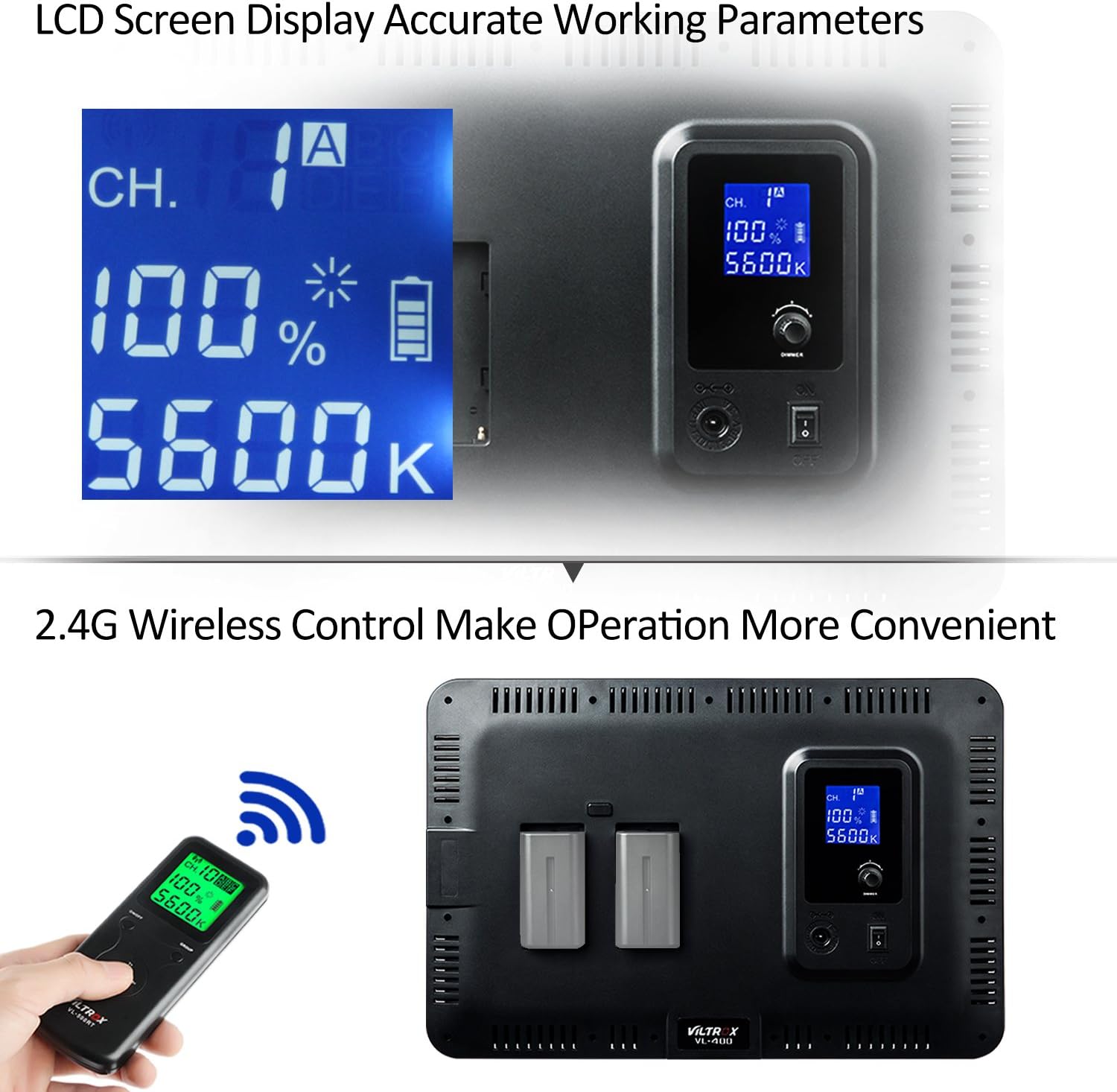
ചിത്രം 4.1: The LCD screen displaying accurate working parameters and the 2.4G wireless remote control for convenient operation.
4.3 വയർലെസ് റിമോട്ട് കൺട്രോൾ ഉപയോഗിക്കുന്നു
The included 2.4G wireless remote control allows for convenient adjustment of the light's settings from a distance.
- റിമോട്ട് കൺട്രോളിൽ പ്രവർത്തിക്കുന്ന ബാറ്ററികളുണ്ടെന്ന് ഉറപ്പാക്കുക.
- Use the dedicated buttons on the remote to adjust brightness and color temperature. Refer to the remote's markings for specific functions.
- Note that some remote controls may require repeated presses for incremental adjustments rather than continuous holding.
5. പരിപാലനം
5.1 വൃത്തിയാക്കൽ
- Before cleaning, ensure the LED light is powered off and unplugged from any power source.
- Use a soft, dry cloth to wipe the exterior of the light.
- കഠിനമായ അടയാളങ്ങൾക്ക്, അല്പം damp നേരിയതും ഉരച്ചിലുകളില്ലാത്തതുമായ ക്ലീനർ ഉള്ള തുണി ഉപയോഗിക്കാം, തുടർന്ന് ഉണങ്ങിയ തുണി ഉപയോഗിക്കാം.
- Do not use harsh chemicals, solvents, or abrasive materials as they may damage the finish or internal components.
- Keep the heat dissipation holes clear of dust and debris to ensure proper airflow.
5.2 സംഭരണം
- When not in use, store the LED light in a cool, dry place, away from direct sunlight and extreme temperatures.
- If storing for an extended period, remove any batteries to prevent leakage.
- It is recommended to store the light in its original packaging or a protective case to prevent damage.
6. പ്രശ്നപരിഹാരം
If you encounter issues with your Viltrox VL 400T LED light, please refer to the following common troubleshooting steps:
| പ്രശ്നം | സാധ്യമായ കാരണം | പരിഹാരം |
|---|---|---|
| ലൈറ്റ് ഓണാക്കില്ല. | വൈദ്യുതിയില്ല, കണക്ഷൻ അയഞ്ഞില്ല, ബാറ്ററികൾ നശിച്ചു. | Ensure the power switch is ON. Check AC adapter connection and wall outlet. If using batteries, ensure they are charged and correctly inserted. |
| Light flickers or turns off intermittently. | Unstable power connection, faulty cable, or low battery. | Verify the AC power cable is securely connected and not damaged. If using batteries, replace or recharge them. Avoid moving the light excessively while powered by AC if connection issues are suspected. |
| റിമോട്ട് കൺട്രോൾ പ്രതികരിക്കുന്നില്ല. | Dead batteries in remote, out of range, or interference. | Replace batteries in the remote control. Ensure you are within the effective range of the remote. Minimize obstructions between the remote and the light. |
| Inaccurate color temperature or brightness. | Incorrect settings or environmental factors. | Check the LCD display to confirm current settings. Adjust the dimmer/color temperature knob or remote control to desired values. |
7 സ്പെസിഫിക്കേഷനുകൾ
| ഫീച്ചർ | വിശദാംശങ്ങൾ |
|---|---|
| മോഡൽ നമ്പർ | VL 400T |
| ബ്രാൻഡ് | വിൽട്രോക്സ് |
| ഉൽപ്പന്ന അളവുകൾ (L x W x H) | 36 x 24 x 2.5 സെൻ്റീമീറ്റർ |
| പാക്കേജ് അളവുകൾ (L x W x H) | 40.8 x 28.2 x 7 സെൻ്റീമീറ്റർ |
| പാക്കേജ് ഭാരം | 1.84 കിലോഗ്രാം |
| നിറം | കറുപ്പ് |
| കണക്റ്റിവിറ്റി ടെക്നോളജി | Wireless (for remote control) |
| ഉൾപ്പെടുത്തിയ ഘടകങ്ങൾ | Viltrox VL 400T Professional & Ultrathin LED light |
| ആദ്യം ലഭ്യമായ തീയതി | 24 ജനുവരി 2018 |
8. വാറൻ്റിയും പിന്തുണയും
8.1 വാറൻ്റി വിവരങ്ങൾ
VILTROX warrants this product against any and all defects in workmanship or performance for a period of 2 വർഷം from the date of purchase. Within the warranted period, all materials are free of charge for repair or replacement. Non-human damage is covered for free replacement within the first 6 months.
8.2 ഉപഭോക്തൃ പിന്തുണ
For technical support, warranty claims, or any inquiries regarding your Viltrox VL 400T LED light, please contact VILTROX customer service. Refer to the official VILTROX webഏറ്റവും കാലികമായ പിന്തുണാ ചാനലുകൾക്കായി നിങ്ങളുടെ വാങ്ങലിനൊപ്പം നൽകിയിരിക്കുന്ന സൈറ്റ് അല്ലെങ്കിൽ കോൺടാക്റ്റ് വിവരങ്ങൾ.
You can also visit the official VILTROX store for more information and resources: VILTROX Official Store
Ask a question about this manual
Ask about setup, troubleshooting, compatibility, parts, safety, or missing instructions. Manuals+ will review the question and use this page’s manual context to help answer it.