
1. ആമുഖം
Thank you for choosing the Hanwha Techwin Wisenet QND-6020R 2 Megapixel Network Camera. This manual provides essential information for the safe and efficient installation, operation, and maintenance of your new surveillance camera. Please read this manual thoroughly before using the product and retain it for future reference.
2 സുരക്ഷാ വിവരങ്ങൾ
ഉൽപ്പന്നത്തിന് പരിക്കോ കേടുപാടുകളോ ഉണ്ടാകാതിരിക്കാൻ ഇനിപ്പറയുന്ന സുരക്ഷാ മുൻകരുതലുകൾ പാലിക്കുക:
- ഊർജ്ജ സ്രോതസ്സ്: Use only the specified power adapter (AC/DC) for this device. Incorrect voltage തീയോ വൈദ്യുതാഘാതമോ ഉണ്ടാക്കാം.
- ഇൻസ്റ്റലേഷൻ: Ensure the camera is securely mounted to prevent it from falling. Wall mounting is recommended.
- ജലവും ഈർപ്പവും: This camera has an IP65 waterproof rating, meaning it is protected against dust and low-pressure water jets. However, avoid submerging the camera in water or exposing it to high-pressure water.
- വൃത്തിയാക്കൽ: വൃത്തിയാക്കുന്നതിന് മുമ്പ് വൈദ്യുതി വിച്ഛേദിക്കുക. മൃദുവായതും ഉണങ്ങിയതുമായ തുണി ഉപയോഗിക്കുക. ലിക്വിഡ് അല്ലെങ്കിൽ എയറോസോൾ ക്ലീനറുകൾ ഉപയോഗിക്കരുത്.
- പ്രവർത്തന താപനില: Do not operate the camera outside its specified temperature range.
- സേവനം: ഈ ഉൽപ്പന്നം സ്വയം സേവിക്കാൻ ശ്രമിക്കരുത്. യോഗ്യതയുള്ള സേവന ഉദ്യോഗസ്ഥർക്ക് എല്ലാ സേവനങ്ങളും റഫർ ചെയ്യുക.
3. പാക്കേജ് ഉള്ളടക്കം
പാക്കേജിൽ എല്ലാ ഇനങ്ങളും ഉണ്ടെന്ന് ഉറപ്പാക്കുക:
- Hanwha Techwin Wisenet QND-6020R Network Camera
- മൗണ്ടിംഗ് സ്ക്രൂകളും ആങ്കറുകളും
- ഇൻസ്റ്റലേഷൻ ഗൈഡ്
- പവർ അഡാപ്റ്റർ (AC/DC)
4. ഉൽപ്പന്നം കഴിഞ്ഞുview
The Hanwha Techwin Wisenet QND-6020R is a 2-megapixel network dome camera designed for reliable surveillance. It features advanced video compression (H.264, H.265, Motion JPEG), 1080p video capture, and a 3.60 mm lens. Key features include night vision up to 65.62 ft and motion detection capabilities.
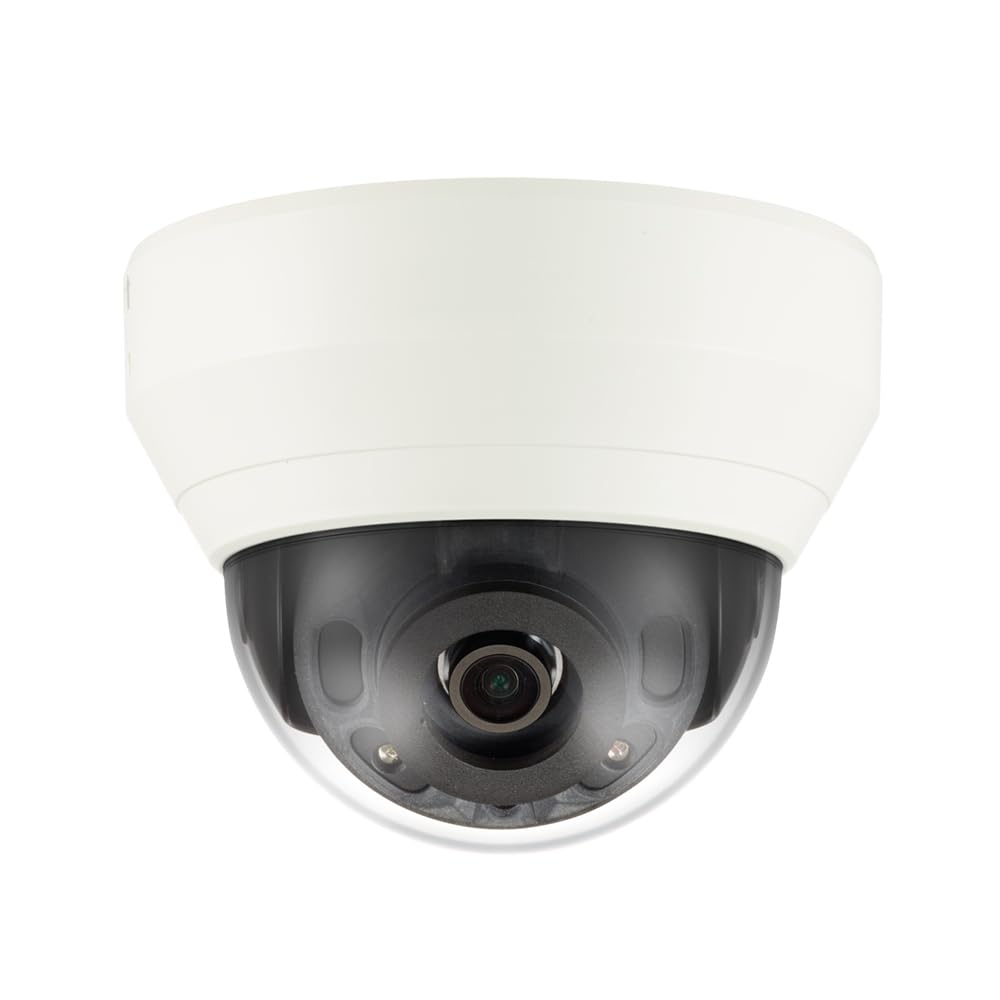
ചിത്രം 4.1: ഫ്രണ്ട് view of the Hanwha Techwin Wisenet QND-6020R 2 Megapixel Network Dome Camera. This image shows the compact dome design, suitable for discreet surveillance installations. The camera features a dark housing and a clear dome covering the lens, indicating its robust construction for various environments.
5. സജ്ജീകരണം
5.1 ക്യാമറ മൗണ്ടിംഗ്
- ഒരു ലൊക്കേഷൻ തിരഞ്ഞെടുക്കുക: Choose a suitable wall location for optimal surveillance coverage. Ensure the surface is strong enough to support the camera.
- തുളകൾ: Use the provided mounting template (if applicable) to mark and drill pilot holes for the mounting screws.
- മൗണ്ട് സുരക്ഷിതമാക്കുക: Attach the camera's mounting base to the wall using the screws and anchors.
- ആംഗിൾ ക്രമീകരിക്കുക: Once mounted, adjust the camera's viewആവശ്യാനുസരണം ആംഗിൾ.
5.2 പവർ, നെറ്റ്വർക്ക് കണക്ഷൻ
- പവർ കണക്ഷൻ: Connect the supplied AC/DC power adapter to the camera's power input port and then to a power outlet.
- നെറ്റ്വർക്ക് കണക്ഷൻ (വയർഡ്): For a wired connection, connect an Ethernet cable from the camera's network port to your network router or switch.
- നെറ്റ്വർക്ക് കണക്ഷൻ (വൈ-ഫൈ): For Wi-Fi connectivity, refer to the camera's initial setup wizard or the dedicated network configuration section in the full digital manual for pairing instructions. The camera supports Wi-Fi connectivity.
5.3 പ്രാരംഭ കോൺഫിഗറേഷൻ
After connecting power and network, the camera will boot up. Access the camera's web interface via a browser using its IP address (refer to your network's DHCP client list or use the manufacturer's discovery tool). Follow the on-screen prompts to set up administrator credentials, network settings, and initial video configurations.
6. പ്രവർത്തന നിർദ്ദേശങ്ങൾ
6.1 തത്സമയം View ഒപ്പം റെക്കോർഡിംഗ്
ക്യാമറയുടെ തത്സമയം ആക്സസ് ചെയ്യുക view through its web interface or a compatible network video recorder (NVR) / surveillance software. Configure recording schedules, motion-triggered recording, and continuous recording settings as desired. Video is captured at 1080p resolution in MP4 format.
6.2 മോഷൻ ഡിറ്റക്ഷൻ
The camera features a motion sensor. Configure motion detection zones and sensitivity settings within the camera's web interface. You can set up alerts (e.g., email notifications) to be triggered upon motion detection.
6.3 നൈറ്റ് വിഷൻ
The QND-6020R is equipped with night vision capabilities, providing clear images in low-light conditions up to 65.62 ft. The camera automatically switches between day and night modes based on ambient light levels. Night vision is in color.
7. പരിപാലനം
7.1 വൃത്തിയാക്കൽ
Regularly clean the camera's lens and housing with a soft, dry cloth to ensure optimal image quality. Avoid using harsh chemicals or abrasive materials.
7.2 ഫേംവെയർ അപ്ഡേറ്റുകൾ
Periodically check the Hanwha Techwin webഫേംവെയർ അപ്ഡേറ്റുകൾക്കായുള്ള സൈറ്റ്. നിങ്ങളുടെ ക്യാമറയുടെ ഫേംവെയർ കാലികമായി നിലനിർത്തുന്നത് മികച്ച പ്രകടനവും സുരക്ഷയും പുതിയ സവിശേഷതകളിലേക്കുള്ള ആക്സസും ഉറപ്പാക്കുന്നു.
8. പ്രശ്നപരിഹാരം
- ശക്തിയില്ല: Ensure the power adapter is securely connected to both the camera and a working power outlet. Verify the outlet has power.
- വീഡിയോ/ഓഫ്ലൈൻ ഇല്ല: Check network cable connections (if wired) or Wi-Fi signal strength (if wireless). Verify the camera's IP address and network settings. Restart the camera and your network router.
- മോശം ചിത്രത്തിന്റെ ഗുണനിലവാരം: ക്യാമറ ലെൻസ് വൃത്തിയാക്കുക. ക്യാമറയുടെ ലെൻസ് ഫീൽഡിൽ തടസ്സങ്ങളൊന്നുമില്ലെന്ന് ഉറപ്പാക്കുക. view. Check lighting conditions.
- മോഷൻ ഡിറ്റക്ഷൻ പ്രവർത്തിക്കുന്നില്ല: Review motion detection zone settings and sensitivity in the camera's web interface. Ensure the feature is enabled.
- ആക്സസ് ചെയ്യാൻ കഴിയില്ല Web ഇൻ്റർഫേസ്: Verify the camera's IP address. Ensure your computer is on the same network segment as the camera. Try a different web ബ്രൗസർ.
9 സ്പെസിഫിക്കേഷനുകൾ
| ഫീച്ചർ | വിവരണം |
|---|---|
| മോഡൽ നമ്പർ | QND-6020R |
| ബ്രാൻഡ് | HANWHA |
| ശുപാർശ ചെയ്യുന്ന ഉപയോഗങ്ങൾ | നിരീക്ഷണം |
| പ്രത്യേക സവിശേഷതകൾ | മോഷൻ സെൻസർ, നൈറ്റ് വിഷൻ |
| പവർ ഉറവിടം | എസി/ഡിസി |
| കണക്റ്റിവിറ്റി പ്രോട്ടോക്കോൾ | വൈഫൈ |
| കൺട്രോളർ തരം | H.264 |
| മൌണ്ട് തരം | മതിൽ മൗണ്ട് |
| അലേർട്ട് തരം | ചലനം മാത്രം |
| വാട്ടർപ്രൂഫ് റേറ്റിംഗ് | IP65 |
| വയർലെസ് ടെക്നോളജി | വൈഫൈ |
| ഫോട്ടോ സെൻസർ ടെക്നോളജി | CMOS |
| വീഡിയോ ക്യാപ്ചർ റെസല്യൂഷൻ | 1080p |
| വീഡിയോ ക്യാപ്ചർ ഫോർമാറ്റ് | MP4 |
| നൈറ്റ് വിഷൻ | രാത്രി നിറം |
| നിർമ്മാതാവ് | Hanwha Group |
10. വാറൻ്റിയും പിന്തുണയും
This Hanwha Techwin product is covered by a manufacturer's warranty provided by Hanwha Group. For detailed warranty terms and conditions, please refer to the warranty card included with your product or visit the official Hanwha Techwin website. For technical support, troubleshooting assistance, or service inquiries, please contact Hanwha Techwin customer support through their official channels.